
Comprehensive Excel Task Tracker for Streamlined Project Management
Efficient task management is essential for maintaining professional productivity and meeting critical deadlines. By implementing a versatile Excel template for tracking work tasks, you can centralize project milestones, monitor progress status, and streamline your daily workflow within a structured spreadsheet environment.
These digital logs offer a robust framework for organizing deliverables, managing resource allocation, and ensuring accountability across various assignments. Enhance your operational efficiency and keep every project on schedule with a professional tracking solution. Please check the already made variation of templates below.
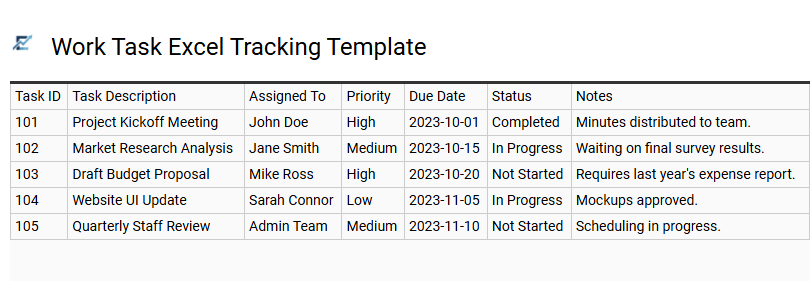
Work Task Excel Tracking Template
A Work Task Excel Tracking Template provides a structured framework to enhance organizational productivity and streamline project management. By centralizing essential data-such as task descriptions, priority levels, due dates, and completion status-this tool ensures clear visibility into daily workflows. Utilizing Excel's powerful features like conditional formatting and dropdown menus allows users to identify bottlenecks and meet deadlines more effectively. Whether you are managing individual responsibilities or team-based assignments, a well-designed spreadsheet fosters accountability and simplifies progress reporting. This digital solution eliminates the chaos of scattered notes, providing a single source of truth for all operational activities.
This template is perfectly suitable for managing freelance client deliverables, coordinating weekly team marketing sprints, and tracking internal administrative department goals.
Download: 💾 Work Task Excel Tracking Template .xls
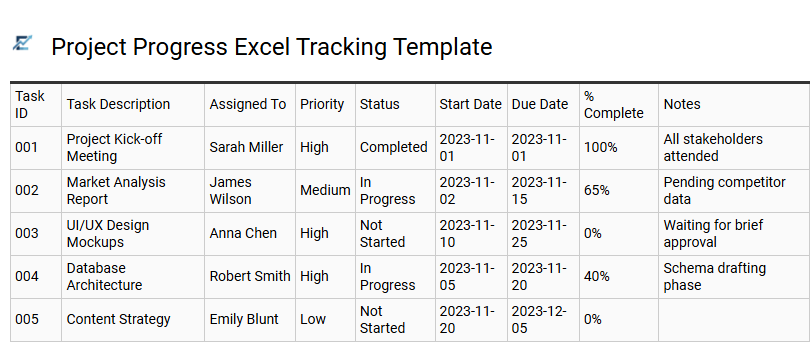
Project Progress Excel Tracking Template
A Project Progress Excel Tracking Template serves as a centralized hub for managing workflows and increasing team accountability. By documenting task statuses, ownership, and due dates, this template provides a clear visual overview of a project's health. Features like automated progress percentages and color-coded status indicators help project managers identify delays early, ensuring milestones are met on schedule.
Utilizing a structured Excel sheet eliminates communication gaps, streamlines resource management, and simplifies complex task dependencies into an actionable roadmap. It is an efficient, cost-effective solution for professionals who need organized data and real-time updates without the complexity of high-end project management software. This digital tracker ensures every stakeholder remains aligned with core objectives and delivery timelines.
This template is perfectly suited for managing marketing campaign rollouts, tracking software development sprints, and coordinating corporate event planning.
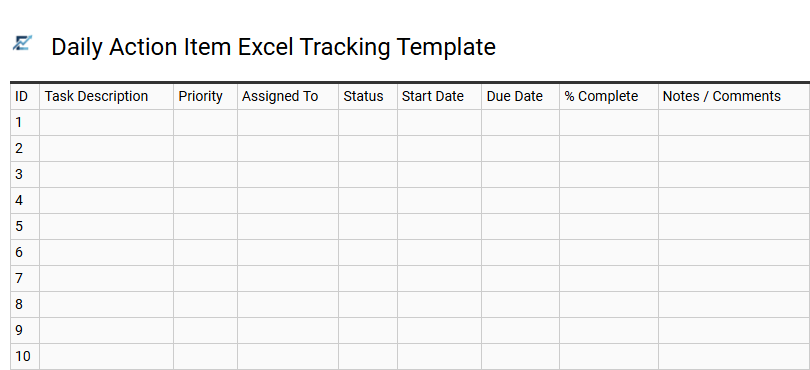
Daily Action Item Excel Tracking Template
A Daily Action Item Excel Tracking Template serves as a centralized hub for managing professional responsibilities and enhancing organizational efficiency. By utilizing structured columns for task descriptions, due dates, and priority levels, this tool allows users to visualize their workload and mitigate the risk of missed deadlines. The spreadsheet format enables quick sorting and filtering, making it easy to identify urgent items and allocate resources effectively.
Implementing this digital tracker promotes accountability within teams and provides a historical record of task completion for performance reviews. It remains a cost-effective solution for maintaining a streamlined workflow without the need for complex project management software. This template is ideal for project managers coordinating sprint tasks, small business owners tracking administrative duties, and marketing teams managing content calendars.
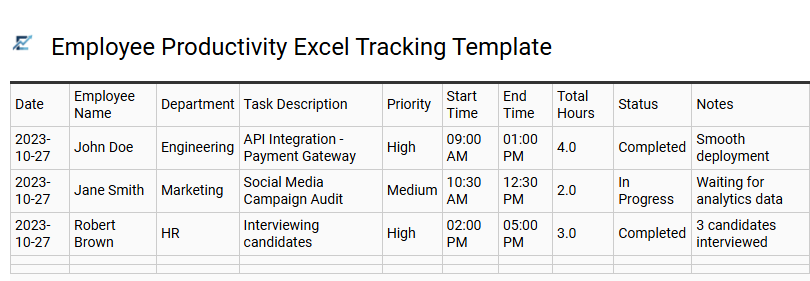
Employee Productivity Excel Tracking Template
Maximizing operational efficiency requires a structured approach to task management. An Employee Productivity Excel Tracking Template serves as a centralized dashboard for monitoring daily activities, project milestones, and individual output. By leveraging automated formulas and status indicators, this tool helps managers identify bottlenecks, evaluate performance metrics, and ensure deadlines are met without the complexity of expensive software.
This spreadsheet-based solution enhances transparency and accountability by documenting task duration and completion rates. It allows for data-driven decisions regarding resource allocation and workload balancing, providing clear visualization of progress for both stakeholders and team members. Integrating this template into your workflow streamlines communication and fosters a culture of consistent delivery.
This template is suitable for freelance project milestone tracking, remote team daily output monitoring, and internal department administrative task management.
Download: 💾 Employee Productivity Excel Tracking Template .xls
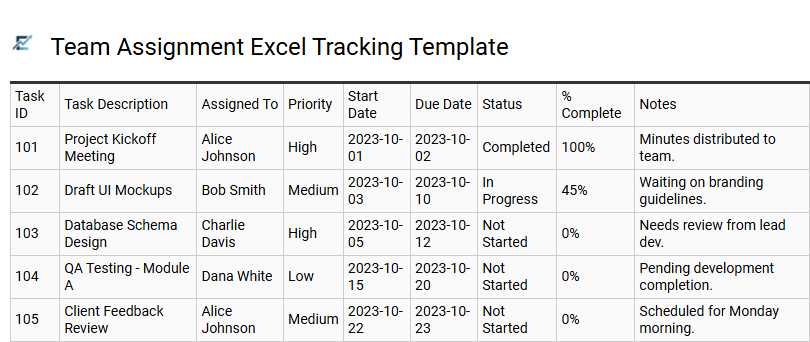
Team Assignment Excel Tracking Template
A Team Assignment Excel Tracking Template is a powerful tool designed to streamline project management and improve team accountability. By centralizing task distribution in a structured spreadsheet, managers can easily monitor progress, assign ownership, and track deadlines in real-time. These templates help eliminate communication silos and ensure that every team member understands their specific responsibilities. Key features often include status dropdowns, priority markers, and automated formatting to highlight overdue items, which helps in balancing workloads and preventing burnout. Utilizing a standardized Excel framework allows for easy data sorting and reporting, making it indispensable for maintaining organizational transparency and meeting project milestones efficiently.
This template is highly suitable for managing weekly marketing content calendars, tracking IT helpdesk tickets, or monitoring deliverables for a product launch campaign.
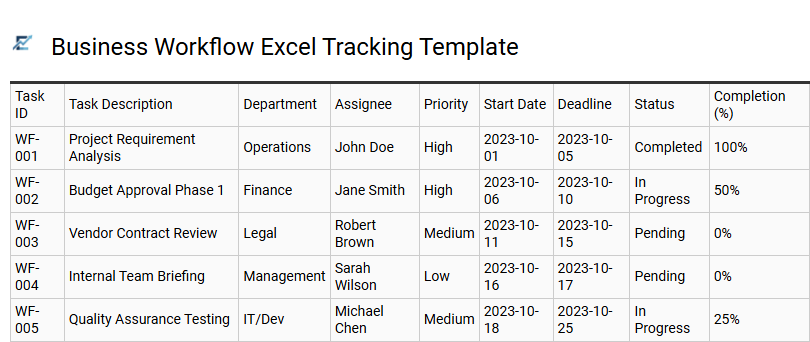
Business Workflow Excel Tracking Template
A business workflow Excel tracking template is a professional tool designed to streamline project management and enhance team productivity. By utilizing a structured spreadsheet, organizations can systematically monitor task progress, assign clear ownership, and manage deadlines effectively. This approach provides a centralized overview of the project lifecycle, allowing stakeholders to identify bottlenecks and optimize resource allocation in real-time.
Using built-in features like conditional formatting and automated status updates, these templates offer visual clarity on priority levels and upcoming milestones. A well-organized tracking system minimizes communication gaps, ensures accountability, and helps teams maintain a consistent pace across complex operations without the need for specialized software.
This kind of template is suitable for managing marketing campaign launches, coordinating human resources onboarding processes, and tracking software development sprints.
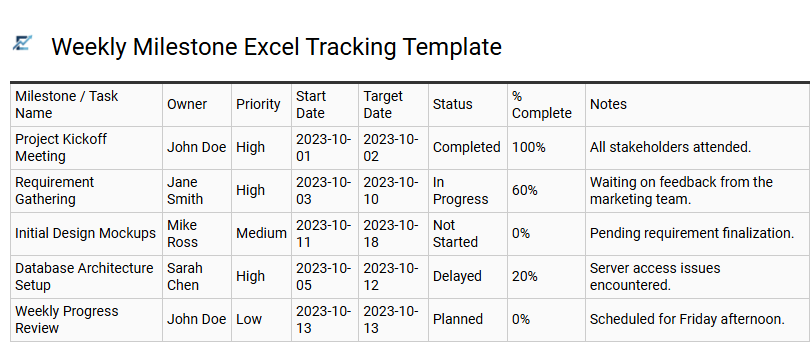
Weekly Milestone Excel Tracking Template
A Weekly Milestone Excel Tracking Template is a strategic project management tool designed to bridge the gap between daily operations and long-term objectives. By organizing workflows into manageable seven-day increments, teams can maintain high visibility over critical deadlines, resource allocation, and potential bottlenecks.
Leveraging Excel's robust features, such as conditional formatting and automated progress bars, this template provides a visual representation of project health. It encourages accountability by clearly defining ownership and success criteria for every high-level goal. This systematic approach ensures that complex projects stay on schedule while offering stakeholders clear, data-driven insights into overall performance and completion rates.
This template is particularly suitable for software development sprints, multi-channel marketing campaign rollouts, and academic research project management.
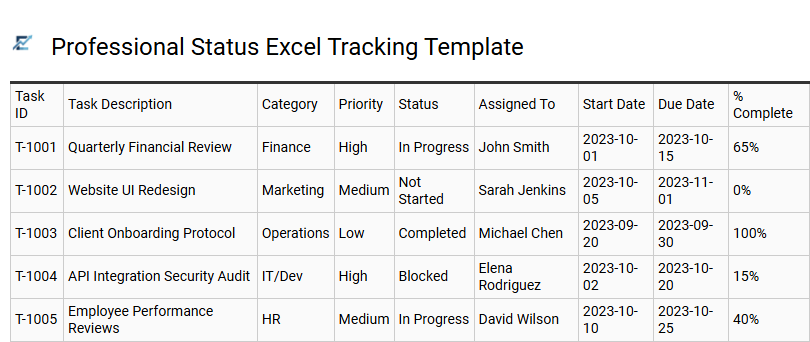
Professional Status Excel Tracking Template
A professional status Excel tracking template provides a centralized system for monitoring project progress and individual responsibilities. By utilizing structured columns for task names, priority levels, due dates, and real-time status updates, businesses can ensure total transparency across workflows. These templates often incorporate conditional formatting to highlight bottlenecks and upcoming deadlines, allowing for immediate visual assessment of a project's health.
Implementing a robust tracking sheet streamlines team communication, reduces the need for frequent status meetings, and improves overall accountability. It serves as a single source of truth, helping project managers evaluate resource allocation and adjust timelines based on data-driven insights.
This template is highly suitable for managing marketing campaign milestones, coordinating software development sprints, and tracking recurring administrative operations.
Download: 💾 Professional Status Excel Tracking Template .xls
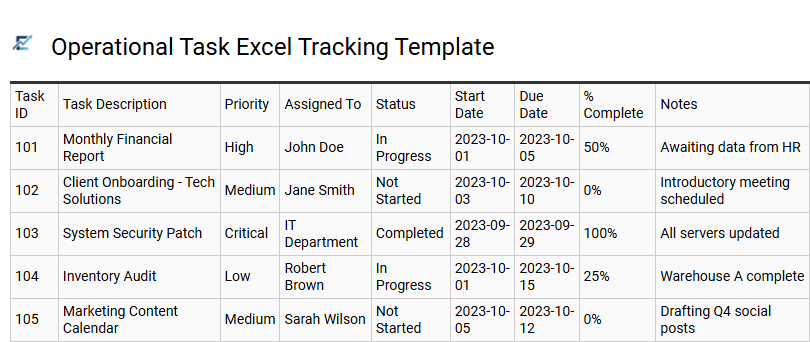
Operational Task Excel Tracking Template
An Operational Task Excel Tracking Template is an essential tool for streamlining daily workflows and enhancing team productivity. By organizing responsibilities into a structured spreadsheet, managers can efficiently monitor progress, set clear deadlines, and assign accountability. These templates typically include columns for task descriptions, priority levels, status updates, and owner names, providing real-time visibility into operational health.
Utilizing Excel allows for easy data filtering and the creation of visual dashboards to identify potential bottlenecks quickly. This systematic approach ensures that critical business processes remain on schedule while reducing manual oversight errors. Using a centralized tracker fosters better communication within teams and ensures no high-priority task is overlooked.
This template is ideal for managing warehouse inventory audits, tracking recurring IT maintenance schedules, or coordinating weekly marketing campaign deliverables.
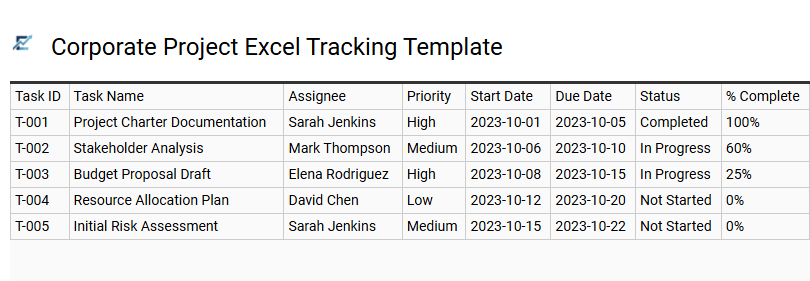
Corporate Project Excel Tracking Template
A corporate project Excel tracking template provides a centralized framework for managing complex workflows, resource allocation, and critical milestones. By utilizing structured data tables and conditional formatting, these templates offer real-time visibility into project health, ensuring team accountability and timely delivery. Key features often include automated progress bars, task prioritization, and specific owner assignments to streamline cross-departmental collaboration.
This organized approach minimizes communication gaps and allows stakeholders to monitor performance indicators without requiring expensive niche software. Leveraging the versatility of Excel ensures high accessibility across an organization while maintaining data integrity for reporting purposes.
This type of template is highly effective for managing cross-functional marketing launches, tracking agile software development sprints, and coordinating comprehensive annual financial audits.
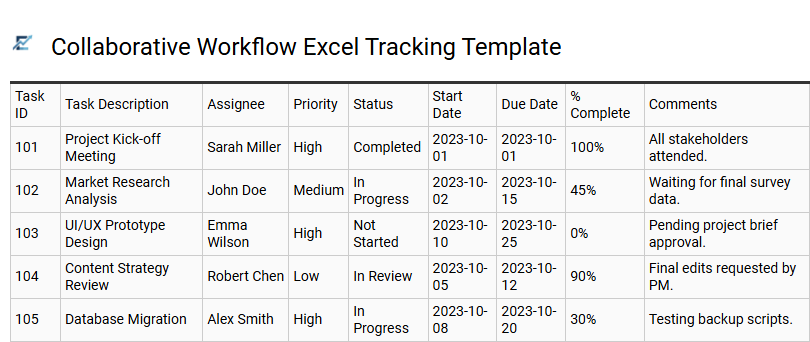
Collaborative Workflow Excel Tracking Template
A collaborative workflow Excel tracking template is a powerful tool designed to enhance team productivity and transparency. By centralizing tasks within a shared spreadsheet, team members can monitor real-time progress, assign ownership, and manage deadlines effectively. These templates typically feature status dropdown menus, automated color-coding through conditional formatting, and priority markers to streamline project visualization.
Using a structured Excel format eliminates communication silos and ensures accountability across the project lifecycle. It offers a cost-effective, highly customizable alternative to complex project management software, allowing managers to identify bottlenecks early and maintain operational efficiency. This organized approach simplifies reporting and keeps stakeholders aligned on key deliverables and milestones.
This template is ideal for managing marketing campaign launches, tracking software development sprints, and coordinating weekly administrative departmental tasks.
Download: 💾 Collaborative Workflow Excel Tracking Template .xls
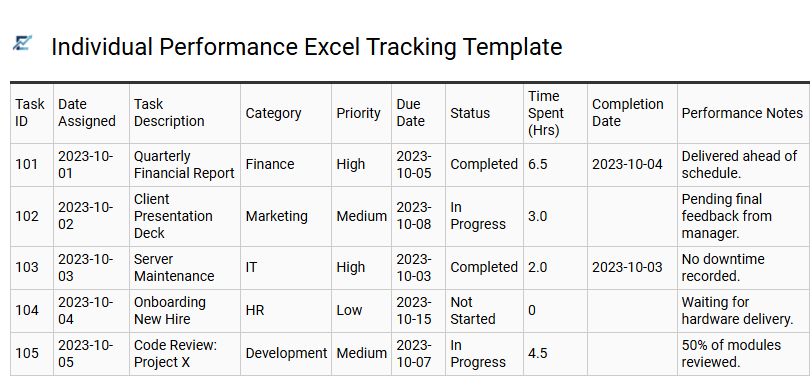
Individual Performance Excel Tracking Template
An Individual Performance Excel Tracking Template is a robust tool designed to streamline personal workflows and enhance professional accountability. By centralizing task lists, deadlines, and completion statuses, users can visualize their workload and identify potential bottlenecks in real-time. These templates typically leverage features like conditional formatting and automated progress bars to provide a data-driven overview of daily efficiency.
Utilizing a structured Excel framework allows for better time management and ensures that high-priority projects receive the necessary focus. Beyond simple task management, these logs serve as a historical record of achievements, making them invaluable for objective self-assessment and career development.
This template is suitable for freelancers managing diverse client deliverables, corporate employees preparing data for annual performance reviews, and project managers tracking their specific contributions to personal milestones.
Download: 💾 Individual Performance Excel Tracking Template .xls
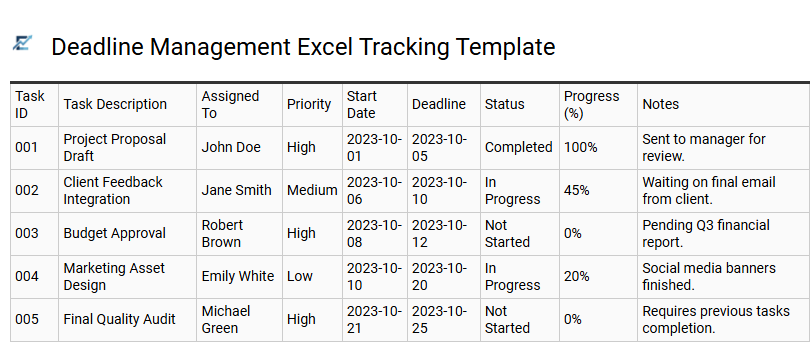
Deadline Management Excel Tracking Template
A Deadline Management Excel Tracking Template is a powerful tool designed to streamline project workflows and enhance productivity. By centralizing tasks, due dates, and priority levels within a familiar spreadsheet interface, teams can gain real-time visibility into project health. These templates often utilize conditional formatting to highlight approaching deadlines, ensuring that no critical milestone is overlooked.
Using a structured tracking system fosters accountability and improves time management across various professional departments. It allows for easy filtering of pending actions and helps in identifying potential bottlenecks before they impact delivery schedules. Whether you are managing individual daily chores or complex team deliverables, an organized Excel sheet provides a scalable and cost-effective solution for maintaining peak efficiency.
This kind of template is suitable for marketing campaign planning, software development sprints, and academic research coordination.
Download: 💾 Deadline Management Excel Tracking Template .xls
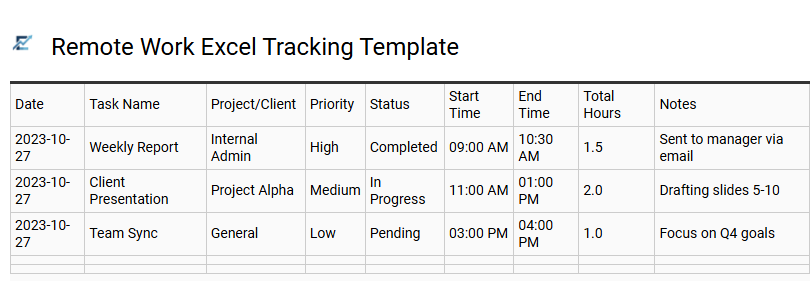
Remote Work Excel Tracking Template
A remote work Excel tracking template is a vital tool for maintaining productivity and transparency in a distributed environment. This spreadsheet solution helps team members organize daily tasks, set clear deadlines, and monitor project status in real-time. By utilizing features like status dropdown menus, priority levels, and automated progress bars, users can visualize their workload and ensure accountability without constant oversight.
This centralized document bridges communication gaps, allowing managers to oversee departmental output and identify potential bottlenecks early. Implementing a structured task tracker streamlines asynchronous collaboration and enhances overall workflow efficiency for any virtual office.
This template is ideal for managing freelance client projects, coordinating weekly social media content calendars, or tracking internal administrative tasks for virtual HR departments.
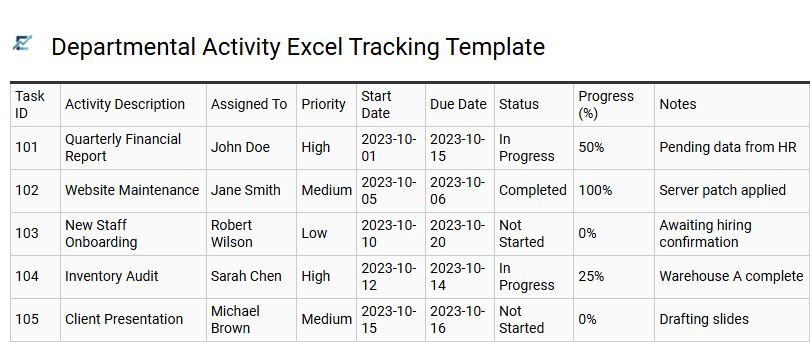
Departmental Activity Excel Tracking Template
A Departmental Activity Excel Tracking Template is a powerful tool designed to streamline internal workflows and enhance team accountability. By centralizing task management, deadlines, and resource allocation within a structured spreadsheet, departments can eliminate communication silos and ensure real-time visibility into project statuses.
Utilizing such a template allows managers to monitor key performance indicators, identify operational bottlenecks, and maintain a historical record of completed work. With features like conditional formatting and data validation, these templates provide a scalable solution for maintaining organized records without the need for complex software. This structured approach fosters transparency and helps teams remain aligned with overarching business objectives.
This kind of template is suitable for managing marketing campaign timelines, tracking IT support tickets, and coordinating human resources onboarding workflows.
Download: 💾 Departmental Activity Excel Tracking Template .xls
Implementing a comprehensive Excel task tracker transforms project management into a seamless process. By utilizing advanced spreadsheets for workflow automation, teams gain real-time visibility into deadline tracking and resource allocation.
This robust tool simplifies the project lifecycle, offering clear status updates and enhanced team collaboration through integrated data visualization. Ultimately, adopting these productivity tools ensures a streamlined environment, driving efficiency and ensuring consistent success across all organizational milestones.