
Professional Excel Timesheet for Streamlined Employee Work Hour Monitoring
Streamline your payroll management and monitor employee productivity effectively using a professional Excel template for tracking work hours. This versatile spreadsheet solution simplifies logging daily shifts, calculating overtime, and monitoring break durations with precision. By digitizing your timesheet, you minimize manual entry errors and gain valuable insights into labor costs and project timelines. Whether for freelance billing or corporate attendance, a robust time tracking tool ensures accurate records for human resources. Please check the already made variation of templates below.
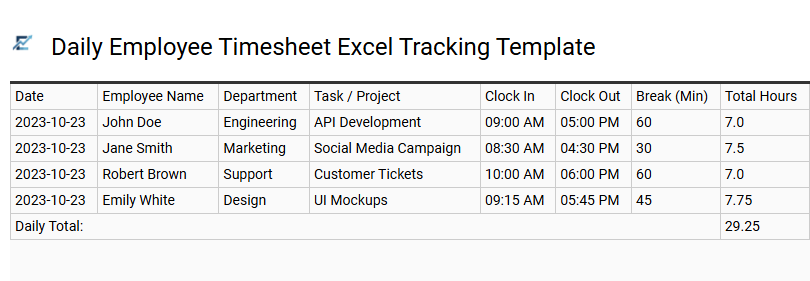
Daily Employee Timesheet Excel Tracking Template
Efficiently managing labor costs and productivity is critical for organizational success. A Daily Employee Timesheet Excel Tracking Template provides a structured digital framework to record clock-in and clock-out times, break durations, and total daily hours. By utilizing automated formulas, this tool eliminates manual calculation errors, ensuring precise data for payroll processing and labor law compliance.
The template allows managers to monitor overtime trends and track specific task durations, leading to better project resource allocation. With a clean, standardized layout, businesses can maintain transparent records that are easy to audit and archive for future reference.
This kind of template is perfectly suitable for freelance project billing, small business payroll management, and monitoring remote contractor hours.
Download: 💾 Daily Employee Timesheet Excel Tracking Template .xls
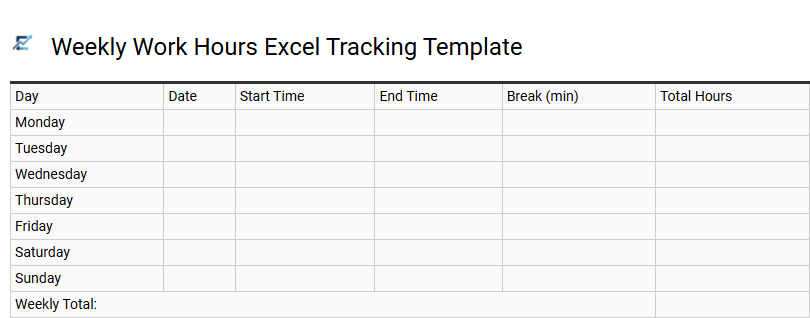
Weekly Work Hours Excel Tracking Template
A weekly work hours Excel tracking template provides a streamlined solution for recording daily start times, end times, and break durations. By utilizing built-in formulas, this tool automatically calculates total hours worked and identifies overtime, ensuring high accuracy for payroll processing. It eliminates manual calculation errors and provides a clear audit trail for both employers and employees.
Beyond simple timekeeping, these templates help in analyzing productivity patterns and maintaining labor law compliance. Users can easily customize fields to include project codes or specific task descriptions, making it a versatile resource for organizational efficiency.
This template is ideal for managing freelance client billing, monitoring remote employee attendance, and tracking seasonal staff shifts.
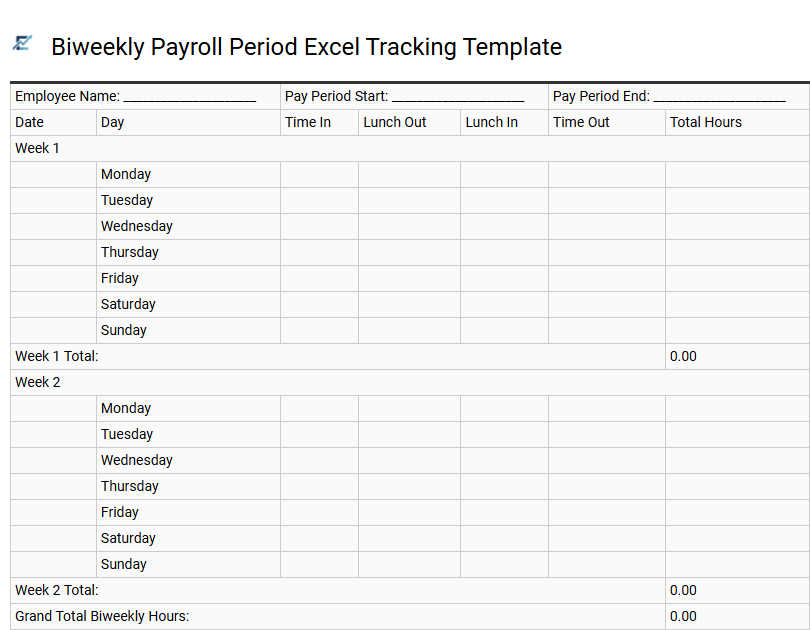
Biweekly Payroll Period Excel Tracking Template
A biweekly payroll period Excel tracking template is a specialized tool designed to log and calculate work hours over a fourteen-day cycle. This template automates the timekeeping process by allowing users to input daily clock-in, clock-out, and break times. With pre-configured formulas, the spreadsheet instantly determines regular hours, overtime, and total pay, significantly reducing the risk of manual calculation errors.
Implementing a digital tracking system ensures transparency between employers and staff, providing a clear audit trail for labor law compliance. It streamlines administrative workflows, making it easier to monitor attendance trends and manage labor costs effectively.
This template is highly suitable for retail employee scheduling, freelance contractor project billing, and small business administrative time tracking.
Download: 💾 Biweekly Payroll Period Excel Tracking Template .xls
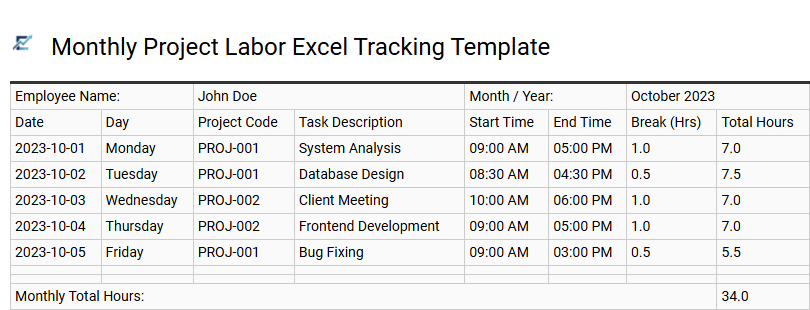
Monthly Project Labor Excel Tracking Template
A Monthly Project Labor Excel Tracking Template is an essential tool for maintaining accurate records of employee hours and project-specific tasks. By utilizing a structured spreadsheet, project managers can monitor labor distribution, calculate total costs, and ensure projects remain within budget. These templates typically feature automated formulas to tally daily logs into monthly summaries, reducing manual entry errors and simplifying the payroll process.
Effective labor tracking enhances transparency between stakeholders and provides critical data for future resource forecasting. By centralizing timekeeping, businesses can improve operational efficiency and streamline client invoicing through precise documentation of billable hours.
This template is suitable for tracking billable hours for freelance consultants, monitoring labor allocation on construction sites, and managing multi-client workflows in digital marketing agencies.
Download: 💾 Monthly Project Labor Excel Tracking Template .xls
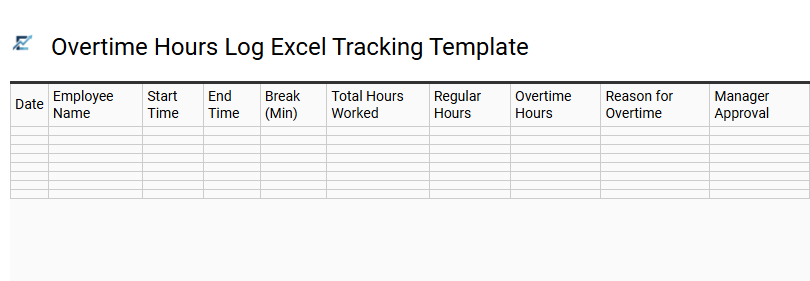
Overtime Hours Log Excel Tracking Template
An Overtime Hours Log Excel Tracking Template is a specialized tool designed to simplify the monitoring of additional labor hours. This automated spreadsheet helps businesses maintain precise records, ensuring accurate payroll processing and adherence to labor regulations. By documenting daily start times, end times, and break durations, the template uses built-in formulas to calculate total overtime hours and associated costs instantly. Using an organized digital log reduces manual entry errors, improves transparency between employers and staff, and provides essential data for effective workforce planning and budget management.
This template is suitable for freelance developers billing project milestones, warehouse managers tracking seasonal shift rotations, and accounting firms managing heavy workloads during tax season.
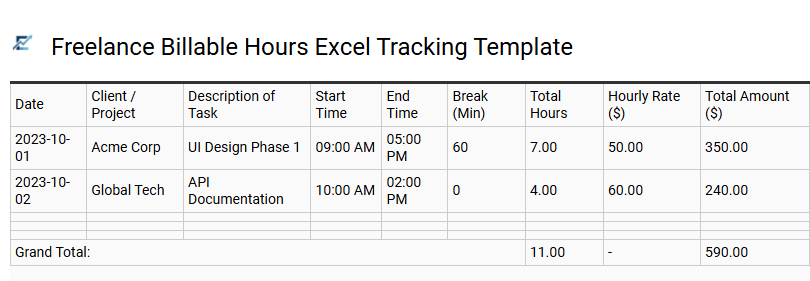
Freelance Billable Hours Excel Tracking Template
Efficiently managing independent projects requires precise timekeeping and organized financial records. A freelance billable hours Excel tracking template provides a streamlined solution for logging daily tasks, calculating total earnings based on hourly rates, and ensuring accurate client invoicing. By using structured data fields and automated formulas, you can eliminate manual errors and maintain a professional audit trail for tax season.
These templates often feature customizable columns for project names, task descriptions, and overtime rates, allowing for high-level productivity analysis across your entire client portfolio. Utilizing such a tool improves transparency, reduces administrative overhead, and helps you visualize your income trends over time. This kind of template is particularly suitable for freelance graphic designers managing multiple commissions, independent software developers tracking sprint hours, and marketing consultants providing detailed monthly retainer reports.
Download: 💾 Freelance Billable Hours Excel Tracking Template .xls
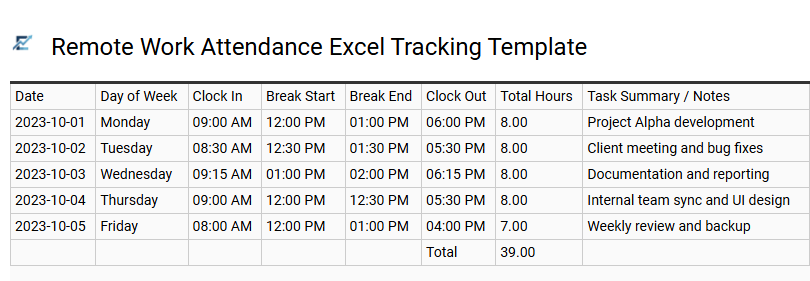
Remote Work Attendance Excel Tracking Template
A Remote Work Attendance Excel Tracking Template is an essential digital tool for distributed teams to monitor productivity and ensure accurate payroll processing. By utilizing automated formulas, these templates simplify logging clock-in times, break durations, and total daily hours. This structured approach helps managers maintain oversight of employee availability while providing remote staff with a transparent way to record their contributions.
The semantic structure of these sheets allows for seamless data organization, handling diverse time formats and calculating overtime automatically to reduce manual entry errors. Implementing a digital timesheet fosters accountability and streamlines administrative workflows in any virtual office environment.
This template is ideal for managing freelance billing cycles, tracking part-time student employee shifts, or monitoring core hours for global software development teams.
Download: 💾 Remote Work Attendance Excel Tracking Template .xls
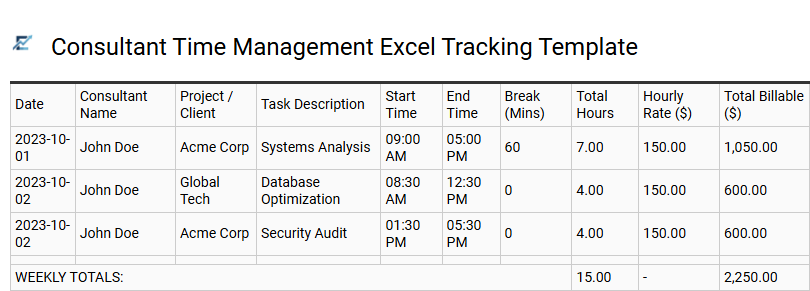
Consultant Time Management Excel Tracking Template
A Consultant Time Management Excel Tracking Template is an essential tool for professionals who need to monitor billable hours and optimize project efficiency. These templates streamline administrative tasks by organizing daily logs, task descriptions, and hourly rates into a centralized format. By maintaining accurate records, consultants ensure transparent invoicing, improve future project estimations, and identify time-draining activities. Utilizing automated Excel formulas allows for real-time calculations of total earnings and budget utilization, helping independent contractors maintain a profitable workflow while providing clear data for client reporting and performance analysis.
This template is ideal for freelance IT developers managing multiple client projects, marketing consultants tracking creative campaign hours, and legal advisors documenting time spent on various case files.
Download: 💾 Consultant Time Management Excel Tracking Template .xls
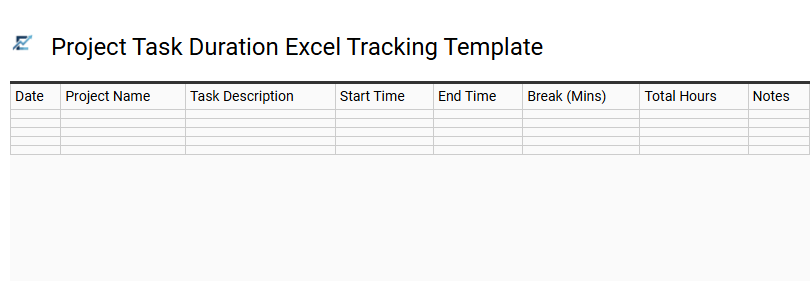
Project Task Duration Excel Tracking Template
A Project Task Duration Excel Tracking Template is an essential tool for professionals seeking to monitor productivity and manage time effectively. By logging start and end times for specific activities, users can automatically calculate total work hours using built-in Excel formulas. This structured approach helps in identifying time-consuming bottlenecks, ensuring project milestones are met on schedule, and maintaining a transparent record of daily operations.
These templates often feature columns for task descriptions, categories, and priority levels, providing a comprehensive overview of resource allocation. Utilizing such a system enhances accountability for freelancers and teams alike, simplifying the transition from raw data to actionable performance insights. Whether you are managing complex deliverables or routine administrative duties, an organized spreadsheet ensures every minute is accounted for.
This template is ideal for freelance client billing, monitoring software development cycles, and tracking employee shift productivity.
Download: 💾 Project Task Duration Excel Tracking Template .xls
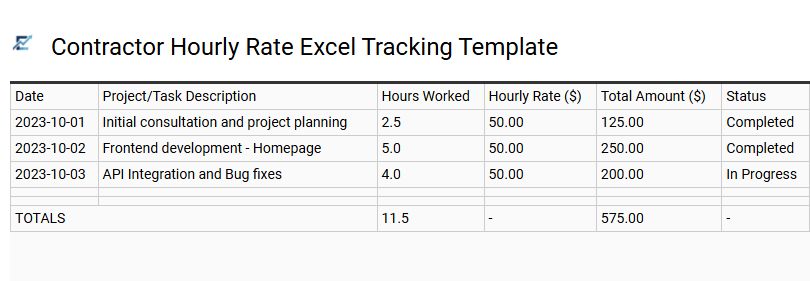
Contractor Hourly Rate Excel Tracking Template
A Contractor Hourly Rate Excel Tracking Template is a specialized digital tool designed to streamline timekeeping and payroll management. By utilizing automated formulas, contractors can efficiently log daily work hours, account for unpaid breaks, and calculate total earnings based on pre-set rates. This systematic approach ensures high accuracy in financial record-keeping, reducing disputes during the invoicing cycle.
Beyond simple time tracking, these templates help professionals monitor project budgets and productivity trends. Using an Excel-based solution provides a flexible, cost-effective way to maintain organized documentation for tax compliance and client audits. This structured format allows for easy data export and professional presentation when requesting payment.
This template is ideal for freelance software developers managing various client projects, independent consultants billing for specialized advisory hours, and construction sub-contractors tracking daily site labor.
Download: 💾 Contractor Hourly Rate Excel Tracking Template .xls
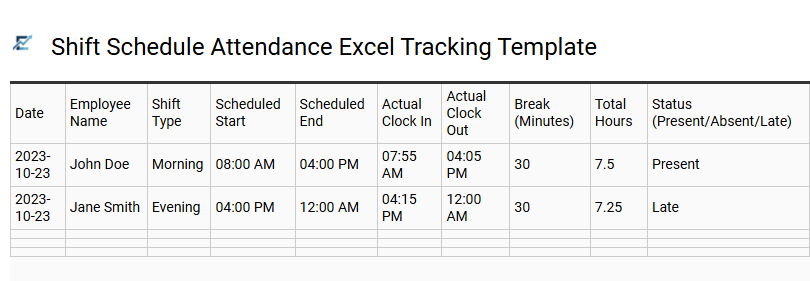
Shift Schedule Attendance Excel Tracking Template
An Excel-based shift schedule attendance template streamlines workforce management by providing a structured framework for recording employee work hours. This digital tool enables managers to monitor clock-in and clock-out times, track breaks, and calculate total hours worked through automated formulas. By organizing data into daily, weekly, or monthly views, it ensures payroll accuracy and helps monitor labor costs in real-time.
These templates often include dedicated fields for tracking overtime, sick leave, and vacation time, offering a comprehensive overview of staff availability. Utilizing a standardized spreadsheet improves transparency between employers and staff while ensuring compliance with labor regulations. It is an efficient, cost-effective solution for maintaining organized digital records without the need for complex software.
This template is suitable for retail store staffing, restaurant shift management, and small business payroll tracking.
Download: 💾 Shift Schedule Attendance Excel Tracking Template .xls
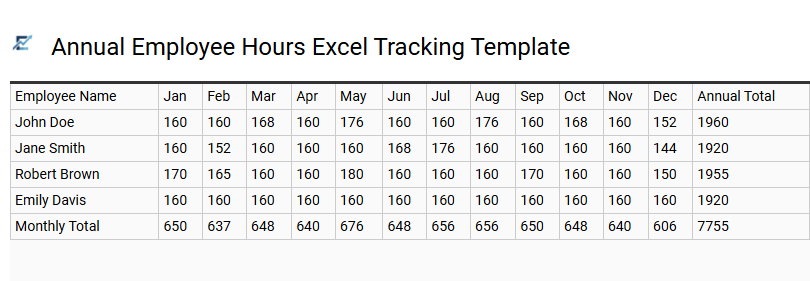
Annual Employee Hours Excel Tracking Template
An Annual Employee Hours Excel Tracking Template is a powerful tool designed to streamline workforce management and ensure payroll accuracy. By consolidating daily logs into a comprehensive yearly overview, businesses can efficiently monitor labor productivity, track overtime, and manage holiday entitlements. This automated spreadsheet solution eliminates manual calculation errors, providing real-time data on total hours worked across different departments or individual roles.
Utilizing a centralized tracking system helps managers identify seasonal staffing trends and maintain compliance with labor regulations. It simplifies the reporting process for performance reviews and tax documentation by keeping all historical attendance data in one accessible file.
This template is perfectly suited for freelancers tracking billable project hours, small business owners managing monthly payroll cycles, and HR departments monitoring annual employee attendance patterns.
Download: 💾 Annual Employee Hours Excel Tracking Template .xls
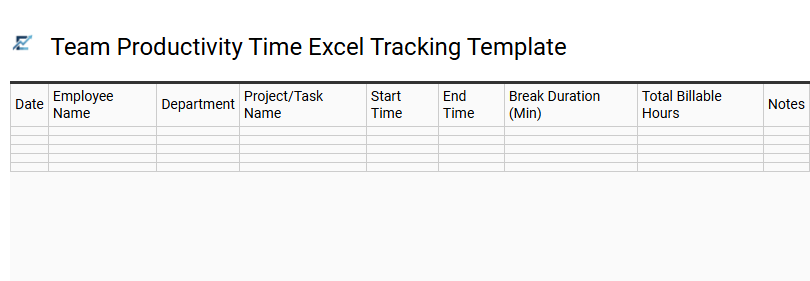
Team Productivity Time Excel Tracking Template
Maximize operational efficiency with a professional Team Productivity Time Excel Tracking Template. This tool is designed to help managers monitor billable hours, track project milestones, and analyze individual performance metrics within a familiar spreadsheet interface. By recording daily logs and task durations, businesses can identify workflow bottlenecks and optimize resource allocation effectively.
The template utilizes automated formulas to calculate total hours and labor costs, ensuring accurate payroll processing and transparent client billing. Centralizing time data fosters accountability and provides stakeholders with data-driven insights into team capacity and project health. Implementing a standardized tracking system reduces administrative errors and streamlines oversight for diverse workforces.
This template is suitable for freelance digital agencies, construction site labor management, and remote software development sprints.
Download: 💾 Team Productivity Time Excel Tracking Template .xls
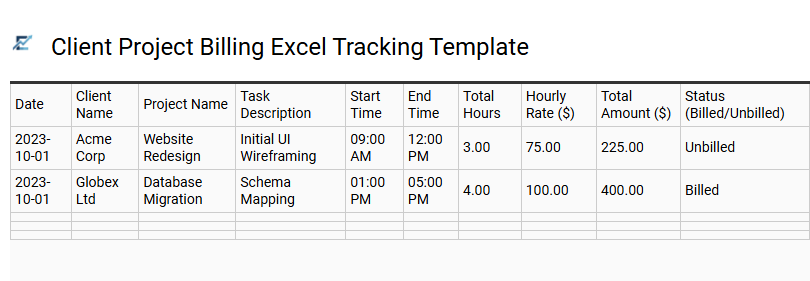
Client Project Billing Excel Tracking Template
A Client Project Billing Excel Tracking Template is an essential tool for professionals who need to document billable time accurately. This spreadsheet streamlines the process of recording daily work hours, task descriptions, and project milestones. By utilizing built-in formulas, users can automatically calculate totals based on custom hourly rates, ensuring transparent and professional invoicing for clients.
This organized approach minimizes administrative overhead and reduces errors associated with manual data entry. It provides a clear audit trail for both the service provider and the client, fostering trust through precise documentation of labor costs. Whether managing multiple accounts or a single long-term contract, a structured Excel tracking system enhances financial oversight and project management efficiency.
This template is ideal for freelance web developers, architectural consulting firms, and independent legal researchers.
Download: 💾 Client Project Billing Excel Tracking Template .xls
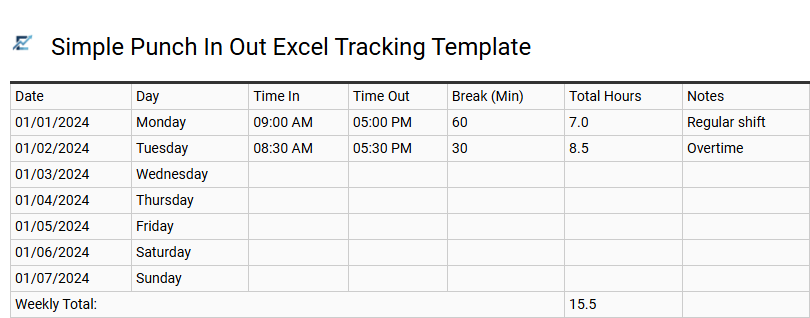
Simple Punch In Out Excel Tracking Template
A simple punch in out Excel tracking template is an efficient tool for monitoring employee attendance and calculating total work hours accurately. By logging precise arrival and departure times, businesses can automate duration calculations and streamline payroll processing. This digital timesheet eliminates manual errors, providing reliable records for freelancers, small businesses, and hourly contractors. Most templates include dedicated fields for break durations and overtime, ensuring a comprehensive view of daily productivity. Implementing a structured spreadsheet fosters transparency between employers and staff while helping maintain compliance with labor regulations.
This template is ideal for tracking freelance project hours, managing retail staff shifts, or monitoring remote student internships.
Download: 💾 Simple Punch In Out Excel Tracking Template .xls
Utilizing a professional Excel timesheet ensures precise employee work hour monitoring and seamless payroll processing. By integrating automated formulas, businesses improve data accuracy while reducing manual administrative burdens. This robust time tracking tool provides essential insights into labor costs and workforce productivity, facilitating better resource allocation. Implementing structured attendance records through spreadsheet automation fosters fiscal accountability. Ultimately, these templates empower management to maintain organized workflows, ensuring every billable hour is captured accurately for a high-performing professional environment.