
Maximizing Project Efficiency with Professional Excel Task Tracking Systems
Streamlining your workflow requires precision and professional organization. An Excel template for tracking tasks offers a powerful framework for managing project milestones, deadlines, and daily responsibilities. By utilizing dedicated spreadsheets, users enhance productivity through seamless data visualization and real-time progress monitoring. Whether coordinating complex team assignments or simple personal checklists, a structured digital to-do list ensures peak organizational efficiency and accountability. Experience better time management with a versatile task management tool. Please review our diverse range of professionally crafted templates below.
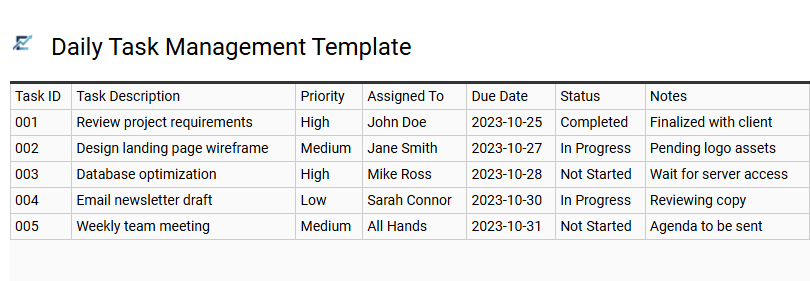
Daily Task Management Template
A Daily Task Management Template in Excel is a high-performance tool designed to streamline workflows and improve personal productivity. By organizing to-do lists, deadlines, and priority levels within a structured spreadsheet, users can effectively visualize their daily workload and ensure no critical action item is overlooked. These templates often leverage features like conditional formatting to highlight urgent tasks and automated status tracking to monitor progress in real-time.
Utilizing a digital task tracker reduces cognitive load, providing a centralized hub for accountability and time management. Whether you are managing complex deliverables or simple chores, an Excel-based solution offers the flexibility to customize columns to fit specific professional or personal requirements.
This template is suitable for freelance project tracking, student assignment planning, and small business operations monitoring.
Download: 💾 Daily Task Management Template .xls
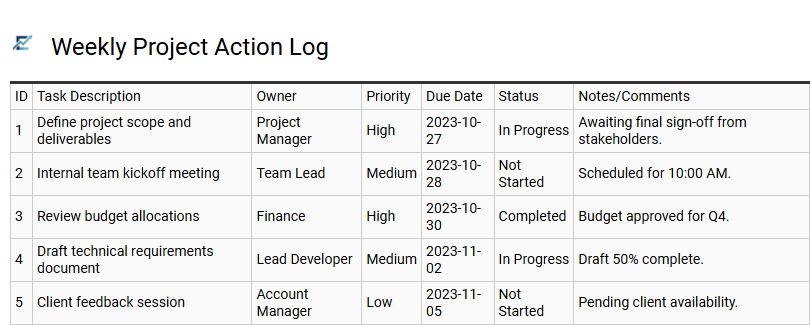
Weekly Project Action Log
A Weekly Project Action Log is a high-efficiency Excel template designed to bridge the gap between high-level planning and daily execution. By organizing tasks into a concise seven-day framework, it allows project managers and teams to monitor progress, assign clear ownership, and enforce deadlines with precision.
This template serves as a centralized source of truth, utilizing status indicators and priority levels to highlight urgent bottlenecks. It simplifies complex workflows by breaking them down into actionable steps, ensuring that no critical milestone is overlooked during the workweek.
This template is suitable for managing marketing campaign sprints, tracking construction site daily tasks, and organizing department-level administrative goals.
Download: 💾 Weekly Project Action Log .xls
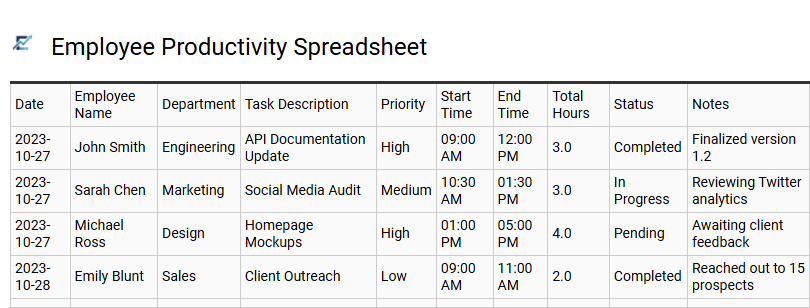
Employee Productivity Spreadsheet
An employee productivity spreadsheet is a robust Excel tool designed to optimize task management and performance tracking. By centralizing assignments, deadlines, and completion statuses, this template enables managers to monitor team output and identify workflow bottlenecks effectively. Using structured data helps in measuring individual performance against key performance indicators (KPIs) while ensuring project timelines remain on track. These templates enhance accountability through clear progress visualization, allowing for data-driven decision-making and improved resource allocation. Its versatility makes it essential for maintaining organized operations in any professional setting. This template is ideal for conducting annual performance reviews, monitoring remote team daily tasks, and tracking complex project milestones.
Download: 💾 Employee Productivity Spreadsheet .xls
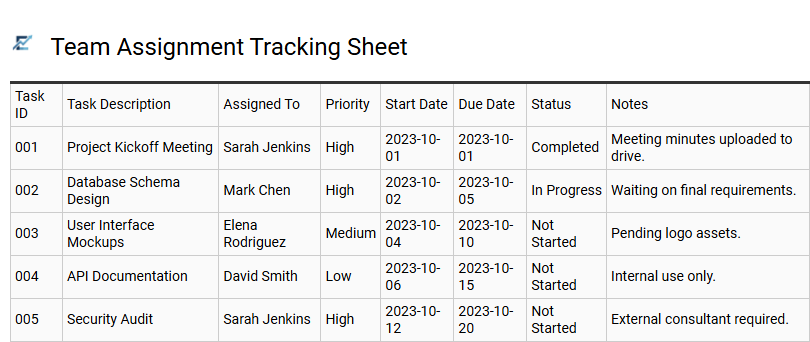
Team Assignment Tracking Sheet
A Team Assignment Tracking Sheet is an essential project management tool designed to streamline workflows and enhance team accountability. By utilizing this structured Excel template, managers can effectively delegate tasks, set firm deadlines, and monitor real-time progress in a centralized location.
This template eliminates communication gaps and prevents resource bottlenecks by providing a clear overview of individual workloads and project milestones. With features like status dropdowns, priority markers, and automated date tracking, teams can maintain high productivity and ensure no critical task is overlooked. Using this document fosters transparency, allowing every member to visualize their specific contributions toward the collective goal.
This kind of template is suitable for marketing campaign coordination, software development sprints, and event planning logistics.
Download: 💾 Team Assignment Tracking Sheet .xls
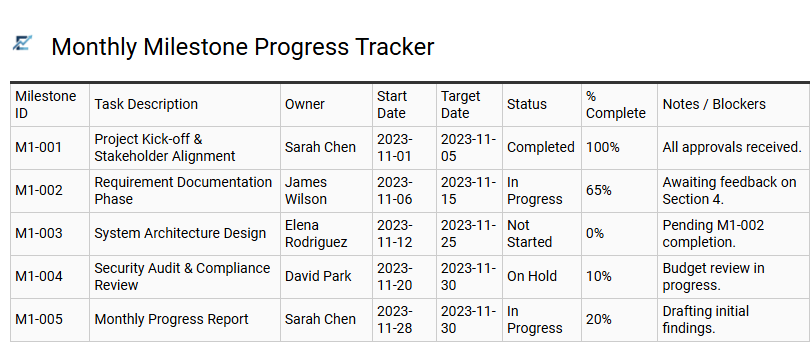
Monthly Milestone Progress Tracker
A Monthly Milestone Progress Tracker is a specialized Excel tool designed to bridge the gap between granular task management and high-level strategic objectives. By organizing deliverables into monthly intervals, this template allows project leads to monitor significant achievements, track deadlines, and assess overall project health at a glance.
Using features like conditional formatting and automated status indicators, the tracker provides a clear visual representation of progress, helping teams identify potential delays before they impact the final deadline. This structured format enhances accountability and ensures stakeholder transparency throughout the project lifecycle. It serves as an invaluable resource for maintaining momentum and ensuring that core business objectives are met with precision.
This template is ideal for managing product launch roadmaps, coordinating multi-phase marketing campaigns, and tracking annual corporate financial reporting cycles.
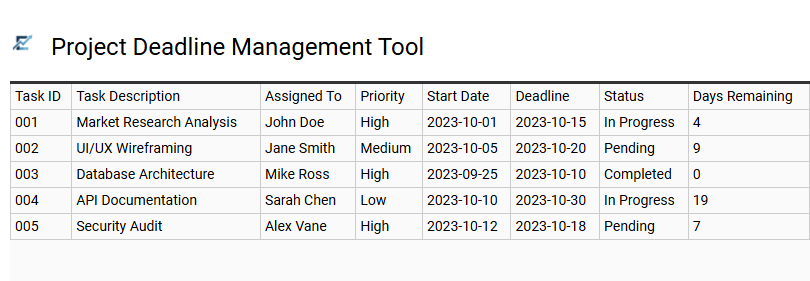
Project Deadline Management Tool
A professional Excel template for tracking tasks serves as a centralized dashboard for monitoring project timelines and critical deliverables. By utilizing structured data tables and automated formulas, this tool allows users to input start dates, define milestones, and establish clear expiration dates for every assignment.
The integration of conditional formatting provides instant visual cues for upcoming or overdue tasks, ensuring high-priority items remain visible. This systematic approach enhances team accountability and improves time management by offering a real-time overview of progress percentages and resource allocation. Implementing a dedicated spreadsheet-based tracker reduces project bottlenecks and minimizes the risk of missed deadlines.
This template is perfectly suited for managing multifaceted marketing campaigns, tracking agile software development sprints, and coordinating complex corporate event planning.
Download: 💾 Project Deadline Management Tool .xls
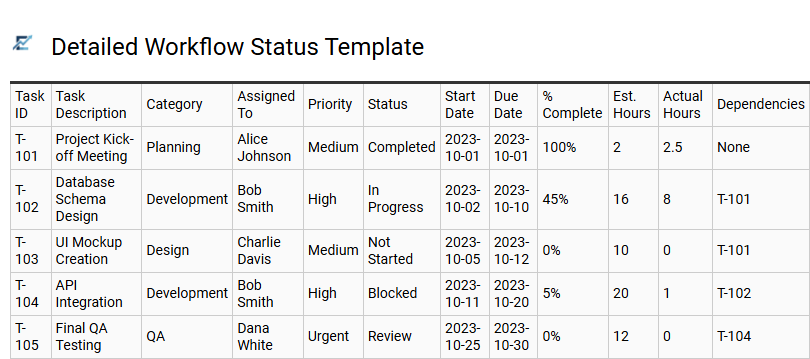
Detailed Workflow Status Template
A detailed workflow status template in Excel provides granular visibility into complex project lifecycles. Unlike basic to-do lists, this structured framework breaks tasks into specific stages, allowing teams to monitor progress from initial conception to final approval. By incorporating data validation for status updates-such as "In Progress," "Awaiting Feedback," or "Completed"-project managers can instantly identify bottlenecks and streamline resource allocation.
Essential features typically include priority markers, assigned owners, automated timeline tracking, and percentage-complete indicators. This methodology ensures team accountability and enhances stakeholder communication by providing a centralized, real-time overview of every moving part within a project.
This template is ideal for managing software development sprints, executing multi-channel marketing campaigns, and overseeing complex architectural design phases.
Download: 💾 Detailed Workflow Status Template .xls
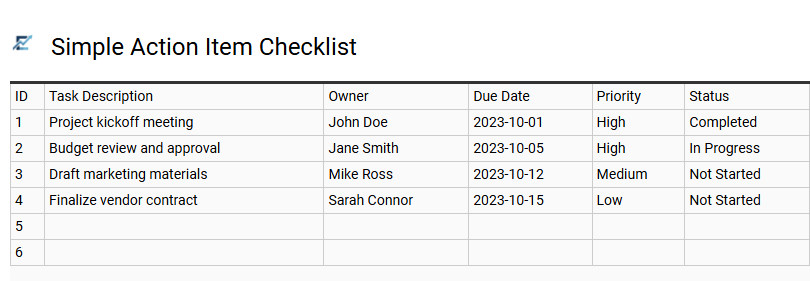
Simple Action Item Checklist
A Simple Action Item Checklist is an efficient Excel-based tool designed to streamline task management and improve team accountability. By organizing duties into a structured format, users can easily define task descriptions, assign responsible owners, and set clear deadlines. This template typically incorporates status dropdowns and priority markers, providing a visual overview of project health and pending requirements.
Utilizing a centralized spreadsheet ensures that no critical task is overlooked and allows for real-time progress tracking. Its straightforward design eliminates the complexity of advanced project management software, making it accessible for users who need immediate organization without a steep learning curve.
This template is highly suitable for tracking post-meeting follow-up tasks, managing small business project punch lists, and organizing weekly team deliverables.
Download: 💾 Simple Action Item Checklist .xls
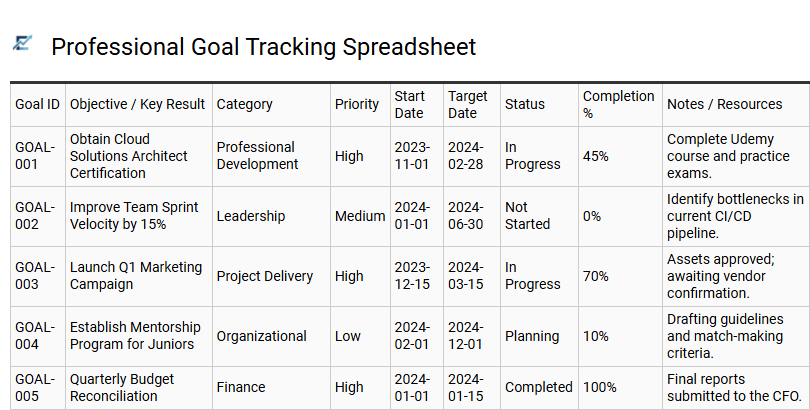
Professional Goal Tracking Spreadsheet
A professional goal tracking spreadsheet is a robust task management tool designed to align daily activities with long-term career objectives. By utilizing a structured Excel template, professionals can categorize high-priority projects, define measurable milestones, and monitor deadlines through automated status indicators. This systematic approach enhances productivity by providing a clear visual representation of progress, helping to identify bottlenecks before they impact performance.
Integrating data visualization features like progress bars and Gantt charts ensures that every task contributes to overarching success. This template is ideal for managing quarterly sales targets, tracking individual career development plans, or overseeing complex project deliverables within a dynamic team environment.
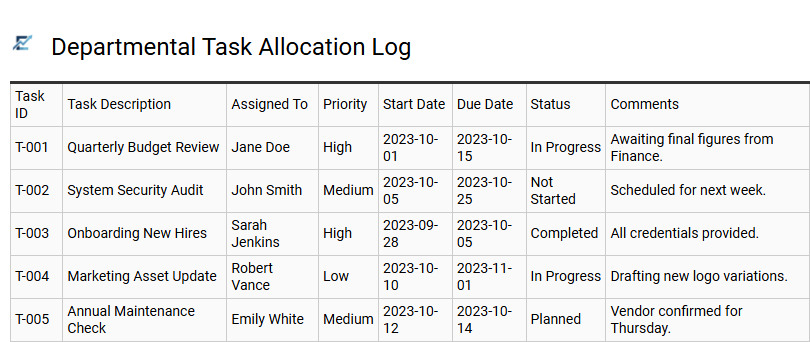
Departmental Task Allocation Log
A Departmental Task Allocation Log is a robust Excel-based tool designed to streamline workflow distribution and enhance team accountability. By centralizing assignments, managers can effectively monitor project ownership, set clear deadlines, and track real-time status updates across the entire department. This structured approach eliminates communication gaps, prevents workload imbalances, and ensures that high-priority objectives remain on schedule.
Using a dedicated log improves operational transparency, allowing team members to visualize their individual contributions within the broader organizational goals. With built-in filtering and categorization features, this template serves as an essential resource for data-driven performance tracking and efficient resource management.
This template is ideal for managing marketing campaign milestones, coordinating internal financial audit cycles, and tracking weekly IT department support tickets.
Download: 💾 Departmental Task Allocation Log .xls
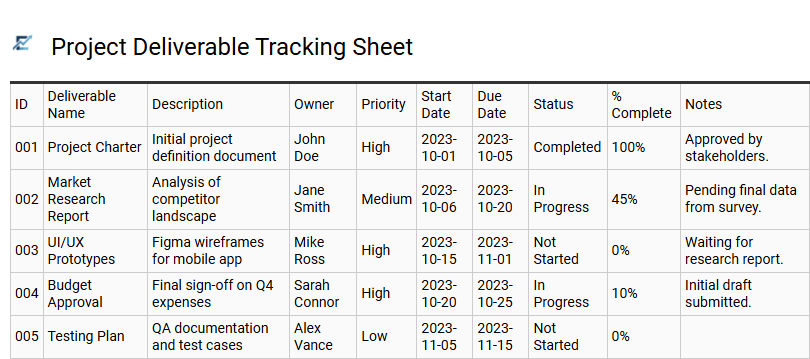
Project Deliverable Tracking Sheet
A Project Deliverable Tracking Sheet is a specialized Excel template designed to monitor the specific outputs and milestones of a project. By organizing task descriptions, assigning owners, and setting firm deadlines in a centralized document, teams can maintain high levels of accountability. This structured approach allows project managers to visualize progress through status updates, ensuring that every deliverable aligns with the overall project timeline.
Using this spreadsheet format enables easy filtering and automated color-coding to highlight overdue items or upcoming priorities. It serves as a single source of truth, reducing communication gaps and helping stakeholders understand the current health of the project at a glance.
This template is perfectly suitable for managing marketing campaign launches, overseeing software development sprints, and coordinating large-scale corporate events.
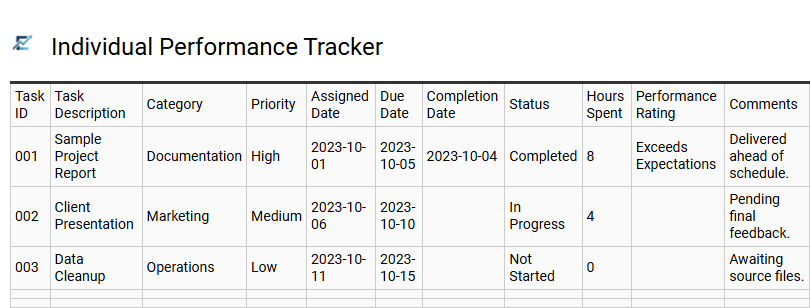
Individual Performance Tracker
An Individual Performance Tracker is a robust Excel template designed to monitor personal productivity and task efficiency. By documenting daily assignments, deadlines, and completion statuses, users can visualize their workflow through automated charts and data-driven metrics. This tool helps professionals stay accountable, identify potential bottlenecks, and maintain a verifiable record of achievements for performance reviews.
It streamlines task management by centralizing key performance indicators (KPIs) in one accessible spreadsheet, ensuring that individual goals remain aligned with broader organizational objectives. Using this structured approach fosters continuous professional growth, improves time management, and provides the clarity needed to prioritize high-impact activities.
This template is ideal for conducting annual employee appraisals, managing freelance project milestones, and monitoring monthly sales target progress.
Download: 💾 Individual Performance Tracker .xls
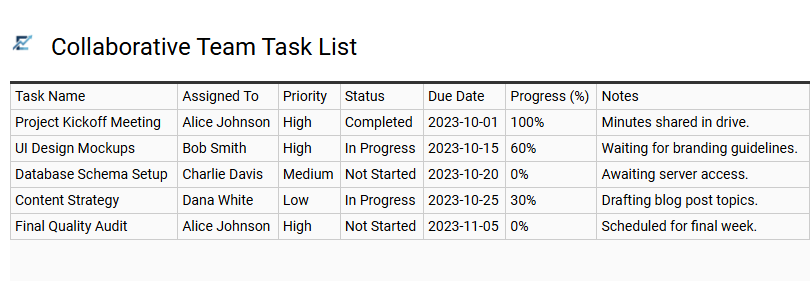
Collaborative Team Task List
A collaborative team task list Excel template is a dynamic tool designed to streamline project management and enhance collective productivity. By centralizing assignments in a shared spreadsheet, teams can monitor real-time progress, assign ownership, and establish clear deadlines. This semantic approach ensures all stakeholders remain aligned on priorities, reducing communication silos and preventing task duplication.
Key features often include automated status tracking, priority indicators, and data validation to ensure consistency across the board. By leveraging a familiar interface, teams can manage complex workflows and identify potential bottlenecks without the overhead of specialized software. This template provides a scalable solution for maintaining transparency and accountability throughout any project lifecycle.
This template is suitable for managing multi-channel marketing campaigns, coordinating weekly software development sprints, and organizing large-scale corporate event planning.
Download: 💾 Collaborative Team Task List .xls
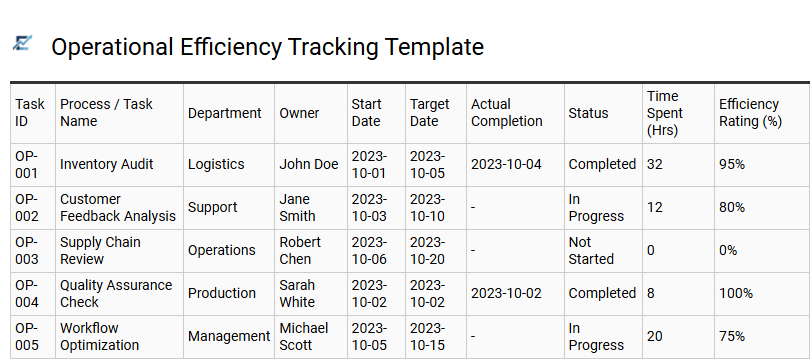
Operational Efficiency Tracking Template
An Operational Efficiency Tracking Template is a powerful Excel tool designed to streamline business workflows and maximize productivity. By centralizing task management, this template allows managers to monitor key performance indicators (KPIs), identify process bottlenecks, and optimize resource allocation in real-time.
Using structured data fields for task duration, priority, and completion status, teams can transform raw data into actionable insights. This systematic approach ensures that operational goals are met consistently while reducing manual errors and improving team accountability. Whether through automated formulas or visual dashboards, these templates provide the clarity needed to refine complex processes and boost overall output.
This template is ideal for managing manufacturing production cycles, tracking high-volume customer support tickets, or streamlining monthly financial reporting workflows.
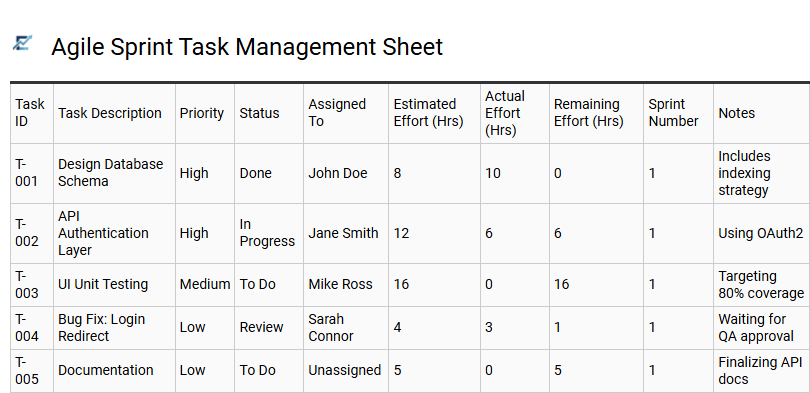
Agile Sprint Task Management Sheet
An Agile Sprint Task Management Sheet is a powerful Excel tool designed to streamline project workflows through time-boxed development cycles. This template allows teams to organize backlogs, define user stories, and assign specific tasks to team members while monitoring progress in real-time. By utilizing columns for task status, priority levels, and estimated hours, project managers can visualize team velocity and identify potential bottlenecks immediately.
The spreadsheet format provides a flexible, cost-effective alternative to complex software, making it easy to generate automated burndown charts and summary reports. This structured approach ensures transparency during daily stand-ups and keeps all stakeholders aligned on upcoming milestones.
This template is ideal for software development cycles, marketing campaign launches, and product prototyping phases.
Implementing professional Excel task tracking systems transforms project management by streamlining workflows and enhancing organizational efficiency. By leveraging advanced spreadsheet features like conditional formatting and automated status tracking, teams can monitor project timelines with precision.
These dynamic tools facilitate better resource allocation and real-time data visualization, ensuring every milestone is met. Ultimately, adopting a robust Excel-based framework minimizes manual errors and boosts overall productivity. Embracing these sophisticated tracking methods is essential for maximizing operational output and achieving consistent, high-quality results.