
Comprehensive Project Progress Tracking Excel Template for Efficient Management
Efficient project management begins with structured organization. Utilizing an Excel template for tracking project progress provides a versatile spreadsheet solution to monitor milestones, task tracking, and critical deadlines in real-time. These tools enhance workflow transparency through data visualization and resource allocation, ensuring every deliverable stays on schedule. By integrating Gantt charts and productivity metrics, teams can simplify reporting and maintain high-level visibility over complex initiatives.
Please explore our curated selection of professionally designed templates below.
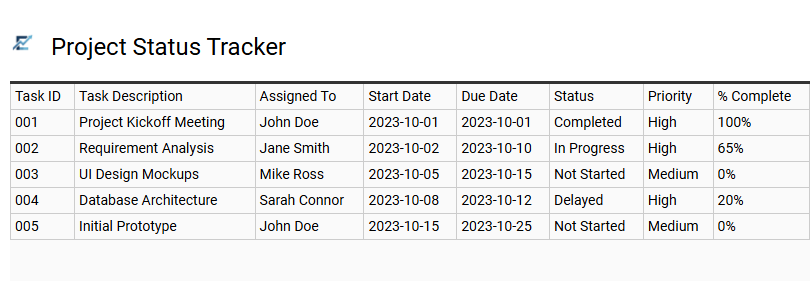
Project Status Tracker
An Excel project status tracker is a robust management tool designed to centralize task monitoring, deadlines, and resource allocation. By providing a structured framework, it allows project managers to visualize progress through real-time updates and automated status indicators. Utilizing features like conditional formatting and progress bars, the template ensures team accountability and helps identify potential bottlenecks before they impact the timeline. This organized approach streamlines communication and simplifies complex data into actionable insights, ensuring all stakeholders stay aligned with project milestones.
This template is perfectly suited for managing agile software development sprints, coordinating multi-channel marketing campaigns, and overseeing residential construction renovations.
Download: 💾 Project Status Tracker .xls
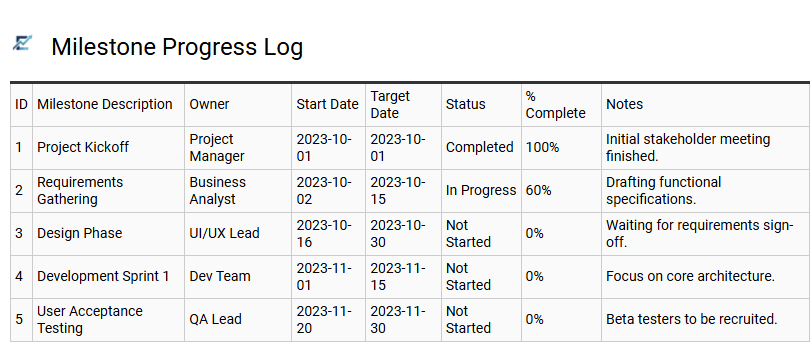
Milestone Progress Log
A Milestone Progress Log is an essential component of any project tracking Excel template, designed to monitor high-level achievements rather than daily tasks. It provides a structured overview of significant checkpoints, allowing project managers to compare target deadlines against actual completion dates. By focusing on these critical deliverables, teams can easily identify schedule variances and assess the overall health of a project at a glance.
This log serves as a powerful communication tool for stakeholders, distilling complex workflows into clear, measurable benchmarks. Documenting milestones ensures that the project remains aligned with its strategic goals while fostering accountability among team members responsible for key outputs.
This template is suitable for software development product launches, construction phase monitoring, and annual marketing campaign rollouts.
Download: 💾 Milestone Progress Log .xls
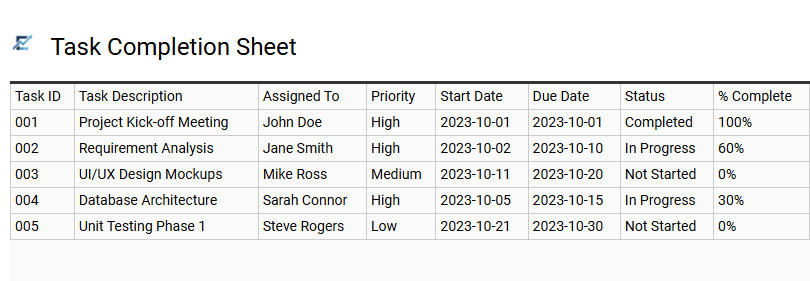
Task Completion Sheet
A Task Completion Sheet serves as the functional core of an Excel project tracker, providing a granular view of every deliverable. This sheet captures critical data points such as task descriptions, assigned personnel, deadlines, and current status markers like "In Progress" or "Complete." By maintaining a centralized log, teams can enhance accountability and ensure that no minor detail is overlooked. High-quality templates often include automated progress bars and priority flags to help project managers visualize workflow efficiency and identify potential bottlenecks before they impact the timeline. Ultimately, this structured approach to task management facilitates better resource allocation and ensures project milestones are met on schedule.
This template is perfectly suited for managing software development sprints, coordinating multi-channel marketing campaigns, or tracking individual phases of a construction project.
Download: 💾 Task Completion Sheet .xls
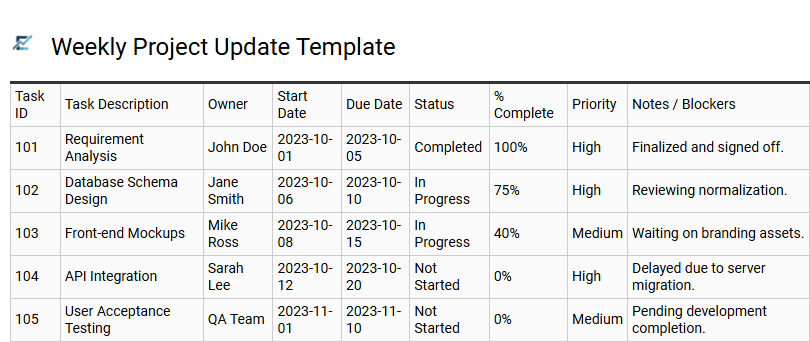
Weekly Project Update Template
A Weekly Project Update Template in Excel provides a standardized framework for tracking milestones and communicating status to stakeholders. By organizing task progress, resource allocation, and risk assessments into a single spreadsheet, project managers ensure transparency across the entire team. This structured approach helps identify bottlenecks early, allowing for proactive adjustments to the project timeline and budget.
Using a semantic-optimized template simplifies data entry and ensures consistent reporting, which is vital for maintaining momentum. It bridges the gap between daily operations and long-term strategic goals, providing a clear snapshot of project health every seven days to keep all contributors aligned on high-priority deliverables.
This template is particularly suitable for software development sprints, multi-channel marketing campaigns, and residential construction project monitoring.
Download: 💾 Weekly Project Update Template .xls
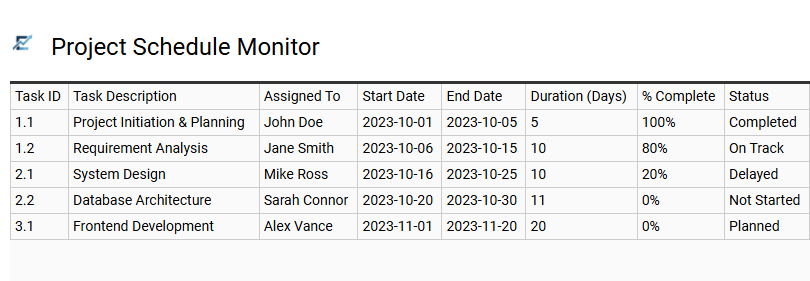
Project Schedule Monitor
A Project Schedule Monitor is a dynamic Excel template designed to visualize timelines and track real-time progress. By utilizing automated formulas and Gantt chart features, this tool helps project managers identify potential bottlenecks before they impact delivery dates. It provides a centralized dashboard to monitor task dependencies, percentage completion, and resource allocation.
Using a structured spreadsheet ensures data integrity and offers stakeholders a clear overview of the project's health. Key indicators like color-coded status alerts and milestone tracking help teams stay aligned and maintain accountability throughout the project lifecycle.
This kind of template is perfectly suitable for construction project planning, software development sprints, and complex marketing campaign launches.
Download: 💾 Project Schedule Monitor .xls
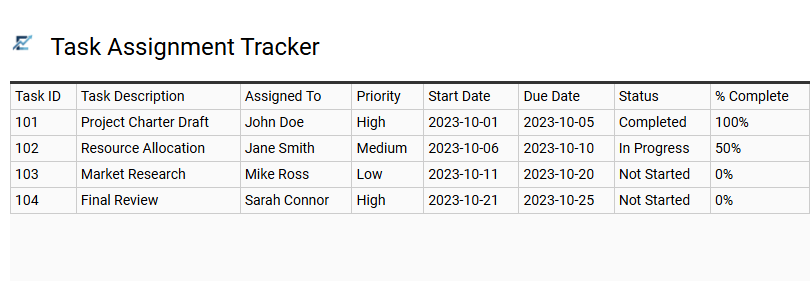
Task Assignment Tracker
A Task Assignment Tracker is a vital component of a project management Excel template, designed to streamline delegation and enhance team accountability. This tool provides a centralized overview of who is responsible for specific deliverables, their current progress, and upcoming deadlines. By integrating features like dropdown status menus and priority indicators, it allows project managers to identify resource bottlenecks and reallocate tasks to keep the project on schedule.
Effective tracking ensures transparency across the team, reducing overlapping efforts and improving overall productivity. This organized data structure makes it easier to monitor individual performance and ensure milestone completion within complex workflows. This template is ideal for managing software development sprints, coordinating multi-channel marketing campaigns, and overseeing commercial construction schedules.
Download: 💾 Task Assignment Tracker .xls
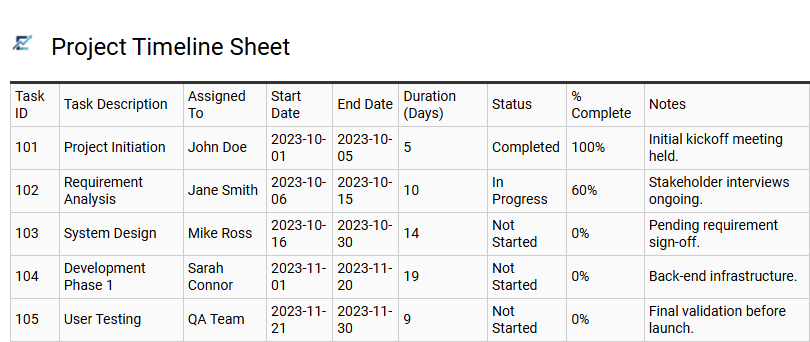
Project Timeline Sheet
A Project Timeline Sheet is a vital component of any Excel tracking template, providing a visual roadmap of task sequences and key milestones. By mapping out activities along a chronological axis, project managers can easily monitor start and end dates, identify task dependencies, and track overall progress against deadlines. This sheet often utilizes Gantt chart features or color-coded bars to offer a clear overview of the project's lifecycle, ensuring that every team member understands the schedule at a glance.
Incorporating a timeline helps in identifying potential bottlenecks early, allowing for proactive resource reallocation to maintain momentum. This high-level visibility is essential for keeping stakeholders informed and ensuring that complex projects stay within their designated timeframes.
This template is suitable for marketing campaign launches, software development sprints, and construction project scheduling.
Download: 💾 Project Timeline Sheet .xls
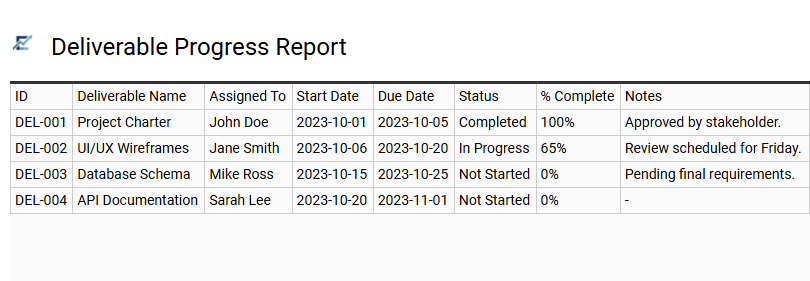
Deliverable Progress Report
A Deliverable Progress Report is a vital component of a project management Excel template, designed to monitor the status of specific outputs throughout the project lifecycle. This report provides a structured overview of milestones, completion percentages, and target deadlines. By centralizing this data, project managers can easily identify bottlenecks, track individual accountability, and ensure that every tangible objective aligns with the broader project timeline.
Utilizing a deliverable-focused tracker enhances transparency among stakeholders and facilitates data-driven decision-making. It transforms complex workflows into manageable checklists, ensuring that no critical task is overlooked. By integrating automated status updates and color-coded progress bars, the template offers an immediate visual representation of project health and resource efficiency.
This template is suitable for software development sprints, integrated marketing campaigns, and architectural construction phases.
Download: 💾 Deliverable Progress Report .xls
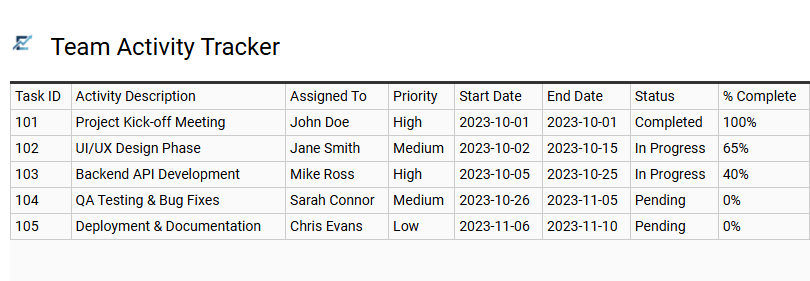
Team Activity Tracker
The Team Activity Tracker is a robust Excel template designed to streamline project management by monitoring individual contributions and collective milestones. It provides a centralized dashboard for assigning tasks, setting deadlines, and tracking real-time status updates across the entire department. By utilizing a structured format, project managers can easily identify bottlenecks, ensure accountability, and maintain a clear overview of progress without the need for complex software.
Key features often include priority levels, task ownership, and automated progress bars to visualize completion stages. This organized approach enhances team communication and ensures every member remains aligned with core project objectives. This template is highly effective for managing multi-channel marketing campaigns, coordinating software development sprints, and organizing large-scale corporate event logistics.
Download: 💾 Team Activity Tracker .xls
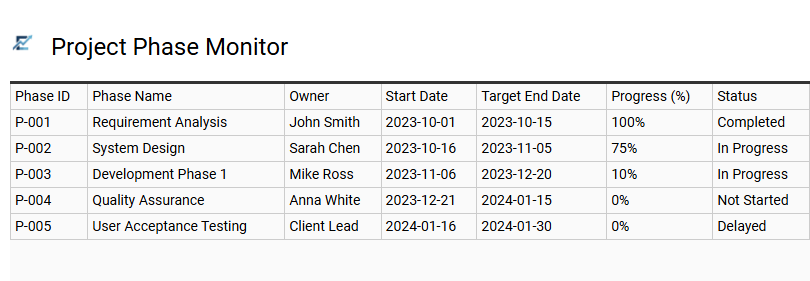
Project Phase Monitor
A Project Phase Monitor is a specialized Excel tool designed to visualize a project's progression through its distinct lifecycle stages. By breaking down complex workflows into manageable phases-such as initiation, planning, execution, and closure-this template provides stakeholders with a clear overview of task statuses and critical deadlines. It typically utilizes automated formulas and conditional formatting to highlight completion percentages, track milestones, and identify potential bottlenecks in real-time.
This structured approach enhances transparency and improves resource management, ensuring that every team member remains aligned with the overarching project goals. By centralizing phase-specific data, the monitor facilitates more accurate reporting and data-driven decision-making throughout the project duration.
This template is ideal for construction timeline management, software development sprints, and corporate marketing campaign rollouts.
Download: 💾 Project Phase Monitor .xls
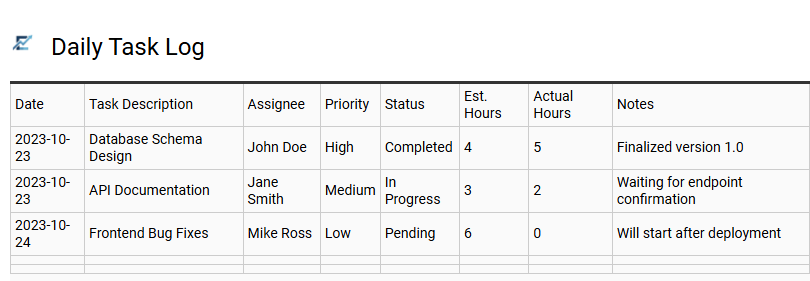
Daily Task Log
A Daily Task Log is an essential feature of an Excel project progress template, designed to bridge the gap between high-level milestones and granular daily execution. By documenting specific activities, project managers can monitor real-time status, identify immediate bottlenecks, and maintain team accountability. This log typically captures task descriptions, assigned owners, priority levels, and completion percentages.
Maintaining a consistent daily record allows for efficient resource allocation and provides a clear historical audit trail for stakeholder reporting. It transforms broad project goals into manageable, actionable steps, ensuring that no critical detail is overlooked throughout the project lifecycle.
This template is ideal for software development sprints, construction site management, and marketing campaign launches.
Download: 💾 Daily Task Log .xls
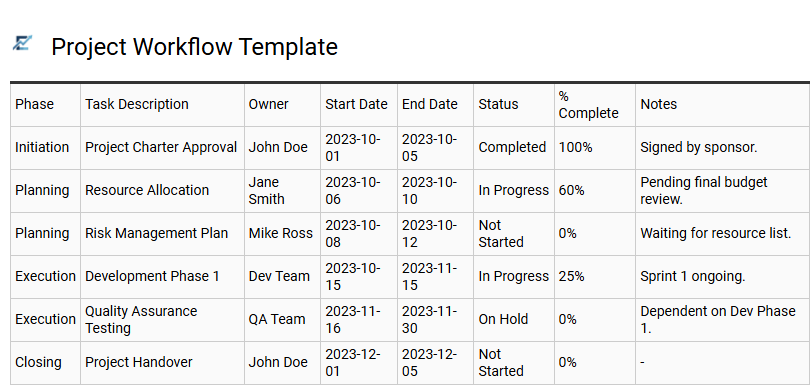
Project Workflow Template
An Excel Project Workflow Template provides a structured framework for managing complex tasks and visualizing progress from initiation to completion. By defining distinct operational stages-such as planning, execution, and review-these templates help teams eliminate bottlenecks, assign clear responsibilities, and maintain strict adherence to deadlines.
Utilizing built-in Excel features like conditional formatting or dropdown status menus transforms raw data into an actionable roadmap. This systematic approach enhances transparency across the team, ensuring all stakeholders stay aligned with key milestones and resource allocations. It is a cost-effective solution for streamlining multi-step processes and improving overall project efficiency.
This kind of template is suitable for software development sprints, marketing campaign launches, and construction project scheduling.
Download: 💾 Project Workflow Template .xls
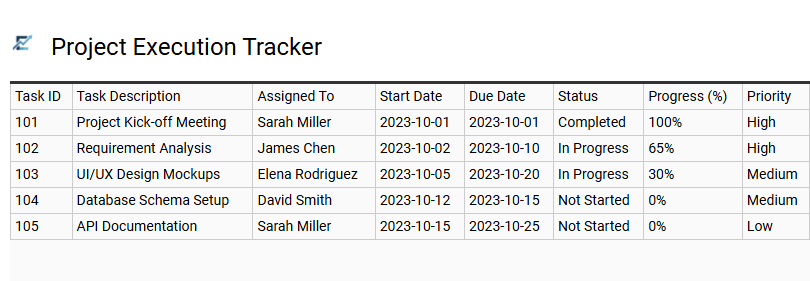
Project Execution Tracker
An Excel project execution tracker is a vital tool for maintaining momentum during the active phase of any initiative. It centralizes task management by recording start dates, deadlines, and current statuses, providing a real-time overview of the project lifecycle. By utilizing structured data, teams can monitor progress percentages, assign clear accountability, and identify potential bottlenecks before they impact the schedule.
This semantic-driven approach ensures that all stakeholders have visibility into resource allocation and milestone achievements. The template transforms complex workflows into an organized roadmap, enhancing operational efficiency and ensuring project goals are met with precision.
This template is suitable for website development cycles, marketing campaign rollouts, and construction schedule management.
Download: 💾 Project Execution Tracker .xls
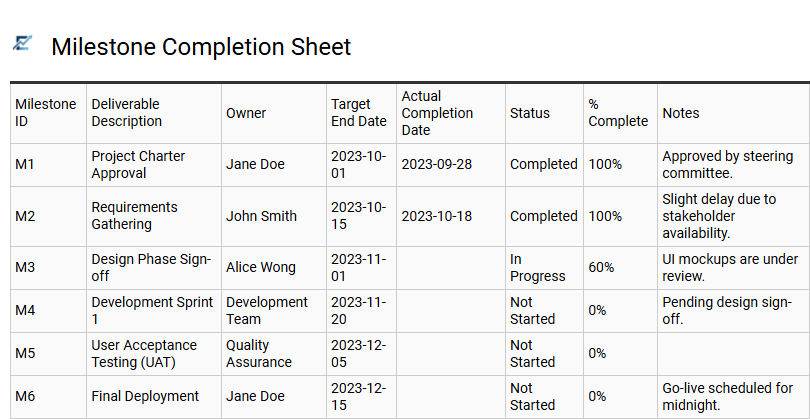
Milestone Completion Sheet
A Milestone Completion Sheet is a specialized component of an Excel project tracker designed to monitor high-level achievements rather than granular daily tasks. It provides a structured overview of significant phases, key deliverables, and critical deadlines. By recording target completion dates against actual results, project managers can easily identify schedule variances and assess overall project health.
This sheet typically includes status indicators and ownership details, ensuring accountability across the team while offering stakeholders a clear visual of progress toward strategic goals. Utilizing this centralized tracking method helps maintain momentum and ensures that no major project phase is overlooked.
This template is suitable for software development roadmaps, large-scale construction phases, and integrated marketing campaign launches.
Download: 💾 Milestone Completion Sheet .xls
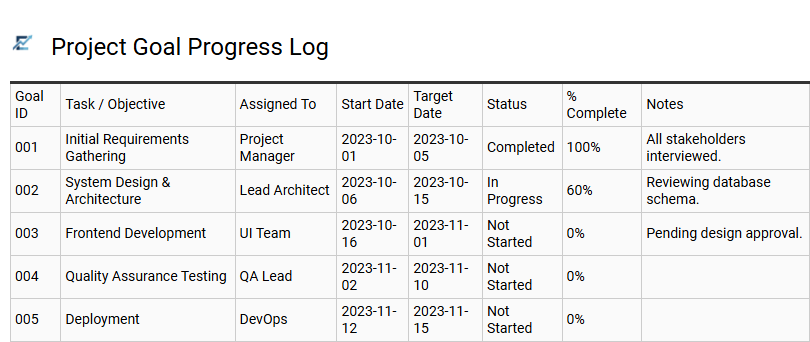
Project Goal Progress Log
A Project Goal Progress Log serves as a centralized tracking hub within an Excel template, designed to monitor high-level objectives and specific milestones. By documenting Key Performance Indicators (KPIs), target dates, and real-time completion percentages, project managers can effectively identify bottlenecks before they impact critical deadlines.
This log transforms raw data into actionable insights, often utilizing visual aids like status bars and conditional formatting to provide immediate clarity on project health. It ensures team alignment, improves accountability, and provides stakeholders with transparent updates on overall momentum. This structured approach streamlines reporting and facilitates data-driven decision-making across the entire project lifecycle.
This template is suitable for small business marketing campaigns, software development sprints, and construction project phase tracking.
Download: 💾 Project Goal Progress Log .xls
This comprehensive project progress tracking Excel template streamlines complex workflows through integrated data visualization and real-time task monitoring. By centralizing milestone tracking and resource allocation, managers maintain a clear project lifecycle overview.
Utilizing this tool enhances workflow optimization and ensures deadlines are met via automated status updates. Download this essential resource to simplify project management, improve team productivity, and achieve consistent operational excellence through precise, data-driven insights and professional reporting.