
Comprehensive Office Task Tracking Excel Template for Enhanced Workplace Productivity
Managing daily operations requires a robust system to ensure efficiency and accountability. Utilizing a professional Excel template for tracking office tasks streamlines your workflow by organizing deadlines, priorities, and individual assignments within a single spreadsheet. These dynamic productivity tools simplify project management, allowing team members to monitor status updates and milestones in real-time. By leveraging automated formulas and data visualization, you can eliminate manual errors and enhance administrative oversight across all departments. Please explore the professionally designed variations of office task templates provided below.
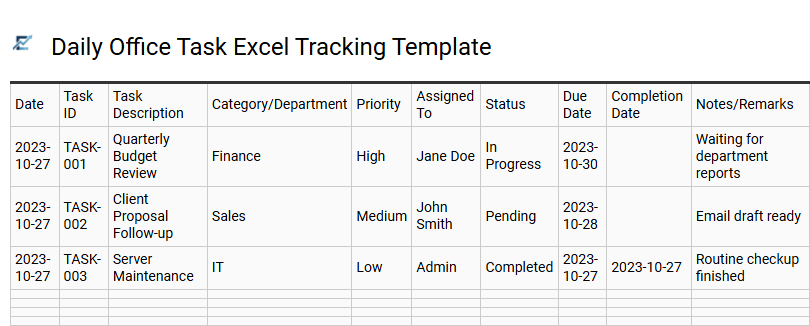
Daily Office Task Excel Tracking Template
A daily office task Excel tracking template is an essential tool for boosting productivity and ensuring no deadline is missed. By organizing responsibilities into a structured spreadsheet, team members can monitor progress, assign priorities, and maintain accountability. Effective templates typically include columns for task descriptions, priority levels, status updates, and due dates, providing a clear visual overview of the workday.
Using these spreadsheets helps streamline communication within departments and identifies bottlenecks before they impact workflow. This digital log serves as both a proactive planning resource and a historical record of completed work, making it easier to evaluate performance and optimize time management strategies across the organization.
This template is ideal for administrative support coordination, tracking project management milestones, and managing recurring daily operations.
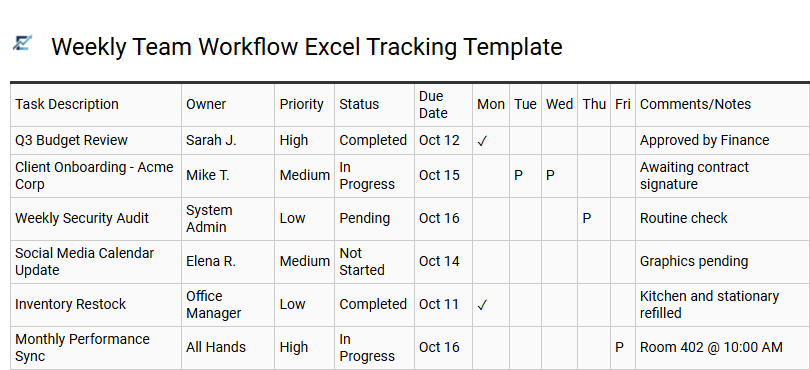
Weekly Team Workflow Excel Tracking Template
A Weekly Team Workflow Excel Tracking Template is an essential productivity tool designed to streamline task management and enhance department transparency. By organizing assignments within a structured spreadsheet, teams can effectively monitor deadlines, assign ownership, and track progress in real-time.
This template utilizes semantic data organization to reduce operational bottlenecks and improve team accountability. Features such as automated status updates and prioritized task lists help project managers visualize workload distribution and ensure that no critical action items are overlooked. It serves as a centralized hub for cross-functional collaboration, ensuring all members remain aligned with the organization's weekly objectives.
This template is highly suitable for managing marketing editorial calendars, tracking recurring administrative duties, and monitoring internal IT support tickets.
Download: 💾 Weekly Team Workflow Excel Tracking Template .xls
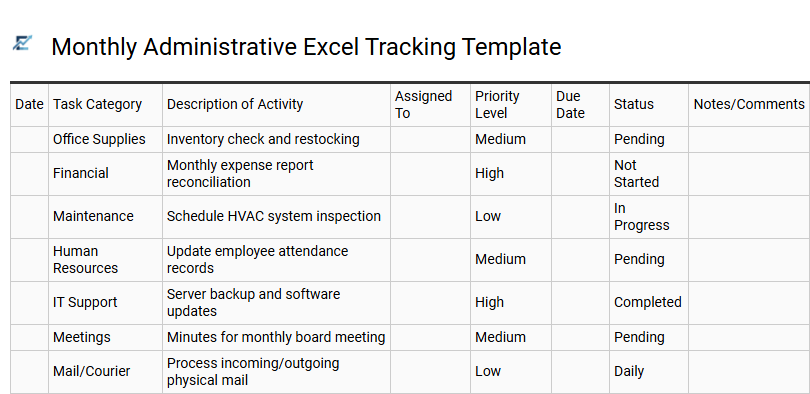
Monthly Administrative Excel Tracking Template
A monthly administrative excel tracking template is an essential tool for streamlining office workflows and improving organizational efficiency. By centralizing recurring duties, deadlines, and priority levels into a single spreadsheet, teams can ensure that critical operational tasks are never overlooked. This structured digital format allows for real-time status updates, clear accountability, and data-driven oversight of department productivity.
Utilizing a standardized tracking system reduces manual errors and provides managers with a transparent view of resource allocation. With built-in categories for task descriptions and completion dates, businesses can maintain consistent performance standards across various administrative functions throughout the month.
This template is suitable for managing office supply procurement, tracking employee onboarding checklists, and coordinating monthly financial reporting deadlines.
Download: 💾 Monthly Administrative Excel Tracking Template .xls
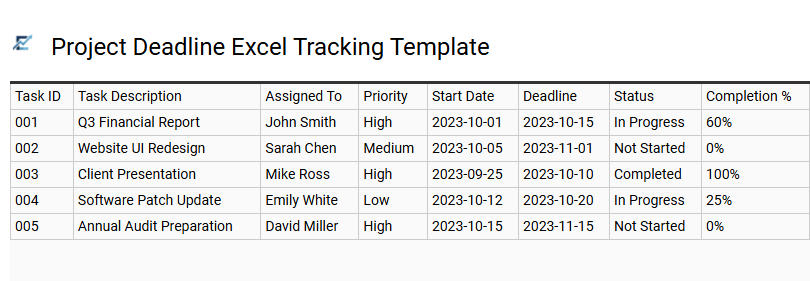
Project Deadline Excel Tracking Template
Streamline your office workflow with a professional Project Deadline Excel Tracking Template. This essential tool centralizes task management by allowing teams to monitor start dates, completion statuses, and critical milestones in one accessible location. By leveraging automated features like conditional formatting, the template provides instant visual cues for overdue tasks and upcoming priorities, ensuring maximum accountability across the department.
An Excel-based tracker eliminates communication gaps and optimizes resource allocation, making it easier for managers to visualize project timelines and identify potential bottlenecks before they impact productivity. This organized approach to task oversight is vital for maintaining high performance in fast-paced business environments. This template is suitable for managing monthly financial audits, coordinating multi-stage marketing campaigns, and tracking internal IT infrastructure upgrades.
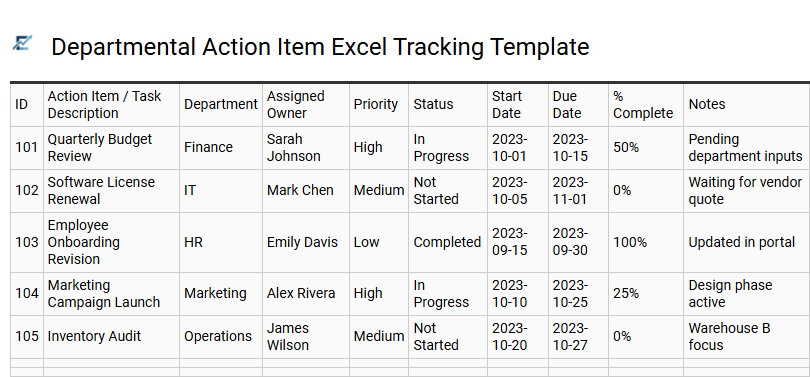
Departmental Action Item Excel Tracking Template
A Departmental Action Item Excel Tracking Template serves as a centralized hub for managing team responsibilities and streamlining workflows. By utilizing structured columns for task descriptions, assigned owners, priority levels, and due dates, departments can maintain high visibility over ongoing projects.
This spreadsheet-based solution enhances accountability, allowing managers to monitor real-time progress and identify potential bottlenecks instantly. Using Excel's built-in filtering and conditional formatting tools, teams can transform raw task data into actionable insights, ensuring no critical deadline is missed. This professional framework is essential for maintaining organizational efficiency and fostering clear communication across various business units.
This template is suitable for managing weekly team huddles, tracking cross-departmental project milestones, and overseeing annual regulatory compliance checklists.
Download: 💾 Departmental Action Item Excel Tracking Template .xls
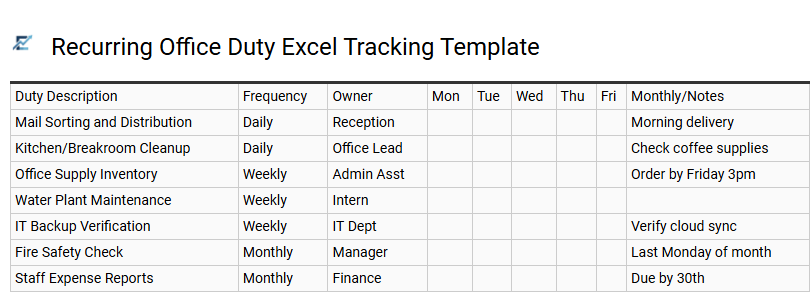
Recurring Office Duty Excel Tracking Template
A Recurring Office Duty Excel Tracking Template is an essential productivity tool designed to streamline repetitive administrative workflows. By organizing daily, weekly, and monthly tasks into a centralized spreadsheet, managers can ensure operational consistency and team accountability. These templates leverage Excel's functional capabilities, such as conditional formatting and data validation, to monitor completion status and upcoming deadlines in real-time.
Implementing a structured tracking system reduces the risk of human error and eliminates the need for costly specialized software. It provides a clear visual overview of office responsibilities, allowing for better resource allocation and efficient time management. This systematic approach ensures that vital maintenance and clerical duties are never overlooked, maintaining high professional standards across the organization.
This template is suitable for managing monthly payroll processing, weekly office supply inventory checks, and daily facility safety inspections.
Download: 💾 Recurring Office Duty Excel Tracking Template .xls
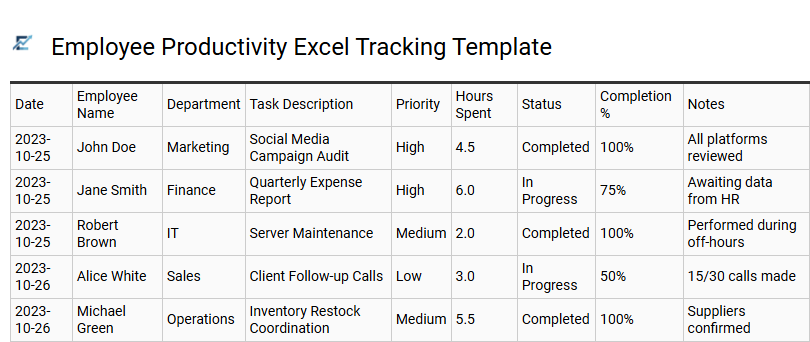
Employee Productivity Excel Tracking Template
An Employee Productivity Excel Tracking Template is a powerful tool designed to streamline office workflows and enhance operational efficiency. This spreadsheet solution enables managers to monitor daily task statuses, set clear deadlines, and quantify individual performance metrics in real-time. By recording time allocation and completion rates, businesses can easily identify operational bottlenecks and optimize resource distribution across departments.
Using a structured Excel format fosters accountability and transparency, allowing teams to visualize progress through organized data and status labels. This centralized approach simplifies task management, ensuring that critical objectives are met while providing actionable insights into team output and labor costs.
This template is ideal for managing administrative department backlogs, tracking weekly deliverables for remote teams, and conducting objective employee performance reviews.
Download: 💾 Employee Productivity Excel Tracking Template .xls
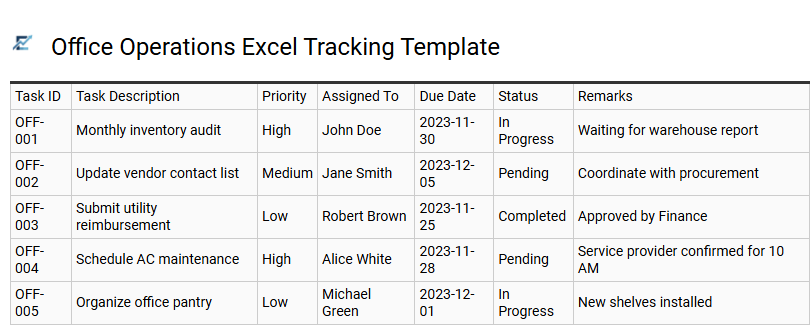
Office Operations Excel Tracking Template
An Office Operations Excel Tracking Template is a robust tool designed to streamline administrative workflows and enhance organizational accountability. By providing a centralized framework for monitoring recurring tasks, deadlines, and project statuses, this template helps teams eliminate manual errors and improve overall efficiency. Key features typically include priority labeling, task ownership assignments, and automated status updates to provide real-time visibility into daily operations.
Utilizing a structured spreadsheet ensures that critical business processes remain transparent and manageable. This systematic approach allows office managers to identify bottlenecks early and redistribute workloads to maintain peak productivity levels across the department.
This template is ideal for managing monthly financial reconciliations, coordinating employee onboarding checklists, and tracking routine facility maintenance schedules.
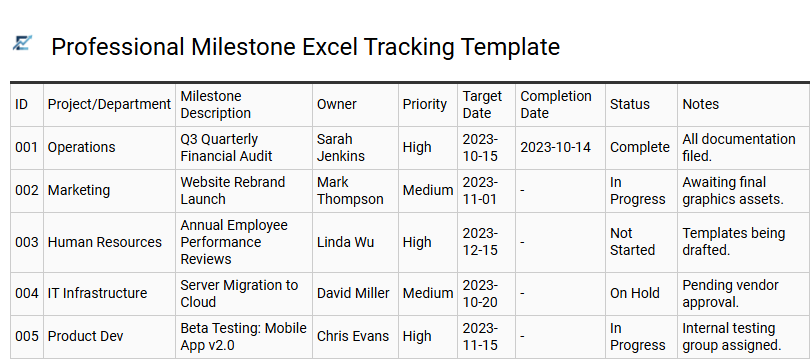
Professional Milestone Excel Tracking Template
A Professional Milestone Excel Tracking Template is a robust tool designed to enhance productivity and organizational oversight within any office environment. This template simplifies project management by breaking down complex objectives into actionable tasks, allowing teams to monitor deadlines, assign owners, and track real-time progress. By leveraging structured data and status indicators, users can visualize project health and ensure key milestones are achieved on schedule.
Integrating this spreadsheet solution into your workflow reduces manual tracking errors and improves team accountability. It provides a centralized dashboard for performance metrics, making it easier to communicate updates to stakeholders while maintaining a clear audit trail of completed work.
This template is ideal for managing quarterly marketing campaigns, tracking employee onboarding checklists, or monitoring annual financial audit preparations.
Download: 💾 Professional Milestone Excel Tracking Template .xls
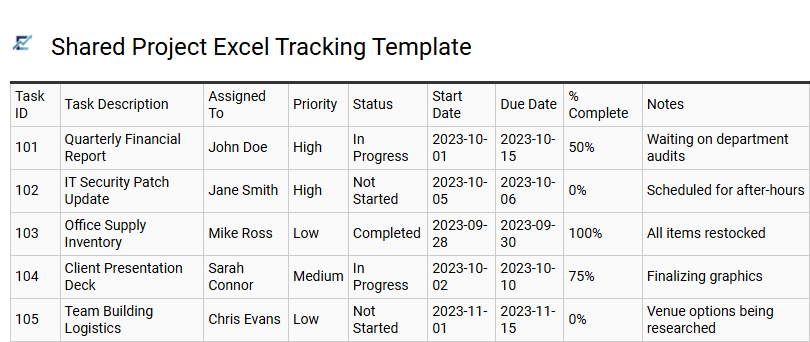
Shared Project Excel Tracking Template
A shared project Excel tracking template streamlines team collaboration by providing a centralized hub for task management. Utilizing features like data validation, dropdown menus, and conditional formatting, it allows multiple stakeholders to monitor deadlines, assign ownership, and update status in real-time. This accessible tool improves accountability and ensures transparency across diverse departments without the need for specialized, expensive software.
By organizing complex workflows into a structured spreadsheet, teams can easily visualize project milestones and identify potential bottlenecks early. Its inherent flexibility makes it a powerful asset for maintaining productivity and keeping projects on schedule in any professional environment. This kind of template is suitable for marketing campaign planning, client onboarding processes, and internal audit scheduling.
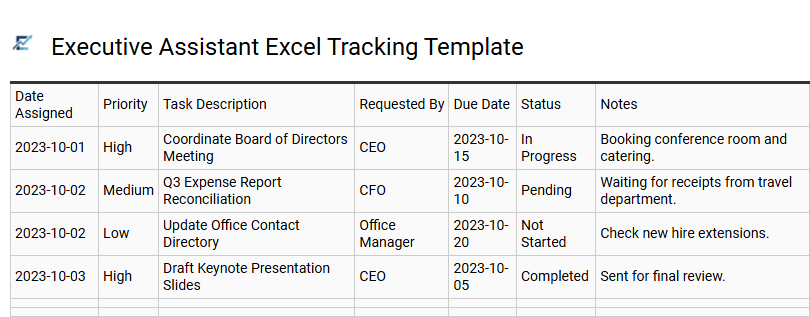
Executive Assistant Excel Tracking Template
An Executive Assistant Excel Tracking Template is an essential productivity tool designed to streamline high-level administrative workflows. By centralizing daily tasks, this structured spreadsheet allows for efficient monitoring of priority levels, deadlines, and project statuses. Utilizing such a template ensures that critical action items are never overlooked, providing a clear visual dashboard for managing complex schedules and sensitive stakeholder communications. It helps EAs maintain peak organization while facilitating seamless reporting to executives regarding ongoing initiatives and operational goals.
This versatile tracking solution is ideal for maintaining accountability in fast-paced corporate environments.
Sample use cases include: managing intricate executive travel itineraries, tracking multi-departmental project milestones, and organizing comprehensive board meeting preparations.
Download: 💾 Executive Assistant Excel Tracking Template .xls
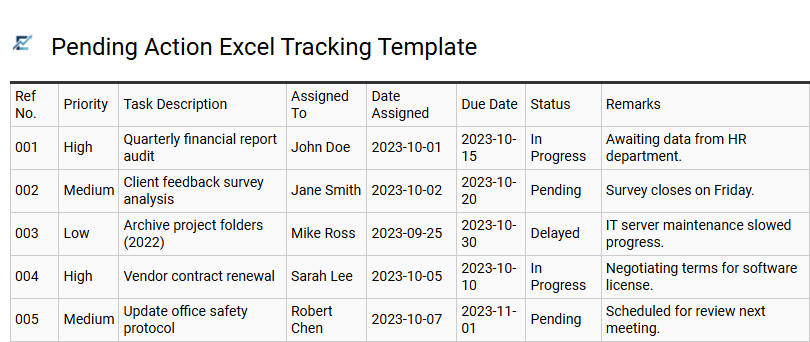
Pending Action Excel Tracking Template
A structured Pending Action Excel Tracking Template is essential for maintaining workplace efficiency and ensuring accountability. This tool allows users to systematically log tasks, assign responsibility, and monitor deadlines within a familiar spreadsheet environment. By utilizing status indicators and priority levels, teams can visualize bottlenecks and streamline their daily operations.
Centralizing pending actions helps prevent oversight, facilitates smoother handovers, and provides a clear audit trail for completed work. It serves as a robust foundation for project management, allowing stakeholders to identify high-priority items at a glance and improve overall productivity.
This template is particularly suitable for managing client follow-ups, tracking internal administrative approvals, and monitoring department-specific project milestones.
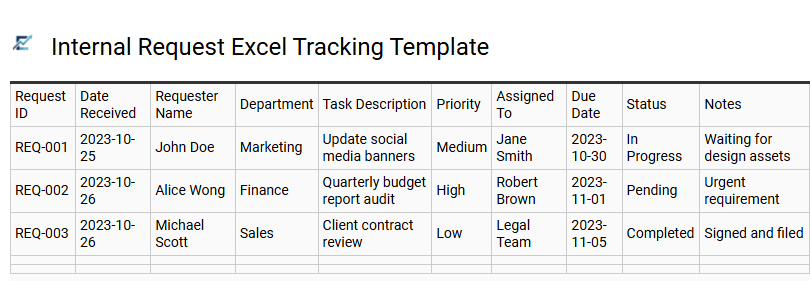
Internal Request Excel Tracking Template
An Internal Request Excel Tracking Template is an essential productivity tool designed to streamline office operations and improve interdepartmental communication. By centralizing task intake into a single spreadsheet, teams can effectively monitor progress, assign priority levels, and ensure accountability for every submission.
This structured approach replaces disorganized email threads with a clear, visual dashboard. Key features often include status updates, deadline alerts, and department-specific categories, allowing managers to identify operational bottlenecks and optimize resource allocation in real-time. Using a standardized tracking system enhances transparency and ensures that critical internal requirements are fulfilled promptly.
This template is highly effective for managing IT support tickets, internal marketing creative briefs, and office facility maintenance logs.
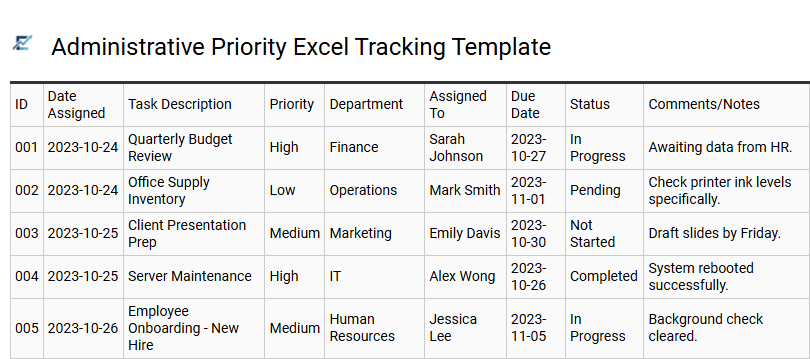
Administrative Priority Excel Tracking Template
Streamline your daily operations with a professional Administrative Priority Excel Tracking Template. This structured tool is designed to help administrative professionals categorize high-volume tasks, monitor approaching deadlines, and maintain a clear overview of project statuses. By integrating features like conditional formatting for priority levels and automated progress bars, the template ensures that urgent responsibilities remain visible and manageable.
Utilizing a centralized spreadsheet improves organizational efficiency, reduces the risk of missed assignments, and facilitates seamless communication within a team. It allows for detailed documentation of task ownership and completion dates, providing a reliable audit trail for performance reporting. This systematic approach to task management transforms chaotic to-do lists into a strategic workflow, empowering users to allocate their time effectively across various business functions.
This template is ideal for coordinating executive travel schedules, tracking monthly vendor billing cycles, and managing facility maintenance requests.
Download: 💾 Administrative Priority Excel Tracking Template .xls
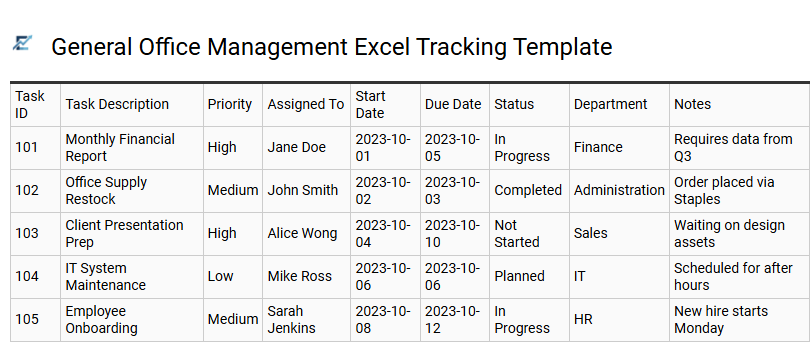
General Office Management Excel Tracking Template
A General Office Management Excel Tracking Template serves as a centralized hub for organizing administrative workflows and improving team accountability. By utilizing structured columns for task descriptions, deadlines, priority levels, and assigned owners, offices can eliminate communication gaps and ensure timely project completion.
These templates often leverage built-in Excel features like conditional formatting to highlight urgent items and data validation for consistent status updates. Implementing such a system enhances productivity by providing a clear visual overview of operational health and resource allocation. This digital tool is essential for maintaining order in fast-paced environments where multitasking is frequent and documentation is critical for success.
This template is suitable for managing recurring facility maintenance, coordinating office supply inventory procurement, and tracking new employee onboarding checklists.
Download: 💾 General Office Management Excel Tracking Template .xls
Streamline your workflow management with a comprehensive office task tracking Excel template, engineered to elevate workplace productivity. This powerful spreadsheet tool facilitates real-time deadline monitoring and task status updates, ensuring no critical deliverable is overlooked. By integrating automated progress visualization and resource allocation, teams can make data-driven decisions while maintaining peak efficiency. Embrace this structured approach to professional task management to minimize oversight and maximize output. Implementing a robust tracking system transforms daily operations into a streamlined, high-performance environment.