
Comprehensive Sequential Numbering Log and Document Tracker for Excel
Efficiently managing business data requires a reliable Excel template for tracking numbering. Whether you are generating sequential invoice numbers, monitoring serial codes, or maintaining a precise document log, an automated system prevents duplicates. Using spreadsheet functions to assign unique identifiers ensures data integrity and streamlines your professional workflow. This optimized approach to sequence tracking eliminates manual errors during data entry. Explore our diverse selection of tools to find the perfect fit. Check out the already made variation of templates below.
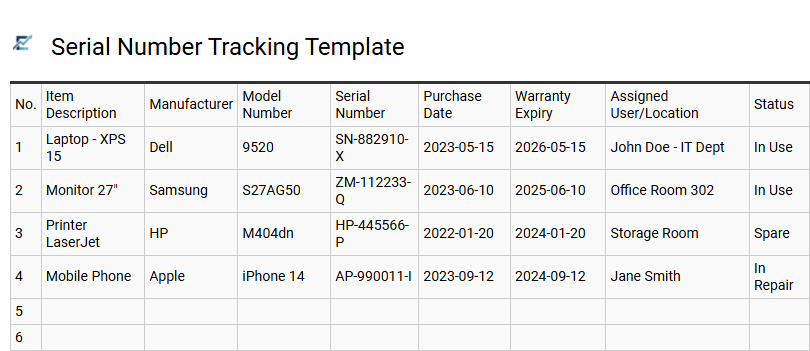
Serial Number Tracking Template
An Excel serial number tracking template is an essential tool for businesses and individuals needing to maintain a precise record of unique identifiers. It prevents duplication, ensures inventory accuracy, and simplifies warranty management. By using structured columns for product details, purchase dates, and assignment status, users can effectively monitor the entire lifecycle of their assets.
Using Excel allows for automated data validation and conditional formatting, which reduces human error and enhances data integrity. This centralized digital ledger provides quick retrieval of information for audits, insurance claims, or technical support queries. It offers a scalable and cost-effective alternative to complex asset management software while remaining user-friendly.
This kind of template is suitable for managing IT hardware inventories, tracking manufactured batches in a warehouse, or organizing software license keys.
Download: 💾 Serial Number Tracking Template .xls
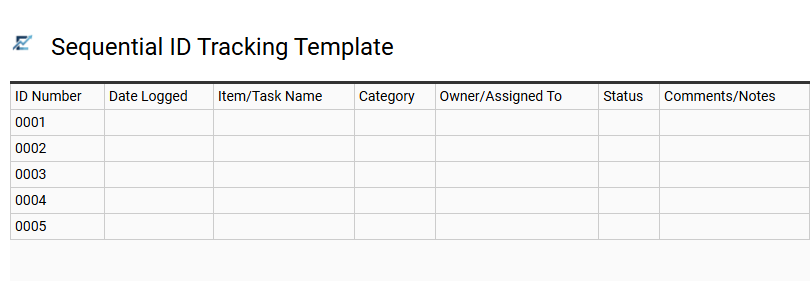
Sequential ID Tracking Template
A Sequential ID Tracking Template in Excel is a fundamental tool for maintaining organized and unique data records. It ensures every new entry receives a non-repeating identifier, which is critical for preventing data duplication and streamlining lookup functions like XLOOKUP. By utilizing automated formulas or custom alphanumeric prefixes, users can maintain chronological order and ensure data integrity across large spreadsheets.
This systematic approach simplifies auditing, improves searchability, and provides a clear reference point for every record within a database. Implementing a dedicated numbering system provides the foundation for scalable information architecture and professional document control.
This template is suitable for managing invoice logs, tracking project tasks, and organizing employee equipment records.
Download: 💾 Sequential ID Tracking Template .xls
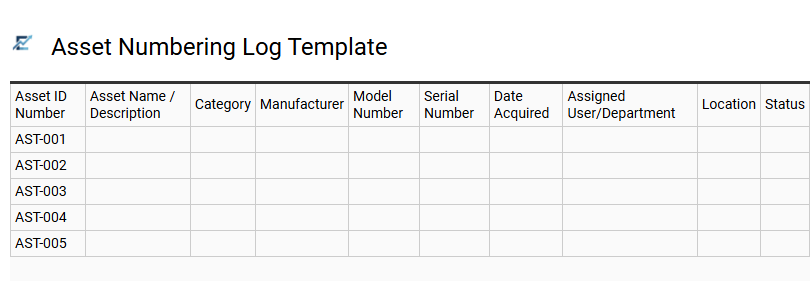
Asset Numbering Log Template
An Asset Numbering Log Template is a systematic tool designed to organize and track organizational property through unique identifiers. By assigning specific codes to equipment, tools, and digital resources, businesses ensure data integrity and eliminate duplication errors. This Excel-based tracking system centralizes vital information, such as asset categories, acquisition dates, and physical locations, providing a clear audit trail.
Implementing a standardized numbering log streamlines inventory management, facilitates routine maintenance scheduling, and enhances operational transparency. With a structured spreadsheet layout, users can efficiently filter, sort, and manage extensive inventories, which is critical for accurate financial reporting and lifecycle management.
This template is ideal for tracking IT hardware in a corporate office, managing industrial machinery on a factory floor, or cataloging laboratory equipment in a research facility.
Download: 💾 Asset Numbering Log Template .xls
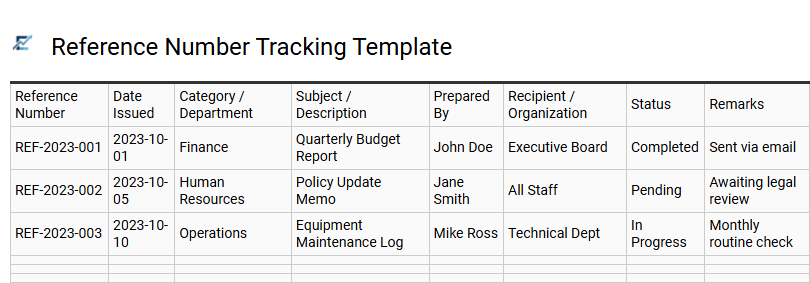
Reference Number Tracking Template
A Reference Number Tracking Template is a specialized Excel tool designed to manage and monitor unique identifiers across various business processes. By utilizing a centralized spreadsheet, organizations can ensure sequential numbering, prevent duplicate entries, and maintain a high level of data integrity. This template typically includes columns for the reference ID, date of issue, category, description, and the person responsible for the entry.
Implementing a structured tracking system streamlines administrative workflows, simplifies document retrieval, and provides a reliable audit trail. Using Excel's automated features, such as data validation and conditional formatting, helps minimize manual entry errors and ensures that every project, invoice, or asset is uniquely accounted for.
This template is suitable for: managing invoice sequences, tracking internal project codes, and assigning unique inventory asset tags.
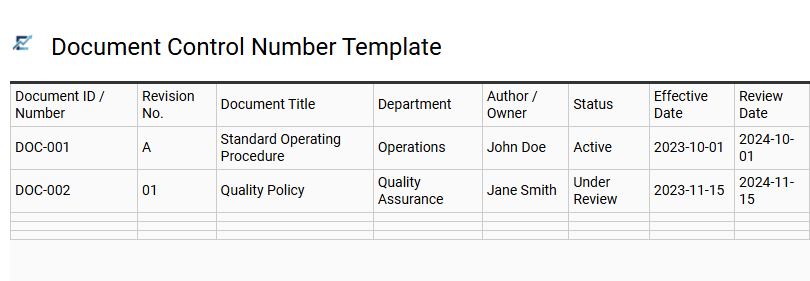
Document Control Number Template
A Document Control Number (DCN) template in Excel is an essential framework for maintaining organizational integrity and data traceability. By assigning a unique, sequential, or coded identifier to every record, businesses can eliminate version confusion and prevent the use of obsolete information. This centralized log typically tracks document titles, revision histories, authors, and approval statuses, ensuring a comprehensive audit trail.
Utilizing an automated numbering system within Excel reduces manual entry errors and simplifies document retrieval during project reviews. It serves as a reliable single source of truth for managing technical specifications, quality standards, and formal agreements across various departments.
This template is ideal for managing engineering blueprints, ISO compliance documentation, and multi-departmental legal contracts.
Download: 💾 Document Control Number Template .xls
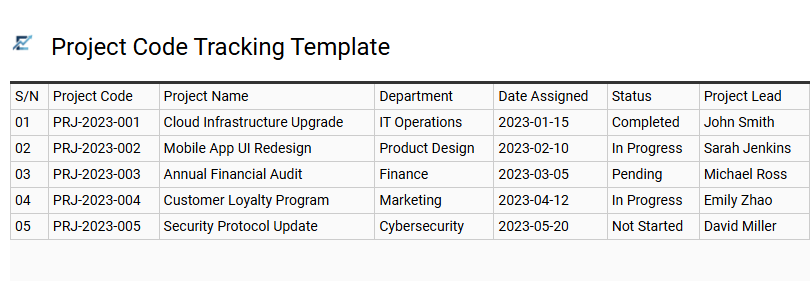
Project Code Tracking Template
A Project Code Tracking Template is a specialized Excel tool designed to centralize and standardize the assignment of unique identifiers across various business initiatives. By maintaining a sequential log, organizations can prevent duplicate IDs, ensure data integrity, and streamline cross-departmental communication. This template typically captures essential metadata, including prefix codes, project categories, and creation dates, facilitating rapid search and retrieval within large databases. Utilizing a structured numbering system simplifies audit trails, improves financial reporting, and enhances resource allocation by linking every task to a specific, traceable reference point.
This kind of template is highly suitable for engineering document control, software development versioning, and large-scale construction site management.
Download: 💾 Project Code Tracking Template .xls
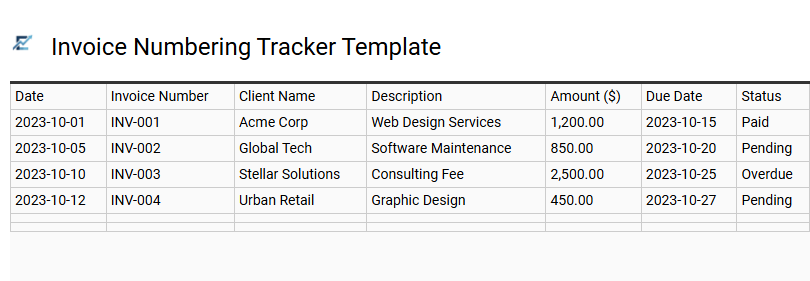
Invoice Numbering Tracker Template
An efficient Invoice Numbering Tracker Template is a vital tool for maintaining organized financial records. By systematically documenting unique identifiers, businesses can prevent duplicate billing, ensure chronological accuracy, and simplify the audit trail for tax compliance.
Utilizing an Excel-based tracker allows users to manage prefixes, suffixes, and sequential digits automatically. This centralized dashboard typically includes essential fields such as:
- Unique Invoice ID and Issue Date
- Client Information and Project Descriptions
- Payment Status and Due Date Tracking
By standardizing the numbering process, you minimize administrative errors and present a professional image to clients. This template is highly suitable for freelance consultants, small e-commerce startups, and independent trade contractors.
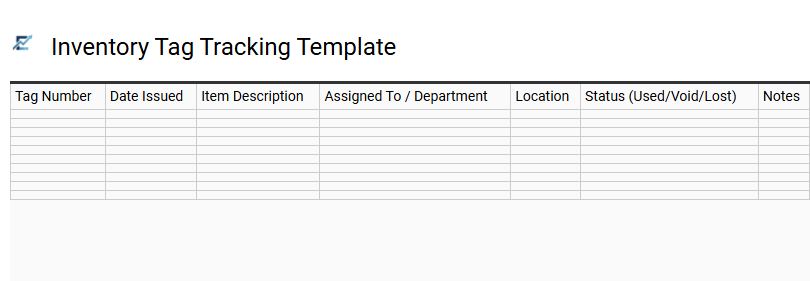
Inventory Tag Tracking Template
An Inventory Tag Tracking Template is an essential tool for maintaining serial continuity and asset accountability. This Excel-based solution allows businesses to record unique identification numbers, item descriptions, and assigned locations in a centralized digital ledger. By systematically logging every tag, organizations can prevent duplicate numbering, identify missing equipment, and streamline the auditing process.
The template utilizes structured data fields to monitor the status and movement of physical assets, ensuring a reliable audit trail. Using Excel's filtering and sorting capabilities, managers can quickly verify inventory levels and update records in real-time, which significantly reduces manual entry errors and improves operational efficiency.
This template is suitable for managing warehouse machinery, tracking corporate IT hardware, and organizing high-value retail inventory batches.
Download: 💾 Inventory Tag Tracking Template .xls
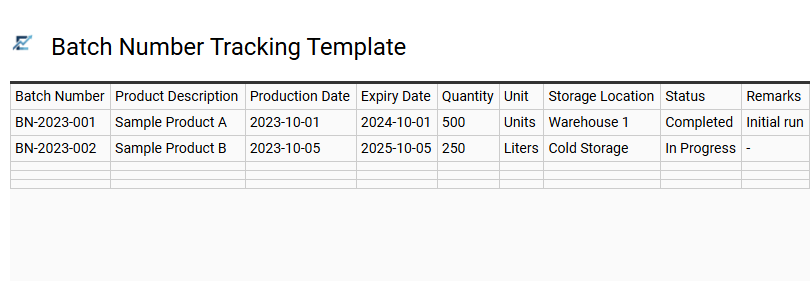
Batch Number Tracking Template
A Batch Number Tracking Template is an essential Excel tool designed for systematic quality control and organizational traceability. It enables businesses to assign unique identifiers to specific groups of products manufactured under identical conditions, ensuring every unit can be traced back to its exact production source.
By utilizing this digital log, companies can efficiently monitor production dates, expiry timelines, and raw material origins, which simplifies regulatory compliance and audit processes. Implementing a structured numbering system reduces human error and enhances inventory transparency throughout the supply chain. This data-driven approach is vital for maintaining product integrity and responding rapidly to potential quality issues or safety recalls.
This kind of template is suitable for food processing plants, pharmaceutical distribution centers, and boutique cosmetic manufacturing.
Download: 💾 Batch Number Tracking Template .xls
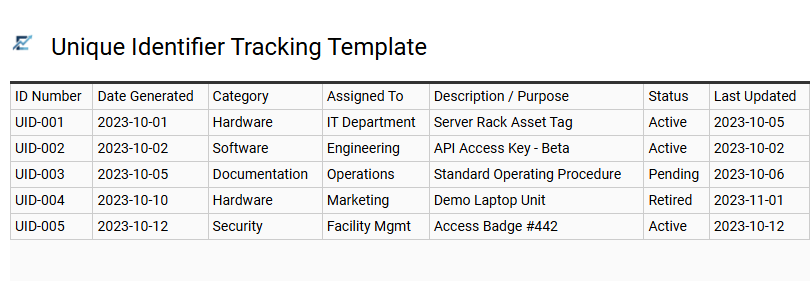
Unique Identifier Tracking Template
An Excel Unique Identifier Tracking Template is a fundamental tool designed to maintain data integrity across complex spreadsheets. By assigning a distinct serial number or alphanumeric code to every entry, users can effectively eliminate duplicate records and significantly enhance searchability.
The template typically features structured columns for IDs, timestamps, descriptions, and statuses. Leveraging Excel's automated fill handles or custom formulas ensures that each new row receives a sequential or categorized identifier automatically. This systematic approach creates a reliable audit trail, making it easier to reference specific data points within large datasets or shared workbooks.
This template is particularly suitable for asset management, invoice logging, and project task tracking.
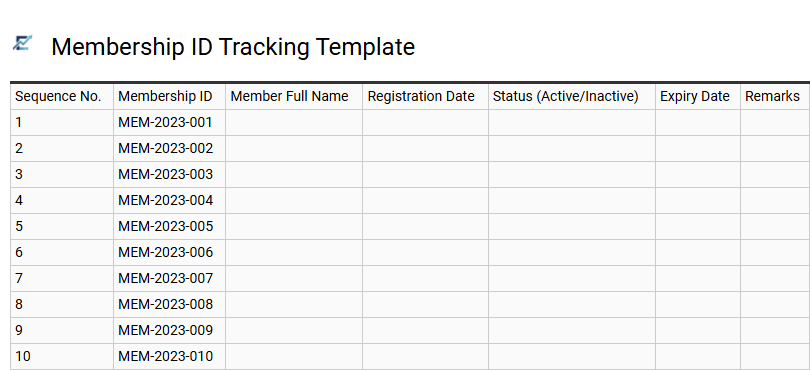
Membership ID Tracking Template
A Membership ID Tracking Template is a specialized Excel tool designed to organize, assign, and monitor unique identification numbers within an organization. This template ensures data integrity by preventing duplicate entries and providing a centralized ledger for member information, registration dates, and status updates.
By utilizing automated numbering sequences and structured data validation, administrators can streamline the enrollment process and simplify member verification. This approach enhances reporting accuracy and allows for seamless integration with other database management tasks. Whether you are tracking tiers, expiration dates, or contact details, a dedicated tracking sheet maintains a professional and audit-ready record of your entire community.
This template is ideally suited for managing local sports clubs, professional trade associations, and non-profit donor loyalty programs.
Download: 💾 Membership ID Tracking Template .xls
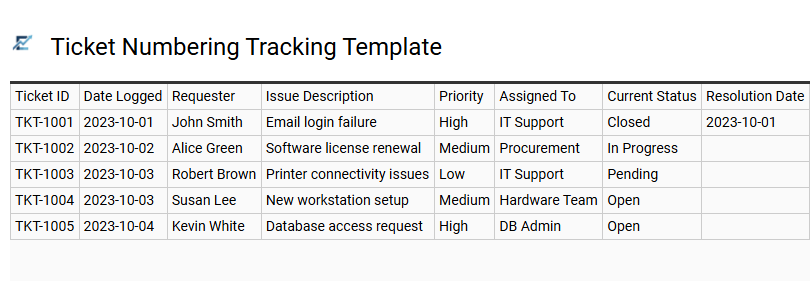
Ticket Numbering Tracking Template
A Ticket Numbering Tracking Template is a specialized Excel tool designed to manage and monitor unique sequential identifiers. This template ensures organizational consistency by preventing duplicate entries and maintaining a chronological record of all issued numbers. It typically features structured columns for tracking the date of issuance, the assigned owner, and the current progress status, providing a comprehensive audit trail for any departmental workflow.
By centralizing data within a spreadsheet, teams can leverage filtering and sorting functions to analyze trends and improve operational efficiency. Using an automated numbering system minimizes manual entry errors and enhances data integrity, making it easier to reference historical records quickly.
This template is highly suitable for managing IT support desk logs, tracking manufacturing serial numbers for inventory, and organizing unique invoice references for accounting.
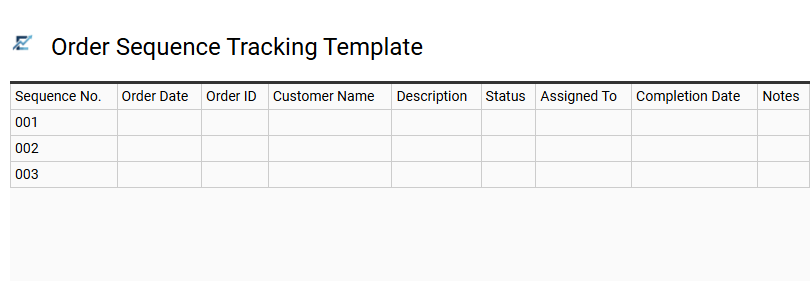
Order Sequence Tracking Template
An Order Sequence Tracking Template is a specialized Excel tool designed to maintain chronological records and eliminate numbering errors. By automating sequence generation, this template ensures data integrity and prevents duplicate entries within business workflows. It provides a reliable audit trail, allowing users to monitor document statuses and identify gaps in numerical records instantly.
Utilizing structured tables and data validation, this tool enhances administrative efficiency by providing a centralized location for all sequential data. This systematic approach streamlines document management and improves operational transparency across various departments, making it easy to search and filter specific transactions. This template is ideal for generating professional invoices, managing warehouse purchase orders, or organizing internal maintenance requests.
Download: 💾 Order Sequence Tracking Template .xls
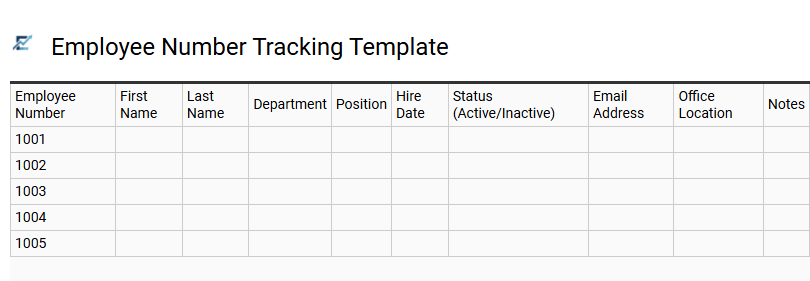
Employee Number Tracking Template
An Employee Number Tracking Template is a specialized Excel tool designed to streamline workforce management by assigning and monitoring unique identifiers for every staff member. By utilizing a structured numbering system, HR professionals can prevent data duplication and ensure each record remains distinct within a centralized database.
These templates typically include fields for employee names, departments, and hire dates, allowing for seamless auditing and reporting. Automating sequential numbering reduces administrative errors and simplifies integration with payroll or security systems. This organized approach is vital for maintaining data integrity and improving searchability as an organization scales.
This template is suitable for onboarding new hires in small businesses, managing temporary contractor IDs, and organizing departmental staff in large manufacturing facilities.
Download: 💾 Employee Number Tracking Template .xls
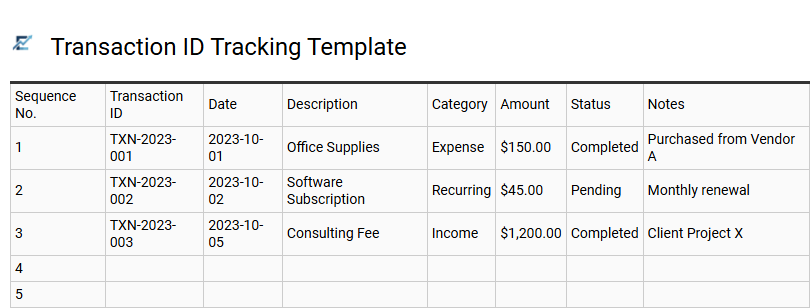
Transaction ID Tracking Template
A Transaction ID Tracking Template in Excel provides a centralized system for generating and managing unique identifiers for every business activity. By maintaining a sequential log, this tool prevents data duplication and ensures a clear audit trail for financial accountability. Users can easily categorize entries, monitor statuses, and filter through historical records to maintain data integrity.
This structured approach simplifies bank reconciliations and speeds up the process of locating specific entries during audits or tax season. Utilizing an Excel-based tracker eliminates manual numbering errors and provides a scalable solution for organizing core business data efficiently.
This template is suitable for managing e-commerce sales orders, tracking professional service invoices, and documenting internal petty cash disbursements.
Download: 💾 Transaction ID Tracking Template .xls
This comprehensive Excel-based sequential numbering log provides a robust solution for systematic document tracking and record management. By utilizing automated unique identifiers, users maintain an impeccable audit trail, ensuring data integrity and enhanced productivity. This versatile spreadsheet tool streamlines workflow organization, offering a reliable document control system for any professional environment. Implement this automated tracking solution to optimize data management processes and eliminate manual entry errors. Efficient record keeping starts with a powerful, customizable sequence generator tailored to your specific business needs.