
Comprehensive Labor Hour Tracking Excel Template for Workforce Management
Managing workforce productivity requires a reliable excel template for tracking labor hours. Such a digital timesheet streamlines payroll processing and monitors project costs with precision. By utilizing automated spreadsheets, businesses can accurately log employee shifts, calculate overtime pay, and analyze billable hours without manual errors. These tools provide essential insights into workforce efficiency and resource allocation. Whether you need a simple attendance log or complex workforce management tools, choosing the right format is vital.
Please check the already made variation of templates below.
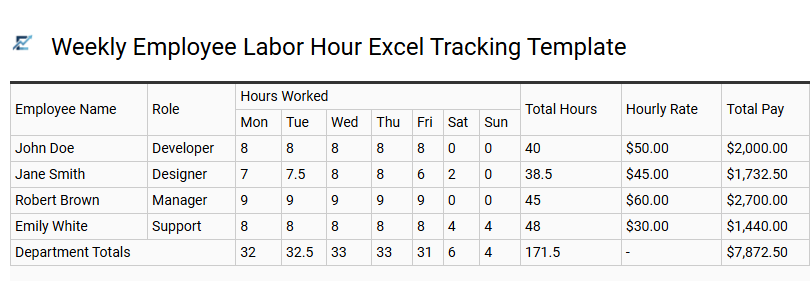
Weekly Employee Labor Hour Excel Tracking Template
An efficient Weekly Employee Labor Hour Excel Tracking Template is an essential tool for streamlining payroll management and workforce monitoring. By utilizing built-in formulas, businesses can automatically calculate regular hours, overtime, and total compensation based on daily clock-in and clock-out times.
This semantic approach to data entry reduces human error, ensures compliance with labor laws, and provides a clear audit trail for administrative records. The template's versatility allows for tracking specific tasks or shifts, offering managers real-time insights into labor costs and employee productivity without the need for complex software. Customizing these spreadsheets ensures that specific industry requirements, such as unpaid breaks or varying pay scales, are accurately reflected in the final reporting.
This template is ideal for managing seasonal retail staff, tracking billable hours for freelance consultants, and monitoring daily shifts for construction crews.
Download: 💾 Weekly Employee Labor Hour Excel Tracking Template .xls
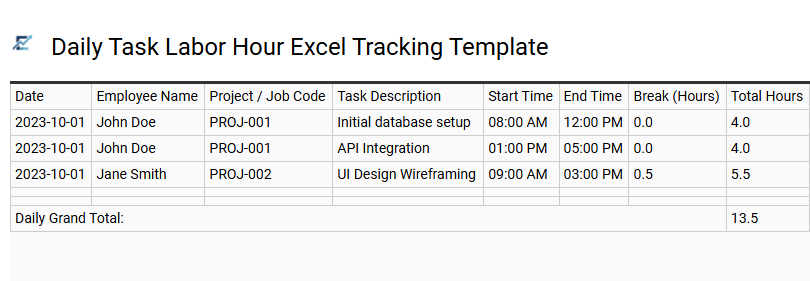
Daily Task Labor Hour Excel Tracking Template
A Daily Task Labor Hour Excel Tracking Template is an essential tool for businesses seeking to streamline workforce management. By recording time spent on specific activities, these templates enhance operational efficiency and provide granular data for payroll processing and project costing. They allow managers to monitor employee productivity, identify workflow bottlenecks, and ensure labor budget compliance through automated formulas.
Utilizing an Excel-based system reduces manual entry errors and simplifies the generation of periodic labor reports. This structured approach to timekeeping fosters accountability across teams while providing clear insights into resource allocation, helping stakeholders make data-driven decisions regarding staffing and project timelines. This template is ideal for construction site project management, freelance billing for multiple clients, and tracking internal software development sprints.
Download: 💾 Daily Task Labor Hour Excel Tracking Template .xls
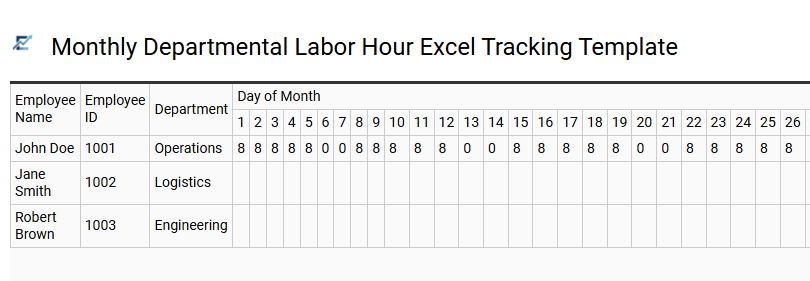
Monthly Departmental Labor Hour Excel Tracking Template
A Monthly Departmental Labor Hour Excel Tracking Template is a specialized tool designed to streamline workforce management and resource allocation. By centralizing daily time logs, managers can accurately monitor employee productivity, track overtime trends, and ensure departmental projects remain within budget.
These templates utilize automated formulas to aggregate total hours, reducing manual entry errors and simplifying monthly payroll preparation. Maintaining a structured spreadsheet enhances operational transparency and provides the data-driven insights necessary for optimizing staffing levels and auditing labor costs across various cost centers.
This template is highly effective for managing construction site crews, tracking nursing shifts in healthcare facilities, and monitoring billable hours for consultancy firms.
Download: 💾 Monthly Departmental Labor Hour Excel Tracking Template .xls
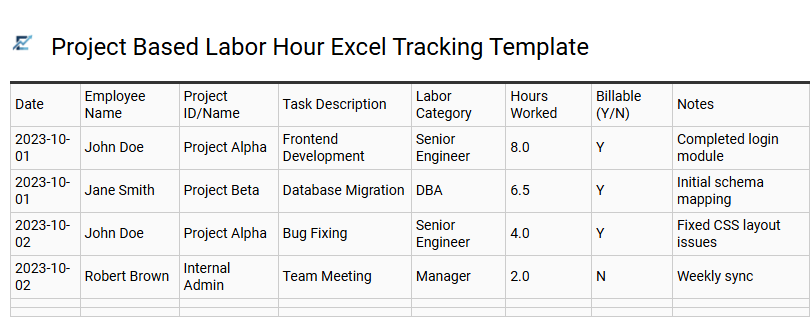
Project Based Labor Hour Excel Tracking Template
A project-based labor hour Excel tracking template is an essential tool for businesses seeking to monitor productivity and manage operational costs effectively. By meticulously recording time spent on specific tasks, teams can ensure accurate client billing and maintain strict adherence to budget constraints. This template simplifies data entry for employees while providing managers with automated summaries of total hours, billable time, and resource allocation.
Utilizing structured spreadsheets eliminates manual calculation errors and streamlines the transition from timesheet submission to payroll processing. It serves as a centralized hub for performance insights, helping stakeholders make informed decisions regarding project timeline adjustments and personnel requirements. This template is ideal for software development sprints, construction project management, and freelance client billing.
Download: 💾 Project Based Labor Hour Excel Tracking Template .xls
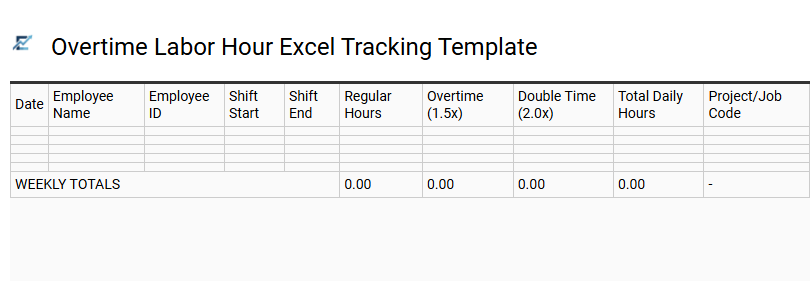
Overtime Labor Hour Excel Tracking Template
Maintaining accurate records of employee time is critical for payroll precision and budget management. An overtime labor hour Excel tracking template simplifies this process by providing a structured layout to log daily clock-in and clock-out times. By integrating automated formulas, these templates instantly calculate total hours worked, distinguish between regular and overtime periods, and apply relevant pay multipliers.
Using a standardized spreadsheet helps project managers monitor labor costs in real-time, ensuring compliance with labor laws while preventing budget overruns. This digital tool eliminates manual errors and offers a clear audit trail for workforce productivity. It is an ideal solution for businesses seeking a cost-effective way to streamline administrative workflows without complex software.
This template is suitable for construction site crew management, retail peak-season staffing, and specialized manufacturing shifts.
Download: 💾 Overtime Labor Hour Excel Tracking Template .xls
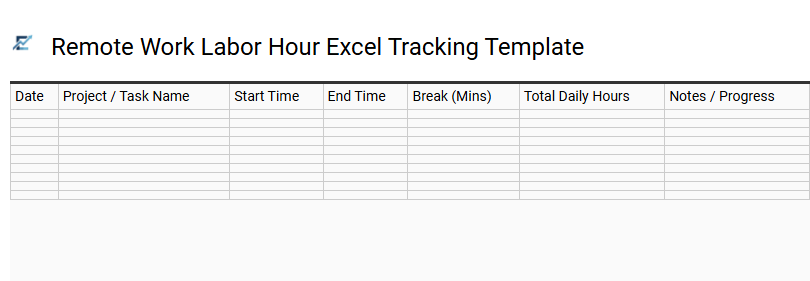
Remote Work Labor Hour Excel Tracking Template
An efficient Excel tracking template is vital for managing distributed teams. It provides a structured framework to log daily tasks, monitor billable hours, and ensure labor compliance across various time zones. By automating calculations, these templates eliminate manual errors, streamline payroll processing, and offer real-time insights into project budgets.
This tool enhances operational transparency, allowing managers to optimize resource allocation and maintain high productivity levels without the need for expensive software. It serves as a centralized hub for performance data, making it easier to generate comprehensive reports for stakeholders and maintain accurate historical records.
This template is ideal for independent freelancers billing multiple clients, digital agencies tracking project-based labor, and corporate departments monitoring hybrid employee attendance.
Download: 💾 Remote Work Labor Hour Excel Tracking Template .xls
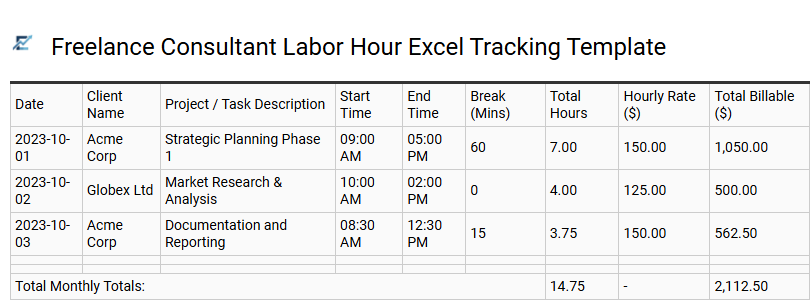
Freelance Consultant Labor Hour Excel Tracking Template
A professional Freelance Consultant Labor Hour Excel Tracking Template is an essential tool for independent contractors to maintain precise records of billable time. This structured spreadsheet allows consultants to log daily tasks, automate total duration calculations using built-in formulas, and ensure transparent client invoicing. By tracking start times, end times, and break intervals, you can generate accurate financial reports and monitor project progress against specific milestones.
Using an Excel-based system improves administrative efficiency and provides a reliable audit trail for tax compliance. This template is highly customizable, enabling users to categorize work by client, project type, or varying hourly rates to better analyze overall profitability.
This template is suitable for: software development sprints, legal advisory services, and monthly digital marketing audits.
Download: 💾 Freelance Consultant Labor Hour Excel Tracking Template .xls
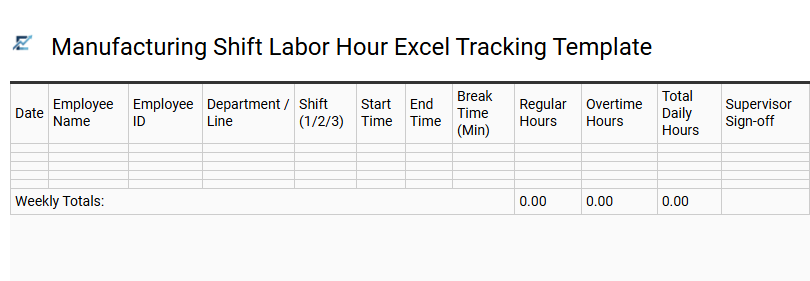
Manufacturing Shift Labor Hour Excel Tracking Template
Optimizing production efficiency requires precise data collection. A manufacturing shift labor hour excel tracking template provides a structured framework for monitoring workforce productivity and resource allocation across multiple shifts. By capturing clock-in times, break durations, and total output, managers can automatically calculate labor costs and identify operational bottlenecks. This tool streamlines administrative tasks, ensures compliance with labor laws, and provides real-time visibility into shop floor performance through automated formulas.
Implementing this digital log simplifies overtime analysis and improves budget forecasting for complex production environments. This kind of template is suitable for tracking assembly line rotations in automotive plants, managing 24/7 shifts in food processing facilities, and monitoring specialized technician hours in electronics manufacturing.
Download: 💾 Manufacturing Shift Labor Hour Excel Tracking Template .xls
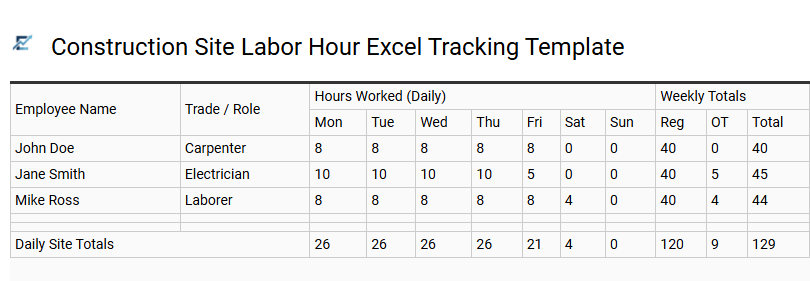
Construction Site Labor Hour Excel Tracking Template
Efficiently managing manpower is critical for project success and profitability. A specialized labor hour tracking template allows site managers to record daily attendance, specific tasks performed, and overtime hours in a centralized digital format. By automating calculations for total work hours and labor costs, these spreadsheets reduce manual entry errors and streamline the payroll process.
These tools are essential for maintaining accurate project timelines and ensuring that labor expenses align with the original budget. Utilizing an Excel-based system provides clear data visualization for stakeholders, making it easier to identify productivity trends and resource gaps across different work phases. Accurate documentation also simplifies compliance reporting and simplifies dispute resolution regarding hours worked.
This template is suitable for managing small residential renovations, tracking specialized subcontractor crews on commercial sites, and auditing labor distribution for large-scale infrastructure projects.
Download: 💾 Construction Site Labor Hour Excel Tracking Template .xls
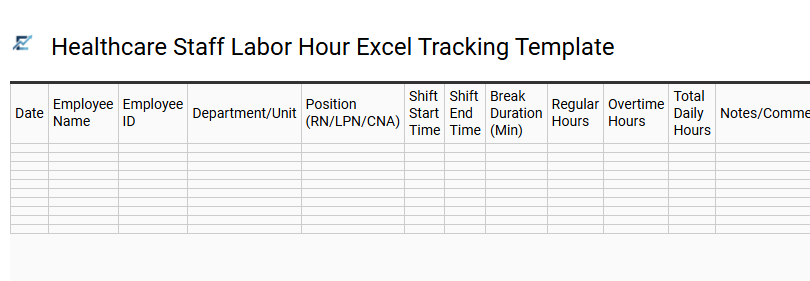
Healthcare Staff Labor Hour Excel Tracking Template
Efficiently managing medical personnel requires precision to ensure patient safety and operational compliance. This Excel-based labor hour tracking template is specifically designed for the healthcare sector, allowing administrators to accurately log shifts, monitor overtime, and categorize hours by department or medical specialty.
By centralizing timekeeping data, healthcare facilities can improve payroll accuracy and optimize staffing ratios in real-time. Automated formulas simplify complex calculations for rotating shifts, night differentials, and holiday pay, providing a clear overview of labor costs while helping managers prevent staff burnout. This structured approach ensures that resources are allocated effectively across 24/7 operations.
This template is ideal for managing nursing rotations in emergency departments, tracking billable hours in outpatient clinics, and monitoring caregiver schedules in residential care facilities.
Download: 💾 Healthcare Staff Labor Hour Excel Tracking Template .xls
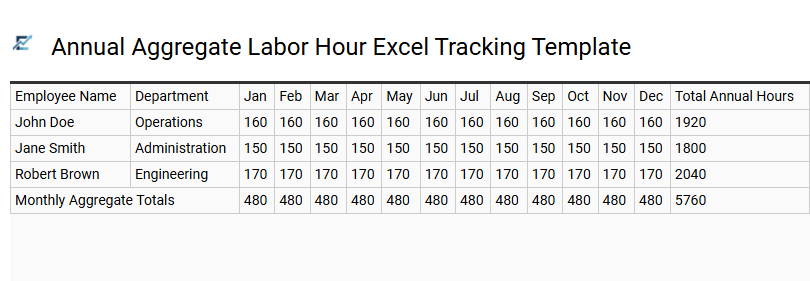
Annual Aggregate Labor Hour Excel Tracking Template
The Annual Aggregate Labor Hour Excel Tracking Template is a robust tool designed for comprehensive workforce oversight and financial transparency. By centralizing daily or weekly time entries, this spreadsheet provides a bird's-eye view of total labor distribution across the entire fiscal year. It enables managers to track cumulative hours, monitor overtime fluctuations, and compare actual labor output against projected budgets.
This systematic approach to data collection enhances payroll accuracy, simplifies year-end audits, and improves resource allocation by identifying productivity gaps within specific departments or projects. By leveraging automated formulas, the template transforms raw time-tracking data into strategic insights for long-term operational efficiency.
This template is particularly suitable for construction project management, non-profit volunteer tracking, and small business payroll auditing.
Download: 💾 Annual Aggregate Labor Hour Excel Tracking Template .xls
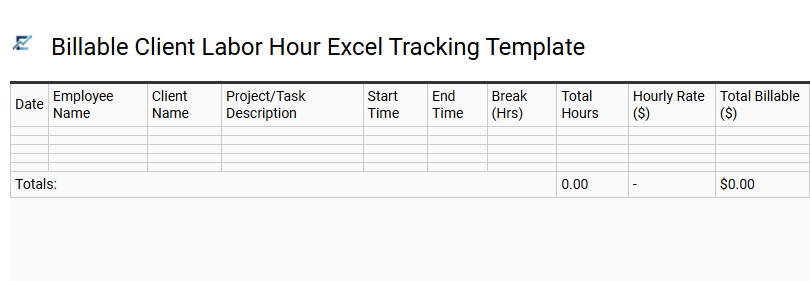
Billable Client Labor Hour Excel Tracking Template
A Billable Client Labor Hour Excel Tracking Template provides a structured framework for professionals to log time dedicated to specific client projects. This tool simplifies the invoicing process by capturing essential data points such as task descriptions, hourly rates, and total duration. By utilizing automated formulas, businesses can minimize manual entry errors and ensure accurate financial reporting.
Implementing this spreadsheet improves transparency between service providers and clients, offering a detailed breakdown of labor costs. It serves as a centralized hub for monitoring resource allocation and assessing project profitability in real-time.
This template is suitable for legal consultations, freelance graphic design projects, and independent IT consulting services.
Download: 💾 Billable Client Labor Hour Excel Tracking Template .xls
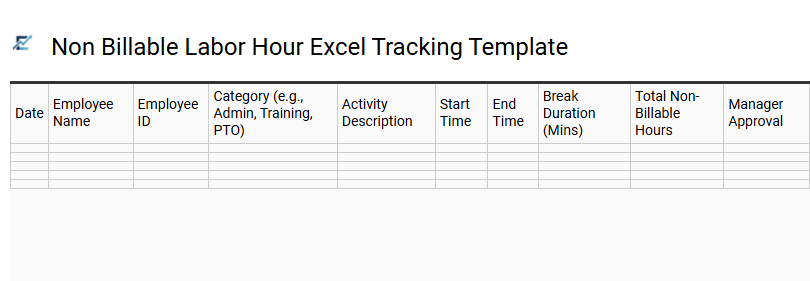
Non Billable Labor Hour Excel Tracking Template
A non-billable labor hour Excel tracking template is a vital resource for organizations to record time spent on internal tasks that are not directly invoiced to clients. Although these activities do not generate immediate revenue, monitoring them is essential for analyzing operational efficiency, managing overhead costs, and optimizing resource distribution.
By documenting categories such as administrative support, internal meetings, and professional training, businesses gain a comprehensive view of how employee time is utilized. This structured data allows managers to identify time-sink activities and improve overall workflow productivity. Using a spreadsheet format simplifies data entry and enables quick reporting for better financial forecasting and labor management.
This template is suitable for internal administrative audits, monitoring employee professional development, and tracking general office maintenance tasks.
Download: 💾 Non Billable Labor Hour Excel Tracking Template .xls
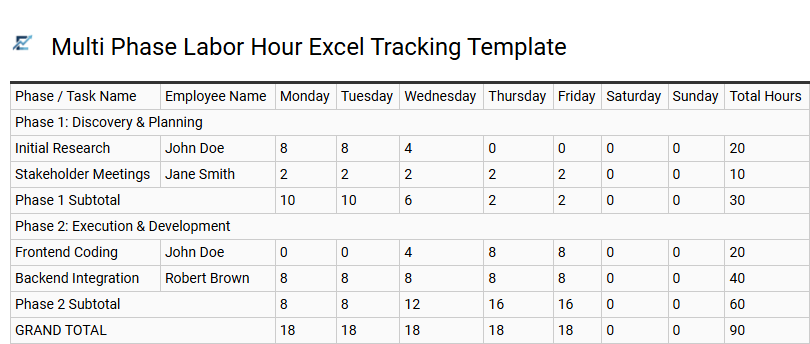
Multi Phase Labor Hour Excel Tracking Template
A multi-phase labor hour Excel tracking template is a robust tool designed for project managers to gain granular visibility into workforce allocation across complex workflows. Unlike standard timesheets, this template categorizes hours by specific project milestones or stages, enabling precise monitoring of budget vs. actual performance. By organizing data chronologically and by phase, businesses can identify operational bottlenecks, optimize resource distribution, and enhance the accuracy of future project estimations. Built-in formulas automate total calculations, ensuring streamlined reporting and efficient payroll processing for multi-layered initiatives.
This kind of template is suitable for construction project management, software development lifecycles, and multi-stage marketing campaign tracking.
Download: 💾 Multi Phase Labor Hour Excel Tracking Template .xls
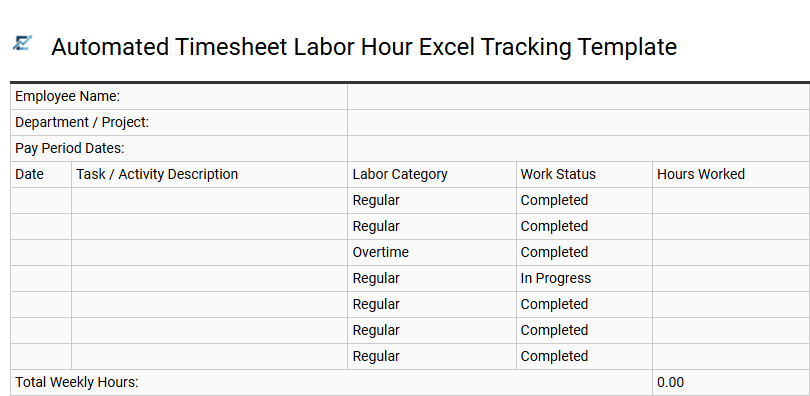
Automated Timesheet Labor Hour Excel Tracking Template
Streamline your workforce management with an automated labor hour tracking template. This professional Excel tool simplifies the recording of daily shifts, automatically calculating regular time, overtime, and total labor costs. By leveraging built-in formulas, the template eliminates manual entry errors and provides real-time visibility into project budgets and resource allocation.
Designed for efficiency, this spreadsheet offers a scalable way to maintain accurate payroll records and analyze team productivity through clear data summaries. It is an essential asset for businesses seeking to optimize time management and ensure precise documentation without the need for complex, expensive software.
This template is suitable for freelance project billing, construction site crew management, and small business monthly payroll processing.
Download: 💾 Automated Timesheet Labor Hour Excel Tracking Template .xls
Streamline operations using a labor hour tracking Excel template designed for precise workforce management. This tool simplifies payroll processing and enhances employee productivity by centralizing attendance and overtime monitoring. By leveraging data-driven insights, managers optimize resource allocation and control labor costs effectively.
Implementing a structured timesheet management system ensures reporting accuracy and operational transparency. Utilizing this comprehensive spreadsheet transforms scheduling efficiency, providing a reliable framework for sustainable organizational growth and refined labor tracking across all departments.