
Professional Knitting Project Management and Yarn Inventory Spreadsheet
Streamlining your creative workflow becomes effortless with a dedicated Excel template for tracking knitting. This digital spreadsheet enables crafters to organize their yarn stash, monitor needle sizes, and document gauge measurements within a single project log. By utilizing data-driven tools for fiber inventory management, you can easily record pattern details and row counts to ensure consistent results. These organizers help enthusiasts maintain a structured overview of their craft progress and supply levels. We invite you to explore our curated selection of pre-designed template variations below.
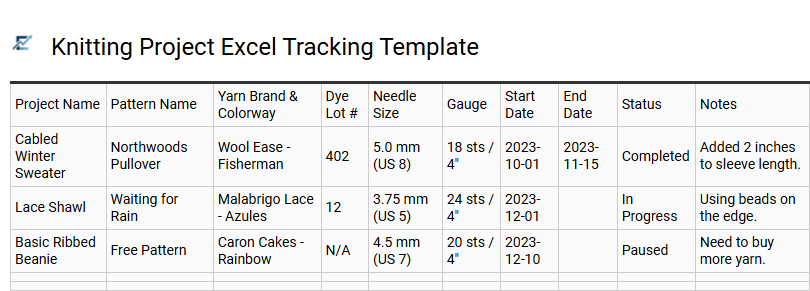
Knitting Project Excel Tracking Template
A Knitting Project Excel Tracking Template is a vital digital tool designed for crafters to organize their creative workflow efficiently. By utilizing a structured spreadsheet, you can meticulously log essential project details such as yarn brands, dye lots, needle sizes, and specific pattern sources. This organized approach eliminates the common frustration of losing track of row counts or forgetting which materials were used for a specific garment.
These templates often feature automated progress percentages, status updates, and comprehensive inventory management for your yarn stash. Centralizing your data in Excel ensures all technical specifications are easily searchable, making it simpler to replicate successful designs or resume unfinished projects (UFOs) with confidence.
This template is ideal for managing professional commission orders, cataloging a large personal yarn collection, or tracking complex multi-part garment patterns.
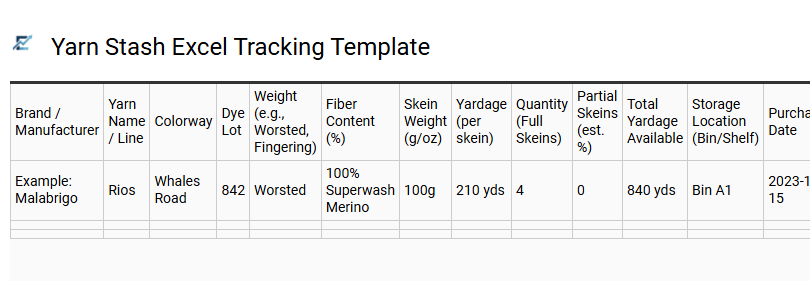
Yarn Stash Excel Tracking Template
A Yarn Stash Excel Tracking Template is an essential digital tool for fiber artists to organize their material inventory efficiently. By logging specific details such as brand name, fiber content, yarn weight, total yardage, and dye lots, you can manage your supplies without digging through physical storage bins. This spreadsheet prevents accidental duplicate purchases and ensures you always have the correct materials for your next project.
Using a structured database allows for easy filtering by color or material, helping you budget effectively and plan your knitting queue with precision. Maintaining a professional record improves both your creative workflow and organizational habits, keeping your craft space clutter-free.
This template is suitable for cataloging large heirloom collections, managing inventory for a small-scale knitwear business, or planning yarn requirements for complex multi-color patterns.
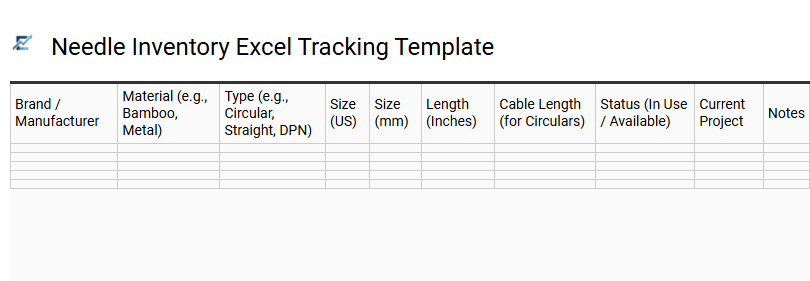
Needle Inventory Excel Tracking Template
Managing a growing collection of knitting tools is essential for any organized crafter. A Needle Inventory Excel Tracking Template provides a centralized digital system to categorize your supplies by type, including circular, straight, and double-pointed needles. By recording specific attributes like metric sizes, US gauges, cable lengths, and materials, you eliminate the frustration of purchasing duplicates or discovering missing equipment mid-project.
This searchable spreadsheet enables quick filtering and sorting, making it easy to audit your toolkit before starting a new pattern. Using a digital log ensures your data is portable, accessible on mobile devices, and easy to update as your collection expands.
This template is suitable for professional designers managing extensive toolkits, hobbyists organizing diverse needle collections, and knitting instructors tracking equipment for student workshops.
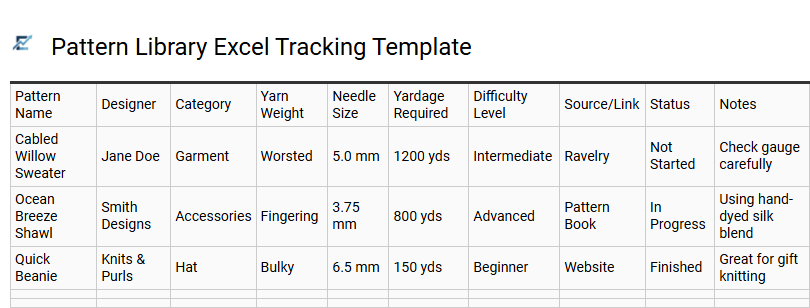
Pattern Library Excel Tracking Template
A Pattern Library Excel Tracking Template serves as a centralized digital database for organizing your knitting project instructions. By cataloging digital PDF downloads, magazine clippings, and book references in one spreadsheet, knitters can efficiently filter designs by yarn weight, needle size, or designer name. This structured approach prevents duplicate purchases and helps you quickly match projects to your existing yarn stash. Incorporating data points like difficulty level, required yardage, and construction type transforms a scattered collection into a searchable resource for any fiber artist.
This template is suitable for cataloging heirloom lace patterns, organizing a growing collection of indie designer PDFs, or managing a high-volume charity knitting schedule.
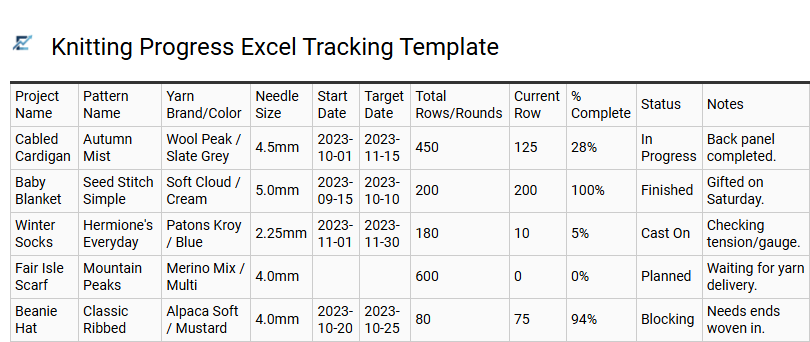
Knitting Progress Excel Tracking Template
A knitting progress Excel tracking template is a specialized digital tool designed to streamline project management for both hobbyists and professionals. This spreadsheet allows users to meticulously record essential data, including pattern sources, yarn dye lots, needle sizes, and real-time row counts.
By leveraging Excel's organizational power, knitters can track completion percentages, monitor project timelines, and maintain a searchable database of their yarn stash. This systematic approach reduces errors in complex patterns and ensures you always have the necessary supplies on hand. Using a digital template transforms handwritten notes into a structured, visual dashboard of your creative output and material inventory.
This template is suitable for managing multi-year heirloom blanket projects, tracking professional knitting commissions for clients, and organizing yarn requirements for intricate colorwork or Fair Isle garments.
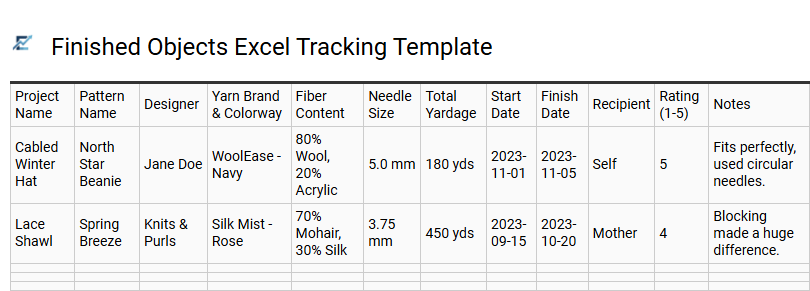
Finished Objects Excel Tracking Template
A Finished Objects (FO) Excel tracking template is a powerful organizational tool for knitters to systematically archive their completed projects. By documenting your crafting history, you create a searchable database of your technical skills, material preferences, and productivity. This digital log typically captures essential data points such as pattern names, yarn fiber content, dye lots, needle sizes, and total project duration.
Utilizing a spreadsheet allows for advanced data filtering and automatic calculations of total yardage used over time. It transforms a hobby into an organized creative portfolio, providing a reliable reference for repeating successful projects or making future modifications. This template is an invaluable resource for anyone looking to turn their knitting progress into actionable insights.
This kind of template is suitable for maintaining a detailed holiday gift log, building a professional knitwear design portfolio, or auditing annual yarn consumption versus stash growth.
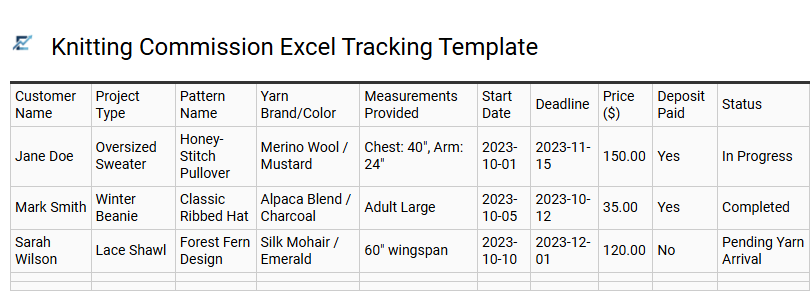
Knitting Commission Excel Tracking Template
A Knitting Commission Excel Tracking Template is an essential tool for professional fiber artists and hobbyists managing custom orders. This digital system allows you to organize client specifications, yarn inventory, and production timelines in one accessible spreadsheet. By documenting key data points like garment measurements, material costs, and labor hours, you can ensure accurate pricing and maintain high levels of customer satisfaction.
Using a structured template reduces the administrative burden of running a handmade business, allowing you more time to focus on your craft while meeting strict delivery deadlines. This organized approach helps in tracking deposits, shipping statuses, and project milestones effectively.
This template is ideal for professional knitters managing a high volume of custom winter garment orders, indie designers tracking progress and feedback for pattern test-knits, and small business owners organizing personalized gift commissions for online storefronts.
Download: 💾 Knitting Commission Excel Tracking Template .xls
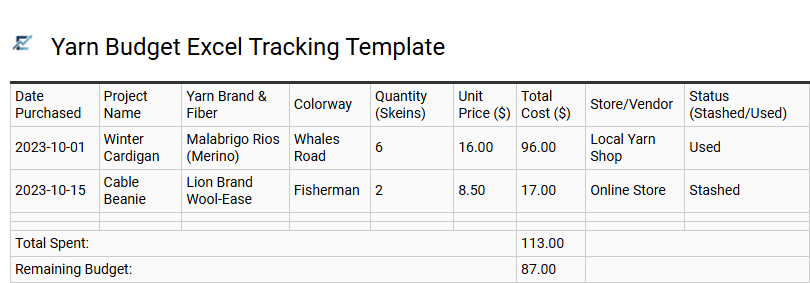
Yarn Budget Excel Tracking Template
A dedicated yarn budget Excel tracking template is an essential tool for fiber artists seeking to manage hobby expenses efficiently. By logging individual purchases, tracking price per yard, and categorizing fiber types, knitters can maintain a clear overview of their financial investment. This digital ledger prevents over-buying by providing a real-time inventory of your current stash alongside remaining budget allocations.
Automated formulas within the spreadsheet help calculate total project costs, monitor seasonal spending habits, and highlight savings from sales or bulk discounts. Integrating this data-driven approach ensures your creative output stays within financial boundaries while organizing your materials for future inspiration.
This template is perfectly suited for professional knitters tracking business overhead, hobbyists participating in a "low-buy" stash challenge, or crafters planning budget-heavy projects like large-scale heirloom blankets.
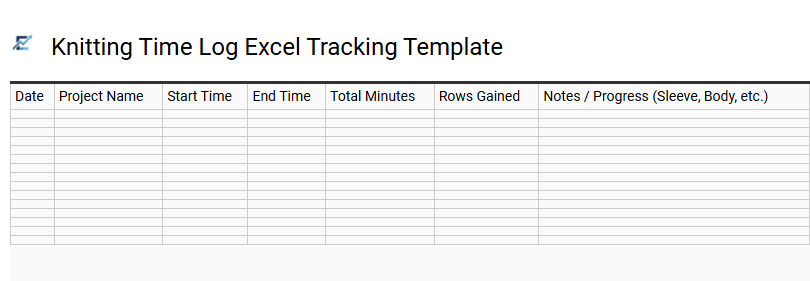
Knitting Time Log Excel Tracking Template
A knitting time log Excel template is a powerful tool designed for fiber artists to quantify their creative process. By systematically recording start times, end times, and total durations for each session, knitters can accurately calculate the labor hours required for any project. This spreadsheet approach provides valuable insights into knitting speed, helps manage complex project timelines, and ensures better productivity.
Beyond simple tracking, a digital log assists in organizing project details like yarn usage and needle sizes alongside time data. This structured documentation is essential for anyone looking to transition from a casual hobby to a more disciplined or professional practice. By analyzing these metrics, you can set realistic finishing dates and improve your overall project management skills.
This template is suitable for professional makers calculating wholesale pricing, designers testing the difficulty of new patterns, and gift-knitters managing strict holiday production schedules.
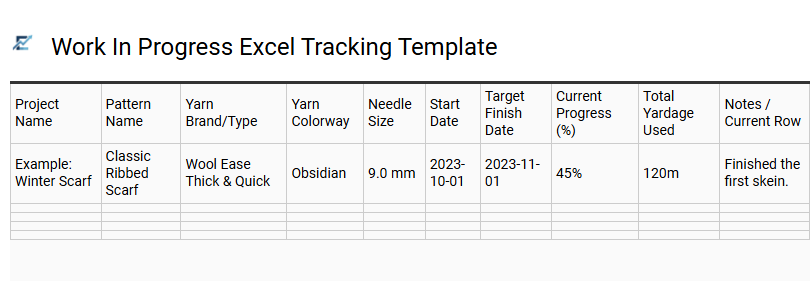
Work In Progress Excel Tracking Template
Managing multiple knitting projects simultaneously requires precise organization to avoid forgotten row counts or misplaced needle sizes. A Work In Progress (WIP) Excel tracking template provides a centralized digital system to document pattern details, yarn dye lots, and current status. By utilizing a spreadsheet, knitters can monitor deadlines, track completion percentages, and link projects directly to their inventory.
This structured approach ensures that "hibernating" projects are never truly lost, allowing for a seamless transition when picking up the needles after a break. The ability to filter by priority or tool requirements makes this an essential productivity tool for any fiber artist looking to streamline their creative workflow.
This template is suitable for professional designers managing simultaneous pattern tests, hobbyists tracking a large queue of holiday gifts, and fiber artists monitoring complex multi-year heirloom projects.
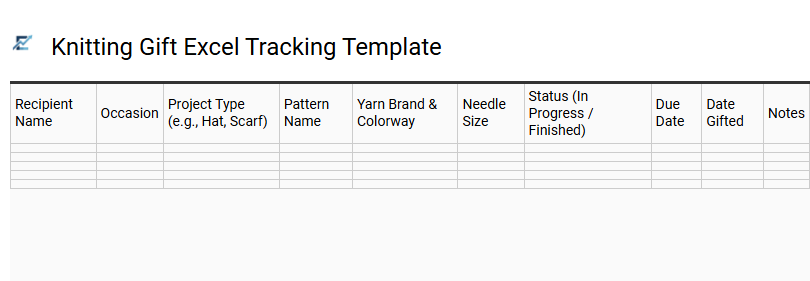
Knitting Gift Excel Tracking Template
Organizing handmade presents requires both creativity and careful planning. A Knitting Gift Excel Tracking Template serves as a comprehensive project management tool for crafters to monitor recipient measurements, yarn requirements, and completion deadlines. By centralizing your data, you can track progress percentages, needle sizes, and pattern sources in one accessible spreadsheet.
This digital log helps prevent the stress of unfinished projects by providing a clear visual overview of your gift-giving queue. It ensures you never lose track of a recipient's color preferences or specific yarn fiber requirements. Using a structured template allows for efficient budgeting and time management, making it easier to balance multiple knitting tasks simultaneously.
This kind of template is suitable for managing extensive holiday gift lists, organizing multiple handmade baby shower presents, or tracking progress for a community charity knitting drive.
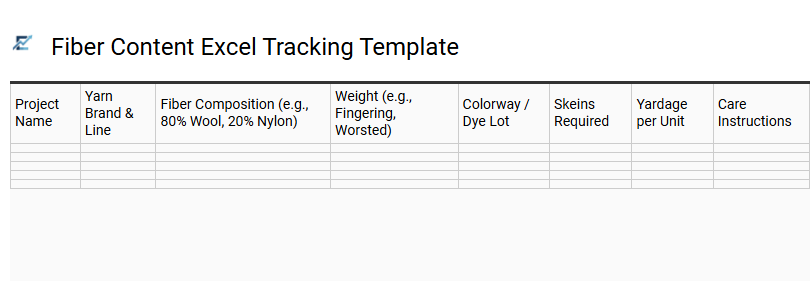
Fiber Content Excel Tracking Template
A Fiber Content Excel Tracking Template is an essential tool for organizing your yarn inventory by material composition. By systematically documenting percentages of wool, silk, cotton, and synthetics, knitters can make informed decisions about drape, warmth, and elasticity for future projects. This digital ledger allows you to filter your stash by specific textile properties, ensuring you always have the right fiber for your pattern's requirements.
Beyond simple organization, tracking fiber content helps manage care instructions and prevents accidental damage during laundering. This data-driven approach simplifies stash management, making it easy to identify available materials and avoid duplicate purchases.
This template is ideal for cataloging a large heirloom yarn collection, planning garments for individuals with specific fiber allergies, or calculating material costs for a professional knitwear business.
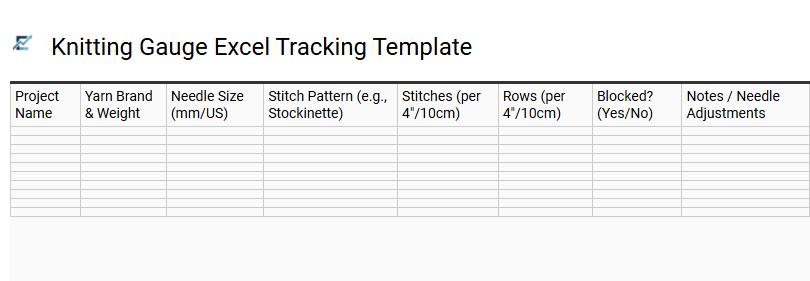
Knitting Gauge Excel Tracking Template
Maintaining a precise knitting gauge Excel tracking template is essential for any fiber artist aiming for professional results. This digital log allows you to systematically record stitches and rows per inch alongside critical variables such as yarn weight, fiber content, and needle size. By documenting your swatches in a searchable spreadsheet, you eliminate guesswork and ensure your finished garments achieve the intended dimensions.
Using Excel for gauge tracking provides analytical clarity, making it easy to compare how different needle materials-like bamboo versus stainless steel-affect your unique tension. This organized approach serves as a permanent reference library, saving time and yarn on future projects while improving overall craft consistency.
This kind of template is suitable for designing original sweater patterns, accurately substituting yarns in commercial instructions, or maintaining a historical record of tension variations across different projects.
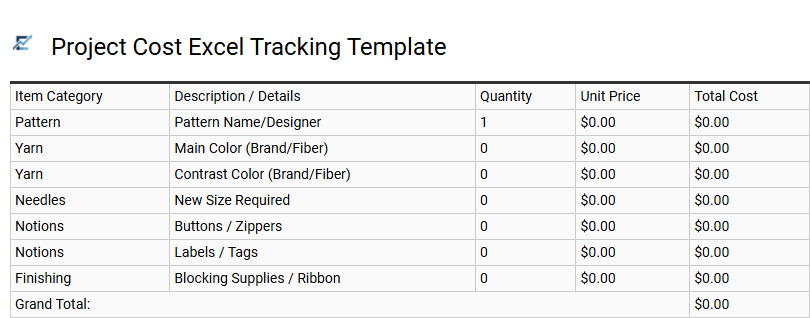
Project Cost Excel Tracking Template
Managing your knitting budget is seamless with a dedicated Project Cost Excel Tracking Template. This specialized tool allows crafters to log every expense, including premium yarns, pattern fees, and essential notions like buttons or specialized needles. By inputting unit prices and quantities used, you gain a transparent overview of your total financial investment per project.
For designers and professional makers, these templates are indispensable for calculating labor hours and determining profitable retail prices. Organizing your data in a spreadsheet ensures your fiber arts finances remain searchable and historical records stay intact. This template is ideal for tracking commissioned hand-knit sweaters, managing small-scale boutique inventory, or monitoring personal hobby budgets.
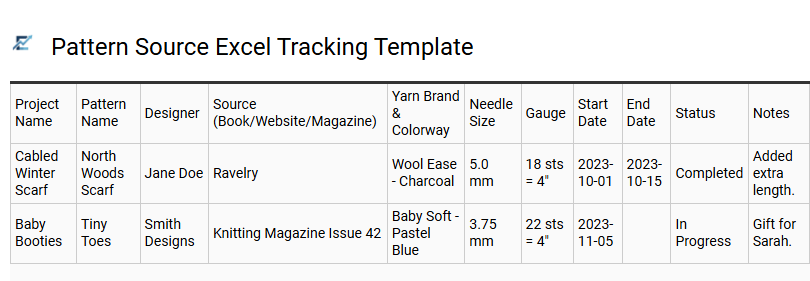
Pattern Source Excel Tracking Template
A pattern source Excel tracking template is a specialized tool designed for fiber artists to organize their digital and physical libraries efficiently. By cataloging pattern names, designers, and publication links in a structured spreadsheet, you can easily filter your collection by yarn weight, garment type, or difficulty level. This centralized database eliminates the frustration of searching through multiple websites or stacks of magazines, allowing you to spend more time knitting and less time searching for instructions.
This template is particularly suitable for managing extensive collections of vintage knitting magazines, organizing PDF downloads from various online designers, and planning a seasonal gift-making schedule based on specific yarn requirements.
This professional knitting project management and yarn inventory spreadsheet streamlines your crafting workflow. By organizing fiber weight, dye lots, and needle sizes in one digital hub, knitters gain total control over their stash. Efficiently track pattern progress and project statuses to prevent unfinished objects. This comprehensive tool transforms disorganized yarn collections into a searchable database, ensuring you always have the right materials for every cast-on. Master your fiber arts hobby with precision and elevate your creative productivity today.