
Mechanical Keyboard Inventory and Custom Build Tracker Spreadsheet
Managing hardware assets efficiently requires precise documentation. Using a dedicated spreadsheet ensures all peripheral data remains organized and accessible. Whether monitoring inventory levels, serial numbers, or hardware maintenance schedules, a robust asset log simplifies data entry and minimizes manual errors. This automated solution streamlines peripheral tracking, offering clear usage statistics for office equipment or gaming setups. By leveraging structured tables, you can easily oversee hardware lifecycles and assignment history across your organization.
Please review our professionally designed variations of these templates available below.
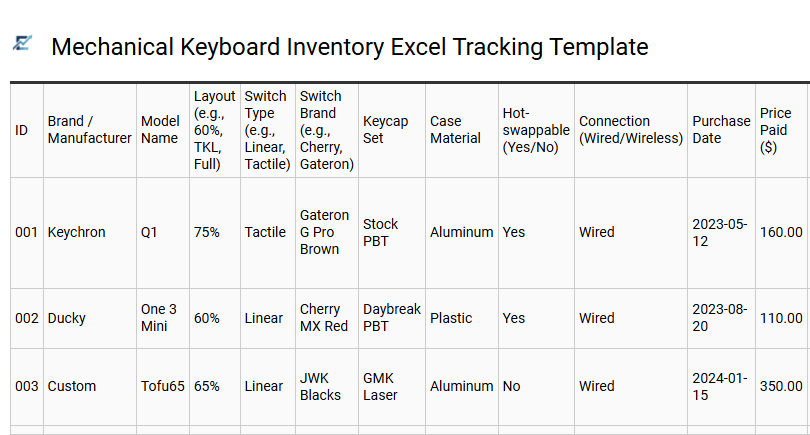
Mechanical Keyboard Inventory Excel Tracking Template
A mechanical keyboard inventory Excel tracking template is a specialized tool designed for enthusiasts to organize their hardware collections efficiently. This digital ledger allows you to document critical specifications including switch types, keycap profiles, PCB layouts, and case materials. By recording purchase dates, warranty info, and modification logs-such as stabilizer tuning or switch lubing-you can maintain a detailed history of every build. This structured approach helps in managing costs, planning future upgrades, and tracking the total market value of your collection.
This template is perfectly suited for custom builders managing components for client commissions, hobbyists organizing a vast rotation of artisan keycaps, and collectors tracking the resale value of limited-edition group buy units.
Download: 💾 Mechanical Keyboard Inventory Excel Tracking Template .xls
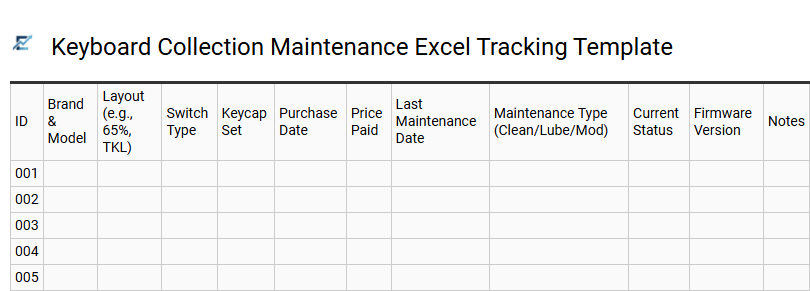
Keyboard Collection Maintenance Excel Tracking Template
A keyboard collection maintenance Excel tracking template is a specialized organizational tool designed for mechanical keyboard enthusiasts to manage their inventory and upkeep schedules. This spreadsheet allows users to log critical hardware specifications, such as switch types, keycap profiles, stabilizer mods, and PCB configurations. By documenting maintenance history-including the last time switches were lubed, gaskets replaced, or firmware flashed-collectors can ensure the longevity and peak performance of every peripheral.
Centralizing this data simplifies part compatibility checks, tracks total investment value, and ensures no custom build is neglected. This template is highly suitable for professional collectors managing high-value assets, enthusiasts tracking maintenance cycles for multiple custom builds, and resellers providing detailed service logs for secondary market listings.
Download: 💾 Keyboard Collection Maintenance Excel Tracking Template .xls
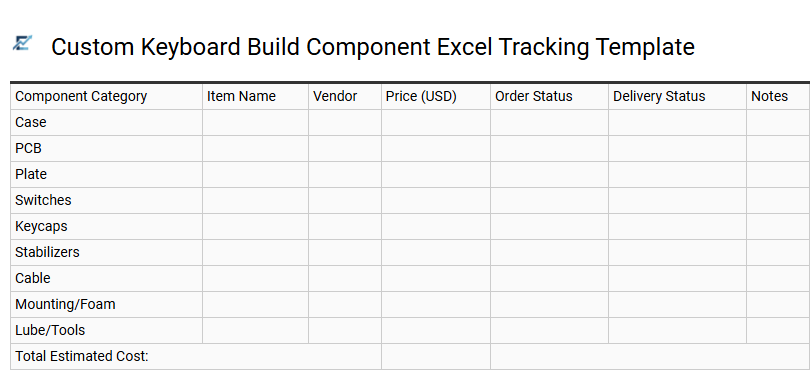
Custom Keyboard Build Component Excel Tracking Template
Organizing a custom mechanical keyboard project requires precise coordination of diverse parts, including PCBs, switches, stabilizers, and keycaps. An Excel tracking template provides a centralized dashboard to monitor individual component costs, vendor lead times, and technical compatibility specifications.
By utilizing structured columns for shipping status and group buy delivery estimates, enthusiasts can ensure every element arrives synchronized for build day. This systematic approach prevents budgetary overruns and accidental duplicate orders during multi-month procurement cycles. Use this spreadsheet to maintain a detailed inventory of specific details like plate mounting styles, switch lubing status, and firmware requirements.
This template is suitable for enthusiasts managing complex long-term group buys, professional builders tracking multiple client commissions, and collectors organizing a vast inventory of spare mechanical components.
Download: 💾 Custom Keyboard Build Component Excel Tracking Template .xls
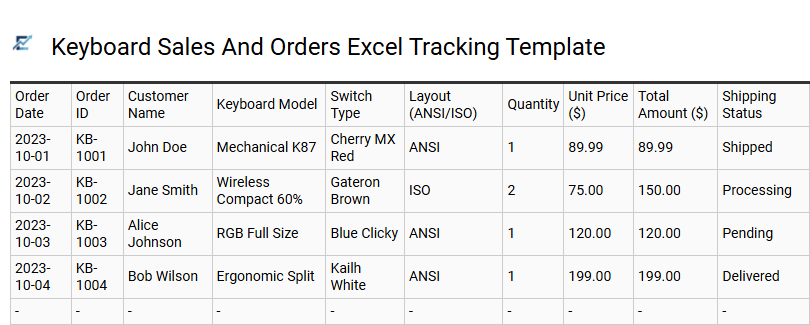
Keyboard Sales And Orders Excel Tracking Template
This tracking template provides a comprehensive solution for managing inventory and sales performance in the peripherals market. It allows users to log essential data including order dates, specific keyboard models-ranging from mechanical to wireless variants-quantities sold, and customer information.
Equipped with automated formulas, the spreadsheet calculates total revenue, tax, and profit margins, ensuring accurate financial reporting. By organizing stock levels and procurement needs in one central location, businesses can optimize their supply chain and avoid stockouts. This professional tool is essential for maintaining data integrity and visualizing growth trends through organized datasets.
This template is ideally suitable for custom keyboard artisans managing build commissions, small electronics retailers tracking daily storefront sales, and e-commerce resellers monitoring multi-brand inventory levels.
Download: 💾 Keyboard Sales And Orders Excel Tracking Template .xls
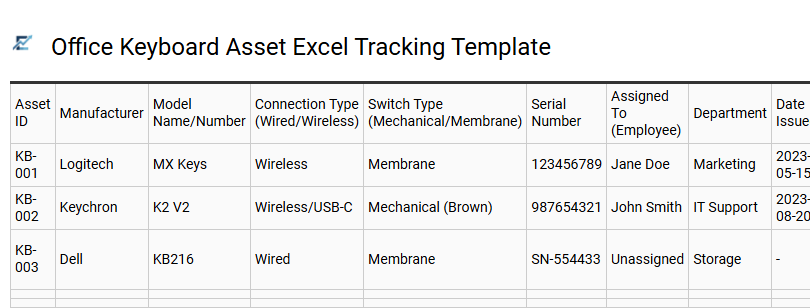
Office Keyboard Asset Excel Tracking Template
An Office Keyboard Asset Excel Tracking Template is an essential digital tool designed for the systematic management of peripheral inventory. This spreadsheet allows IT administrators and office managers to record critical data points, such as serial numbers, model types, purchase dates, and current user assignments. By centralizing this information, organizations can effectively prevent equipment loss, streamline maintenance schedules, and accurately forecast budgets for future hardware procurement.
Implementing a structured tracking system ensures accountability across departments and provides a clear audit trail for the lifecycle of every input device. This data-driven approach simplifies asset recovery during employee offboarding and helps maintain an optimal supply of spare peripherals.
This template is suitable for managing bulk hardware distribution during office relocations, monitoring warranty expiration dates for IT maintenance, and tracking ergonomic equipment assigned to remote employees.
Download: 💾 Office Keyboard Asset Excel Tracking Template .xls
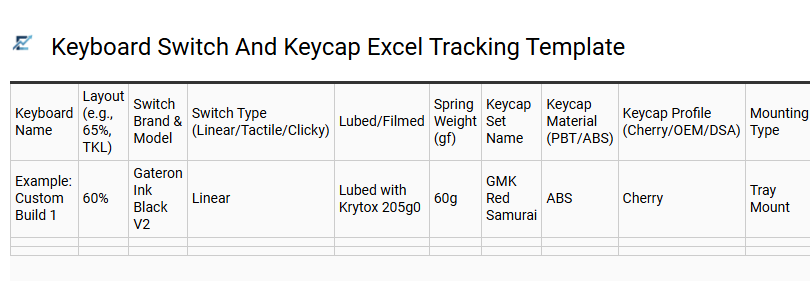
Keyboard Switch And Keycap Excel Tracking Template
A dedicated keyboard tracking template is an essential tool for enthusiasts managing growing inventories of mechanical components. This spreadsheet provides a structured environment to log critical switch data-such as brand, actuation force, and lubrication status-alongside keycap specifications like profile, material (PBT/ABS), and kit compatibility.
By centralizing your collection in Excel, you can easily monitor total investment costs, track component storage locations, and ensure compatibility for future builds. This digital logbook eliminates the guesswork for collectors, offering a clear overview of available assets and historical modifications in one accessible file.
This template is suitable for cataloging massive switch collections, tracking estimated delivery dates for group buys, and documenting specific hardware configurations for resale or display.
Download: 💾 Keyboard Switch And Keycap Excel Tracking Template .xls
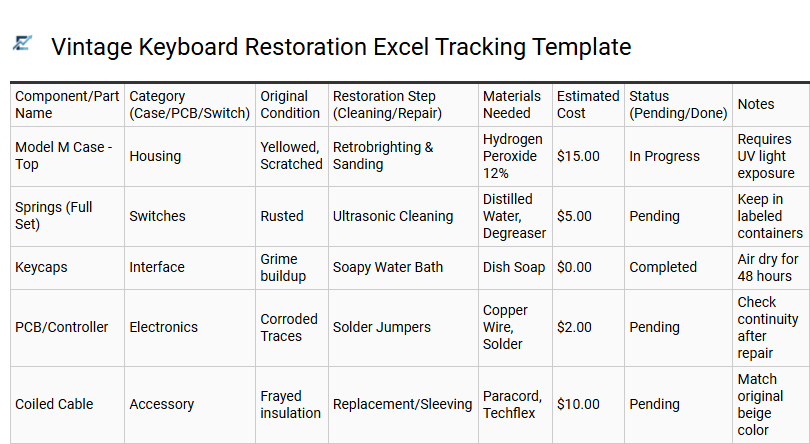
Vintage Keyboard Restoration Excel Tracking Template
A vintage keyboard restoration Excel template is an essential organizational tool for hobbyists reviving classic mechanical hardware. This structured spreadsheet allows you to meticulously document every phase of the refurbishment process, from initial component sourcing to final testing. By tracking specific variables such as switch types, ultrasonic cleaning cycles, and retrobrighting durations, you can ensure consistency and quality across your collection.
The template serves as a centralized database for managing project budgets, part replacement logs, and chronological progress updates. Utilizing a digital tracker prevents the loss of rare components and provides a valuable historical record of the work performed on each unit.
This template is ideal for cataloging IBM Model M bolt mods, tracking bulk switch lubing projects, or managing a multi-unit collection of legacy mechanical boards for resale.
Download: 💾 Vintage Keyboard Restoration Excel Tracking Template .xls
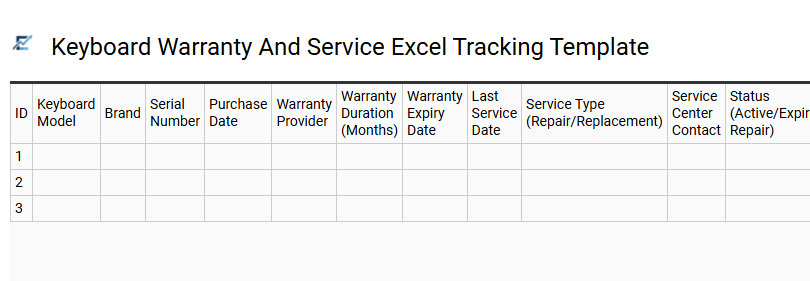
Keyboard Warranty And Service Excel Tracking Template
Managing a fleet of peripheral devices requires organized data to ensure longevity and cost-efficiency. This keyboard warranty and service Excel tracking template provides a centralized system for monitoring hardware lifecycles. By recording serial numbers, purchase dates, and warranty expiration periods, users can proactively manage repairs and avoid unnecessary replacement costs.
The template allows for detailed logging of service history and maintenance schedules, ensuring that every piece of hardware performs optimally. Using a structured spreadsheet simplifies asset management, making it easy to retrieve documentation for vendor claims or technical support. This professional approach to hardware tracking reduces downtime and streamlines IT inventory audits.
This template is ideal for corporate IT departments managing office equipment, owners of high-traffic esports gaming centers, and organizations tracking hardware assets distributed to remote employees.
Download: 💾 Keyboard Warranty And Service Excel Tracking Template .xls
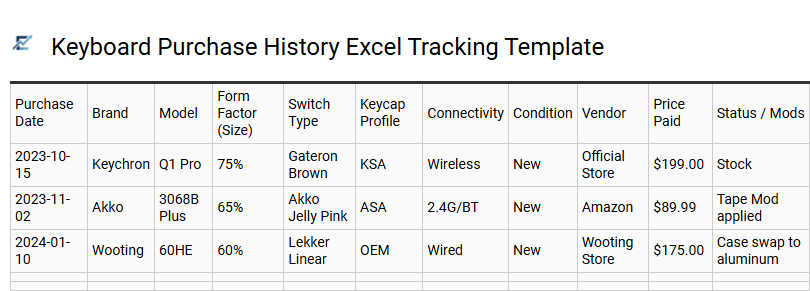
Keyboard Purchase History Excel Tracking Template
A Keyboard Purchase History Excel Tracking Template is a specialized digital log designed to manage hardware inventory for enthusiasts and IT departments. This tool allows users to document essential specifications such as switch types, keycap materials, purchase dates, and warranty status in one central location. By utilizing dedicated columns for cost tracking and vendor details, you can monitor your total investment and streamline maintenance schedules effectively.
Organizing your data in this structured format prevents duplicate purchases and ensures a comprehensive historical record of your collection's lifecycle. This template is ideal for custom mechanical keyboard hobbyists, corporate IT asset management, and professional hardware reviewers.
Download: 💾 Keyboard Purchase History Excel Tracking Template .xls
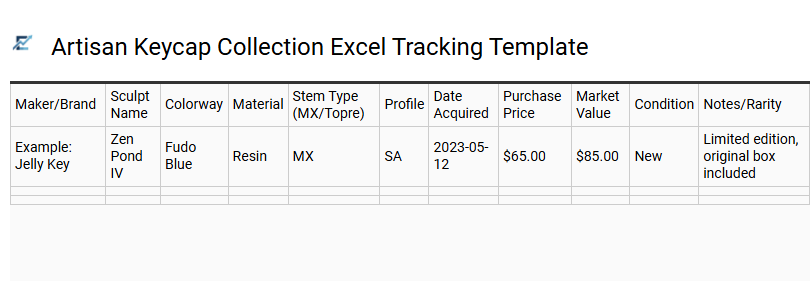
Artisan Keycap Collection Excel Tracking Template
Managing a growing mechanical keyboard hobby requires organization and precision. This Artisan Keycap Collection Excel Tracking Template provides a structured database for enthusiasts to catalog their unique handcrafted pieces. Key data points typically include the sculptor, colorway, casting material, and purchase price.
By organizing your inventory, you can monitor the total market value of your collection, track international shipping statuses, and maintain detailed logs of rare caps. Whether you are a casual buyer or a dedicated collector, this spreadsheet acts as a comprehensive digital inventory to prevent duplicates and simplify the secondary market trading process.
This template is ideal for cataloging limited edition artisan drops, managing trade history between collectors, and documenting investment value for insurance purposes.
Download: 💾 Artisan Keycap Collection Excel Tracking Template .xls
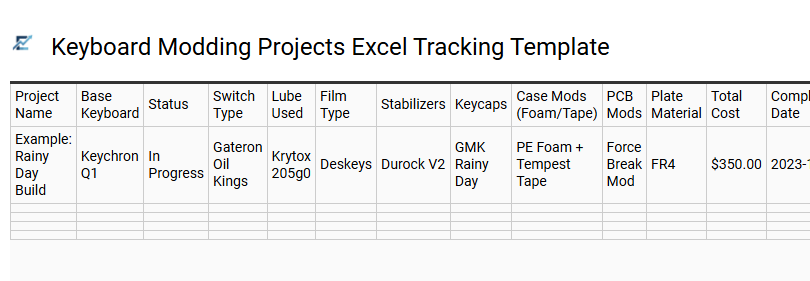
Keyboard Modding Projects Excel Tracking Template
A Keyboard Modding Projects Excel Tracking Template is an essential tool for mechanical keyboard enthusiasts to manage complex builds and component inventories. This structured spreadsheet allows you to monitor budget allocations, vendor shipping statuses, and technical specifications such as switch spring weights or stabilizer mounting types. By centralizing data for PCBs, plates, and keycap sets, you can ensure part compatibility and avoid redundant purchases during long-lead group buys.
Detailed tracking helps maintain a historical log of modifications like lubing techniques, filming, or foam additions, providing a roadmap for future fine-tuning. Whether you are a hobbyist or a professional builder, using a template ensures your project stays organized from the initial interest check to the final assembly.
This template is ideal for managing high-value group buy arrivals, cataloging extensive switch collections for frankenswitching, or documenting repair logs for a multi-keyboard workstation collection.
Download: 💾 Keyboard Modding Projects Excel Tracking Template .xls
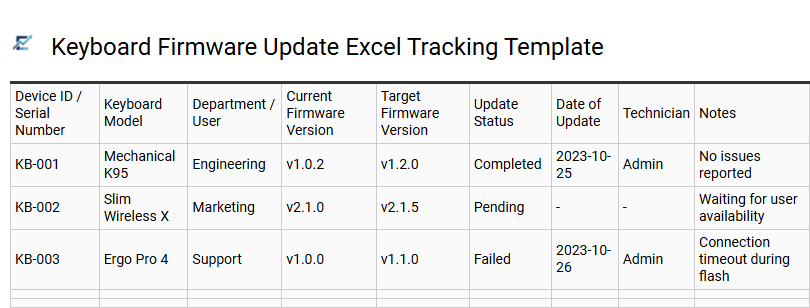
Keyboard Firmware Update Excel Tracking Template
Managing hardware efficiency requires precise documentation, especially when maintaining peripheral performance. A keyboard firmware update tracking template provides a structured framework to log version history, deployment dates, and device compatibility. By utilizing a centralized Excel spreadsheet, IT administrators and tech enthusiasts can monitor patch releases, resolve latency issues, and ensure security vulnerabilities are addressed across all units. This systematic approach reduces the risk of bricking devices during batch updates and ensures that every workstation remains optimized with the latest manufacturer features.
This template is ideal for corporate IT departments auditing hardware assets, gaming center operators maintaining low-latency peripherals, and mechanical keyboard hobbyists managing multiple custom builds.
Download: 💾 Keyboard Firmware Update Excel Tracking Template .xls
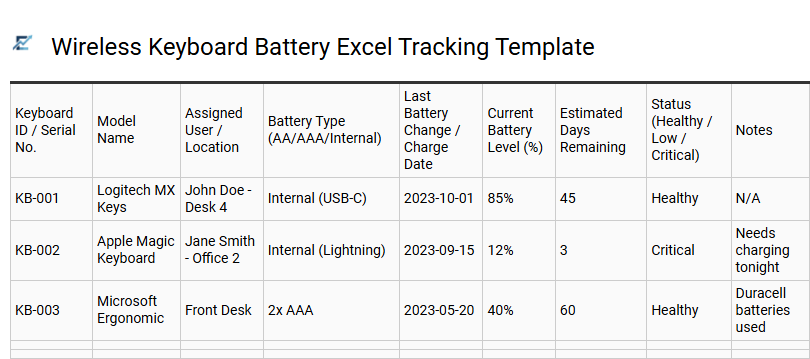
Wireless Keyboard Battery Excel Tracking Template
A Wireless Keyboard Battery Excel Tracking Template provides a structured approach to monitoring power levels and replacement cycles for peripheral devices. By logging data points such as battery types, installation dates, and last charge timestamps, users can effectively predict when maintenance is required.
This semantic-optimized spreadsheet helps identify high-drain devices and optimize hardware settings for better energy efficiency. Using conditional formatting within Excel allows for automated visual alerts, ensuring you are never caught with a dead keyboard during critical work sessions. This organized system is vital for maintaining uptime and prolonging hardware health across diverse digital environments.
This template is suitable for corporate IT asset management, professional gaming setups, and home office inventory tracking.
Download: 💾 Wireless Keyboard Battery Excel Tracking Template .xls
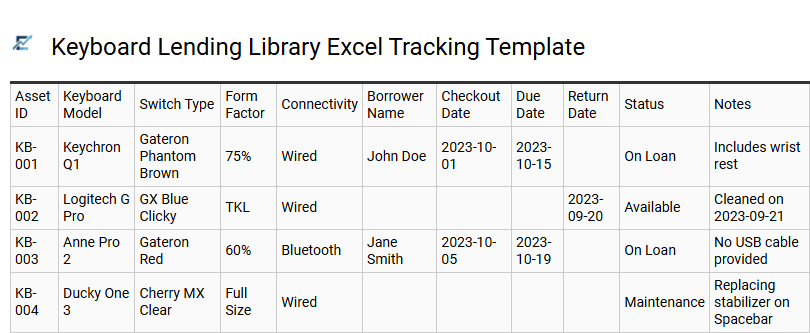
Keyboard Lending Library Excel Tracking Template
Streamline the management of your hardware collection with a dedicated Keyboard Lending Library Excel Tracking Template. This tool provides a centralized system to monitor inventory, track borrower details, and manage return deadlines efficiently. By utilizing structured data fields for serial numbers, switch types, and condition reports, you can ensure accountability for every asset in your library.
The template simplifies logistics by using automated status indicators to highlight available gear versus checked-out items. This prevents equipment loss and helps maintain an organized workflow for communal or corporate resources. Use this digital ledger to transform how you handle mechanical keyboards, custom builds, and peripheral accessories.
This template is perfectly suited for corporate IT departments managing peripheral pools, mechanical keyboard enthusiast meetups, and university computer labs providing specialized hardware.
Download: 💾 Keyboard Lending Library Excel Tracking Template .xls
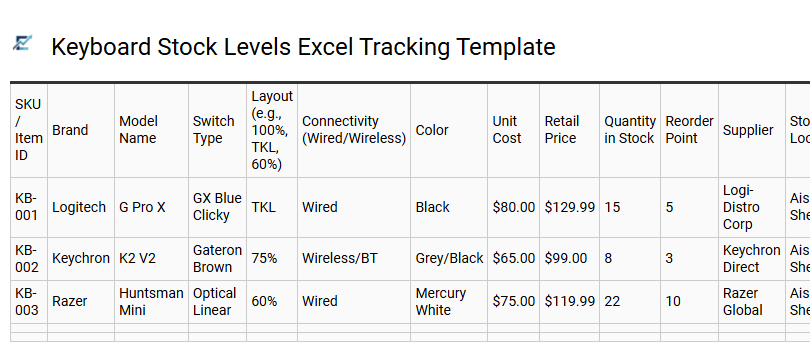
Keyboard Stock Levels Excel Tracking Template
Efficiently managing peripheral inventory requires a specialized Keyboard Stock Levels Excel Tracking Template. This tool allows businesses and enthusiasts to monitor real-time availability across various models, layouts, and switch types. By documenting critical data points such as SKU numbers, connection types (wired or wireless), and current quantities, users can maintain optimal stock balance and prevent costly shortages.
The template streamlines the replenishment process by using automated calculations to highlight when items fall below a predefined reorder point. Organizing hardware data in a structured spreadsheet improves visibility, ensures data accuracy, and simplifies the auditing of high-value mechanical or membrane units.
This template is perfectly suited for e-commerce hardware retailers, corporate IT departments managing office equipment, and gaming cafe operators overseeing high-performance peripherals.
Download: 💾 Keyboard Stock Levels Excel Tracking Template .xls
Efficiently managing a collection requires precision. This mechanical keyboard inventory and custom build tracker spreadsheet simplifies organizing switches, stabilizers, and PCB layouts. Enthusiasts can monitor artisan keycaps, track group buy shipping dates, and document specific lubrication techniques for tactile or linear components.
Streamline your desk setup by cataloging hot-swappable parts and mounting styles. Effective data management ensures your hobby remains organized, offering a clear overview of every modification for a superior typing experience.