
Streamlining Project Management with Professional Excel Job Progress Tracking Templates
Optimizing your workflow requires a robust system for task monitoring. An Excel template for tracking job progress offers a versatile solution for managing project milestones and deadlines. By utilizing a structured spreadsheet, teams can enhance productivity through real-time status updates and efficient resource allocation. Whether you are overseeing complex operations or daily checklists, a customized tracker ensures transparency and accountability across every phase. Streamline your project management and eliminate manual errors with these automated reporting tools. Please explore our curated collection of professionally designed templates below.
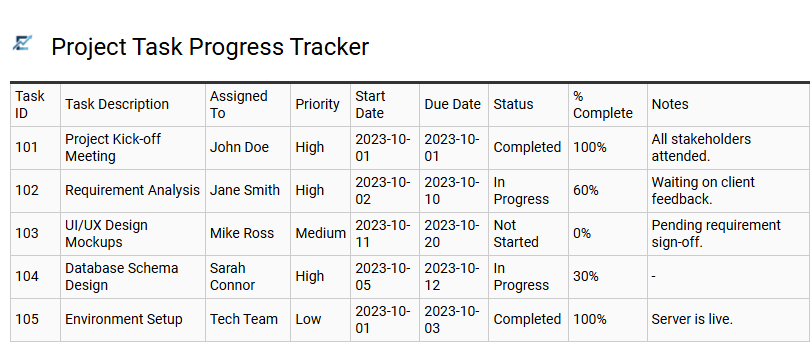
Project Task Progress Tracker
A Project Task Progress Tracker is an essential tool for streamlining workflows and enhancing team accountability. This Excel template allows users to monitor individual assignments, set realistic deadlines, and visualize overall project health through real-time status updates. By documenting task owners, priority levels, and completion percentages, businesses can identify bottlenecks and ensure resource optimization across multiple project stages.
Implementing a structured tracker simplifies complex management by providing a clear roadmap for every stakeholder. It eliminates confusion regarding responsibilities and fosters a data-driven approach to meeting milestones efficiently.
This template is suitable for construction site management, software development sprints, and marketing campaign launches.
Download: 💾 Project Task Progress Tracker .xls
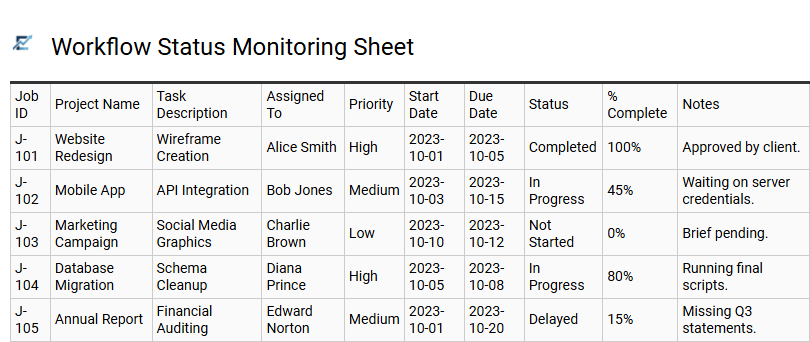
Workflow Status Monitoring Sheet
A Workflow Status Monitoring Sheet is an essential Excel tool designed to streamline project management and enhance operational visibility. By utilizing a centralized dashboard, teams can track task progression from initiation to completion in real-time. This template leverages automated features like conditional formatting and dropdown status menus-such as "Pending," "In Progress," or "Completed"-to quickly identify bottlenecks and ensure deadlines are met.
Implementing this structured approach improves accountability and simplifies resource allocation. By organizing complex data into a scannable format, project managers can maintain a clear overview of multiple workstreams simultaneously, fostering better communication and productivity across the entire organization.
This template is perfectly suited for managing creative agency deliverables, tracking construction project milestones, or monitoring multi-stage manufacturing production lines.
Download: 💾 Workflow Status Monitoring Sheet .xls
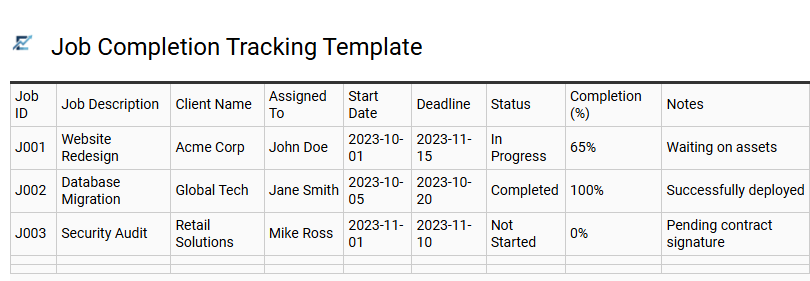
Job Completion Tracking Template
A Job Completion Tracking Template is a powerful Excel tool designed to streamline workflow management and provide real-time visibility into project lifecycles. By centralizing task data, deadlines, and responsibility assignments, this template helps teams monitor progress and maintain accountability. Key features often include status dropdown menus, automated date calculations, and conditional formatting to highlight overdue items, ensuring that no critical milestone is overlooked.
Utilizing a structured tracker allows businesses to identify bottlenecks early, optimize resource allocation, and improve overall operational efficiency. This organized approach to data entry transforms complex project details into actionable insights, facilitating better communication between stakeholders and team members. This template is ideal for construction project management, freelance client handovers, and manufacturing production schedules.
Download: 💾 Job Completion Tracking Template .xls
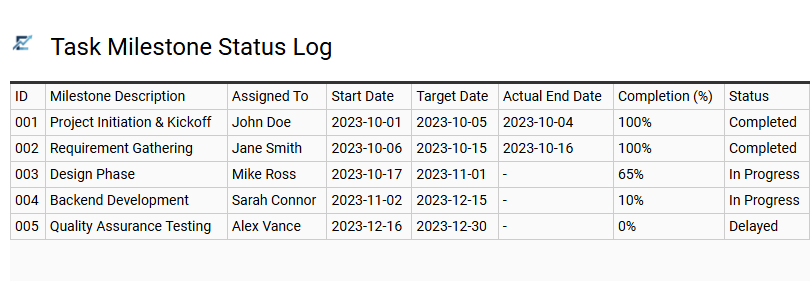
Task Milestone Status Log
A Task Milestone Status Log is a critical feature of an Excel job progress template, designed to provide high-level visibility into a project's lifecycle. It functions as a centralized record for tracking major deliverables and significant turning points within a workflow. By capturing essential data points-such as milestone descriptions, assigned owners, target deadlines, and real-time status updates-this log helps project managers identify potential delays before they escalate.
Using organized columns and conditional formatting in Excel ensures that stakeholders can quickly assess which phases are "On Track," "At Risk," or "Completed." This systematic approach to monitoring key objectives improves accountability and keeps complex projects aligned with their original timelines. This template is ideal for construction project scheduling, software development sprints, and marketing campaign launches.
Download: 💾 Task Milestone Status Log .xls
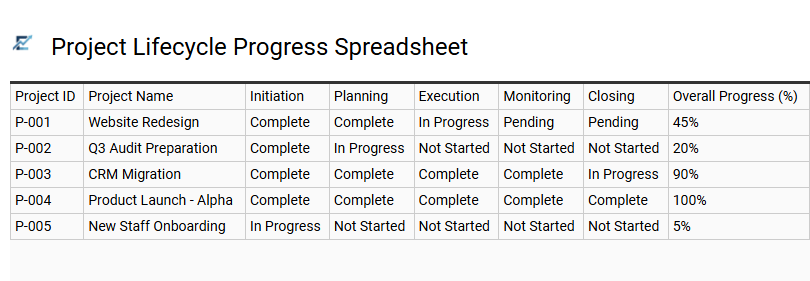
Project Lifecycle Progress Spreadsheet
A Project Lifecycle Progress Spreadsheet is a dynamic Excel tool designed to monitor tasks from inception to completion. By using structured data fields such as task ownership, priority levels, and automated status bars, this template provides a high-level overview of operational health. It enables project managers to visualize milestones, identify potential bottlenecks early, and maintain a centralized record of progress updates.
Integrating this spreadsheet into your workflow improves transparency and ensures that every stakeholder remains aligned with the project timeline. This streamlined approach to tracking helps in managing resources efficiently while reducing the risk of missed deadlines.
This template is ideal for managing residential construction schedules, tracking software development sprints, or coordinating multi-channel marketing campaigns.
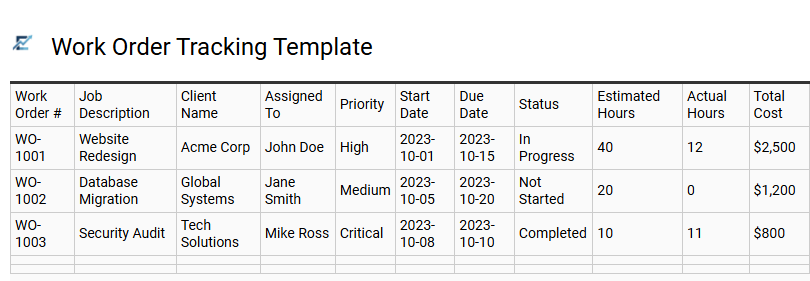
Work Order Tracking Template
A Work Order Tracking Template is a powerful Excel tool designed to streamline job management and monitor the entire project lifecycle. It provides a centralized dashboard to record essential details, including task descriptions, assigned technicians, priority levels, and deadlines. By using a structured spreadsheet, businesses can enhance operational transparency, prevent scheduling conflicts, and ensure every job moves efficiently from initiation to completion.
Key features often include automated status updates and resource allocation, helping managers identify bottlenecks and maintain high productivity. This organized approach to documentation improves team accountability and ensures client expectations are consistently met.
This template is ideal for HVAC maintenance services, custom carpentry projects, and IT support ticketing systems.
Download: 💾 Work Order Tracking Template .xls
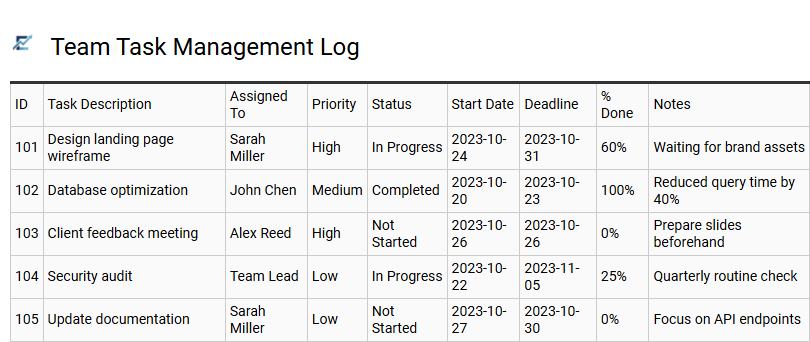
Team Task Management Log
A Team Task Management Log serves as a centralized hub for tracking job progress within collaborative environments. This Excel-based solution allows project managers to monitor individual contributions, set clear deadlines, and visualize task statuses in real-time. By documenting every phase of a workflow, teams can identify potential bottlenecks, allocate resources effectively, and ensure accountability across the board.
Utilizing a structured log enhances transparency, reducing the need for constant status updates while keeping project milestones on track. Key features typically include priority tagging, automated progress percentages, and ownership assignments to streamline daily operations and improve overall productivity.
This template is suitable for software development sprints, marketing campaign launches, and construction project scheduling.
Download: 💾 Team Task Management Log .xls
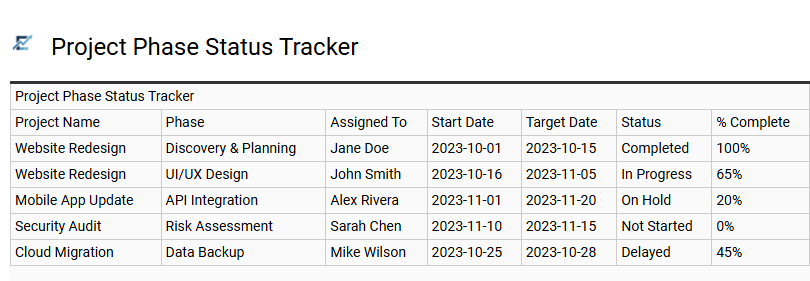
Project Phase Status Tracker
A Project Phase Status Tracker is an essential feature within an Excel job progress template, designed to decompose complex workflows into manageable, sequential milestones. By categorizing tasks into specific stages-such as planning, execution, and final review-project managers can easily identify bottlenecks and monitor real-time completion percentages.
Utilizing data validation for status updates and conditional formatting for visual cues, this tracker provides immediate clarity on project health. This structured visibility ensures that teams remain aligned, deadlines are respected, and resource allocation is optimized across the entire project lifecycle.
This kind of template is perfectly suited for managing residential construction timelines, tracking software development lifecycles, or overseeing multi-channel marketing campaign rollouts.
Download: 💾 Project Phase Status Tracker .xls
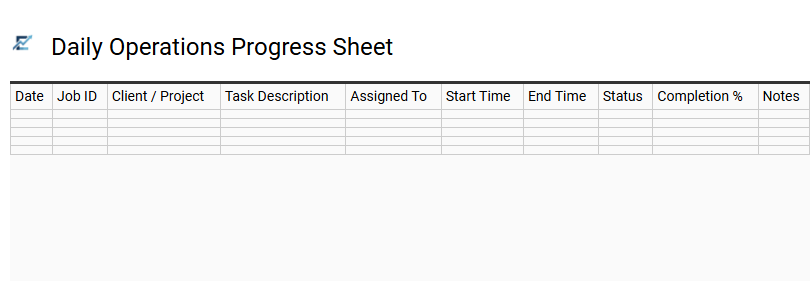
Daily Operations Progress Sheet
A Daily Operations Progress Sheet is a specialized Excel tool designed to streamline workflow management and enhance team productivity. This template provides a structured framework for monitoring daily task completion, identifying operational bottlenecks, and ensuring project milestones are achieved on schedule.
By centralizing project data, managers can visualize real-time progress through status indicators and automated updates, fostering transparency across the organization. Utilizing this sheet simplifies complex processes, allowing for better resource allocation and improved accountability. It serves as a single source of truth for tracking labor, materials, and deadlines efficiently.
This template is ideal for construction site management, manufacturing production lines, and marketing campaign execution.
Download: 💾 Daily Operations Progress Sheet .xls
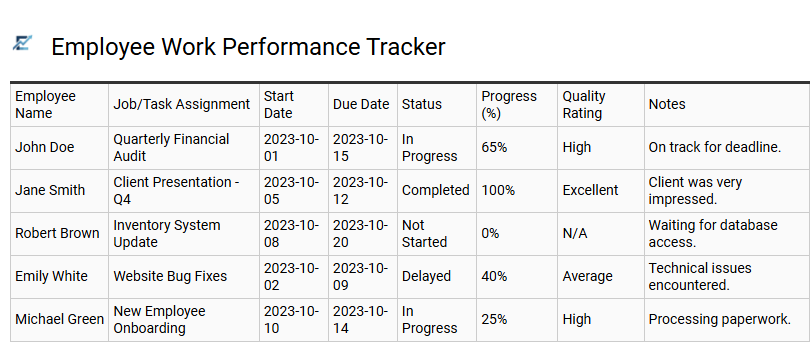
Employee Work Performance Tracker
An Employee Work Performance Tracker is a professional Excel template designed to monitor productivity and streamline job progress. By centralizing task assignments, deadlines, and completion statuses, managers gain clear visibility into individual output and overall team efficiency. This tool facilitates data-driven insights through key performance indicators (KPIs), allowing for objective performance appraisals and proactive identification of project bottlenecks.
Integrated features like progress bars and automated status updates help teams stay aligned with critical milestones. Implementing this structured reporting method fosters transparency, improves accountability, and ensures that daily operations remain synchronized with organizational goals.
This template is ideal for managing remote team deliverables, tracking seasonal project milestones, or conducting annual performance evaluations.
Download: 💾 Employee Work Performance Tracker .xls
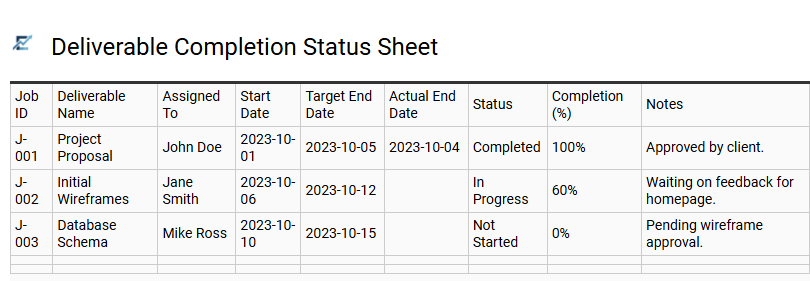
Deliverable Completion Status Sheet
A Deliverable Completion Status Sheet is a fundamental component of a professional Excel template for tracking job progress. This sheet provides a high-level overview of specific project outputs, moving beyond simple task lists to focus on tangible results. It allows project managers to monitor the lifecycle of each milestone through key data points such as owner assignment, current status, percentage completion, and deadline compliance.
By utilizing this structured format, teams can leverage data validation and conditional formatting to highlight bottlenecks or overdue deliverables instantly. This centralized visibility ensures accountability and keeps stakeholders informed of the project's overall health without digging into granular daily activities. It effectively bridges the gap between individual effort and final project goals.
This kind of template is suitable for website development projects, marketing campaign launches, and construction phase monitoring.
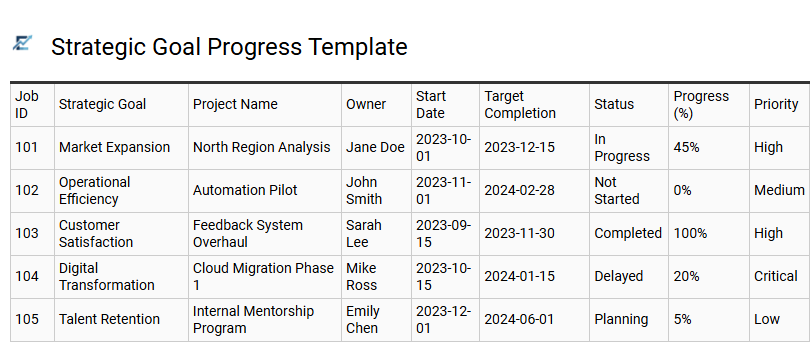
Strategic Goal Progress Template
A strategic goal progress template for Excel is a high-level management tool designed to align daily operational tasks with long-term business objectives. This specialized job progress tracker moves beyond simple "To-Do" lists by focusing on key performance indicators (KPIs) and major milestones. It allows project managers to visualize how individual work orders and department outputs contribute to the company's overarching vision.
By utilizing automated features like conditional formatting and status indicators (RAG status), stakeholders can quickly identify project bottlenecks. This template ensures transparency across teams, providing a data-driven approach to monitoring completion percentages and deadline adherence. It effectively transforms raw data into actionable insights, ensuring that every resource is optimized toward achieving critical success factors.
This template is ideal for tracking quarterly sales targets, managing product development roadmaps, or monitoring organizational digital transformation initiatives.
Download: 💾 Strategic Goal Progress Template .xls
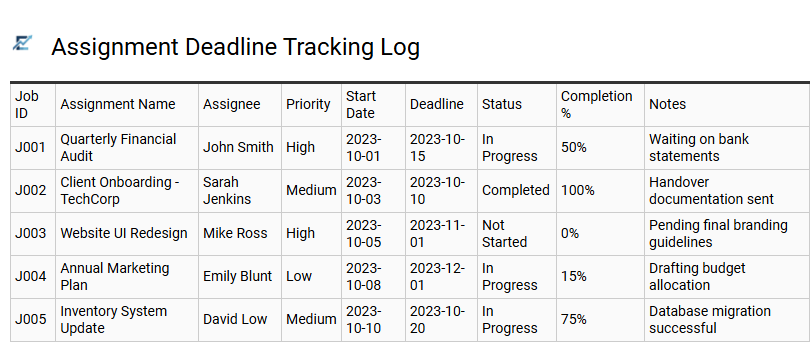
Assignment Deadline Tracking Log
An Assignment Deadline Tracking Log is a vital component of a professional job progress Excel template. It provides a structured framework for monitoring time-sensitive tasks, ensuring that every project milestone is met with precision. By logging start dates, due dates, and current status updates, users can visualize their workflow and prioritize high-impact activities.
This systematic approach to deadline management reduces the risk of missed targets and enhances overall team productivity. Utilizing an automated tracking log facilitates better resource allocation, improves accountability, and keeps stakeholders informed of real-time progress. This template is ideal for managing freelance client deliverables, tracking academic project milestones, and coordinating corporate marketing campaigns.
Download: 💾 Assignment Deadline Tracking Log .xls
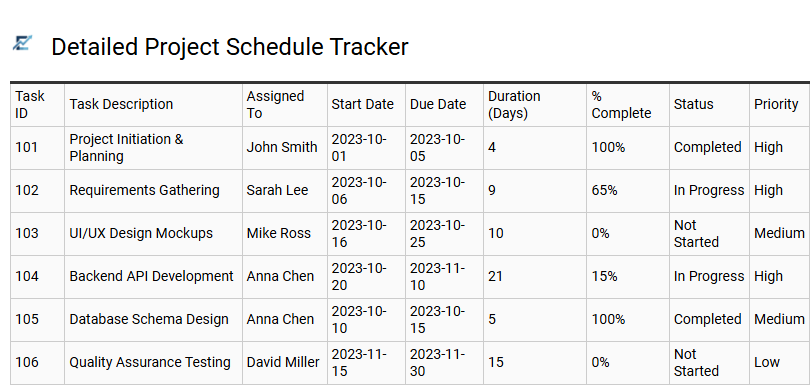
Detailed Project Schedule Tracker
A detailed project schedule tracker is a robust Excel-based solution designed to provide granular visibility into complex workflows. By organizing tasks chronologically, this template allows project managers to monitor start and end dates, completion percentages, and critical milestones in real-time. Utilizing automated formulas and conditional formatting, the tracker helps identify potential bottlenecks and resource gaps before they impact the final deadline. It acts as a centralized source of truth, ensuring team accountability and streamlining communication across different departments. This structured approach to job progress tracking transforms raw data into actionable insights for better decision-making. This kind of template is perfectly suitable for managing large-scale residential construction projects, coordinating multi-stage software development sprints, and overseeing integrated corporate marketing campaigns.
Download: 💾 Detailed Project Schedule Tracker .xls
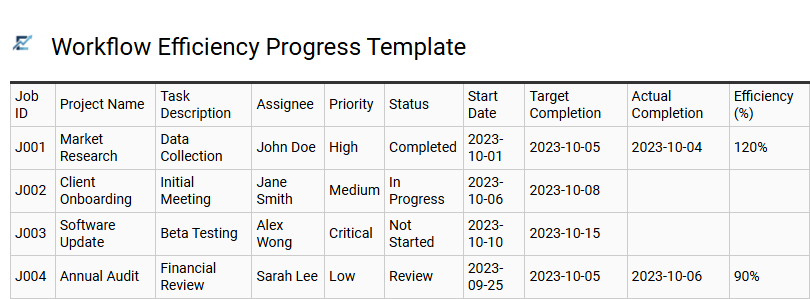
Workflow Efficiency Progress Template
A workflow efficiency progress template for Excel streamlines project management by providing a centralized hub for tracking task completion and resource performance. This data-driven tool leverages automated visualization to highlight potential bottlenecks, ensuring teams maintain steady momentum throughout the project lifecycle. By monitoring key performance indicators and real-time status updates within a structured spreadsheet, managers can optimize labor distribution and enhance operational transparency. It serves as an essential framework for transforming complex workflows into manageable milestones, allowing for precise oversight of deadlines and departmental output. Using this template fosters a culture of accountability and helps refine processes for maximum productivity.
This kind of template is perfectly suitable for software development sprints, marketing campaign launches, and industrial maintenance scheduling.
Streamlining project management requires robust tools for peak efficiency. Professional Excel job progress tracking templates offer an integrated solution for monitoring complex workflows. By utilizing advanced spreadsheet features, teams can oversee task status, resource allocation, and project milestones within a centralized dashboard. These templates facilitate real-time data visualization and automated reporting, significantly reducing manual overhead. Implementing a structured tracker ensures seamless communication and accountability. Adopt these powerful spreadsheet assets to simplify your operations, enhance productivity, and achieve consistent project success through organized data management.