
Maximizing Workforce Productivity with Strategic Excel Performance Tracking Templates
Optimizing workforce management requires precise monitoring of key performance indicators (KPIs) and productivity metrics. An Excel template for tracking job performance provides a structured spreadsheet solution for objective employee evaluation. By leveraging data-driven insights, managers can effectively facilitate performance reviews and ensure consistent monitoring progress across teams. These versatile tools streamline administrative tasks while enhancing professional accountability and organizational growth. Please explore the various professionally designed templates provided below to find your ideal fit.
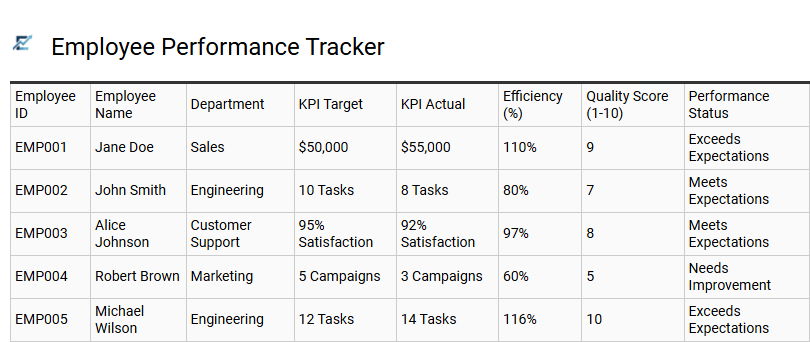
Employee Performance Tracker
An Employee Performance Tracker is a professional Excel tool designed to monitor staff productivity, goal achievement, and professional growth. By utilizing a structured template, managers can systematically record Key Performance Indicators (KPIs), track attendance, and document qualitative feedback throughout the fiscal year. This centralized data hub simplifies performance reviews, ensuring evaluations are based on objective metrics and data-driven insights rather than subjective memory.
Implementing this tracker helps HR departments identify high-performers, recognize skill gaps, and align individual contributions with broader organizational objectives. With customizable fields and automated formulas, businesses can transform raw data into actionable progress reports for more effective talent management.
This template is ideal for conducting annual appraisals, monitoring monthly sales quotas, and managing project-specific milestones for remote teams.
Download: 💾 Employee Performance Tracker .xls
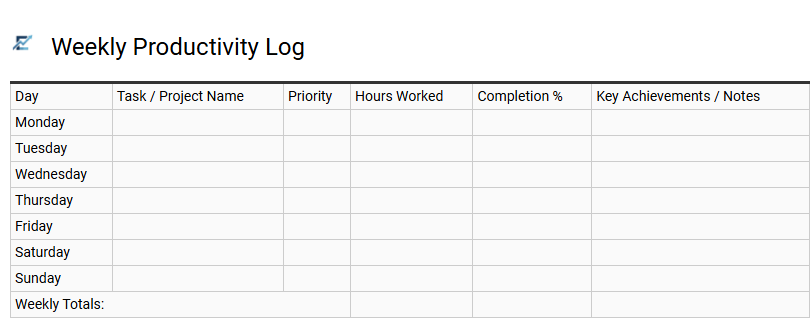
Weekly Productivity Log
A Weekly Productivity Log is a vital feature in any job performance Excel template, providing a structured framework to monitor output over a seven-day period. This log enables employees and managers to track completed assignments, hours spent on specific projects, and key performance indicators (KPIs). By recording data systematically, users can identify peak performance hours, eliminate time-wasters, and ensure balanced workloads.
Integrating this log into your workflow fosters accountability and provides a clear audit trail for performance reviews. It transforms subjective effort into objective metrics, allowing for data-backed decisions regarding professional development and resource allocation. This template is suitable for freelance project billing, remote team monitoring, and manufacturing output tracking.
Download: 💾 Weekly Productivity Log .xls
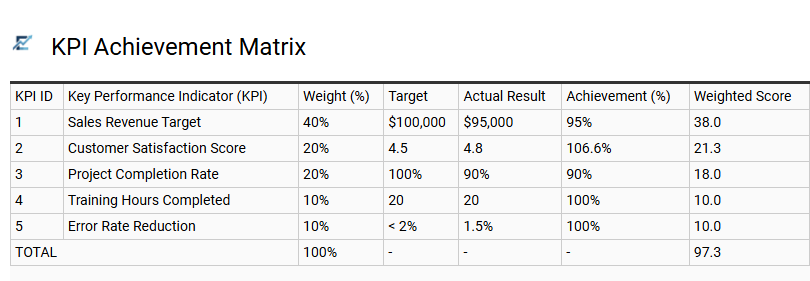
KPI Achievement Matrix
A KPI Achievement Matrix is a vital component of a job performance Excel template, providing a structured framework to visualize employee progress. It maps specific Key Performance Indicators against predefined targets, allowing managers to quantify success through objective data. By using this matrix, organizations can automate performance scoring and use conditional formatting to highlight strengths and developmental gaps.
This data-driven approach ensures that evaluations remain fair, transparent, and aligned with company-wide objectives. Integrating a matrix into your tracking sheet simplifies complex performance metrics into actionable insights, facilitating more productive one-on-one reviews.
This template is suitable for quarterly sales performance reviews, annual corporate employee appraisals, and project-specific milestone tracking.
Download: 💾 KPI Achievement Matrix .xls
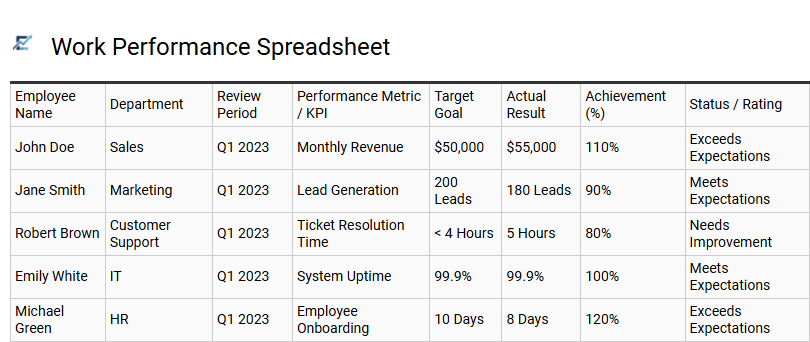
Work Performance Spreadsheet
A Work Performance Spreadsheet is an essential tool for monitoring employee productivity and professional growth. By centralizing key performance indicators (KPIs), task completion rates, and quality metrics into one accessible Excel template, businesses can foster a data-driven culture of accountability.
This structured approach simplifies the appraisal process, allowing managers to identify high-performers and pinpoint specific areas for professional development. Utilizing a standardized tracking sheet ensures transparency, improves communication during reviews, and helps align individual contributions with organizational goals. These templates provide a visual representation of progress, making it easier to track long-term trends and optimize workflows for maximum efficiency.
This kind of template is suitable for quarterly employee reviews, freelance project management, and monitoring sales team targets.
Download: 💾 Work Performance Spreadsheet .xls
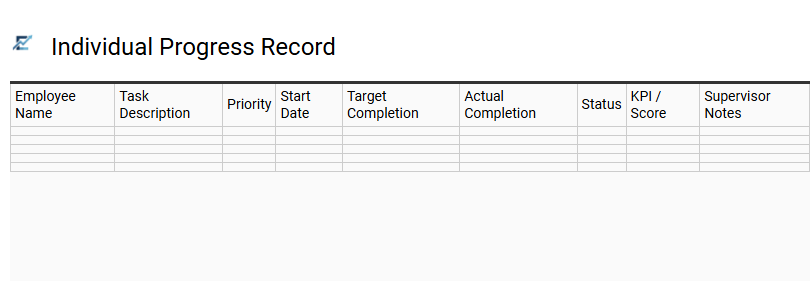
Individual Progress Record
An Individual Progress Record is a vital component of a job performance Excel template, designed to document an employee's professional growth and output over time. This centralized log tracks key performance indicators (KPIs), specific milestones, and skill acquisitions, providing an objective overview of work history. By utilizing a standardized format, managers can eliminate bias and ensure that performance evaluations are based on quantifiable data rather than anecdotal evidence.
This record serves as a roadmap for career development, helping to identify talent gaps and recognize high-achieving staff. It simplifies the reporting process during one-on-one meetings and keeps individual goals aligned with broader organizational objectives. Maintaining this digital trail fosters accountability and ensures that every achievement is recognized and documented for future reference.
This template is suitable for annual employee appraisals, monitoring new hire probationary periods, and tracking individual contributions within quarterly project cycles.
Download: 💾 Individual Progress Record .xls
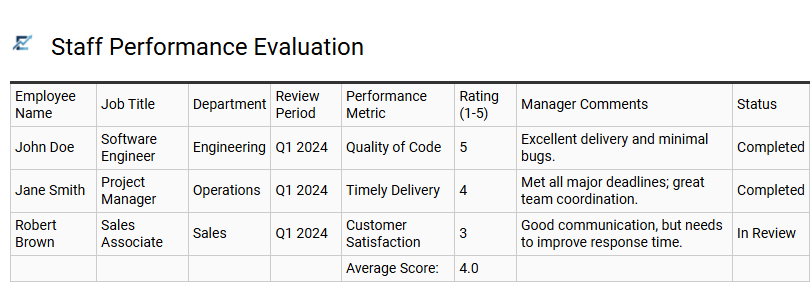
Staff Performance Evaluation
A dedicated Excel template for staff performance evaluation streamlines the review process by providing a structured framework to measure employee contributions accurately. By utilizing predefined Key Performance Indicators (KPIs) and competency ratings, managers can maintain consistency and objectivity across various departments. These templates facilitate longitudinal tracking, allowing leadership to identify skill gaps, reward high achievers, and make data-driven decisions regarding professional development.
Integrating automated calculations and visual dashboards transforms raw performance data into actionable insights, ensuring individual goals remain aligned with broader organizational objectives. This systematic approach fosters transparency and supports a culture of continuous improvement through clear, documented feedback.
This template is ideally suitable for conducting annual salary reviews, monitoring probationary periods for new hires, and managing structured performance improvement plans.
Download: 💾 Staff Performance Evaluation .xls
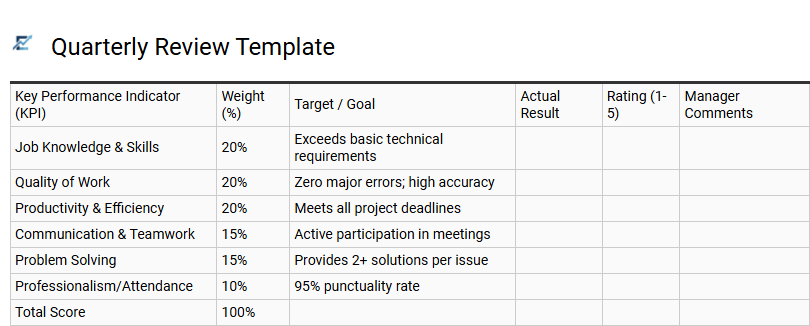
Quarterly Review Template
A Quarterly Review Template for Excel is a strategic tool designed to evaluate employee progress every 90 days. Instead of waiting for annual appraisals, this template allows managers to track key performance indicators (KPIs), document core competencies, and monitor professional development goals in real-time. By utilizing Excel's data visualization features, such as sparklines and conditional formatting, teams can easily identify performance trends and address skill gaps before they impact year-end results.
This systematic approach ensures continuous feedback, improves employee engagement, and aligns individual output with broader organizational objectives. It transforms raw data into actionable insights for more meaningful performance conversations.
This template is suitable for sales target monitoring, software development sprint evaluations, and customer service quality assurance tracking.
Download: 💾 Quarterly Review Template .xls
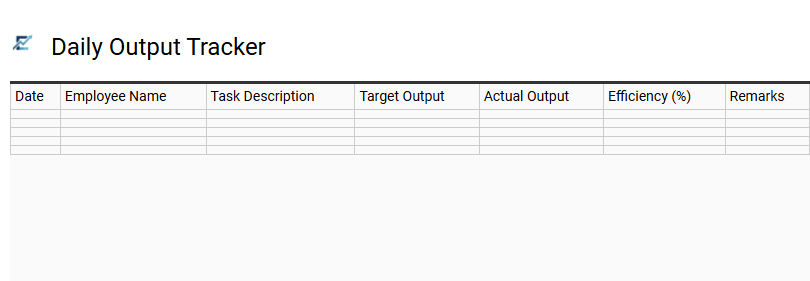
Daily Output Tracker
A Daily Output Tracker is a vital component of a comprehensive job performance Excel template. It enables employees and managers to monitor productivity with granular detail by recording specific tasks, completed units, or achieved milestones on a day-to-day basis. By maintaining a real-time log of work volume and quality, businesses can identify operational bottlenecks, recognize high-performance trends, and ensure that daily activities align with long-term strategic goals.
Using this data-driven tool facilitates objective performance reviews and enhances individual accountability. The structured format of an Excel-based tracker allows for easy data visualization through automated charts, making it simple to spot fluctuations in efficiency. This template is ideal for content creators tracking daily word counts, warehouse staff monitoring order fulfillment rates, and sales representatives logging outbound call volumes.
Download: 💾 Daily Output Tracker .xls
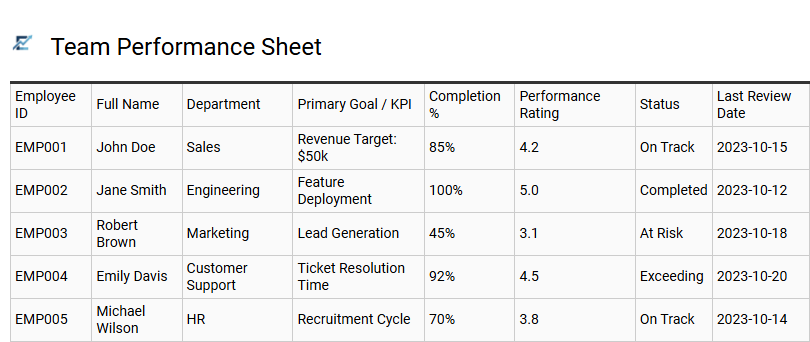
Team Performance Sheet
A Team Performance Sheet serves as a centralized dashboard within an Excel template to monitor collective output and individual contributions. By aggregating Key Performance Indicators (KPIs) such as task completion rates, quality scores, and deadline adherence, managers gain a transparent view of departmental efficiency. This tool simplifies the identification of high-performers and areas requiring additional training, ensuring data-driven decision-making during appraisal cycles.
Utilizing automated formulas and visual charts, the sheet translates complex workforce data into digestible insights to improve overall productivity and alignment with organizational goals. This template is ideal for quarterly sales target reviews, monitoring customer support response times, and tracking software development sprint progress.
Download: 💾 Team Performance Sheet .xls
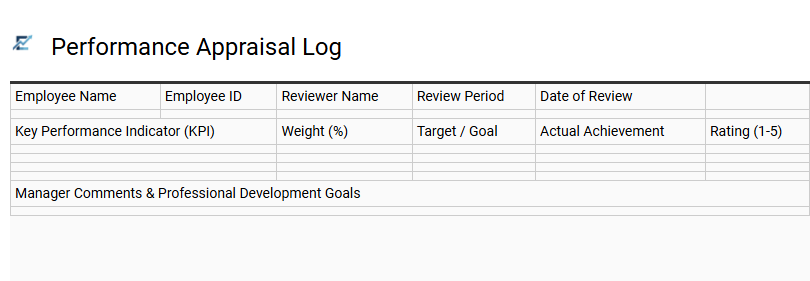
Performance Appraisal Log
A Performance Appraisal Log is a strategic Excel tool designed to document employee achievements, feedback, and growth throughout a review period. By systematically recording key performance indicators (KPIs) and behavioral observations, managers can ensure objective evaluations and eliminate recency bias. This template provides a centralized space to track goal completion, professional development milestones, and specific areas requiring improvement.
Maintaining a detailed log facilitates data-driven performance conversations and simplifies the final appraisal process by providing a clear historical record of an individual's contributions to the organization. This template is ideal for conducting quarterly sales performance reviews, tracking technical milestone progress in software engineering departments, and monitoring operational efficiency goals in healthcare management.
Download: 💾 Performance Appraisal Log .xls
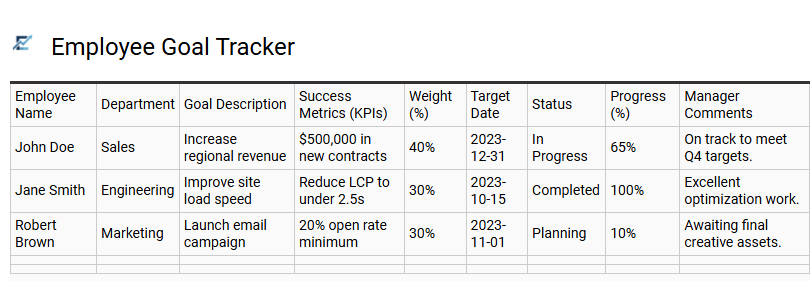
Employee Goal Tracker
An Employee Goal Tracker Excel template is an essential performance management tool designed to align individual achievements with broader organizational objectives. By implementing SMART (Specific, Measurable, Achievable, Relevant, and Time-bound) criteria, this template provides a structured framework for defining expectations and monitoring progress in real-time.
Using automated features like status bars and KPI indicators, managers can easily identify bottlenecks and celebrate milestones, fostering a culture of accountability and transparency. This centralized dashboard simplifies the evaluation process, ensuring that professional development and core job responsibilities remain on track throughout the fiscal year.
This template is ideally suited for monitoring quarterly sales targets, tracking software development project milestones, and documenting annual administrative performance reviews.
Download: 💾 Employee Goal Tracker .xls
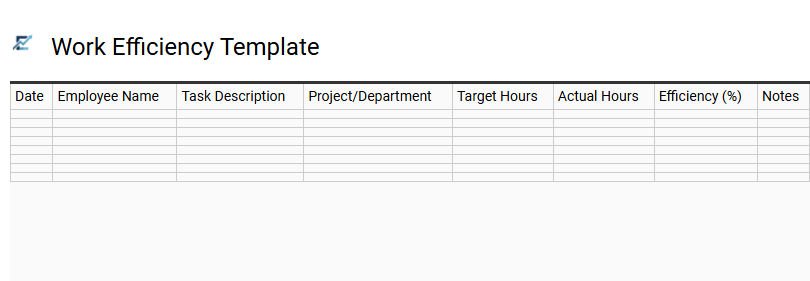
Work Efficiency Template
A Work Efficiency Template is a powerful Excel-based tool designed to measure how effectively employees utilize their time and resources to achieve professional goals. By focusing on the ratio of output to input, this template helps managers identify high-performing workflows and operational bottlenecks. It typically tracks key metrics such as task completion rates, time-to-market, and resource utilization percentages.
Using this data-driven approach ensures that performance evaluations are objective, allowing for targeted training and process optimization. Implementing a structured efficiency tracker fosters a culture of accountability and continuous improvement across the organization.
This template is ideal for monitoring assembly line production rates, tracking software development sprint velocity, and managing high-volume customer service ticket resolution.
Download: 💾 Work Efficiency Template .xls
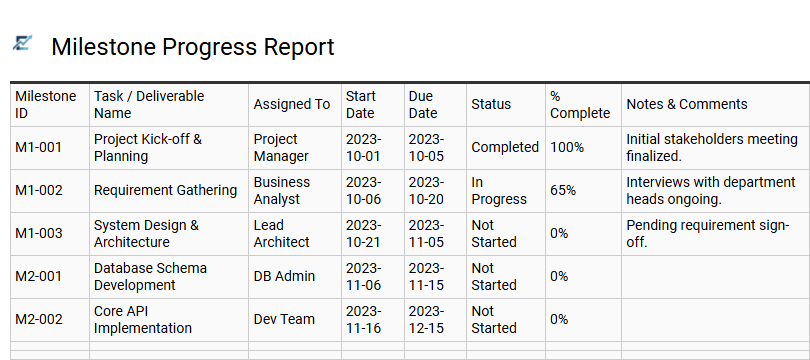
Milestone Progress Report
A Milestone Progress Report is a critical component of any job performance Excel template, designed to break down high-level objectives into manageable, time-bound targets. This section allows both managers and employees to track the status of key deliverables, ensuring that long-term projects stay on schedule. By utilizing status indicators, completion percentages, and deadline tracking, the report provides a visual representation of professional growth and operational efficiency.
Integrating this report into your performance review process fosters accountability and transparency, making it easier to identify potential bottlenecks before they impact final results. It transforms abstract goals into a concrete roadmap for success, providing essential data for data-driven performance appraisals.
This template is ideal for tracking quarterly sales targets, monitoring software development sprint cycles, and managing individual employee certification paths.
Download: 💾 Milestone Progress Report .xls
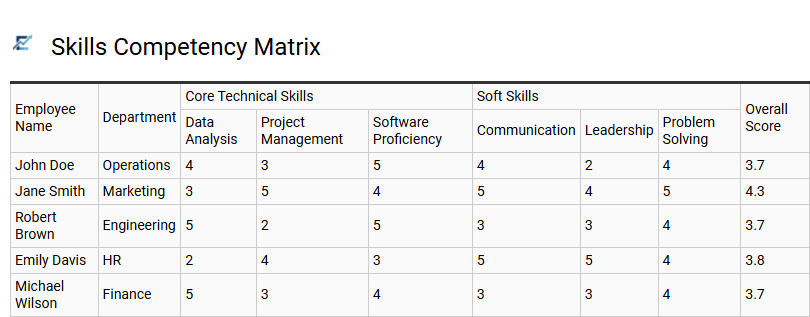
Skills Competency Matrix
A Skills Competency Matrix is a powerful framework within a job performance Excel template used to visualize and evaluate the specific capabilities of your workforce. By mapping individual employee proficiency levels against defined role requirements, this tool identifies critical skill gaps and highlights high-performing talent.
This data-driven approach enables managers to transition from subjective assessments to objective, measurable growth tracking. It facilitates better workforce planning by ensuring that team members are aligned with organizational goals and possess the necessary expertise to execute their tasks effectively. Integrating this matrix into your performance workflow streamlines talent management and prioritizes professional development investments.
This template is suitable for conducting annual performance appraisals, performing technical gap analysis for upcoming projects, and developing strategic internal succession plans.
Download: 💾 Skills Competency Matrix .xls
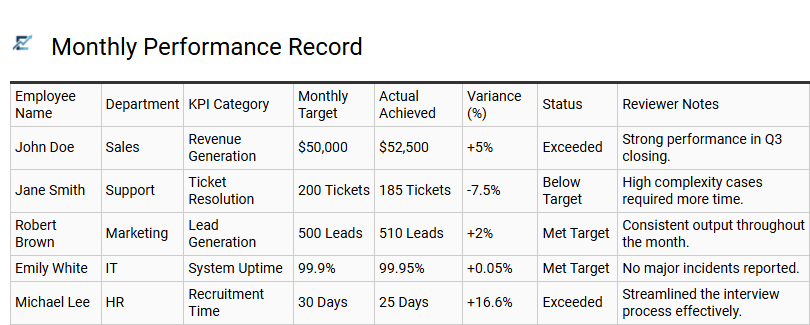
Monthly Performance Record
A Monthly Performance Record is a vital component of a job performance Excel template, designed to provide a granular view of an employee's progress over a thirty-day cycle. This section allows managers and employees to document key performance indicators (KPIs), track the completion of specific goals, and note professional achievements in real-time. By maintaining a consistent monthly log, organizations can identify productivity trends, address performance gaps proactively, and ensure that objective data is available for year-end evaluations.
This structured approach fosters continuous feedback and keeps individual output aligned with broader departmental objectives.
This template is suitable for tracking monthly sales quotas, monitoring progress during new hire probationary periods, and managing milestone delivery for long-term project consultants.
Download: 💾 Monthly Performance Record .xls
Implementing strategic Excel performance tracking templates empowers organizations to unlock peak workforce productivity. By utilizing data-driven monitoring tools, managers gain clear insights into employee efficiency and key performance indicators (KPIs). These streamlined spreadsheets facilitate workflow optimization and objective evaluation, ensuring professional growth aligns with corporate goals.
Ultimately, adopting these robust tracking frameworks transforms raw data into actionable strategies, fostering accountability. Leveraging customized Excel solutions remains an essential approach for businesses aiming to scale performance and maintain a competitive edge.