
Professional Invoice Tracking Spreadsheet for Efficient Excel Account Management
Managing business finances requires precision, and an Excel template for tracking invoices offers a streamlined solution for monitoring accounts receivable. By utilizing a structured spreadsheet, small business owners can easily record payment statuses, due dates, and client details in a centralized billing management system. These financial tools often feature automated formulas to calculate totals and aging reports, ensuring no outstanding balances are overlooked. Improve your bookkeeping workflow and maintain steady cash flow with these versatile digital logs.
Explore our curated selection of professionally designed templates below.
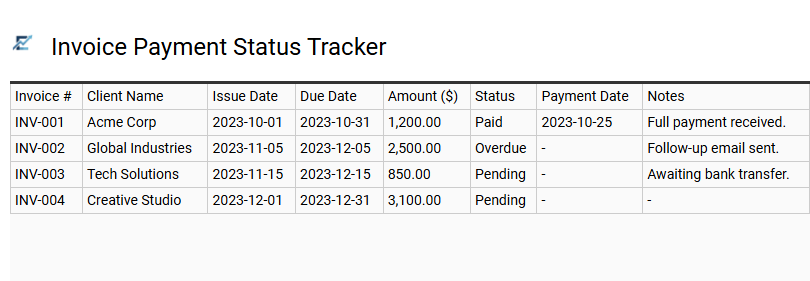
Invoice Payment Status Tracker
An Invoice Payment Status Tracker is a specialized Excel tool designed to streamline accounts receivable and enhance financial oversight. By centralizing invoice numbers, client details, due dates, and payment stages in one structured spreadsheet, businesses can effectively prevent missed deadlines and maintain a healthy cash flow.
Utilizing automated formulas and conditional formatting, this template identifies overdue accounts at a glance, allowing for proactive follow-ups. It simplifies the reconciliation process and provides a clear snapshot of outstanding revenue, replacing disorganized manual logs with a professional data management system.
This template is ideal for: freelancers managing multiple client contracts, small businesses tracking monthly service billing, and property managers monitoring tenant rent collections.
Download: 💾 Invoice Payment Status Tracker .xls
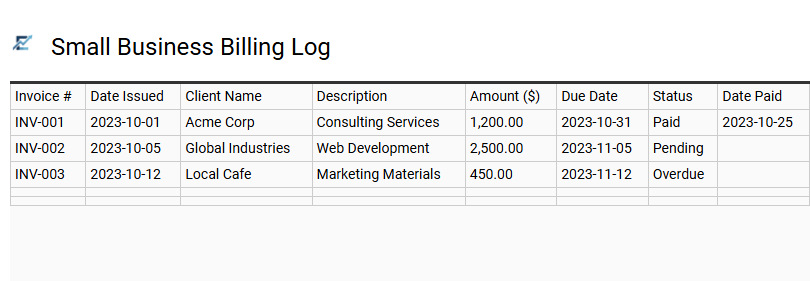
Small Business Billing Log
A Small Business Billing Log is a specialized Excel template designed to streamline your accounts receivable process. This tool allows entrepreneurs to systematically record invoice numbers, client information, payment terms, and outstanding balances in one centralized location. By monitoring payment statuses in real-time, businesses can effectively reduce late payments and improve overall cash flow management.
Using a spreadsheet for invoice tracking ensures financial organization and provides a clear audit trail for tax season. It eliminates the manual errors associated with disorganized record-keeping, allowing you to focus on business growth while maintaining professional financial standards. This kind of template is suitable for freelance graphic designers, independent consultants, and local landscaping services.
Download: 💾 Small Business Billing Log .xls
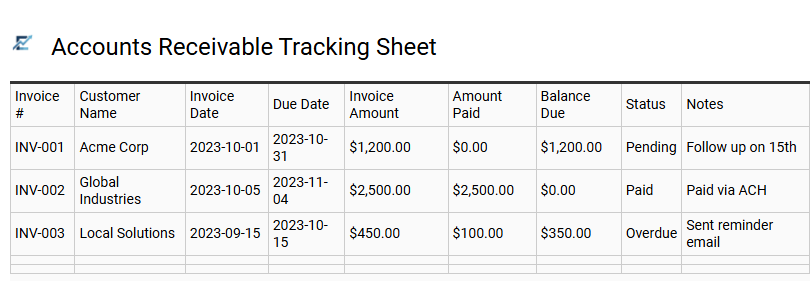
Accounts Receivable Tracking Sheet
An Accounts Receivable Tracking Sheet is an essential financial management tool used to monitor outstanding invoices and optimize cash flow. By centralizing data such as invoice numbers, client names, due dates, and payment statuses within an Excel template, businesses can maintain rigorous oversight of their liquid assets. This structured approach allows for the quick identification of overdue accounts, facilitating timely follow-ups and reducing the risk of bad debt.
Utilizing a dedicated tracking sheet ensures that your billing cycle remains organized, predictable, and professional. This system is particularly effective when integrated with automated aging formulas to highlight critical payment delays.
This template is ideally suited for freelance consultants managing multiple project milestones, subscription-based service providers tracking recurring monthly billing, and wholesale distributors overseeing large-scale credit sales.
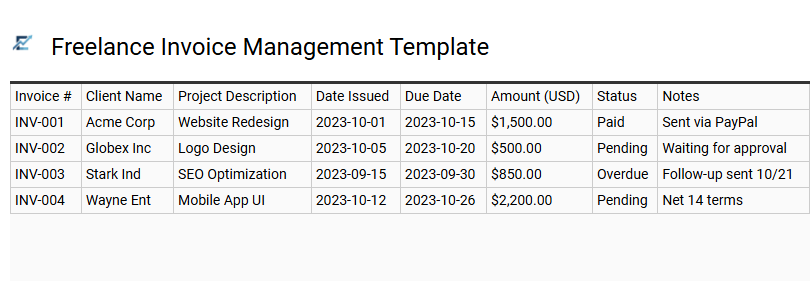
Freelance Invoice Management Template
Efficiently managing finances is vital for independent professionals. A Freelance Invoice Management Template provides a structured Excel framework to monitor outstanding payments, track billing cycles, and organize client records. By utilizing dedicated columns for invoice IDs, issuance dates, and payment statuses, freelancers can prevent missed deadlines and maintain a healthy cash flow.
This solution eliminates the need for expensive accounting software while ensuring all financial data remains centralized. Integrated formulas help automate totals, simplifying tax preparation and annual financial reporting. Using an Excel-based tracker allows for easy customization to fit specific business needs, ensuring you stay organized as your client base grows.
This template is ideal for graphic designers managing multiple client projects, independent consultants tracking monthly retainers, and freelance writers monitoring article submissions across various publications.
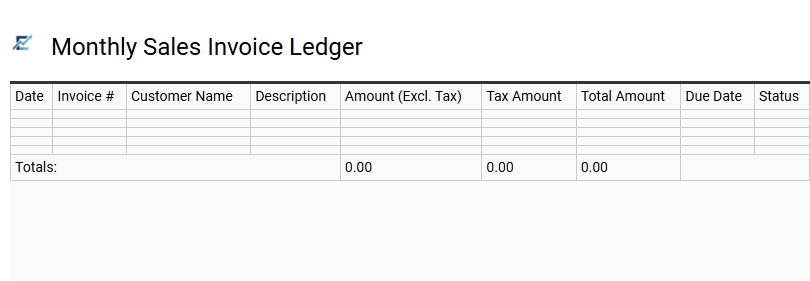
Monthly Sales Invoice Ledger
A Monthly Sales Invoice Ledger is an essential tool for small businesses and freelancers to maintain organized financial records. This Excel-based tracker streamlines accounts receivable by logging critical data points such as invoice numbers, client details, billing amounts, and due dates. By centralizing your monthly revenue data, you can easily monitor payment statuses, identify overdue accounts, and simplify year-end tax preparation. Utilizing this ledger enhances cash flow management and ensures no billable work goes unpaid. The structured format provides a clear overview of your business's monthly performance and helps maintain a professional audit trail for long-term financial health.
This template is suitable for independent graphic designers managing multiple client projects, small consulting firms tracking recurring monthly retainers, and e-commerce startups monitoring wholesale orders and bulk shipments.
Download: 💾 Monthly Sales Invoice Ledger .xls
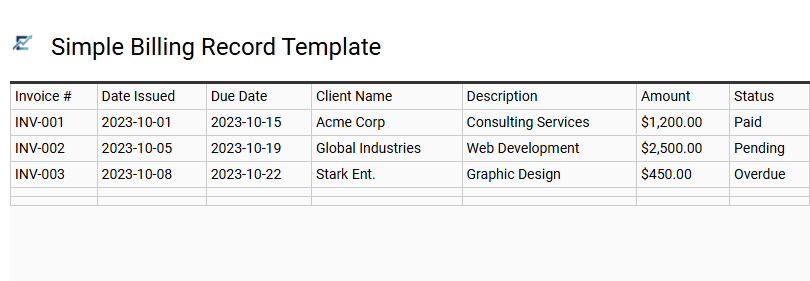
Simple Billing Record Template
A simple billing record template in Excel provides a streamlined approach for small business owners and freelancers to monitor their accounts receivable. By centralizing essential data such as invoice numbers, client contact information, issuance dates, and payment statuses, this tool ensures a clear financial overview.
Using a spreadsheet for tracking eliminates the need for complex accounting software while allowing for easy organization. Users can leverage basic formulas to automate totals and use filters to quickly identify overdue accounts. This organized method of record-keeping is vital for maintaining healthy cash flow and simplifying documentation during tax season.
This kind of template is perfectly suitable for independent consultants, freelance graphic designers, and local landscaping services.
Download: 💾 Simple Billing Record Template .xls
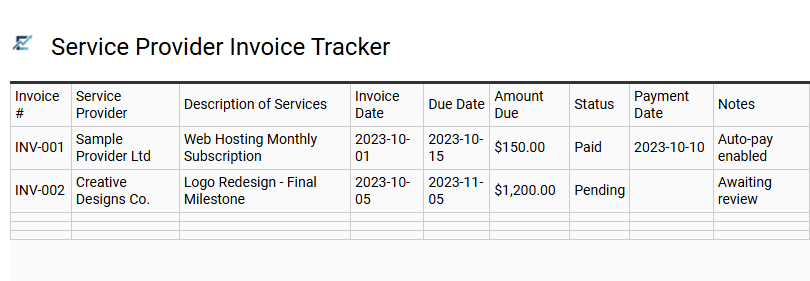
Service Provider Invoice Tracker
Managing professional billing requires precision and organization. An Excel template for tracking invoices helps service providers monitor outstanding balances, payment deadlines, and client histories in one centralized location. By utilizing automated formulas, these templates calculate totals and highlight overdue accounts, ensuring healthy cash flow and reducing administrative errors. This structured approach simplifies financial reporting and tax preparation by maintaining a clear audit trail of all transactions. Using a dedicated spreadsheet allows small businesses and independent contractors to maintain professional standards without the need for expensive accounting software.
This template is perfectly suitable for freelance consultants managing monthly retainers, landscaping companies billing for recurring maintenance, and web design agencies tracking project-based milestones.
Download: 💾 Service Provider Invoice Tracker .xls
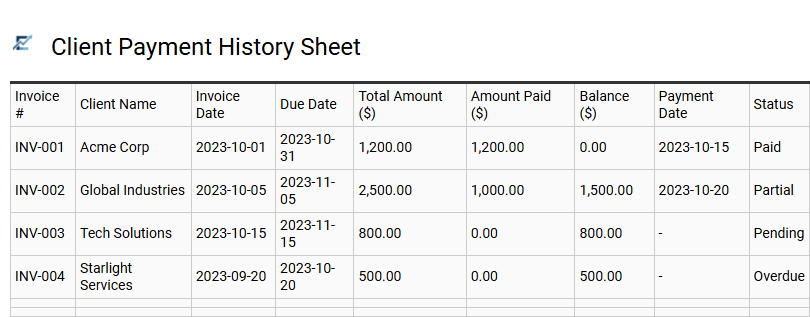
Client Payment History Sheet
A Client Payment History Sheet is a vital ledger within an invoice tracking Excel template, designed to document every transaction associated with a specific customer. It provides a centralized view of historical payments, credited amounts, and remaining balances, allowing businesses to monitor client reliability and cash flow trends over time.
By systematically logging invoice dates, payment methods, and receipt numbers, this sheet simplifies account reconciliation and helps identify delinquent accounts before they impact operations. Utilizing a structured history sheet ensures data integrity during financial audits and provides the necessary documentation to resolve billing disputes efficiently.
This template is ideally suited for freelance consultants managing long-term retainers, small service-based agencies tracking monthly project billings, and wholesale distributors monitoring recurring bulk product orders.
Download: 💾 Client Payment History Sheet .xls
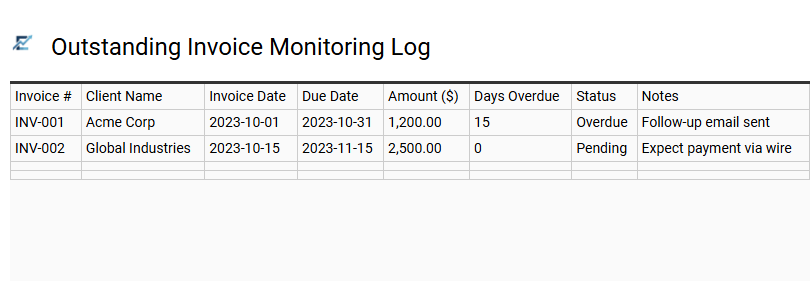
Outstanding Invoice Monitoring Log
An Outstanding Invoice Monitoring Log is an essential Excel tool designed to streamline accounts receivable and maintain healthy business cash flow. By centralizing critical data-such as invoice numbers, client details, issuance dates, and payment terms-this template provides real-time visibility into unpaid balances. It serves as a simplified aging report, enabling businesses to automatically calculate days overdue and prioritize collection efforts. Maintaining a structured log reduces the risk of revenue leakage, ensures professional follow-ups, and simplifies financial reconciliation at year-end.
This template is highly suitable for freelance graphic designers managing multiple client projects, small consulting firms tracking monthly service retainers, and local trade contractors monitoring material and labor billings.
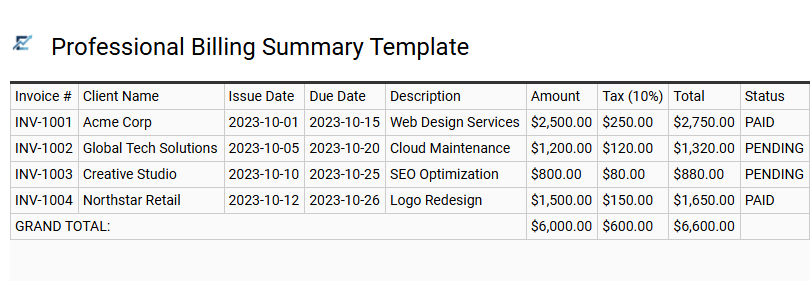
Professional Billing Summary Template
A professional billing summary template is a powerful Excel-based tool designed to streamline accounts receivable and improve cash flow management. By centralizing essential data-such as invoice numbers, client information, issue dates, and payment statuses-this template provides a comprehensive overview of your business's financial health.
Using a structured layout helps you monitor upcoming deadlines and quickly identify overdue payments. Many templates include automated formulas to calculate total outstanding balances and tax obligations, reducing manual entry errors. This organizational framework ensures that every transaction is documented, making year-end tax preparation and financial auditing significantly more efficient.
This template is highly suitable for freelance graphic designers, independent consulting firms, and small landscaping businesses.
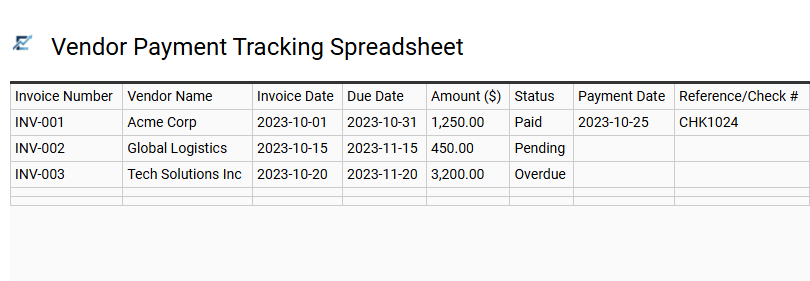
Vendor Payment Tracking Spreadsheet
Efficiently managing accounts payable is vital for maintaining professional supplier relationships and protecting business cash flow. A dedicated vendor payment tracking spreadsheet provides a centralized system to record invoice numbers, billing dates, and payment statuses. By utilizing Excel's automated formulas and conditional formatting, users can highlight upcoming deadlines to avoid late fees and ensure financial accuracy. This structured approach simplifies bank reconciliations and offers clear visibility into total liabilities at any given time. Organizing data digitally prevents duplicate payments and streamlines tax season preparation.
This template is suitable for small business owners managing monthly supplier bills, freelancers tracking subcontractor expenses, and project managers monitoring construction site procurement costs.
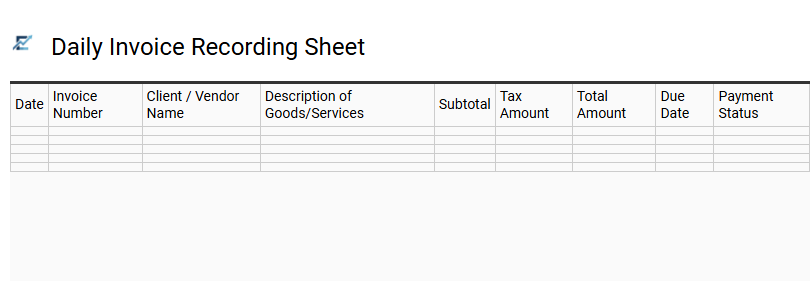
Daily Invoice Recording Sheet
A Daily Invoice Recording Sheet is a vital component of an Excel invoice tracking template, serving as a centralized ledger for all financial transactions. By logging invoices in real-time, businesses can maintain precise control over their accounts receivable and payable, ensuring that no payment date is overlooked. This systematic approach helps monitor cash flow, track outstanding balances, and simplify end-of-month reconciliations.
The sheet typically includes essential data points such as invoice numbers, client details, issuance dates, and payment statuses. Utilizing this structured format reduces manual errors and provides a clear audit trail for tax season. It is an indispensable tool for maintaining organized financial records and improving professional transparency with stakeholders.
This template is perfectly suitable for freelance photographers, local landscaping businesses, and independent consulting firms.
Download: 💾 Daily Invoice Recording Sheet .xls
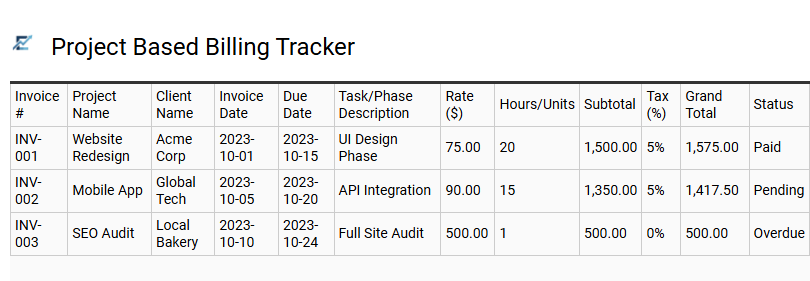
Project Based Billing Tracker
A project-based billing tracker is a specialized Excel template designed for businesses that invoice clients based on specific deliverables, milestones, or project phases. Unlike standard recurring billing, this tool allows for precise financial management by linking every invoice directly to a particular project's scope and budget. It helps freelancers and agencies monitor outstanding balances, track payment statuses, and ensure accurate cash flow forecasting across multiple active accounts.
By automating calculations for taxes, discounts, and totals, an Excel-based tracker minimizes manual errors and provides a professional overview of your project portfolio's profitability. This centralized system is essential for maintaining organized financial records and improving client transparency throughout the project lifecycle.
This template is ideal for freelance web developers managing multiple site launches, construction firms billing via project milestones, and marketing agencies tracking individual client campaigns.
Download: 💾 Project Based Billing Tracker .xls
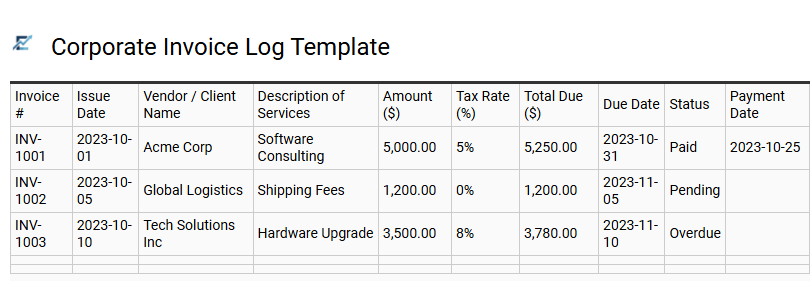
Corporate Invoice Log Template
A Corporate Invoice Log Template is a strategic tool designed to centralize financial data and streamline accounts payable workflows. By utilizing a structured Excel format, businesses can meticulously track invoice dates, vendor information, payment terms, and outstanding balances. This systematic approach enhances financial transparency, minimizes the risk of late penalties, and simplifies cash flow forecasting.
Integrating a professional log allows accounting teams to monitor real-time status updates, ensuring that no obligation is overlooked during audit cycles. It acts as a comprehensive database for historical spending patterns and tax documentation, providing a clear audit trail for fiscal management.
This template is ideal for managing monthly vendor payments in small businesses, tracking client billing cycles for freelance agencies, and overseeing departmental expense approvals within large organizations.
Download: 💾 Corporate Invoice Log Template .xls
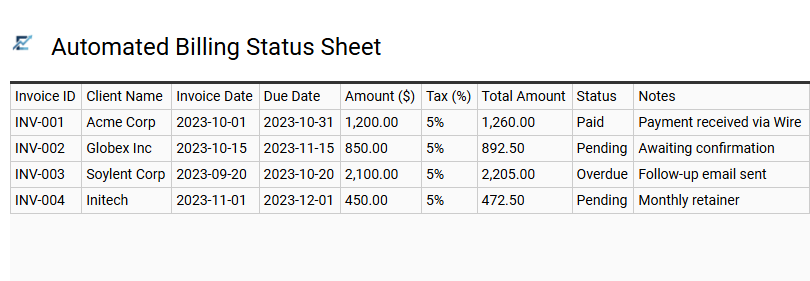
Automated Billing Status Sheet
An Automated Billing Status Sheet is a powerful Excel tool designed to streamline accounts receivable management. By utilizing dynamic formulas and conditional formatting, this template tracks payment deadlines, calculates outstanding balances, and highlights overdue invoices in real-time.
This automated approach reduces manual data entry errors and provides immediate visibility into your business's cash flow. With built-in alerts for upcoming due dates, it ensures that no payment goes unnoticed, helping you maintain a healthy financial pipeline. It transforms static spreadsheets into an active monitoring system that organizes your entire billing cycle from issuance to reconciliation.
This template is ideal for freelance consultants managing various client projects, small e-commerce businesses tracking retail orders, and property managers overseeing monthly rental payments.
Download: 💾 Automated Billing Status Sheet .xls
This professional invoice tracking spreadsheet streamlines your accounts receivable process, ensuring timely payments and enhanced cash flow. By leveraging automated Excel functions, users can monitor outstanding balances, track deadlines, and organize client billing records with precision. This robust account management tool minimizes errors in financial reporting while maintaining data integrity across all bookkeeping tasks. Ultimately, implementing a structured tracking system optimizes your billing cycle, providing a comprehensive overview of business finances for smarter, data-driven decision-making and fiscal stability.