
Comprehensive Excel Template for Efficient Project Task Hour Tracking
Streamlining project workflows requires a reliable system. An Excel template for tracking hours by tasks simplifies monitoring productivity and calculating billable hours. Utilizing a structured time log spreadsheet helps teams organize labor costs and maintain accurate records for project management. Whether you are a freelancer or overseeing a team, optimizing task management through automated formulas ensures better resource allocation and workflow efficiency. This data-driven approach enhances overall accountability and transparency. Please check the already made variation of templates below.
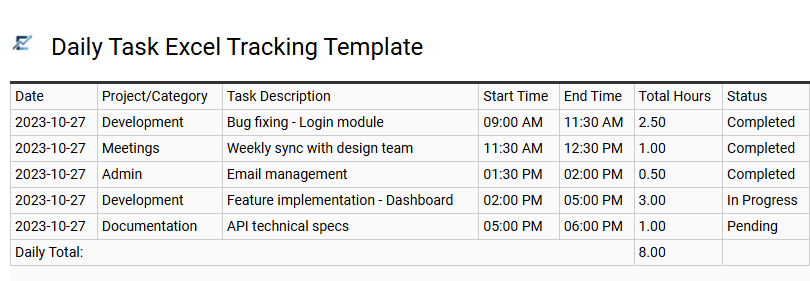
Daily Task Excel Tracking Template
A Daily Task Excel Tracking Template is an essential tool for professionals looking to enhance productivity and maintain accurate records of time allocation. By utilizing structured spreadsheets, users can log specific tasks, start and end times, and total duration, allowing for a granular view of daily output. These templates often incorporate automated formulas to calculate billable hours and categorize activities by project or priority level.
Implementing a digital log improves time management, simplifies reporting, and ensures transparency for both individual contributors and project managers. By visualizing where time is spent, users can identify bottlenecks and optimize their workflows for better efficiency. This template is ideal for freelance client billing, internal project management, and personal productivity auditing.

Weekly Project Excel Tracking Template
A Weekly Project Excel Tracking Template is a professional tool designed to monitor labor hours and task efficiency with precision. By documenting daily time logs against specific deliverables, project managers can identify productivity bottlenecks and ensure accurate resource allocation. This spreadsheet-based approach allows for automated calculations of total weekly hours, providing clear visibility into project health and budget adherence.
Organizing data in this format streamlines the reporting process, turning raw numbers into actionable insights for stakeholders. It serves as a centralized hub for performance metrics, ensuring that every minute spent contributes directly toward project milestones and deadlines.
This kind of template is suitable for freelancers billing hourly clients, software development teams tracking sprint progress, and marketing agencies managing multiple client campaigns.

Monthly Task Excel Tracking Template
A Monthly Task Excel Tracking Template is a robust tool designed to streamline time management and project oversight. By categorizing daily activities into a structured spreadsheet, users can accurately log hours spent on specific responsibilities throughout the month. This granular visibility helps identify time-drains, improve resource allocation, and ensure deadlines are met with precision.
Utilizing built-in formulas, these templates often automate hourly totals for individual tasks, providing real-time insights into productivity levels. Whether you are managing complex deliverables or monitoring personal goals, an Excel-based tracker offers a flexible, cost-effective solution for data-driven decision-making. This system simplifies monthly reporting and enhances accountability across professional environments.
This kind of template is suitable for freelance billing, monitoring project team performance, and managing internal departmental workflows.

Billable Hour Excel Tracking Template
A billable hour Excel tracking template is an essential tool for professionals to accurately record time spent on specific client tasks. By automating calculations for total hours and earnings, these templates ensure precision in invoicing and financial reporting. Users can easily categorize entries by project, date, or activity type, providing a clear audit trail for both internal review and client transparency. Leveraging built-in formulas reduces manual data entry errors, allowing for more efficient project management and improved profitability analysis.
This template is perfectly suitable for freelance consultants managing diverse projects, legal professionals tracking billable case hours, and software development teams monitoring technical sprint progress.

Employee Task Excel Tracking Template
An Employee Task Excel Tracking Template is a vital tool for improving workplace productivity and ensuring accurate time management. By systematically logging daily assignments and the duration spent on each, businesses can gain clear insights into resource allocation and project progress. These spreadsheets often include automated formulas to calculate total hours, which minimizes manual errors and streamlines the payroll process.
Using a structured tracking system helps managers identify operational bottlenecks and justify staffing needs through data-driven reporting. It provides a transparent audit trail for both internal performance reviews and external client billing. Maintaining a central record of tasks ensures that every billable hour is accounted for and every deadline stays on track.
This template is highly effective for managing freelance contractor billing, monitoring internal marketing department projects, and tracking billable hours within professional service agencies.

Freelance Project Excel Tracking Template
Efficiently managing time is critical for independent professionals. A freelance project Excel tracking template provides a structured way to monitor billable hours across various tasks and clients. By utilizing automated formulas, you can instantly calculate total earnings, track project milestones, and ensure accurate invoicing.
These templates typically feature columns for task descriptions, dates, hourly rates, and duration, offering a clear audit trail for both tax documentation and client transparency. Implementing a semantic layout improves data organization, allowing you to identify time-consuming activities and improve overall productivity.
This template is ideal for graphic designers managing multiple creative revisions, independent consultants tracking billable strategy hours, and software developers logging specific sprint tasks for various clients.

Team Productivity Excel Tracking Template
Optimize your workflow with a Team Productivity Excel Tracking Template, designed to monitor time allocation across various tasks and projects. By systematically logging hours, managers gain visibility into team workloads, helping to identify productivity bottlenecks and improve resource management. This semantic-driven tool simplifies data entry while providing actionable insights into labor costs and project timelines.
Using an automated spreadsheet ensures accuracy in reporting, allowing for better budget forecasting and workload balancing. It serves as a centralized hub for tracking billable hours and internal milestones, ensuring every team member remains aligned with organizational goals. This template is highly effective for enhancing transparency and accountability within any professional environment.
This template is suitable for managing software development sprints, tracking marketing agency client hours, and coordinating freelance consultant projects.

Client Work Excel Tracking Template
A professional client work Excel tracking template is a vital resource for accurately monitoring time spent on specific tasks and projects. By utilizing structured columns for dates, task descriptions, and durations, users can maintain a clear record of their daily activity. These templates often feature automated formulas to calculate total billable hours, simplifying the invoicing process and ensuring financial transparency.
Implementing this tool helps identify time-consuming activities, allowing for better resource allocation and improved project estimation. It provides a centralized location for data, making it easy to generate performance reports or audit project progress.
This template is ideal for freelance web developers managing multiple contracts, independent consultants tracking billable hours across various clients, and marketing agencies monitoring staff time allocation for campaign management.

Internal Task Excel Tracking Template
An Internal Task Excel Tracking Template is an essential tool for organizations aiming to enhance productivity and maintain accurate records of resource allocation. By documenting specific tasks alongside start and end times, businesses gain clear insights into how operational hours are distributed across various departments.
These templates typically feature automated formulas to calculate total durations, reducing manual entry errors and simplifying project oversight. Implementing a standardized spreadsheet allows managers to identify workflow bottlenecks, justify staffing needs, and generate detailed performance reports for internal reviews. This structured approach ensures that every hour spent contributes directly to company objectives and budget efficiency.
This template is suitable for managing software development sprints, tracking administrative support hours, and monitoring internal marketing campaign progress.

Resource Management Excel Tracking Template
A Resource Management Excel Tracking Template is an essential tool for streamlining workflow and monitoring workforce productivity. By meticulously logging hours allocated to specific tasks, organizations gain real-time visibility into project timelines and labor costs. This spreadsheet-based approach allows project managers to identify resource bottlenecks, balance workloads, and ensure that every hour contributes to strategic goals.
Featuring automated calculations for daily and weekly totals, these templates simplify data entry while improving reporting accuracy for stakeholders. Utilizing a structured Excel framework ensures better capacity planning and helps teams meet deadlines with precision. This kind of template is perfectly suited for freelance client billing, software development sprint tracking, and marketing agency campaign management.
Download: 💾 Resource Management Excel Tracking Template .xls

Detailed Task Excel Tracking Template
A detailed task Excel tracking template is an essential tool for professionals seeking to enhance productivity through precise time management. By systematically logging hours against specific projects, users can gain clear insights into their daily workflows and identify time-intensive bottlenecks. These templates often feature automated formulas to calculate durations, categories for easy filtering, and status updates to monitor progress in real-time.
Using a structured spreadsheet ensures high levels of accountability and provides the data necessary for accurate resource allocation and performance analysis. Whether you are monitoring individual output or managing a team's collective effort, this organized approach simplifies complex project oversight.
This template is ideal for freelance client billing, internal corporate project management, and tracking academic research hours.

Simple Hourly Excel Tracking Template
A simple hourly Excel tracking template is an essential tool for boosting productivity and ensuring accurate time management. By logging specific tasks alongside start and end times, users can easily calculate total hours worked and analyze daily output. This systematic approach helps identify efficiency bottlenecks and maintains precise records for administrative or financial purposes. Using automated formulas within Excel reduces manual calculation errors and allows for seamless data visualization.
The template typically includes columns for the date, task description, and duration, making it easy to summarize weekly performance. This streamlined documentation process is vital for transparency and effective project planning.
This template is ideal for freelancers billing multiple clients, project managers monitoring team milestones, and remote workers documenting daily task progress.

Multi Project Excel Tracking Template
A Multi Project Excel Tracking Template is an essential tool for professionals who need to organize time expenditure across various assignments simultaneously. By systematically logging hours by task, team members can gain clear visibility into resource allocation and workload distribution. These templates often feature automated formulas and dropdown menus to simplify data entry, ensuring high accuracy for client billing and internal productivity analysis.
Centralizing data in a single spreadsheet helps stakeholders monitor deadlines and budget adherence without switching between multiple files. This versatile framework supports data-driven decision-making by highlighting which tasks consume the most resources and identifying potential project bottlenecks.
This template is highly suitable for freelance consultants managing diverse client portfolios, marketing agencies tracking multi-channel campaigns, and software development teams balancing several feature sprints.

Budgeted Task Excel Tracking Template
A Budgeted Task Excel Tracking Template is an essential tool for monitoring project efficiency and financial health. By capturing actual hours spent against predefined budget estimates, this template provides real-time visibility into resource utilization. It allows project managers to identify variances early, preventing scope creep and ensuring that deliverables remain profitable.
Using automated formulas, the spreadsheet calculates remaining hours and percentage of budget consumed, offering a data-driven approach to task management. This level of granular tracking fosters accountability and improves future forecasting accuracy. It simplifies complex workflows by centralizing time logs and financial targets in one accessible location.
This template is ideal for freelance client billing, software development sprints, and marketing campaign execution.

Annual Project Excel Tracking Template
Efficiently managing year-long initiatives requires a structured approach to time logging and task oversight. An Annual Project Excel Tracking Template empowers users to monitor labor hours against specific project milestones, ensuring both productivity and budget adherence. By categorizing activities and automating total calculations, this tool provides real-time visibility into resource distribution and project velocity. Utilizing an Excel-based system allows for seamless data manipulation, professional reporting, and long-term performance benchmarking. This template is essential for stakeholders needing to visualize progress over a 12-month period while maintaining granular control over daily assignments.
This template is perfectly suited for freelance client billing, corporate department budget allocation, and academic research timeline management.
This comprehensive Excel template streamlines project management by providing a robust framework for task hour tracking. Utilizing automated formulas and intuitive dashboards, project managers can monitor resource allocation and individual productivity in real-time. By documenting precise task durations and deadlines, teams ensure workflow optimization while staying within budget constraints.
This versatile timesheet solution simplifies data visualization, offering clear insights into project progress. Implementing this structured tracking system enhances accountability and drives successful project delivery through meticulous time management and organized data analysis.