
Comprehensive Employee Holiday Hour Tracking Spreadsheet for Professional Management
Streamlining employee leave management is effortless with a dedicated excel template for tracking holiday hours. This versatile spreadsheet solution helps HR professionals monitor PTO accruals, vacation time, and statutory holidays with precision. By centralizing attendance data, you ensure payroll accuracy and maintain clear visibility over team availability. Whether managing sick leave or annual shutdowns, these digital tools simplify absence tracking for businesses of all sizes. Please check the already made variation of templates below.
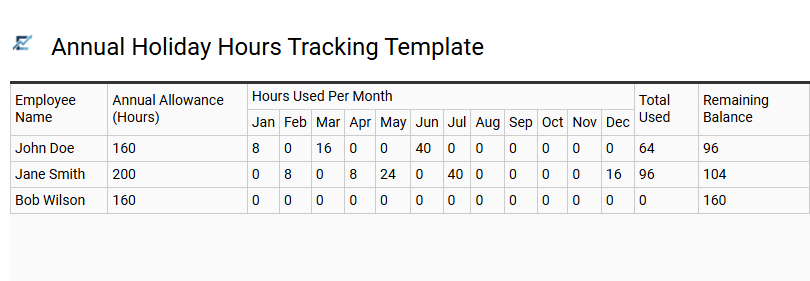
Annual Holiday Hours Tracking Template
An Annual Holiday Hours Tracking Template is a robust Excel tool designed to streamline employee leave management. It provides a centralized system to record public holidays, track paid time off (PTO) accruals, and monitor used hours throughout the year. By utilizing automated formulas, this template eliminates manual calculation errors, ensuring accurate balances for both employers and staff.
Beyond simple record-keeping, the spreadsheet offers a visual overview of team availability, which is crucial for maintaining operational efficiency during peak seasons. It helps HR departments stay compliant with labor regulations while providing clear documentation for payroll processing and year-end reporting.
This template is perfectly suited for small business payroll management, tracking remote team availability across multiple regions, and organizing seasonal staff rotation schedules.
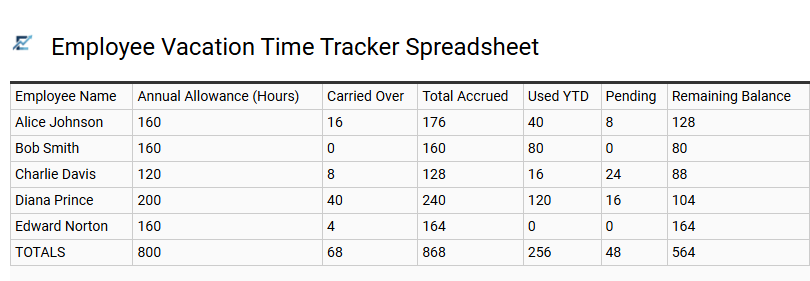
Employee Vacation Time Tracker Spreadsheet
An Employee Vacation Time Tracker Spreadsheet is an essential tool for maintaining operational efficiency and ensuring accurate leave management. This Excel-based solution allows HR managers and business owners to monitor holiday hours, track accruals, and visualize upcoming absences within a centralized dashboard. By digitizing time-off requests, organizations can eliminate manual errors, prevent scheduling conflicts, and maintain a clear audit trail for payroll compliance.
Using a structured template provides real-time visibility into remaining leave balances, helping teams plan projects around staff availability. It simplifies the oversight of various leave categories, including annual vacation, sick time, and personal days, fostering transparency between management and personnel.
This kind of template is suitable for small business payroll management, departmental shift planning, and non-profit volunteer coordination.
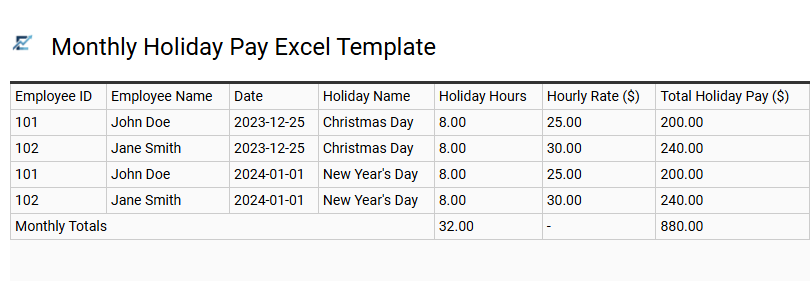
Monthly Holiday Pay Excel Template
An efficient monthly holiday pay Excel template streamlines the process of tracking employee time off and calculating accurate compensation. By automating formulas for accrued hours and remaining balances, this tool reduces manual entry errors and ensures payroll consistency. It provides a clear overview of monthly leave patterns, helping managers maintain adequate staffing levels while complying with labor regulations.
Using a structured spreadsheet allows for easy data entry of hourly rates and holiday dates, resulting in professional reports for both accounting and human resources. This centralized digital log ensures that both employers and employees have transparent access to earned leave data throughout the fiscal year.
This template is ideal for small business owners managing part-time staff, HR departments tracking annual leave entitlements, and project managers coordinating team availability during peak seasons.
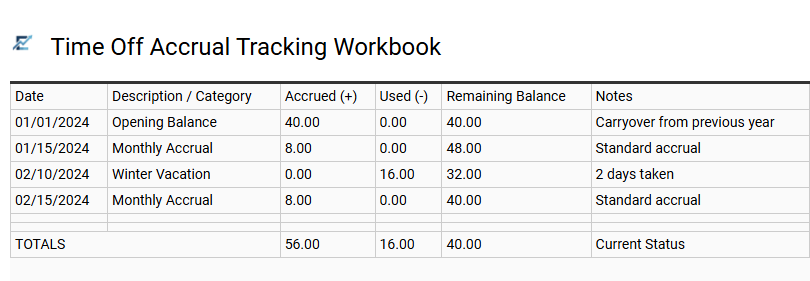
Time Off Accrual Tracking Workbook
A Time Off Accrual Tracking Workbook is an essential Excel tool designed to streamline leave management and ensure accurate record-keeping. This template automates the calculation of earned holiday hours, sick leave, and personal time based on specific accrual rates or tenure. By centralizing employee data, it maintains transparency between management and staff while reducing the risk of manual entry errors.
Users can monitor carryover balances, track real-time usage, and project future availability to improve workforce planning. This structured approach simplifies complex HR tasks, providing a clear overview of team capacity and holiday liabilities throughout the fiscal year.
This template is suitable for small business payroll management, tracking remote team holiday schedules, and monitoring departmental leave balances for budget planning.
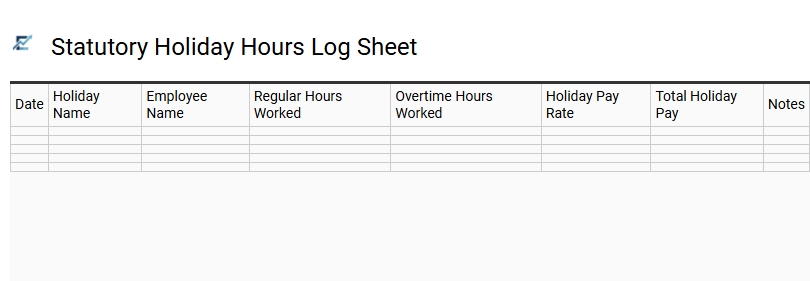
Statutory Holiday Hours Log Sheet
A Statutory Holiday Hours Log Sheet is an essential Excel tool designed to streamline payroll management and ensure labor law compliance. This template allows employers to accurately record time worked on public holidays, calculate premium pay rates, and track employee eligibility for holiday pay. By using automated formulas within a spreadsheet, businesses can minimize manual entry errors and maintain transparent records for auditing purposes. This structured approach helps in managing labor costs and ensures that staff are compensated correctly for their time during mandatory break periods.
This template is suitable for retail businesses managing shifts during long weekends, manufacturing facilities operating on a 24/7 schedule, and small businesses tracking seasonal part-time worker entitlements.
Download: 💾 Statutory Holiday Hours Log Sheet .xls
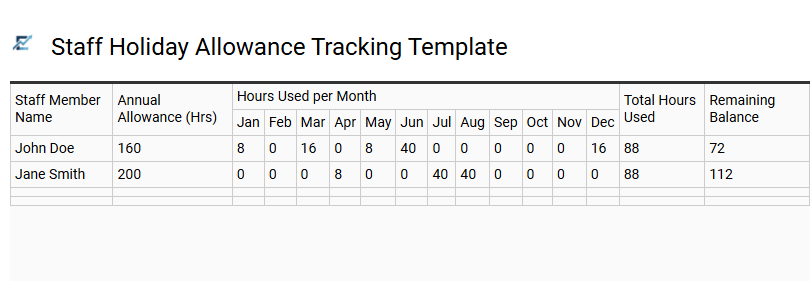
Staff Holiday Allowance Tracking Template
An efficient Staff Holiday Allowance Tracking Template simplifies employee leave management by automating calculations for accrued time and remaining balances. Utilizing an Excel-based system allows HR managers to monitor holiday hours, sick leave, and personal time off within a centralized dashboard.
These templates help prevent scheduling conflicts and ensure staffing levels remain consistent throughout the year. By accurately tracking total entitlements versus hours taken, businesses maintain transparency and ensure compliance with labor regulations. Implementing a structured tracking tool reduces administrative errors and provides employees with clear visibility into their available rest days.
This template is suitable for small business payroll management, HR departments tracking diverse shift patterns, and project managers coordinating team leave schedules.
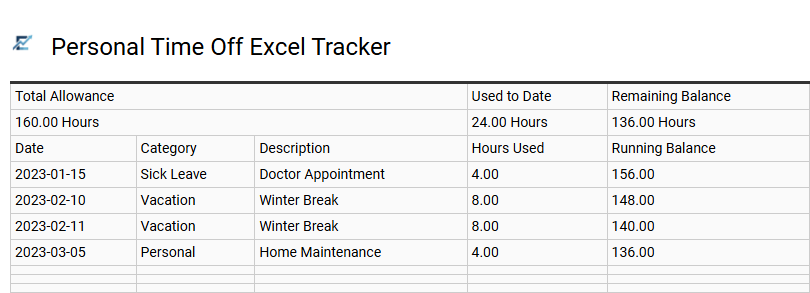
Personal Time Off Excel Tracker
An efficient Personal Time Off (PTO) Excel tracker simplifies leave management by providing a centralized system to monitor vacation days, sick leave, and holiday hours. This template automates calculations for accrued time and used hours, ensuring users maintain an accurate real-time balance. By utilizing a structured spreadsheet, both employees and managers can prevent scheduling conflicts and improve workforce planning transparency.
Tracking holiday hours in Excel eliminates manual errors and provides a reliable audit trail for payroll processing. It is a cost-effective solution for maintaining organized records without the need for complex software.
This template is ideal for small business owners managing staff rotations, freelancers tracking their own billable downtime, and HR managers overseeing departmental annual leave schedules.
Download: 💾 Personal Time Off Excel Tracker .xls
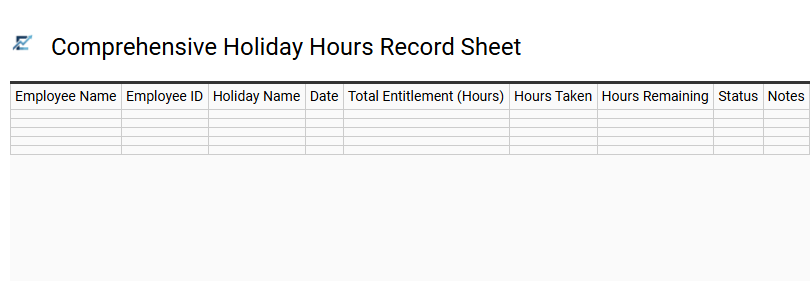
Comprehensive Holiday Hours Record Sheet
A comprehensive holiday hours record sheet is an essential Excel tool designed to streamline time-off management. This template allows businesses to accurately document employee vacations, public holidays, and personal leave in one centralized location. By automating calculations for accrued hours and remaining balances, it minimizes payroll errors and ensures compliance with labor regulations.
Using a structured spreadsheet improves workforce planning, helping managers visualize team availability and prevent staffing shortages during peak seasons. This data-driven approach provides clear insights into annual leave trends and individual entitlements while maintaining organizational transparency.
This template is ideal for small business payroll management, HR departments tracking annual leave entitlements, and project managers coordinating seasonal team availability.
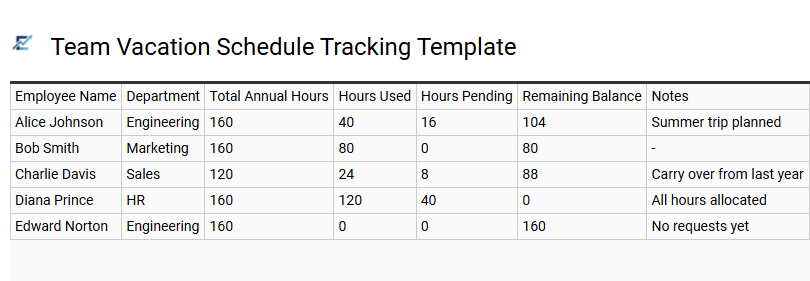
Team Vacation Schedule Tracking Template
A team vacation schedule tracking template is an essential Excel-based tool designed to streamline workforce management and ensure operational continuity. By centralizing all holiday requests and approved absences, managers can easily visualize staff availability, identify potential coverage gaps, and prevent overlapping leave conflicts. These templates often include automated formulas to calculate remaining leave balances and track different types of time off, such as personal days, sick leave, and public holidays.
Implementing a structured spreadsheet simplifies the approval process and enhances transparency within the department. It provides a clear overview of seasonal availability, allowing for better resource allocation and project planning during peak holiday periods.
This template is suitable for small business annual leave management, project resource planning, and departmental attendance tracking.
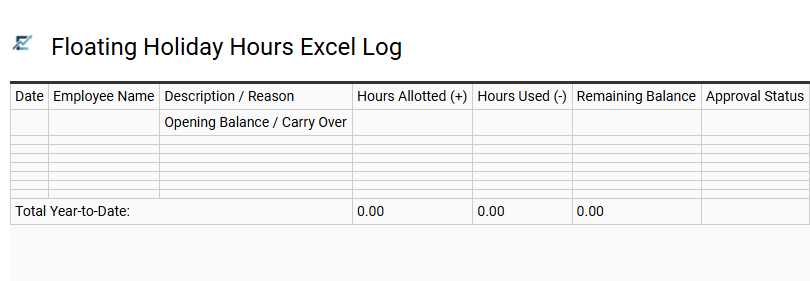
Floating Holiday Hours Excel Log
A Floating Holiday Hours Excel Log is a specialized tracking tool designed to manage flexible time off that falls outside of standard public holidays. This template allows employees and HR managers to accurately monitor holiday accruals, usage, and remaining balances in real-time. By utilizing structured tables and automated formulas, the log minimizes manual data entry errors and ensures transparency in leave management.
Using a dedicated Excel sheet for floating holidays helps organizations maintain policy compliance and provides employees with a clear view of their available personal time. It serves as a central repository for recording the specific dates hours were used and any carry-over balances from previous periods.
This template is ideal for managing cultural or religious observations not included in the standard corporate calendar, rewarding staff with "birthday leave" benefits, or tracking compensatory time earned through project-based overtime.
Download: 💾 Floating Holiday Hours Excel Log .xls
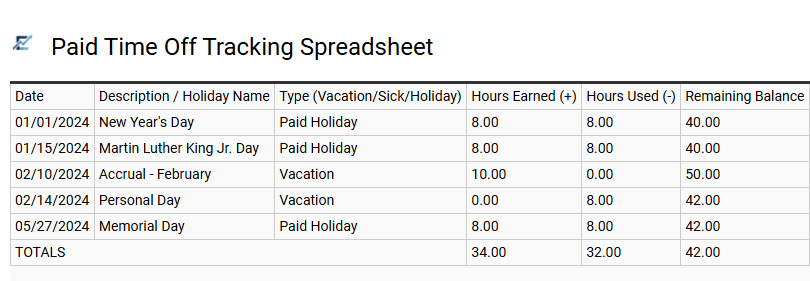
Paid Time Off Tracking Spreadsheet
A Paid Time Off (PTO) tracking spreadsheet is an essential Excel tool designed to streamline the management of employee leave and holiday hours. By centralizing data, it allows businesses to accurately monitor vacation time, sick leave, and public holidays in one accessible location. Using automated formulas, these templates calculate accruals and remaining balances in real-time, eliminating manual errors and ensuring payroll compliance. This systematic approach enhances transparency between employers and staff, providing a clear overview of attendance patterns and helping managers maintain adequate staffing levels during peak seasons.
This template is ideal for: small business employee leave management, tracking freelance project availability, and organizing department-wide holiday schedules.
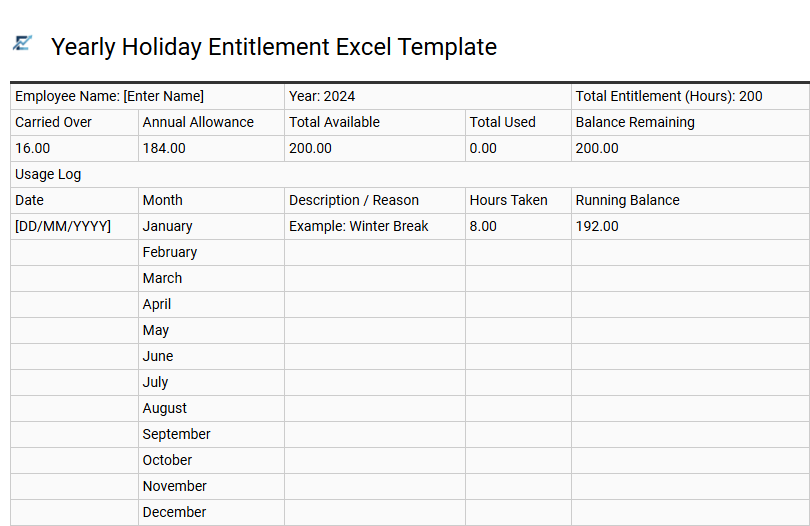
Yearly Holiday Entitlement Excel Template
Efficiently managing employee time off is vital for maintaining workplace productivity. A yearly holiday entitlement Excel template offers a streamlined solution for recording vacation hours, tracking accruals, and monitoring remaining balances in real-time. By utilizing built-in formulas, these templates eliminate manual calculation errors and provide instant visibility into staff availability throughout the fiscal year. This centralized tool allows HR managers to oversee annual leave requests, bank holidays, and carry-over periods, ensuring fair distribution of time off while preventing potential understaffing. Transitioning to a digital tracking system improves transparency and simplifies administrative reporting for organizations of all sizes. This template is suitable for small business payroll management, tracking remote team availability, and coordinating seasonal staffing requirements.
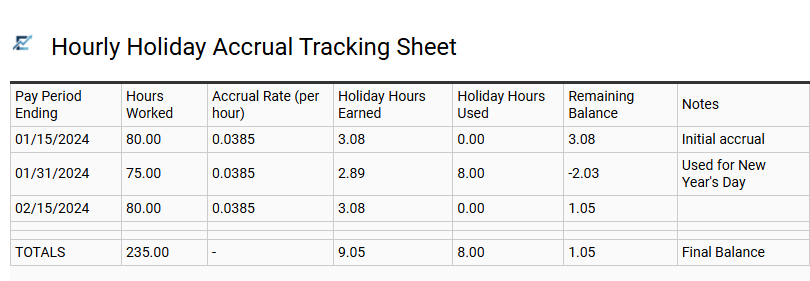
Hourly Holiday Accrual Tracking Sheet
An Hourly Holiday Accrual Tracking Sheet is a specialized Excel template designed to automate the calculation of earned leave based on hours worked. This tool streamlines human resources workflows by applying predefined accrual rates to employee timesheets, providing real-time updates on available holiday balances. By using a digital tracker, businesses reduce payroll discrepancies and ensure compliance with labor contracts or local regulations.
The spreadsheet provides a transparent overview of holiday entitlements, allowing managers to approve time-off requests with confidence. It eliminates the manual effort of calculating pro-rata benefits for staff with fluctuating schedules, making it an indispensable resource for accurate record-keeping and financial planning. This template is suitable for small business payroll management, seasonal hospitality staffing, and tracking part-time employee benefits.
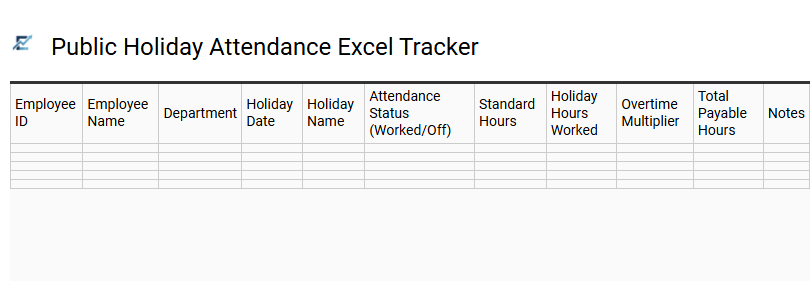
Public Holiday Attendance Excel Tracker
Streamline your payroll and compliance processes with a Public Holiday Attendance Excel Tracker. This specialized tool is designed to monitor employee availability and hours worked during statutory holidays, ensuring accurate compensation and labor law adherence. By automating calculations for holiday pay multipliers and premium rates, the template reduces administrative errors and provides real-time visibility into staffing costs.
It allows managers to record attendance statuses, track holiday entitlements, and generate reports for efficient workforce planning during peak periods. Using a structured digital format ensures transparency and helps maintain organized records for auditing purposes.
This template is ideal for retail stores managing seasonal shifts, hospitality businesses tracking holiday pay premiums, and HR departments overseeing annual leave balances for diverse teams.
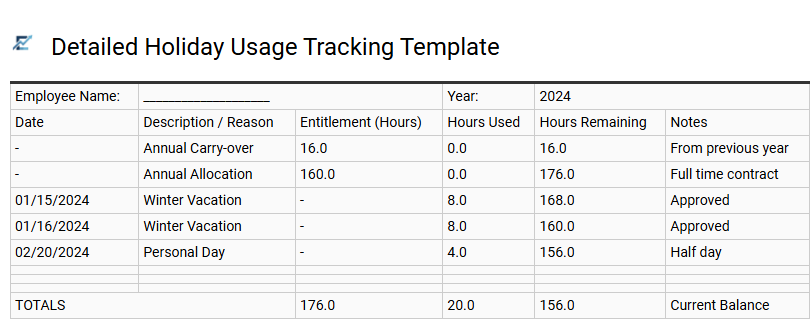
Detailed Holiday Usage Tracking Template
A detailed holiday usage tracking template in Excel provides a centralized system for monitoring employee time-off requests, accrued leave, and remaining balances. By utilizing automated formulas, this spreadsheet tool eliminates manual calculation errors and ensures total transparency between management and staff. These templates typically feature dedicated columns for holiday types, date ranges, and total hours deducted from the annual allowance.
Efficient tracking helps maintain optimal staffing levels and ensures compliance with labor regulations regarding paid time off. With visual indicators or summary dashboards, managers can quickly assess department availability, streamlining the approval process during peak vacation seasons. This type of digital ledger is essential for maintaining accurate historical records for payroll audits and performance reviews.
This template is suitable for small business payroll management, HR departments tracking multi-departmental leave, and freelance contractors managing personal project downtime.
Efficient workforce planning relies on a robust employee holiday hour tracking spreadsheet to maintain precise attendance records. By centralizing annual leave and time-off management, organizations ensure payroll accuracy while simplifying accrual tracking. This professional tool streamlines staff scheduling, offering a transparent overview of vacation balances and historical trends. Implementing a structured system optimizes resource allocation and minimizes administrative overhead. Ultimately, consistent monitoring fosters a balanced workplace, ensuring every team member's entitlements are managed with professional integrity and operational excellence.