
Professional Excel Grid Template for Systematic Performance Tracking
Streamlining complex workflows requires a robust Excel template for tracking grid to maintain peak productivity. This versatile spreadsheet solution enhances data visualization and task monitoring, allowing for seamless project management across various industries. By utilizing advanced cell formatting and conditional logic, users can transform raw information into actionable insights. These organizational tools provide a clear structural framework for monitoring milestones and resource allocation efficiently. Please browse our curated selection to discover a specialized variation of templates below.
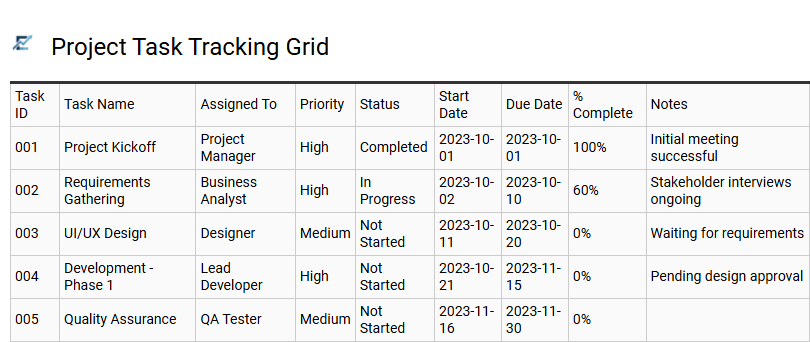
Project Task Tracking Grid
A Project Task Tracking Grid is a professional Excel template designed to streamline project management and enhance team productivity. This structured spreadsheet serves as a centralized hub for monitoring individual assignments, deadlines, and real-time progress updates. By utilizing organized columns for task ownership, priority levels, and completion status, it provides stakeholders with immediate visibility into project health.
Implementing this tracking grid helps teams identify bottlenecks early, allocate resources effectively, and ensure every milestone is met on schedule. It is an essential tool for maintaining accountability and data clarity across complex workflows, allowing for seamless communication between team members and managers.
This template is perfectly suitable for software development sprints, marketing campaign launches, and construction project scheduling.
Download: 💾 Project Task Tracking Grid .xls
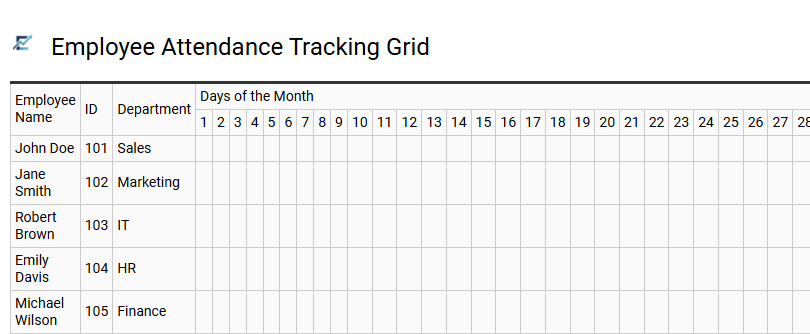
Employee Attendance Tracking Grid
An Employee Attendance Tracking Grid is a robust Excel template designed to streamline workforce management. This tool allows HR managers and business owners to monitor daily presence, sick leave, vacations, and remote work shifts within a single, organized interface. By utilizing a grid layout, you can visualize staffing levels at a glance, ensuring optimal coverage for all operational needs.
Using an automated spreadsheet reduces manual data entry errors and simplifies payroll processing. It provides a historical record of attendance patterns, which is essential for performance reviews and compliance reporting. This centralized system fosters transparency and accountability across teams of any size by clearly documenting punctuality and time-off requests.
This template is ideal for managing small business payroll, tracking seasonal retail staff, and monitoring remote team availability.
Download: 💾 Employee Attendance Tracking Grid .xls
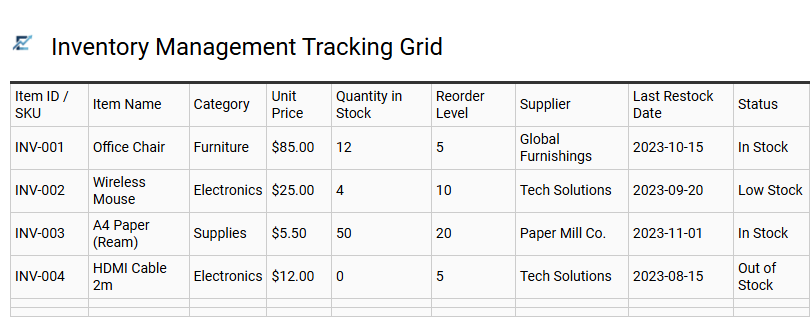
Inventory Management Tracking Grid
An Excel-based inventory management tracking grid provides a centralized framework for monitoring stock levels, sales velocity, and procurement needs. By utilizing a structured grid format, businesses maintain high data accuracy and gain immediate visibility into their physical assets. These templates leverage powerful Excel features like conditional formatting to highlight low-stock items and automated formulas to calculate total inventory value or turnover rates.
Implementing this grid streamlines the supply chain process, minimizes the risk of overstocking, and ensures essential items are always available for fulfillment. It serves as a scalable, cost-effective solution for organizing complex data sets without the need for expensive software.
This kind of template is suitable for retail stock monitoring, warehouse asset tracking, and manufacturing raw material oversight.
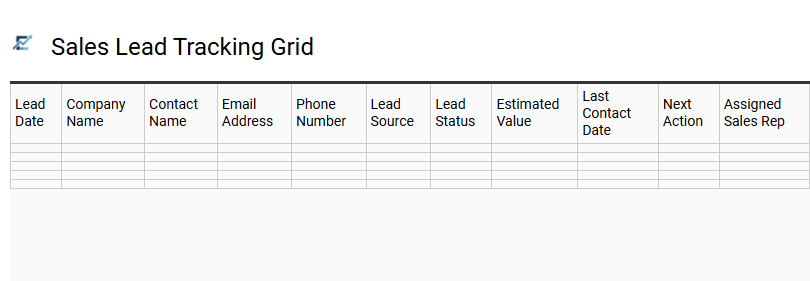
Sales Lead Tracking Grid
A Sales Lead Tracking Grid is a specialized Excel template designed to centralize prospect management and optimize the conversion funnel. By utilizing a structured grid, sales professionals can efficiently monitor lead sources, contact history, and deal stages in a single, organized view. This systematic approach ensures that no opportunity is overlooked, allowing for precise follow-up scheduling and data-driven performance analysis.
Incorporating features like data validation and conditional formatting transforms a basic spreadsheet into a dynamic dashboard for real-time pipeline visibility. This tool is essential for teams aiming to improve outreach efficiency, increase closing rates, and maintain a clear overview of their overall sales health.
This template is perfectly suited for managing high-volume B2B sales cycles, tracking residential real estate prospects, and organizing independent consultant client acquisition.
Download: 💾 Sales Lead Tracking Grid .xls
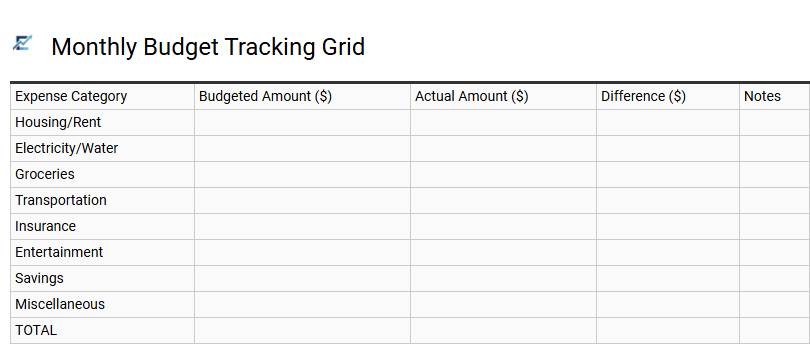
Monthly Budget Tracking Grid
A Monthly Budget Tracking Grid is a robust Excel framework designed to streamline financial oversight by logging income and expenditures. This structured layout allows users to categorize spending-such as housing, utilities, and discretionary costs-while providing a side-by-side comparison of projected estimates versus actual totals.
By utilizing Excel's automated formulas, the grid calculates variances in real-time, offering immediate insights into your fiscal health. Implementing this tracking system helps identify unnecessary spending patterns, ensures adherence to financial goals, and provides a clear visual representation of monthly cash flow. It is an essential tool for anyone looking to improve financial discipline through organized, data-driven monitoring.
This template is ideal for personal finance management, small business expense auditing, or tracking shared household costs.
Download: 💾 Monthly Budget Tracking Grid .xls
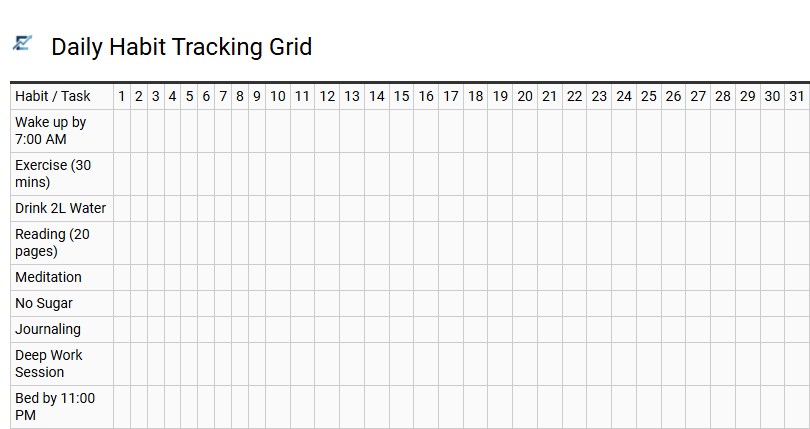
Daily Habit Tracking Grid
A Daily Habit Tracking Grid in Excel is a versatile productivity tool designed to help individuals monitor their routines and achieve long-term goals. By organizing specific habits into rows and dates into columns, the grid provides a clear visual representation of consistency. Using an Excel template allows for automated progress calculations and conditional formatting, which offers immediate visual feedback on streaks and performance trends.
This systematic approach fosters accountability by transforming abstract intentions into measurable data. It simplifies behavioral analysis, helping users identify patterns and maintain motivation through organized documentation. By digitizing your habit journal, you can easily adjust goals and analyze monthly success rates with built-in formulas.
This template is ideal for monitoring fitness routines, managing medication schedules, or maintaining professional development goals.
Download: 💾 Daily Habit Tracking Grid .xls
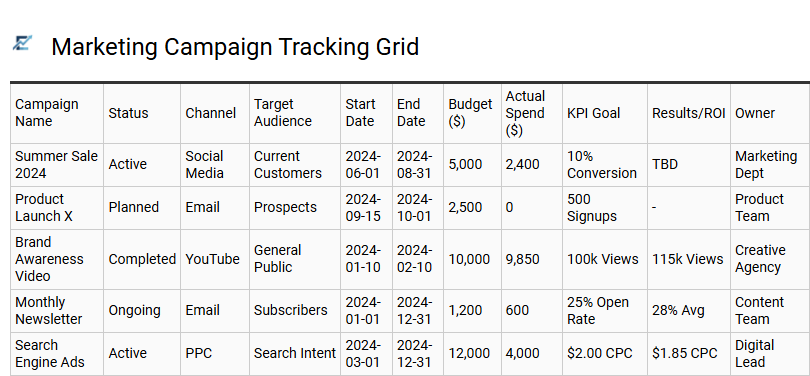
Marketing Campaign Tracking Grid
A Marketing Campaign Tracking Grid Excel template is an essential tool for centralizing project management and performance data. It provides a structured framework to monitor multi-channel initiatives, ensuring alignment across timelines, budgets, and key performance indicators (KPIs).
By utilizing a grid layout, teams can easily visualize status updates, assign responsibilities, and analyze conversion metrics in one cohesive view. This streamlined approach eliminates data silos, facilitating real-time adjustments and data-driven decision-making. Whether managing social media, email outreach, or paid advertising, this template ensures all campaign components remain on schedule and within budget.
This template is ideal for managing seasonal retail promotions, coordinating multi-platform product launches, and tracking monthly social media ad performance.
Download: 💾 Marketing Campaign Tracking Grid .xls
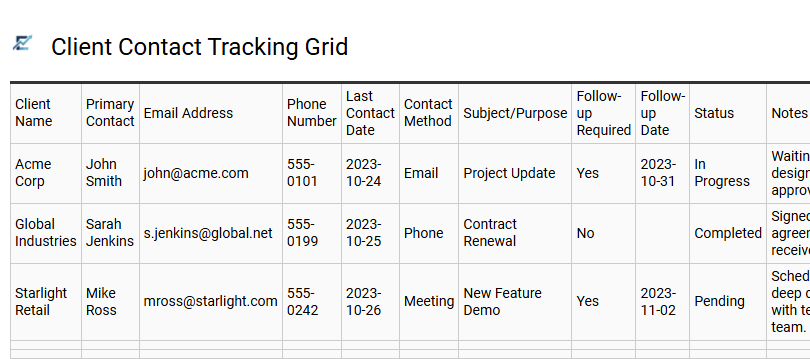
Client Contact Tracking Grid
A Client Contact Tracking Grid is a specialized Excel template designed to centralize communication history and streamline relationship management. By organizing essential data-such as contact details, interaction dates, communication channels, and follow-up status-this tool ensures professional engagement and prevents missed opportunities. It serves as a lightweight CRM, allowing users to monitor the sales funnel or project milestones without the need for complex software. Utilizing a structured grid improves team transparency and data consistency, making it significantly easier to analyze client touchpoints and improve long-term retention strategies.
This template is highly effective for managing independent freelance outreach, tracking high-volume B2B sales leads, and coordinating non-profit donor relations.
Download: 💾 Client Contact Tracking Grid .xls
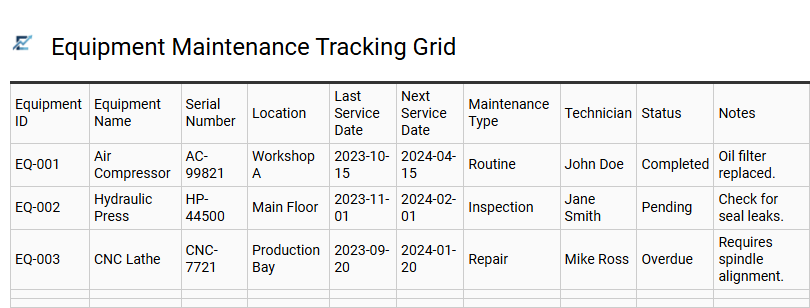
Equipment Maintenance Tracking Grid
An Equipment Maintenance Tracking Grid is a specialized Excel tool designed to streamline asset management and ensure operational continuity. By centralizing critical data-including service intervals, repair history, task status, and technician assignments-businesses can effectively shift from costly reactive repairs to proactive preventive maintenance strategies.
This structured grid format allows for real-time monitoring of machinery health, helping to minimize unexpected downtime and maximize the lifespan of high-value assets. Utilizing a standardized template enhances data integrity, simplifies regulatory compliance, and provides clear visibility into total maintenance costs. This systematic approach is essential for any organization relying on technical infrastructure to drive production.
This template is perfectly suited for managing industrial manufacturing machinery, tracking routine service for commercial vehicle fleets, and overseeing the calibration of sensitive laboratory medical equipment.
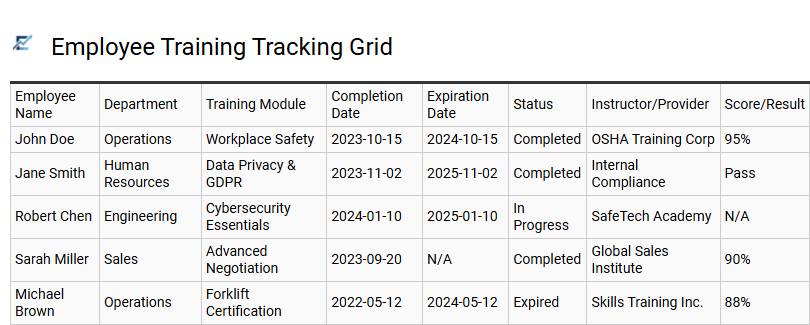
Employee Training Tracking Grid
An Employee Training Tracking Grid is a powerful resource for HR managers and department heads to monitor professional development across a workforce. This Excel template provides a centralized dashboard to track mandatory compliance certifications, technical skill acquisitions, and onboarding progress. By utilizing a grid format, organizations can quickly identify skill gaps, monitor upcoming renewal dates, and ensure every team member meets industry standards.
Using automated formulas and conditional formatting, this tool simplifies complex data into a visual roadmap for talent management. It streamlines the reporting process, ensuring that personnel remain qualified and audit-ready at all times. This template is ideal for managing annual safety certifications, tracking software proficiency across departments, and overseeing new hire orientation milestones.
Download: 💾 Employee Training Tracking Grid .xls
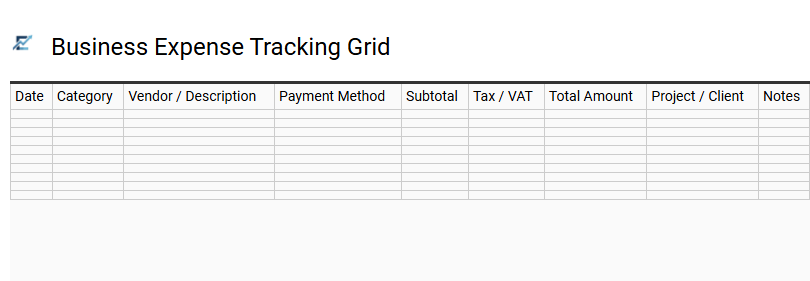
Business Expense Tracking Grid
A business expense tracking grid is a specialized Excel template designed to streamline financial monitoring and maintain precise records of company expenditures. By systematically logging transaction dates, spending categories, vendors, and payment methods, businesses can visualize real-time cash flow and maximize potential tax deductions. This structured format simplifies data entry and leverages built-in formulas to automate totals, ensuring accurate budget oversight and fiscal transparency. Utilizing a digital ledger reduces manual accounting errors, simplifies monthly bank reconciliation, and provides a clear audit trail for year-end reporting.
This template is ideal for managing freelance project costs, tracking corporate travel reimbursements, or monitoring monthly office supply overhead.
Download: 💾 Business Expense Tracking Grid .xls
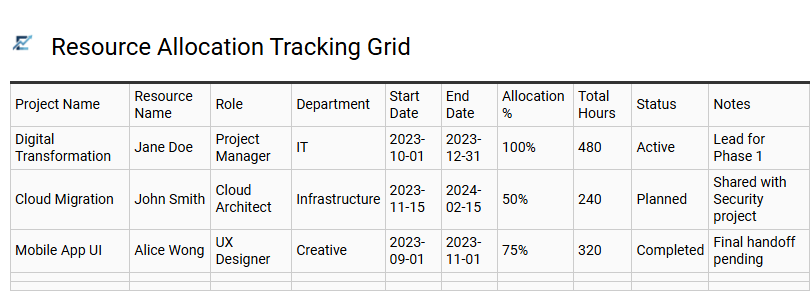
Resource Allocation Tracking Grid
A Resource Allocation Tracking Grid is a specialized Excel template designed to streamline project management by mapping team members and equipment against specific timelines. This tool provides a clear visual overview of workload distribution, helping managers identify resource bottlenecks and underutilized assets in real-time.
By utilizing dynamic formulas and data validation, the grid simplifies complex scheduling into actionable insights, ensuring every task is appropriately staffed. This centralized tracking system enhances organizational transparency, prevents employee burnout, and optimizes operational efficiency by aligning team capacity with project demands.
This template is highly suitable for managing software development sprints, coordinating construction site labor, and scheduling complex multi-city marketing events.
Download: 💾 Resource Allocation Tracking Grid .xls
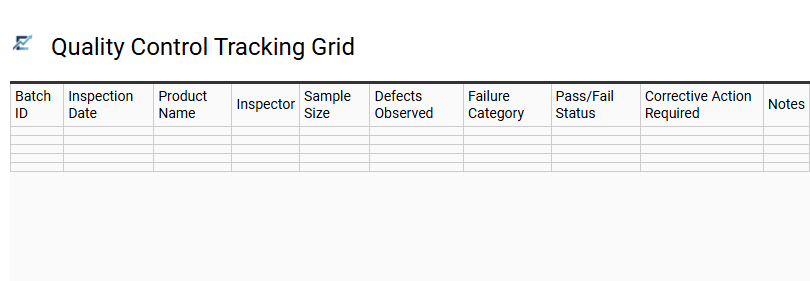
Quality Control Tracking Grid
A Quality Control (QC) Tracking Grid is a specialized Excel tool designed to monitor production standards and maintain operational excellence. By utilizing a structured grid format, businesses can systematically document inspections, track defect rates, and ensure adherence to rigorous industry benchmarks. This template facilitates real-time data entry and visualization, allowing teams to identify process bottlenecks or recurring errors through conditional formatting and automated status updates.
Implementing a digital tracking grid enhances organizational accountability and simplifies audit trails by centralizing performance metrics in one accessible location. This streamlined approach to quality management ensures that corrective actions are recorded and addressed promptly, effectively reducing waste and improving output consistency.
This template is suitable for manufacturing production lines, software beta testing logs, and food safety compliance inspections.
Download: 💾 Quality Control Tracking Grid .xls
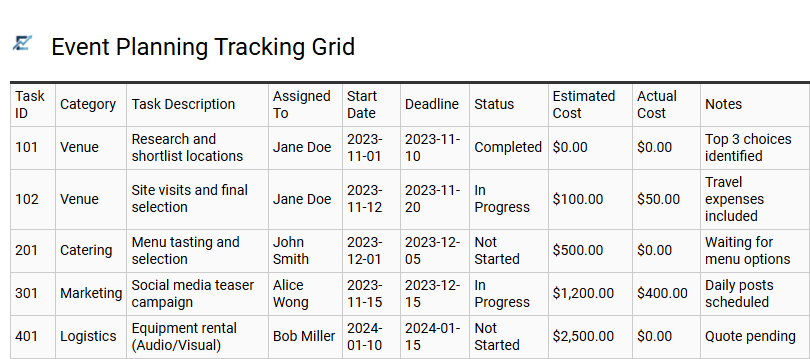
Event Planning Tracking Grid
An Event Planning Tracking Grid is a comprehensive project management tool designed to streamline logistics and ensure no detail is overlooked. By utilizing an Excel-based template, organizers can centralize task lists, monitor vendor deadlines, and manage budgets within a single, cohesive document. This structured approach provides high-level visibility into project timelines, allowing teams to identify potential bottlenecks and maintain stakeholder alignment through real-time updates.
Key features often include conditional formatting for status indicators, automated date calculations, and priority tags to help planners stay on schedule. Organizing data into a clear grid format allows for easy filtering of responsibilities across various phases of execution.
This template is suitable for corporate conferences, wedding coordination, and community fundraisers.
Download: 💾 Event Planning Tracking Grid .xls
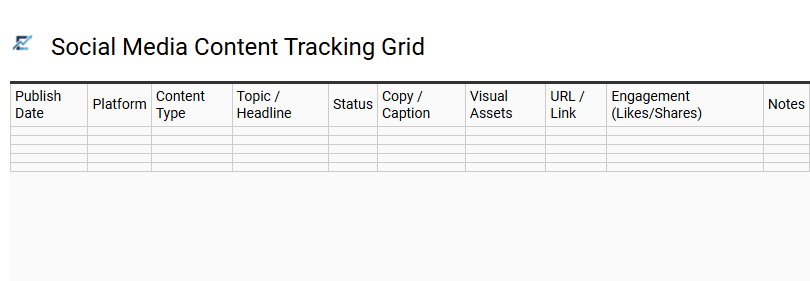
Social Media Content Tracking Grid
A social media content tracking grid is an essential Excel-based tool designed to streamline the planning, execution, and analysis of your digital marketing strategy. By centralizing publication dates, platform-specific requirements, and creative assets into one structured layout, it ensures your brand maintains a consistent online presence. This template allows teams to monitor the entire content lifecycle-from initial ideation and drafting to final approval and live status.
Utilizing a tracking grid helps identify gaps in your editorial calendar, manage multi-channel workflows, and record engagement metrics for future performance optimization. Its versatile format simplifies collaboration between content creators and managers, ensuring every post aligns with broader marketing objectives. This template is perfectly suited for managing multi-platform seasonal campaigns, coordinating monthly influencer deliverables, and organizing a consistent daily posting schedule for boutique agencies.
This professional Excel grid template serves as a comprehensive data management solution for systematic performance tracking. By utilizing optimized spreadsheet layouts, users can effectively monitor KPIs and streamline progress evaluation. This productivity tool ensures high-level workflow efficiency, turning raw metrics into actionable insights through structured reporting. Elevate your monitoring strategy with a robust reporting dashboard designed for precision. Implementing this systematic approach facilitates consistent improvement and accountability across all operational metrics to help you master organizational goals and drive sustainable results.