
Comprehensive Excel Spreadsheet for Google Docs Organization and Management
Streamlining your digital workflow becomes effortless when utilizing a specialized Excel template for tracking Google Docs. This robust spreadsheet solution centralizes document management, allowing teams to monitor content status, collaborative edits, and access permissions within a single interface. By integrating project tracking metadata and version history logs, you ensure peak productivity and seamless data organization across your cloud storage. Optimize your editorial calendar and maintain strict workflow oversight using these professional tools. Please check our already made variation of templates below.
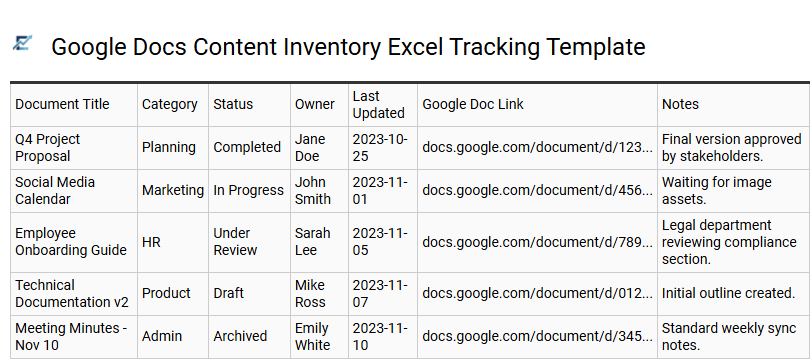
Google Docs Content Inventory Excel Tracking Template
Managing a high volume of cloud-based files requires a centralized system to maintain oversight. An Excel-based content inventory acts as a master directory for your Google Docs, enabling superior organization, status monitoring, and metadata tracking. By logging document URLs, author permissions, and update frequencies in a structured spreadsheet, teams can eliminate content silos and drastically improve workflow efficiency.
This tracking template is essential for performing comprehensive content audits, ensuring every digital asset is categorized by topic, lifecycle stage, and SEO priority. It bridges the gap between collaborative live editing in Google Drive and the robust data sorting and filtering capabilities of Microsoft Excel.
This template is suitable for content marketing audits, academic research bibliographies, and cross-departmental project documentation management.
Download: 💾 Google Docs Content Inventory Excel Tracking Template .xls
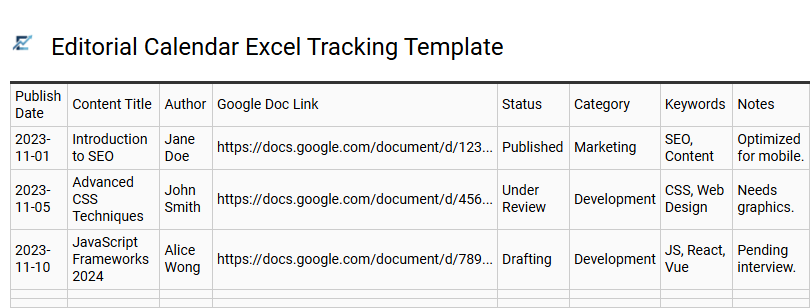
Editorial Calendar Excel Tracking Template
Maintaining a streamlined workflow requires a centralized hub for your digital assets. An Editorial Calendar Excel Tracking Template serves as a master directory for your Google Docs, allowing teams to monitor document statuses, deadlines, and ownership in real-time. By integrating live document links directly into an Excel sheet, content managers can track metadata such as SEO keywords, target personas, and publication stages without toggling between multiple tabs.
This organizational structure reduces version control errors and ensures that every piece of content aligns with your broader marketing strategy. Using a structured spreadsheet provides high-level visibility into your content pipeline, making it easier to identify bottlenecks and maintain a consistent posting frequency across all channels.
This template is suitable for managing multi-author blog schedules, tracking white paper revision cycles, and organizing collaborative social media copy assets.
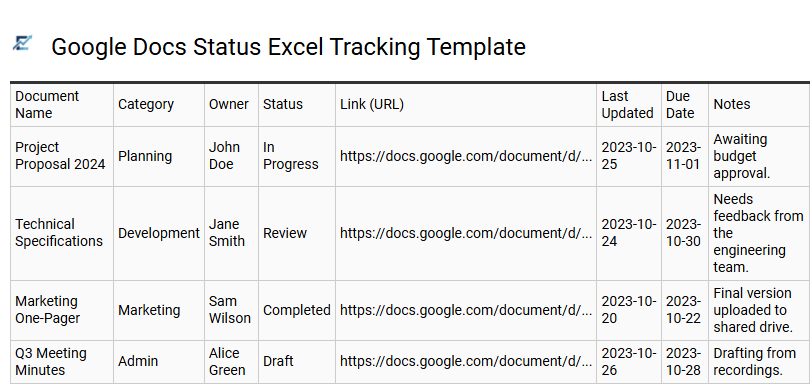
Google Docs Status Excel Tracking Template
Managing a high volume of cloud-based files requires a centralized system to maintain version control and project transparency. A Google Docs status Excel tracking template provides a structured overview of your digital workspace. By logging document titles, direct URLs, assigned owners, and real-time statuses-such as "Drafting," "In Review," or "Approved"-teams can eliminate the frustration of searching through cluttered folders.
Using Excel for tracking allows for advanced filtering and deadline monitoring that native file systems lack. It bridges the gap between collaborative writing and rigorous project management, ensuring stakeholders have immediate visibility into the document lifecycle. This systematic approach reduces communication overhead and prevents critical files from being overlooked.
This template is ideal for managing a content editorial calendar, tracking legal contract approvals, or coordinating collaborative academic research papers.
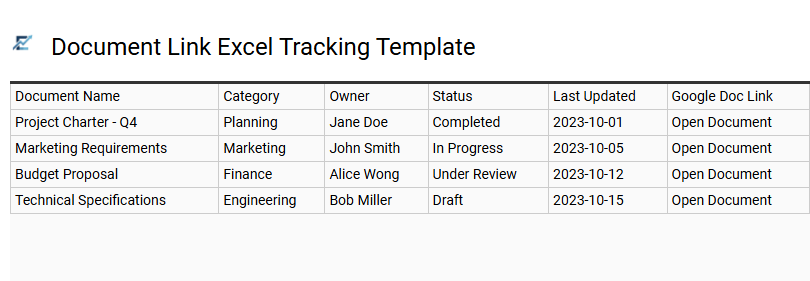
Document Link Excel Tracking Template
Managing a high volume of cloud-based files requires a centralized organization system. A Document Link Excel Tracking Template serves as a master directory, bridging the gap between local project management and Google Drive. By utilizing this structured spreadsheet, teams can categorize Google Docs by status, department, or priority while maintaining instant access through embedded hyperlinks.
This tracking method prevents document fragmentation and ensures that collaborators always locate the most current versions. Essential columns typically include document titles, live URLs, assigned owners, and last-modified dates, providing a comprehensive overview of your digital workspace at a glance.
This template is suitable for managing content editorial calendars, tracking legal contract repositories, and organizing academic research project logs.
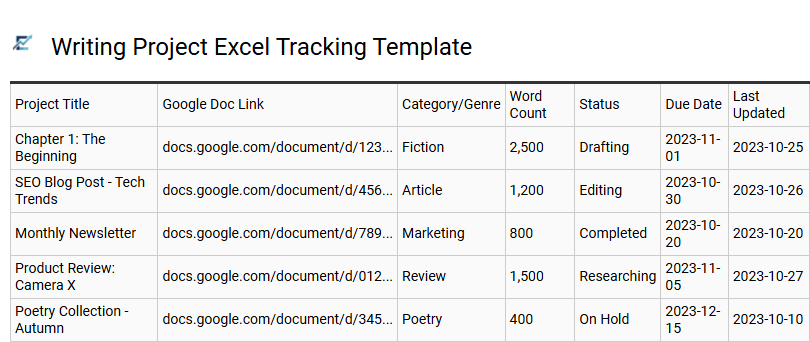
Writing Project Excel Tracking Template
Managing a high volume of Google Docs requires a centralized system to prevent version confusion and missed deadlines. An Excel tracking template provides a high-level dashboard for your writing pipeline, allowing you to monitor document status, word counts, and direct links in one location.
By organizing metadata such as target keywords, due dates, and stakeholder assignments, you transform a cluttered list of files into a data-driven workflow. This structured approach improves visibility across the entire content lifecycle-from initial ideation to final publication. Utilizing a spreadsheet ensures every Google Doc is accounted for, enabling better resource allocation and real-time progress reporting for teams and solo creators alike.
This template is ideal for managing multi-author blogs, tracking academic research papers, or organizing complex technical documentation suites.
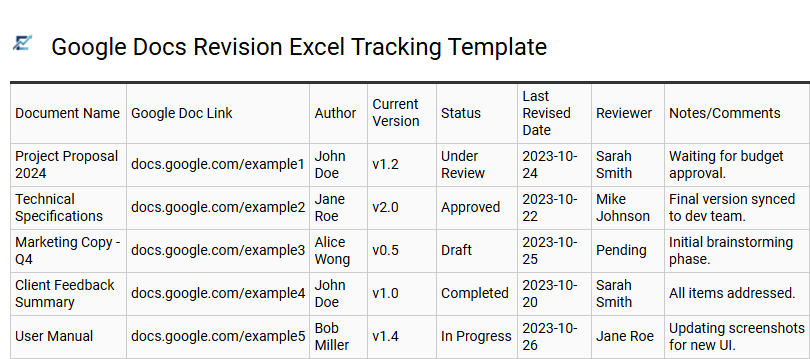
Google Docs Revision Excel Tracking Template
A Google Docs Revision Excel Tracking Template is a vital tool for teams requiring high-level oversight of document lifecycles. This structured spreadsheet serves as a centralized log to monitor version history, record modification dates, and track contributor edits across multiple cloud files. By integrating document IDs and status updates into Excel, project managers can easily filter progress and maintain a definitive audit trail that native folders often lack.
This systematic approach ensures accountability and prevents data loss during complex collaborative projects. It bridges the gap between real-time editing and formal reporting, allowing for efficient management of content revisions and approval workflows.
This template is suitable for managing multi-author whitepapers, tracking legal contract iterations, and monitoring monthly content marketing calendars.
Download: 💾 Google Docs Revision Excel Tracking Template .xls
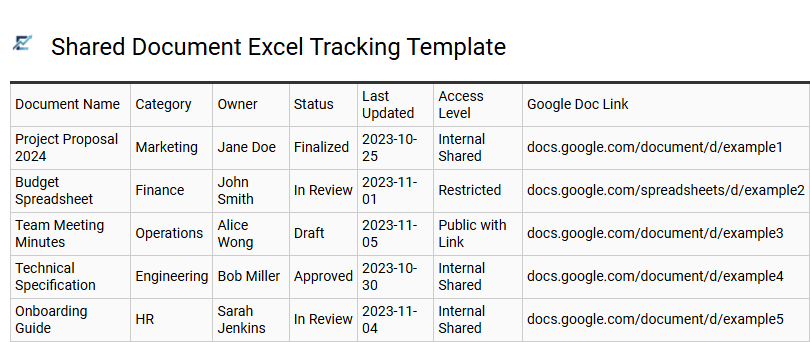
Shared Document Excel Tracking Template
A Shared Document Excel Tracking Template provides a centralized dashboard to manage and monitor multiple Google Docs from a single spreadsheet. By indexing live document links, assigned owners, permission levels, and real-time production statuses, teams can eliminate the search fatigue often associated with disorganized cloud storage. This semantic organization ensures all collaborators have immediate access to the latest file versions while tracking progress against specific project deadlines. Utilizing an Excel-based log enhances oversight for project managers who need to coordinate high volumes of shared assets across various departments or external stakeholders.
This template is ideal for managing a multi-channel content marketing calendar, organizing legal contract reviews, and tracking collaborative technical documentation updates.
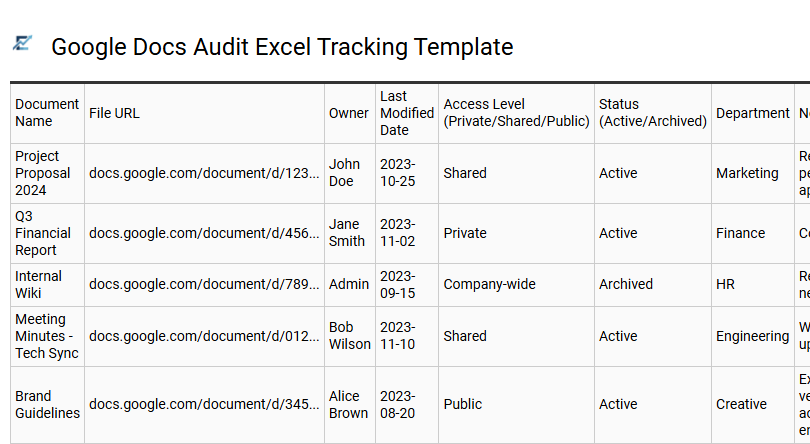
Google Docs Audit Excel Tracking Template
Efficiently managing a growing library of cloud-based assets requires structured oversight to ensure data security and workflow productivity. A Google Docs Audit Excel Tracking Template provides a centralized dashboard to catalog document URLs, ownership, access levels, and last-modified dates. By maintaining this inventory, teams can perform regular security audits, identify redundant files, and ensure that sensitive information is shared only with authorized users.
This systematic approach bridges the gap between Google's collaborative flexibility and Excel's robust filtering and reporting capabilities, making it indispensable for maintaining an organized digital workspace. Utilizing this template helps prevent "document sprawl" and ensures that every file serves a current purpose within your organization's ecosystem.
This template is ideal for content marketing editorial calendars, internal corporate compliance audits, and collaborative academic research projects.
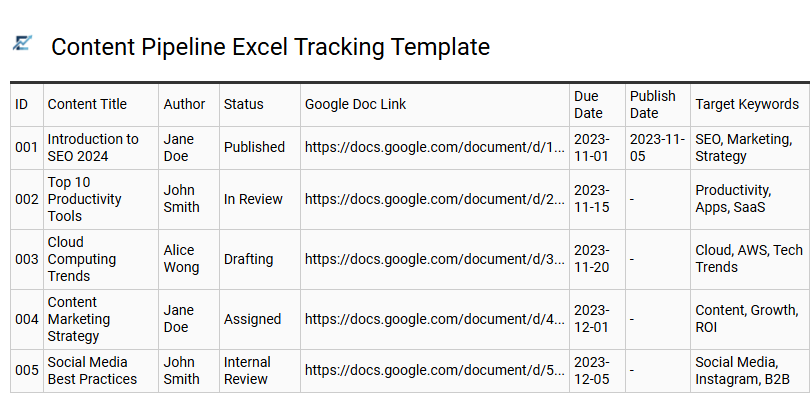
Content Pipeline Excel Tracking Template
A Content Pipeline Excel Tracking Template serves as a centralized command center for managing collaborative writing projects. While Google Docs is ideal for real-time drafting, Excel provides a robust framework for monitoring metadata, deadlines, and production stages. By cataloging document URLs, assigned creators, and SEO keywords in a structured grid, teams can visualize their entire workflow at a glance.
This systematic approach prevents content bottlenecks and ensures accountability across various departments. Integrating status markers like "Drafting," "In Review," and "Published" allows project managers to identify delays instantly and streamline the transition from ideation to publication.
This template is suitable for managing multi-author blog calendars, tracking collaborative academic research papers, and organizing corporate legal document reviews.
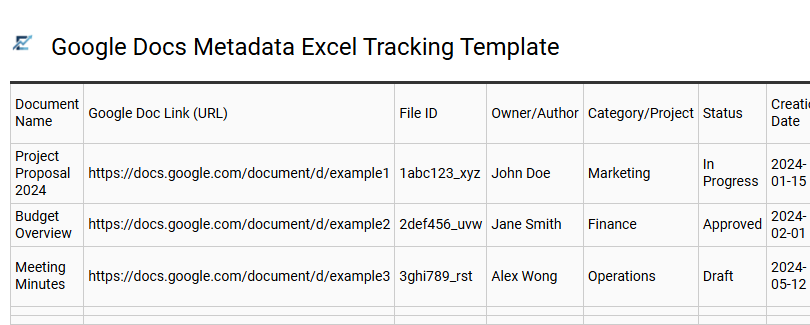
Google Docs Metadata Excel Tracking Template
Managing a high volume of cloud-based files requires a centralized system to ensure accessibility and oversight. This Excel template streamlines Google Docs management by capturing vital metadata, including document titles, live URLs, ownership details, and last-modified dates.
By maintaining a structured spreadsheet index, teams can perform rapid audits, monitor workflow statuses, and eliminate the frustration of searching through cluttered Drive folders. Using Excel as a master directory enhances searchability and ensures that stakeholders have immediate access to the most current document versions. This approach is essential for maintaining organizational transparency, improving version control, and ensuring long-term digital asset preservation.
This template is ideal for managing content marketing editorial calendars, tracking multi-stage legal contract approvals, and archiving technical project documentation.
Download: 💾 Google Docs Metadata Excel Tracking Template .xls
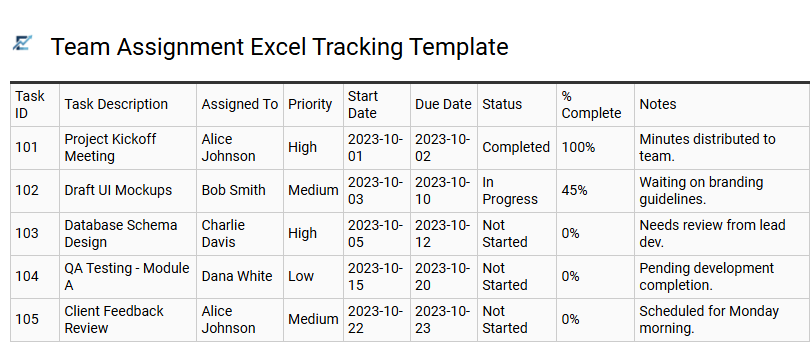
Team Assignment Excel Tracking Template
A Team Assignment Excel Tracking Template is an essential tool for project managers looking to centralize collaboration across multiple Google Docs. While Google Workspace offers real-time editing, an Excel-based tracker provides a superior birds-eye view of document ownership, status updates, and delivery timelines.
By integrating direct links to live documents within a structured spreadsheet, teams can eliminate the confusion of searching through drive folders. This method enhances accountability by clearly defining assignees and deadlines for every collaborative asset. Utilizing such a template ensures that high-priority files are never lost and that workflow progress remains transparent for all stakeholders.
This template is perfectly suited for managing collaborative research whitepapers, tracking recurring monthly financial reports, or organizing multi-author content marketing editorial calendars.
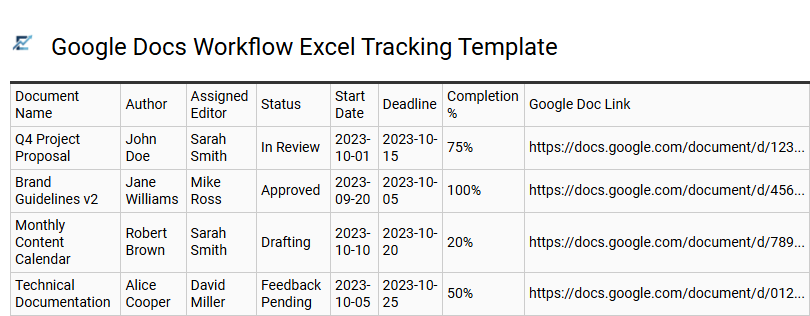
Google Docs Workflow Excel Tracking Template
A Google Docs workflow Excel tracking template is an essential tool for centralizing document management outside of the standard folder view. It provides a structured framework to monitor the lifecycle of multiple files, tracking key data points such as creation dates, editor assignments, current status, and live URLs. By bridging Google's collaborative writing power with Excel's data analysis features, teams can gain high-level visibility into content production pipelines.
Using this template eliminates manual searching and ensures project accountability across remote or hybrid teams. It allows for quick filtering of deadlines and performance reporting that Google Drive cannot provide natively.
This template is ideal for managing a multi-author editorial blog calendar, coordinating complex academic research documentation, and tracking version control for corporate policy updates.
Download: 💾 Google Docs Workflow Excel Tracking Template .xls
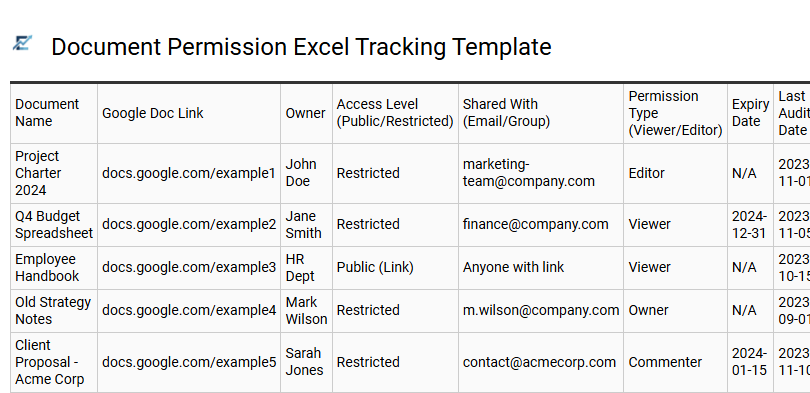
Document Permission Excel Tracking Template
Managing access levels across multiple Google Docs is essential for maintaining data security and organizational clarity. A Google Docs permission tracking template provides a centralized audit trail to monitor who has "Viewer," "Commenter," or "Editor" rights. While Google Drive offers individual file sharing settings, an Excel-based tracker allows administrators to see a high-level overview of sharing statuses, document owners, and expiration dates for external links.
By using this template, teams can prevent unauthorized data leaks and streamline the offboarding process when team members depart. It bridges the gap between live cloud collaboration and formal governance by recording every permission change in a sortable, filterable format.
This template is suitable for managing client deliverables in creative agencies, tracking internal SOP access for HR departments, and monitoring sensitive financial reports during annual audits.
Download: 💾 Document Permission Excel Tracking Template .xls
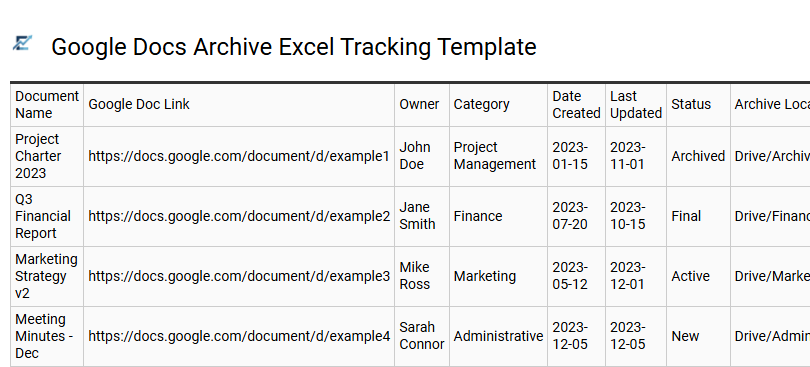
Google Docs Archive Excel Tracking Template
Managing an extensive library of cloud-based files requires organization beyond the standard Google Drive interface. A Google Docs Archive Excel Tracking Template provides a centralized system to catalog document URLs, metadata, and current statuses. By consolidating cloud file details into an Excel spreadsheet, teams can leverage advanced filtering, sorting, and offline accessibility to ensure critical information remains discoverable.
This tracking system improves workflow efficiency by documenting key attributes such as file owners, last modified dates, and departmental tags. It serves as a vital audit trail for version control and digital asset management. Utilizing an Excel-based archive allows for better resource oversight and long-term data preservation across complex projects.
This template is suitable for managing content marketing calendars, organizing legal contract repositories, and tracking collaborative academic research papers.
Download: 💾 Google Docs Archive Excel Tracking Template .xls
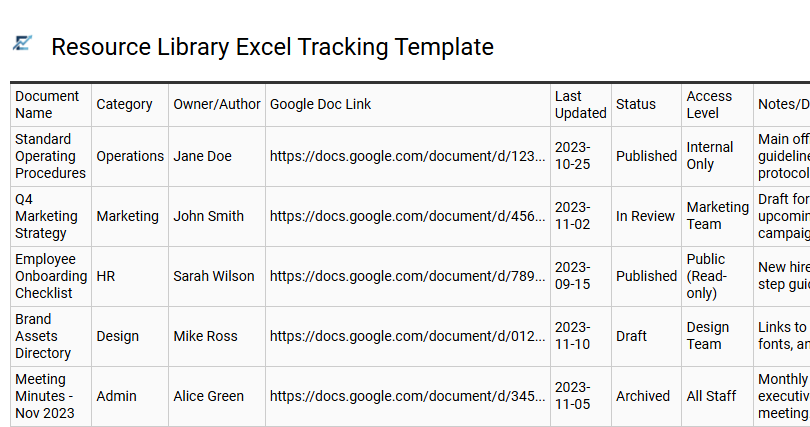
Resource Library Excel Tracking Template
Managing a growing digital archive requires more than just cloud storage; it demands a centralized system for oversight. A Resource Library Excel Tracking Template provides a structured dashboard to catalog your Google Docs, enabling you to monitor document status, ownership, and accessibility at a glance. By recording live links alongside metadata such as keywords, creation dates, and review cycles, you bridge the gap between file storage and active project management.
This semantic-focused approach ensures that your document inventory remains searchable and organized, reducing the time spent navigating complex folder hierarchies. It is an essential tool for teams seeking to maintain a single source of truth for their shared assets while leveraging Excel's superior filtering and reporting capabilities.
This template is perfectly suited for managing marketing content calendars, maintaining corporate policy handbooks, and organizing academic research repositories.
This comprehensive Excel spreadsheet serves as a powerful central dashboard for Google Docs organization. By integrating document tracking and workflow optimization, users can effectively manage cloud storage assets. This productivity tool leverages data sorting and metadata analysis to enhance administrative efficiency. Implementing this file management system ensures seamless digital asset categorization. Ultimately, utilizing a structured Excel workbook provides the necessary oversight for content creators and teams to maintain a clutter-free workspace and streamlined information architecture.