
Comprehensive Error Tracking Log Spreadsheet Template for Microsoft Excel
Managing data accuracy is crucial for operational success. Utilizing a robust Excel template for tracking errors streamlines your quality control process, ensuring every discrepancy is documented. By implementing a structured log, teams can identify recurring patterns, improve data integrity, and enhance workflow efficiency. This spreadsheet solution simplifies monitoring bugs or data entry mistakes, providing a clear audit trail for reporting and analysis. Effective error management prevents costly oversights and optimizes performance. Explore our curated selection to find a versatile variation of templates below.
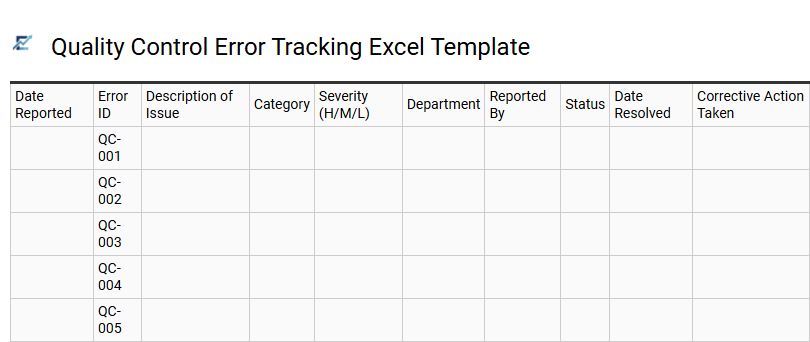
Quality Control Error Tracking Excel Template
A Quality Control Error Tracking Excel Template is an essential tool for organizations dedicated to maintaining high standards and operational excellence. By systematically documenting defects, oversights, and system failures, teams can pinpoint recurring issues and implement effective corrective actions. This structured approach to quality assurance minimizes waste, improves data integrity, and boosts overall productivity.
Utilizing an Excel-based log facilitates easy filtering, automated reporting, and visual trend analysis via built-in charts. It acts as a centralized repository for troubleshooting, ensuring every mistake is transformed into a measurable opportunity for continuous process improvement.
This template is highly effective for monitoring manufacturing production defects, tracking software bugs during development cycles, and auditing manual data entry for financial accuracy.
Download: 💾 Quality Control Error Tracking Excel Template .xls
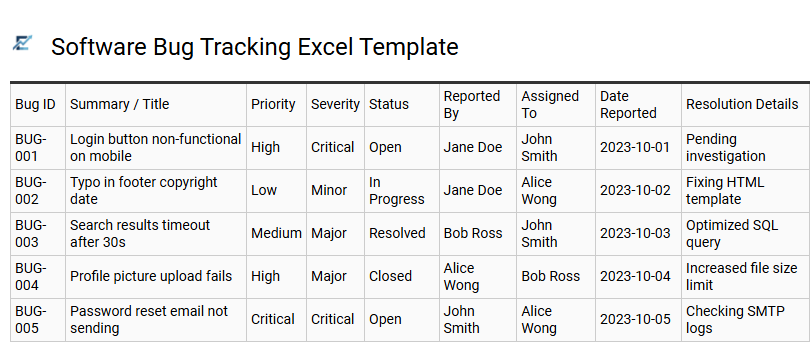
Software Bug Tracking Excel Template
A software bug tracking Excel template is an essential framework for developers and QA engineers to document, categorize, and monitor technical glitches throughout the development lifecycle. By utilizing dedicated columns for issue severity, priority, status, and assigned owners, teams can maintain a centralized overview of project health and resolution progress.
This structured approach facilitates efficient communication and ensures that critical errors are addressed promptly before deployment. Using a spreadsheet-based tracker provides a cost-effective, highly customizable solution for managing workflows without the overhead of complex enterprise software. It allows for easy filtering and reporting, helping project managers identify recurring bottlenecks in the debugging phase.
This template is ideally suited for small-scale mobile app development, internal tool beta testing phases, and collaborative academic coding projects.
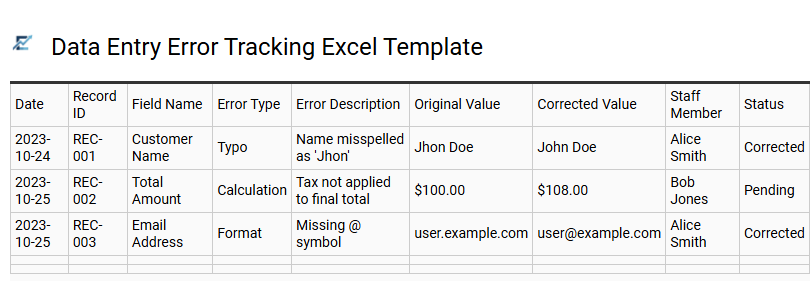
Data Entry Error Tracking Excel Template
A Data Entry Error Tracking Excel Template is a vital tool for maintaining high data integrity and operational accuracy. By systematically documenting mistakes, teams can identify recurring patterns and address root causes through targeted training or process refinements.
These templates typically feature structured columns for the error date, category, responsible party, and corrective actions. Centralizing this information allows managers to monitor Quality Assurance (QA) metrics, reduce expensive rework, and improve overall productivity. Leveraging a spreadsheet for error logs transforms raw data into actionable insights, ensuring long-term consistency across all business documentation.
This template is suitable for medical billing audits, e-commerce product uploads, and financial record management.
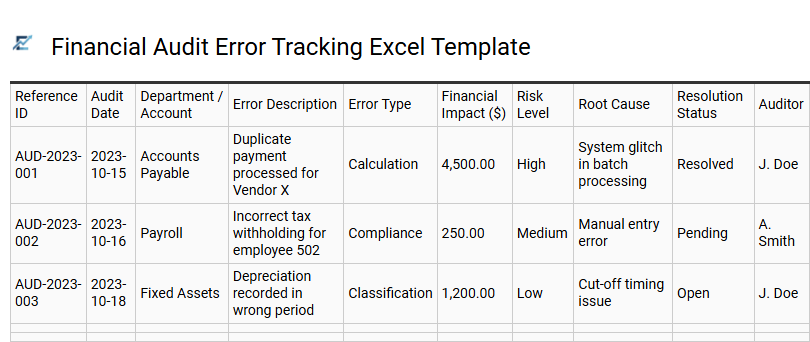
Financial Audit Error Tracking Excel Template
A Financial Audit Error Tracking Excel Template is an essential tool for maintaining fiscal integrity and ensuring regulatory compliance. This structured framework allows auditors to systematically document accounting discrepancies, procedural deviations, and calculation inaccuracies. By capturing data points such as error frequency, financial impact, and root cause analysis, organizations can identify systemic weaknesses in their internal controls.
Utilizing a centralized spreadsheet improves transparency, providing a clear audit trail for stakeholders and simplifying the remediation process. It enables teams to monitor the status of corrective actions in real-time, significantly reducing the risk of material misstatements in final reports. This template is suitable for internal control testing, quarterly tax filing verification, and accounts payable reconciliation processes.
Download: 💾 Financial Audit Error Tracking Excel Template .xls
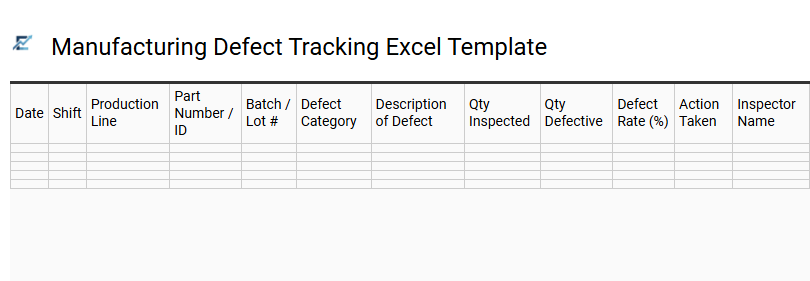
Manufacturing Defect Tracking Excel Template
A manufacturing defect tracking Excel template is a vital quality control tool designed to document, categorize, and analyze production errors in real-time. By systematically recording data points such as defect type, root cause, severity, and production line, businesses can identify recurring patterns and minimize waste. These templates facilitate data-driven decision-making, helping quality assurance teams implement corrective actions to improve overall yield and maintain industry compliance. Utilizing a structured spreadsheet ensures clear visibility into operational bottlenecks and streamlines the reporting process for stakeholders. This systematic approach to error logging is essential for maintaining high standards and reducing the cost of poor quality across various industrial sectors. This template is suitable for electronics assembly lines, textile garment inspections, and automotive component manufacturing.
Download: 💾 Manufacturing Defect Tracking Excel Template .xls
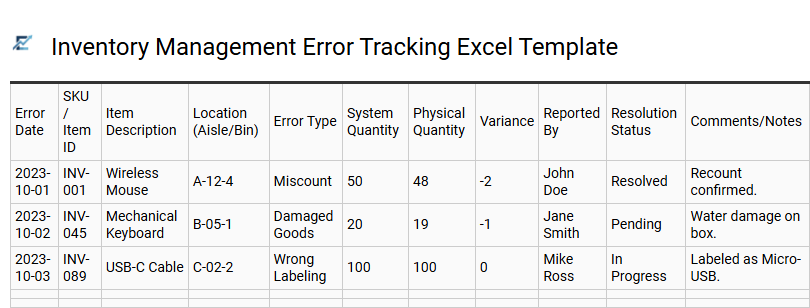
Inventory Management Error Tracking Excel Template
Streamline your warehouse operations with an Inventory Management Error Tracking Excel Template. This specialized digital tool allows businesses to systematically document discrepancies such as mispicks, stockout events, and data entry mistakes. By recording the frequency and root causes of logistical slip-ups, managers can identify recurring patterns, enhance quality control protocols, and minimize financial losses associated with shrinkage. Implementing a structured error log ensures that corrective measures are monitored, leading to improved supply chain transparency and significantly more accurate stock levels. This data-driven approach is essential for any organization aiming to optimize their fulfillment process, reduce overhead, and maintain high customer service standards.
This template is ideal for retail warehouse audits, e-commerce order fulfillment monitoring, and manufacturing raw material reconciliation.
Download: 💾 Inventory Management Error Tracking Excel Template .xls
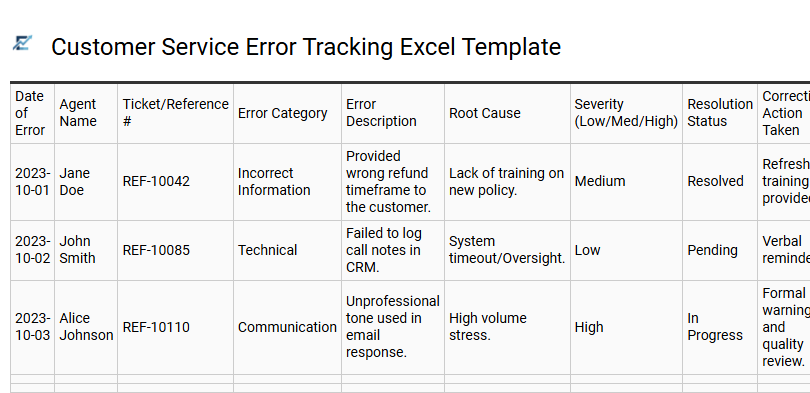
Customer Service Error Tracking Excel Template
A Customer Service Error Tracking Excel Template is a specialized quality assurance tool designed to document, categorize, and analyze mistakes within support workflows. By systematically recording discrepancies in communication, data entry, or technical troubleshooting, businesses can identify recurring patterns and root causes.
Utilizing this structured format allows managers to transform raw error data into actionable insights. Features often include dropdown menus for error types, severity rankings, and resolution status, enabling precise performance monitoring. This data-driven approach facilitates targeted employee training, optimizes internal processes, and ensures a consistently high standard of customer satisfaction.
This template is suitable for: e-commerce order fulfillment audits, call center quality monitoring, and SaaS technical support ticket reviews.
Download: 💾 Customer Service Error Tracking Excel Template .xls
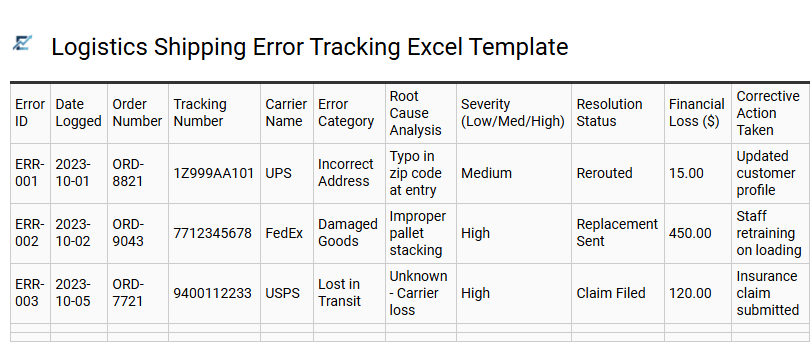
Logistics Shipping Error Tracking Excel Template
A Logistics Shipping Error Tracking Excel Template is a vital tool for supply chain professionals aiming to minimize disruptions and optimize delivery performance. By systematically logging issues such as incorrect labeling, damaged cargo, or delayed shipments, businesses can perform a deep root cause analysis to prevent recurring failures. This template facilitates data-driven decision-making, allowing managers to hold carriers accountable and improve overall customer satisfaction.
Key metrics tracked often include error frequency, financial impact, and time-to-resolution, providing a clear overview of operational health. Utilizing a structured spreadsheet ensures that every discrepancy is documented, categorized, and addressed efficiently. This template is suitable for e-commerce fulfillment centers monitoring carrier reliability, warehouse teams auditing order picking accuracy, and import-export coordinators tracking documentation errors.
Download: 💾 Logistics Shipping Error Tracking Excel Template .xls
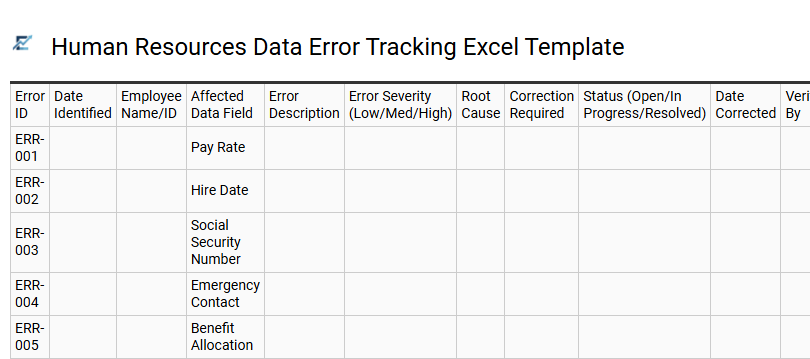
Human Resources Data Error Tracking Excel Template
Maintaining accurate employee records is critical for organizational compliance and operational efficiency. This Excel template serves as a centralized log for identifying, categorizing, and resolving discrepancies within HR databases. By tracking errors-such as incorrect payroll details, outdated contact information, or missing compliance certifications-teams can pinpoint recurring issues and implement corrective training measures.
This structured approach ensures high data integrity, facilitating reliable reporting for internal audits and strategic decision-making. Utilizing a standardized spreadsheet simplifies the oversight of data cleaning projects and significantly improves the quality of long-term record-keeping.
This template is ideal for auditing payroll submissions, verifying onboarding documentation completeness, and managing benefits enrollment data accuracy.
Download: 💾 Human Resources Data Error Tracking Excel Template .xls
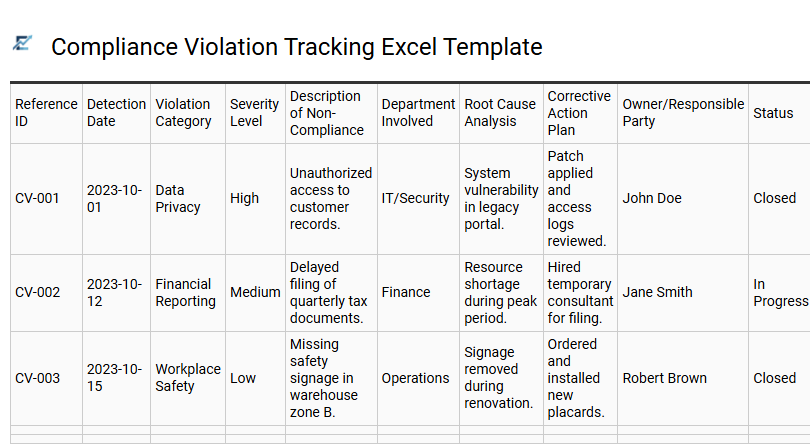
Compliance Violation Tracking Excel Template
A Compliance Violation Tracking Excel Template is an essential tool for organizations aiming to maintain regulatory standards and internal integrity. This template allows risk management teams to systematically document errors, policy breaches, and procedural deviations in a centralized format. By capturing key data points such as the date of occurrence, severity level, root cause analysis, and remediation status, businesses can effectively mitigate risks and ensure accountability.
Implementing this structured tracking system facilitates clear audit trails and helps identify recurring patterns that require process improvements. It serves as a cost-effective solution for maintaining transparency and demonstrating due diligence during external audits.
This kind of template is suitable for financial services monitoring AML breaches, healthcare providers tracking HIPAA privacy violations, and HR departments logging workplace safety incidents.
Download: 💾 Compliance Violation Tracking Excel Template .xls
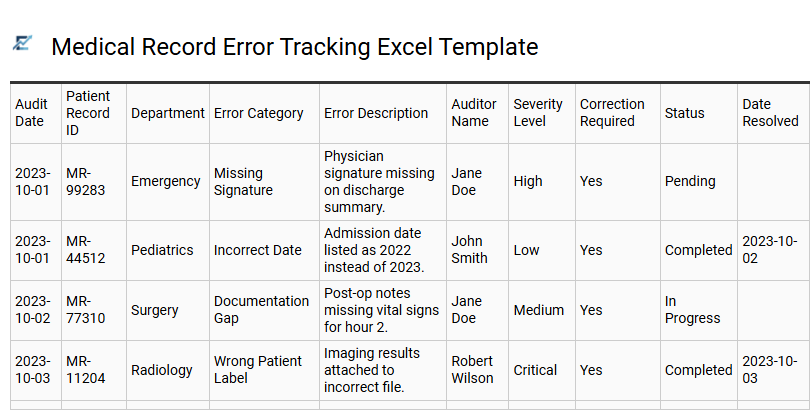
Medical Record Error Tracking Excel Template
A Medical Record Error Tracking Excel Template is a specialized tool designed to maintain high standards of data integrity and patient safety. It provides a centralized framework for healthcare professionals to document, categorize, and monitor discrepancies within clinical documentation, patient demographics, and billing procedures. By utilizing structured fields for error types, severity levels, and resolution status, organizations can conduct thorough root cause analyses and ensure compliance with regulatory mandates like HIPAA.
Implementing this systematic approach allows Health Information Management (HIM) departments to identify recurring trends, improve staff training, and mitigate risks associated with inaccurate health records. This template is suitable for hospital quality assurance audits, medical billing and coding accuracy reviews, and clinical documentation improvement (CDI) programs.
Download: 💾 Medical Record Error Tracking Excel Template .xls
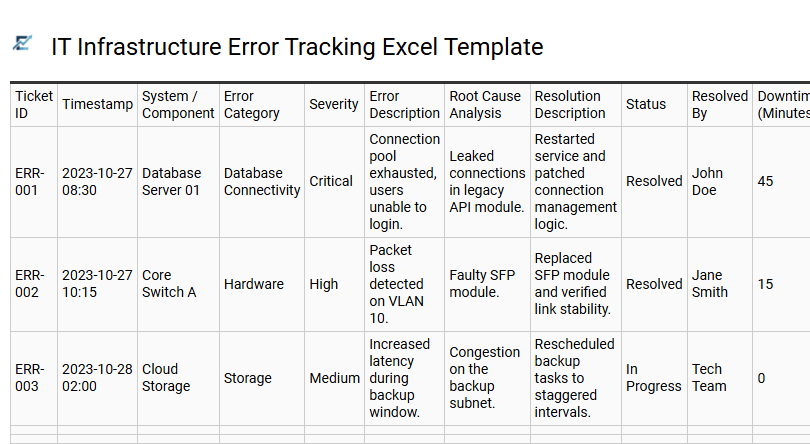
IT Infrastructure Error Tracking Excel Template
An IT Infrastructure Error Tracking Excel Template is an essential tool for maintaining system reliability and documenting technical disruptions. This structured spreadsheet allows IT teams to log hardware failures, software glitches, and network outages in a centralized location. By capturing critical data points like error severity, affected components, and downtime duration, organizations can identify recurring patterns and perform effective root cause analysis.
Utilizing this template streamlines the troubleshooting process, improves incident response times, and ensures historical data is readily available for future audits or maintenance planning. It serves as a cost-effective alternative to complex management software for small to medium-sized data centers looking to optimize their workflow.
This kind of template is suitable for tracking server hardware malfunctions, monitoring enterprise database connectivity issues, and documenting scheduled maintenance performance gaps.
Download: 💾 IT Infrastructure Error Tracking Excel Template .xls
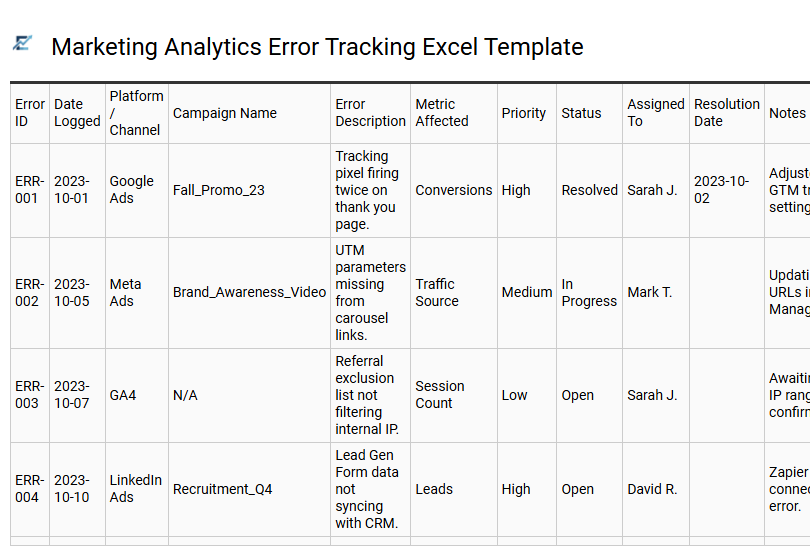
Marketing Analytics Error Tracking Excel Template
Maintaining data integrity is critical for accurate performance reporting. This specialized Excel template provides a structured framework for identifying, logging, and resolving discrepancies within your marketing datasets. By documenting technical glitches, tracking pixel failures, and manual entry mistakes, marketing analysts can ensure the reliability of their KPIs and ROI calculations.
The template helps teams categorize errors by severity and platform-such as GA4, Meta Ads, or Google Ads-facilitating faster troubleshooting and long-term trend analysis. Using a centralized log improves communication between data teams and stakeholders, ensuring that budget decisions are based on validated information. This proactive approach to data quality management reduces reporting downtime and strengthens the overall marketing analytics infrastructure.
This template is ideal for auditing UTM tagging inconsistencies, monitoring conversion tracking pixel firing errors, and identifying data synchronization issues between CRMs and ad platforms.
Download: 💾 Marketing Analytics Error Tracking Excel Template .xls
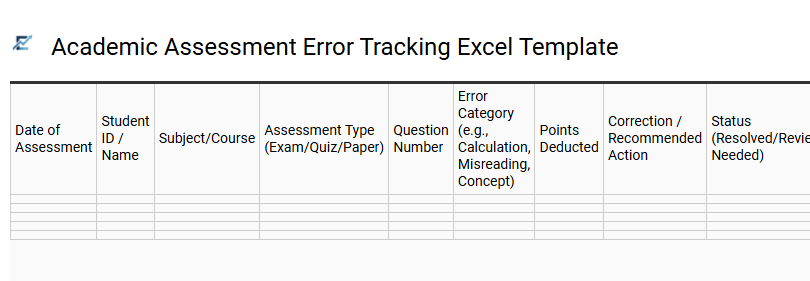
Academic Assessment Error Tracking Excel Template
An Academic Assessment Error Tracking Excel Template is a structured data management tool designed to identify, categorize, and analyze mistakes within educational grading and testing processes. By systematically logging discrepancy types-such as calculation slips, conceptual misunderstandings, or administrative oversights-educators can maintain high standards of evaluation integrity. This template facilitates data-driven decision-making, allowing institutions to pinpoint recurring learning gaps and refine instructional strategies based on quantitative evidence.
Key features often include automated dashboards, error-frequency charts, and status trackers to ensure every correction is addressed promptly. This systematic approach streamlines quality control and improves the overall accuracy of student performance reporting.
This template is ideal for university examination auditing, multi-teacher grading moderation, and tracking learning deficit trends in K-12 standardized testing.
Download: 💾 Academic Assessment Error Tracking Excel Template .xls
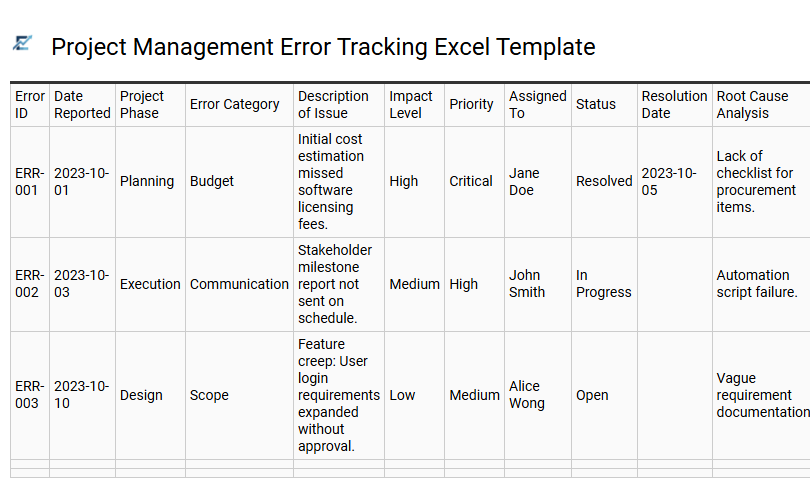
Project Management Error Tracking Excel Template
A Project Management Error Tracking Excel Template is a vital tool designed to identify, document, and resolve inconsistencies throughout a project lifecycle. By centralizing data, teams can monitor bug reports, operational mistakes, or data entry errors in real-time. This structured approach ensures accountability through clear ownership, severity levels, and status updates, which significantly improves quality control and project deliverability.
Utilizing Excel provides a customizable and cost-effective environment to visualize trends and prevent recurring issues from derailing milestones. Streamlining error management through a spreadsheet allows stakeholders to maintain transparency and ensure every oversight is addressed promptly.
This template is ideal for software development bug logging, financial audit discrepancy tracking, and marketing campaign editorial reviews.
Download: 💾 Project Management Error Tracking Excel Template .xls
This comprehensive error tracking log spreadsheet template for Microsoft Excel optimizes your quality assurance process. By centralizing bug reporting and issue management, teams can streamline workflow automation and enhance data validation. This formula-driven project management tool allows for precise status tracking, prioritizing resolution time and troubleshooting efficiency. Utilizing such a robust system ensures superior data integrity across complex datasets. Implement this Excel-based solution today to achieve meticulous documentation, improved team collaboration, and a more resilient operational framework for all technical projects.