
Comprehensive Employee Time Tracking Spreadsheet for Accurate Labor Management
Streamlining workforce management begins with a high-performance excel template for tracking employee time. By utilizing a structured spreadsheet to monitor daily shifts and cumulative hours worked, businesses can significantly enhance payroll management and organizational productivity. These digital timesheets provide a transparent method for auditing attendance and controlling labor costs effectively. Implementing automated tracking solutions reduces manual entry errors while offering valuable insights into staff performance and scheduling. Please explore our comprehensive collection and check out the already made variation of templates below.
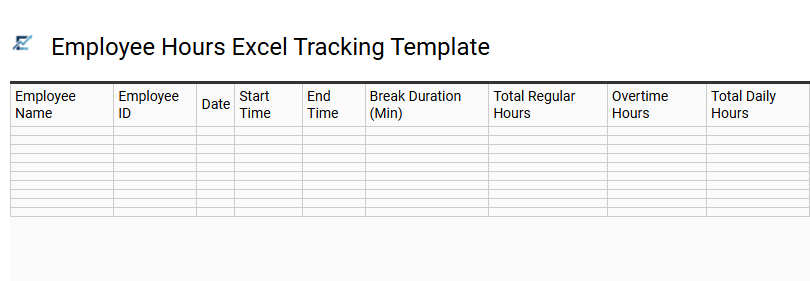
Employee Hours Excel Tracking Template
An efficient employee hours Excel tracking template streamlines payroll processing and labor management. By recording daily clock-in times, breaks, and overtime, businesses can monitor workforce productivity while ensuring compliance with labor regulations. These spreadsheets typically feature automated formulas that calculate total weekly hours, significantly reducing manual data entry errors.
Utilizing a structured time log helps HR departments maintain accurate attendance records and analyze labor costs in real-time. This digital approach provides a transparent audit trail for both employers and staff, fostering accountability and organized record-keeping across the organization.
This template is ideal for managing freelance contractor billing, tracking small business weekly payroll, or monitoring billable hours for client-based projects.
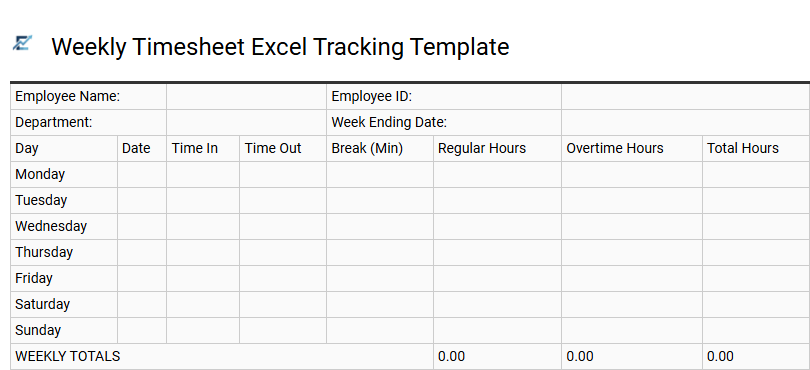
Weekly Timesheet Excel Tracking Template
A Weekly Timesheet Excel Tracking Template provides a structured and efficient way for businesses to monitor employee labor hours, attendance, and productivity. By utilizing built-in formulas, these templates automatically calculate daily totals, overtime, and gross pay, significantly reducing manual data entry errors. This streamlined approach ensures payroll accuracy and helps managers maintain labor law compliance while providing clear data for project budgeting.
Using a standardized spreadsheet allows for easy data sorting and historical record-keeping without the need for expensive software subscriptions. It offers transparency for both employers and staff, fostering a clear understanding of time allocation across various tasks.
This template is suitable for managing freelance contractors, monitoring shift-based retail staff, and tracking billable hours for professional services like legal or accounting consulting.
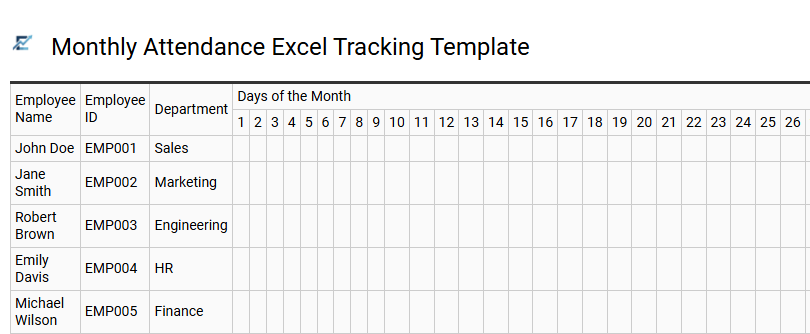
Monthly Attendance Excel Tracking Template
A Monthly Attendance Excel Tracking Template is a professional tool designed to streamline how organizations monitor employee working hours, punctuality, and absences. By utilizing automated formulas, this spreadsheet calculates total hours worked, overtime, and remaining leave balances, significantly reducing the risk of manual payroll errors.
The template provides a centralized dashboard for HR managers to visualize workforce trends, ensuring optimal staffing levels and better compliance with labor regulations. Its structured layout allows for easy data entry of daily clock-in and clock-out times, making it a scalable solution for growing teams. This digital approach ensures historical records are easily accessible for performance reviews and financial auditing.
This template is suitable for retail stores managing rotating shifts, boutique agencies tracking project-based billable hours, and non-profit organizations monitoring volunteer participation.
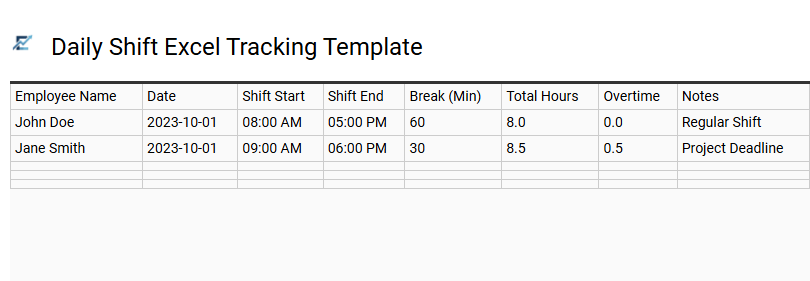
Daily Shift Excel Tracking Template
A Daily Shift Excel Tracking Template is a functional tool designed to streamline workforce management and ensure payroll accuracy. By systematically recording clock-in times, clock-out times, and break durations, this template automatically calculates total daily hours, minimizing human error in manual bookkeeping. It provides supervisors with instant visibility into labor distribution and attendance patterns, which is essential for maintaining operational efficiency and budget control.
The structured grid format facilitates easy data entry and long-term reporting, helping businesses remain compliant with labor laws and overtime regulations. Because it utilizes Excel's native functions, the template is highly customizable for specific organizational needs. This kind of template is suitable for managing restaurant staff rotations, tracking retail clerk shifts, and monitoring construction site labor hours.
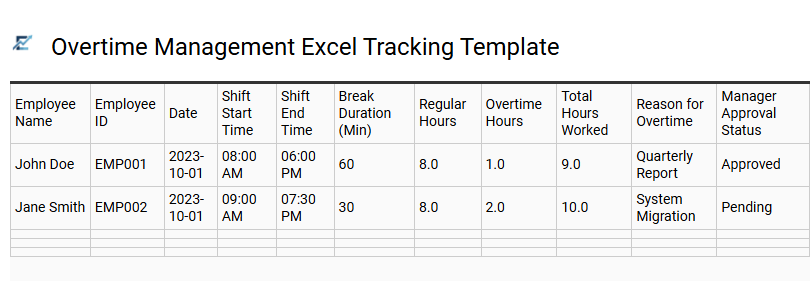
Overtime Management Excel Tracking Template
An Overtime Management Excel Tracking Template is a vital tool for HR departments and small business owners to monitor work hours beyond standard shifts. This automated spreadsheet simplifies calculating extra hours, ensuring labor law compliance and accurate payroll processing. By inputting daily clock-in and clock-out times, the template automatically identifies overtime thresholds, reducing manual errors and administrative overhead.
It provides clear visibility into staffing costs and helps managers mitigate burnout risks by tracking excessive additional hours. This digital solution streamlines timekeeping and budget control, making it easier to maintain transparent records for internal auditing or labor inspections.
This template is ideal for retail staff scheduling, construction project timekeeping, and seasonal warehouse peak-period management.
Download: 💾 Overtime Management Excel Tracking Template .xls
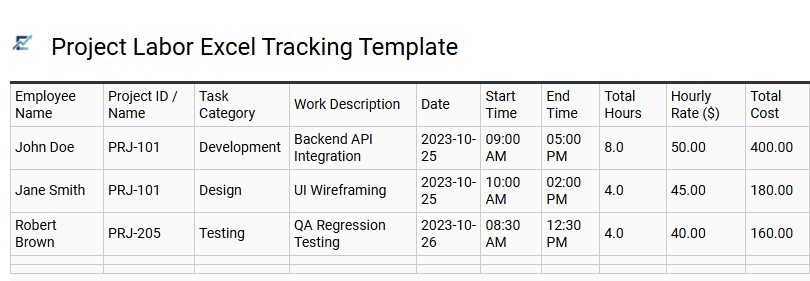
Project Labor Excel Tracking Template
Streamlining workforce management requires a precise method for monitoring billable hours and resource distribution. A Project Labor Excel Tracking Template provides an organized framework to record daily employee hours, categorize tasks by specific project phases, and automate labor cost calculations.
By leveraging built-in formulas, businesses can gain real-time visibility into budget consumption and team productivity. This tool eliminates manual entry errors, simplifies the payroll transition, and helps managers identify resource gaps before they impact deadlines. It serves as a cost-effective solution for maintaining transparency and operational efficiency across diverse project portfolios.
This kind of template is suitable for construction site management, freelance client billing, and software development sprint tracking.
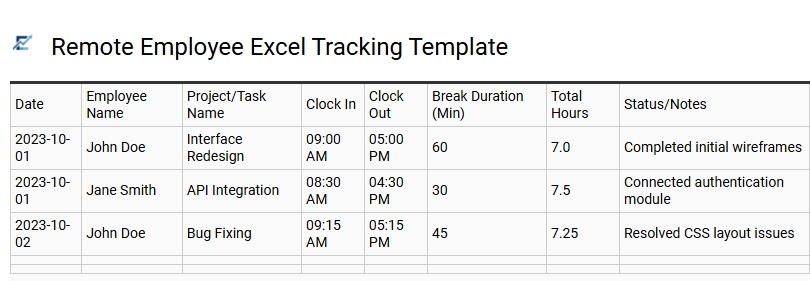
Remote Employee Excel Tracking Template
Managing a distributed workforce requires a reliable system for monitoring productivity and labor costs. A remote employee Excel tracking template provides a centralized digital timesheet where off-site staff can log daily work hours, break durations, and project-specific tasks. By utilizing built-in formulas, these templates automatically calculate total billable hours and overtime, reducing manual data entry errors and streamlining the payroll process for HR departments.
This structured approach ensures transparency and accountability across different time zones without the need for complex software. It offers managers real-time visibility into resource allocation, helping to maintain project timelines and budget compliance effectively.
This kind of template is suitable for monitoring freelance contractor hours, managing flexible shifts for remote support teams, and tracking billable time spent on specific client deliverables.
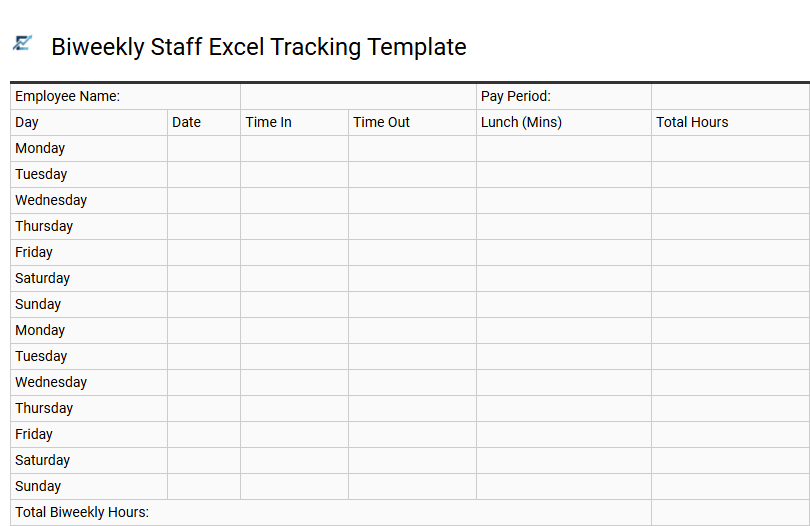
Biweekly Staff Excel Tracking Template
A biweekly staff Excel tracking template is an essential tool for businesses operating on a fourteen-day pay cycle. This spreadsheet simplifies timekeeping by allowing employees to log clock-in times, breaks, and total hours worked. By utilizing automated formulas, the template calculates regular and overtime hours with high precision, reducing manual entry errors and ensuring accurate payroll processing.
Implementing this digital solution enhances transparency and streamlines administrative workflows. Managers can monitor attendance trends, track labor costs in real-time, and maintain organized records for legal compliance. It provides a cost-effective way to manage workforce productivity without the need for complex software.
This template is ideal for retail stores managing rotating shifts, small consulting firms tracking billable project hours, and local restaurants coordinating seasonal part-time staff.
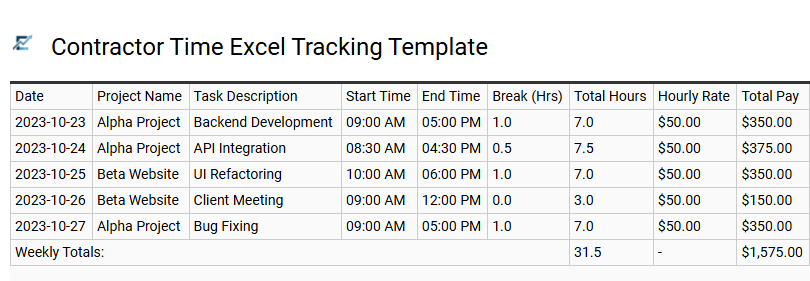
Contractor Time Excel Tracking Template
Efficiently managing external labor requires precise documentation and automated calculations. A contractor time excel tracking template provides a structured format to log daily clock-in and clock-out times, break durations, and total billable hours. By utilizing built-in formulas, these templates eliminate manual entry errors in gross pay calculations and help project managers maintain strict budget controls.
Beyond simple timekeeping, these templates serve as a vital communication link, ensuring transparency between the hiring organization and the contractor. They offer a reliable audit trail for tax compliance and resource allocation, making it easy to generate reports for stakeholders or financial departments.
This template is suitable for independent freelancers billing hourly for creative projects, construction firms managing subcontracted trade workers on-site, and tech startups tracking billable hours for remote software consultants.
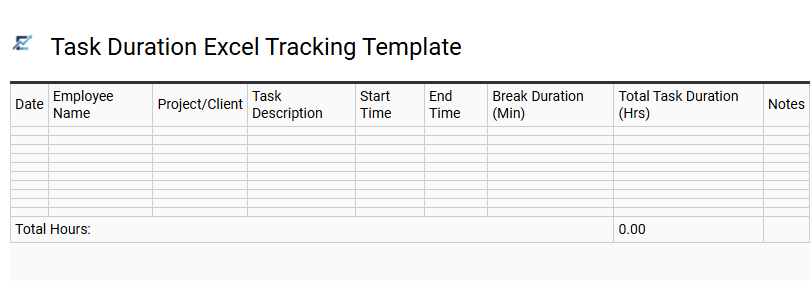
Task Duration Excel Tracking Template
A task duration Excel tracking template is a vital tool for monitoring productivity and ensuring project timelines remain on schedule. By logging start and end times for specific activities, businesses can identify operational bottlenecks and optimize resource allocation. These spreadsheets often incorporate automated formulas to calculate total hours, minimizing manual entry errors and streamlining payroll or client invoicing.
Implementing a structured tracking system provides managers with clear visibility into employee workflows, fostering accountability and data-driven performance reviews. This accessible solution allows teams to maintain precise records and improve time management efficiency without investing in complex software.
This template is ideal for tracking billable hours for freelancers, monitoring manufacturing cycle times, or managing internal software development sprints.
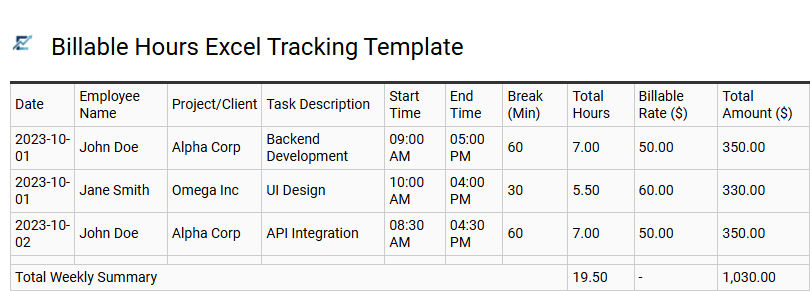
Billable Hours Excel Tracking Template
A billable hours Excel tracking template is an essential resource for businesses looking to optimize labor management and ensure financial precision. These templates provide a structured environment for employees to log daily tasks, project codes, and duration, automatically calculating total hours using built-in formulas. By distinguishing between billable and non-billable time, companies can generate accurate invoices and maintain transparent records for project stakeholders.
Implementing a standardized spreadsheet reduces manual entry errors and simplifies the transition from time logs to payroll processing. It also offers valuable insights into team productivity and resource allocation, making it a cost-effective alternative to complex software.
This kind of template is highly suitable for freelance consultants managing multiple clients, legal firms tracking billable case hours, and digital marketing agencies overseeing various project milestones.
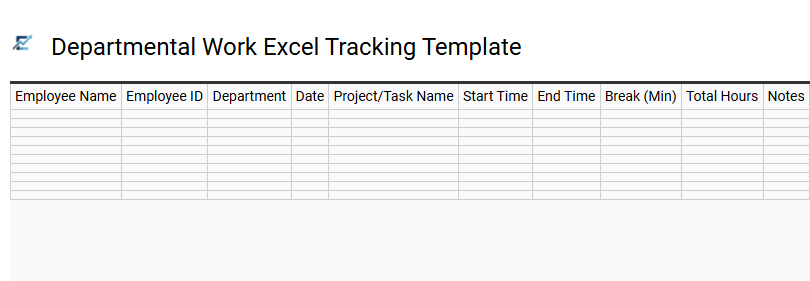
Departmental Work Excel Tracking Template
A Departmental Work Excel Tracking Template is a professional tool designed to centralize workforce management and enhance operational transparency. By utilizing structured spreadsheets, managers can accurately record daily attendance, monitor specific task durations, and analyze labor costs across various departments.
This semantic approach to time tracking helps eliminate manual calculation errors through integrated formulas, ensuring precise payroll data and overtime monitoring. It provides a clear visual overview of resource allocation, allowing for better capacity planning and performance evaluation. By maintaining organized digital logs, businesses can improve team accountability and streamline project workflows effectively.
This template is ideal for monitoring billable hours in creative agencies, managing shift rotations in retail departments, and tracking project-specific labor in manufacturing plants.
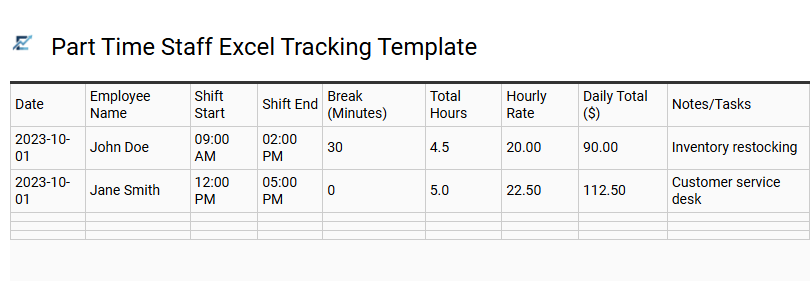
Part Time Staff Excel Tracking Template
Efficiently managing a flexible workforce requires a structured approach to logging hours and calculating wages. A part-time staff Excel tracking template provides a streamlined solution for monitoring hourly shifts, break times, and daily earnings. By utilizing automated formulas, small businesses can minimize manual entry errors and ensure payroll accuracy without the need for expensive software.
This digital tool offers a transparent view of labor costs and attendance patterns, helping managers optimize scheduling and remain compliant with labor regulations. It serves as a cost-effective, customizable resource that adapts to various pay cycles and departmental requirements.
This template is ideally suited for managing weekly retail shifts, tracking billable hours for freelance contractors, and coordinating seasonal staff in the hospitality sector.
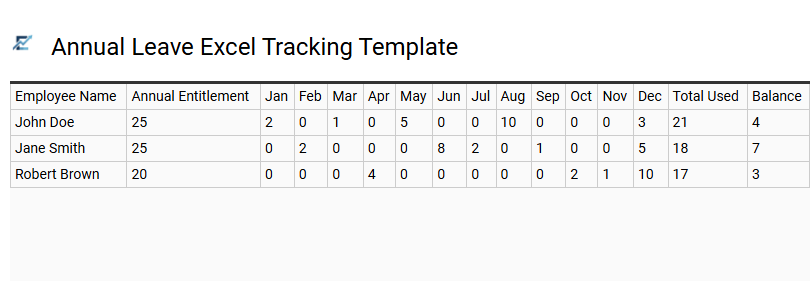
Annual Leave Excel Tracking Template
An Annual Leave Excel Tracking Template is a vital resource for HR professionals and small business owners seeking to streamline employee time-off management. This spreadsheet solution allows you to centralize the recording of vacation days, sick leave, and personal time, ensuring accurate data for payroll and compliance purposes. By utilizing automated formulas, the template calculates accrued leave and remaining balances in real-time, which minimizes manual entry errors and improves transparency.
Maintaining a digital log helps managers visualize staff availability, preventing scheduling conflicts and ensuring operational continuity during peak holiday seasons. It provides a structured overview of attendance patterns, making it easier to generate reports and monitor labor costs efficiently.
This template is ideal for small business payroll management, departmental holiday planning, and monitoring individual employee attendance trends.
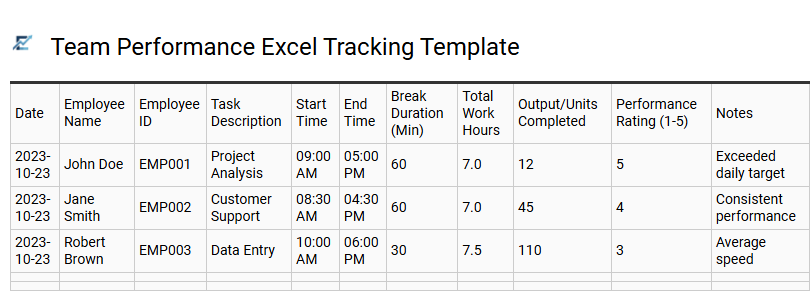
Team Performance Excel Tracking Template
A Team Performance Excel Tracking Template is a powerful tool designed to streamline workforce management and monitor operational efficiency. By utilizing structured spreadsheets to log clock-in times, task durations, and project milestones, managers can gain data-driven insights into employee productivity. This organized approach helps identify workflow bottlenecks, ensures accurate labor cost calculations, and promotes transparency across the organization.
Implementing a centralized time-tracking system in Excel eliminates the need for complex software while providing the flexibility to customize KPIs and reporting metrics. It allows leaders to visualize resource allocation in real-time, ensuring that deadlines are met and workloads are balanced effectively.
This template is suitable for managing remote development teams, tracking billable hours for legal consultancy, and monitoring daily production shifts in manufacturing.
This comprehensive employee time tracking spreadsheet streamlines labor management by providing a robust framework for monitoring billable hours and workforce productivity. By utilizing a structured timesheet template, businesses can ensure payroll accuracy while analyzing labor costs through precise clock-in and clock-out data.
Ultimately, implementing this attendance monitoring tool simplifies project management and optimizes resource allocation. Adopting these streamlined workflows ensures your organization maintains peak operational efficiency and financial transparency across every department.