
Professional Excel Timesheet Template for Accurate Employee Hour Tracking and Payroll Management
Efficiently managing workforce productivity requires an accurate Excel template for tracking employee hours to streamline payroll processing and attendance monitoring. These digital spreadsheets eliminate manual errors by automating overtime calculations and clock-in logs. Utilizing a professional timesheet system ensures better labor cost management and compliance with scheduling requirements. Whether you are managing small teams or a larger department, organizing work shifts becomes seamless with the right data structure. Please explore the already made variations of templates provided below.
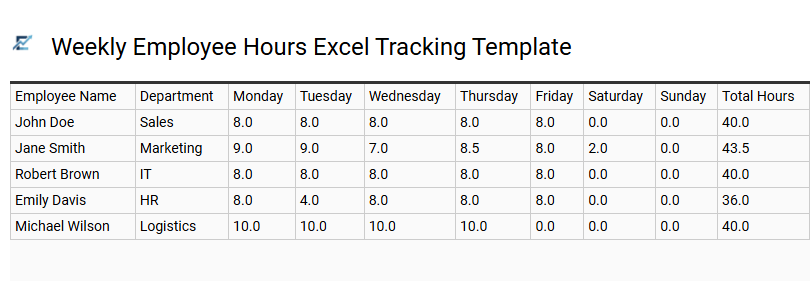
Weekly Employee Hours Excel Tracking Template
Accurately managing labor costs is vital for maintaining business efficiency and ensuring fair compensation. A weekly employee hours Excel tracking template provides a structured framework for logging daily start times, end times, and break durations. By utilizing automated formulas, this tool calculates total work hours and distinguishes between regular and overtime pay, significantly reducing manual data entry errors.
Implementing a digital timesheet improves transparency, simplifies reporting for HR departments, and helps organizations remain compliant with labor regulations. This versatile spreadsheet serves as a centralized hub for monitoring workforce productivity and streamlining payroll cycles.
This template is ideal for retail staff scheduling, freelance project billing, and small business payroll management.
Download: 💾 Weekly Employee Hours Excel Tracking Template .xls
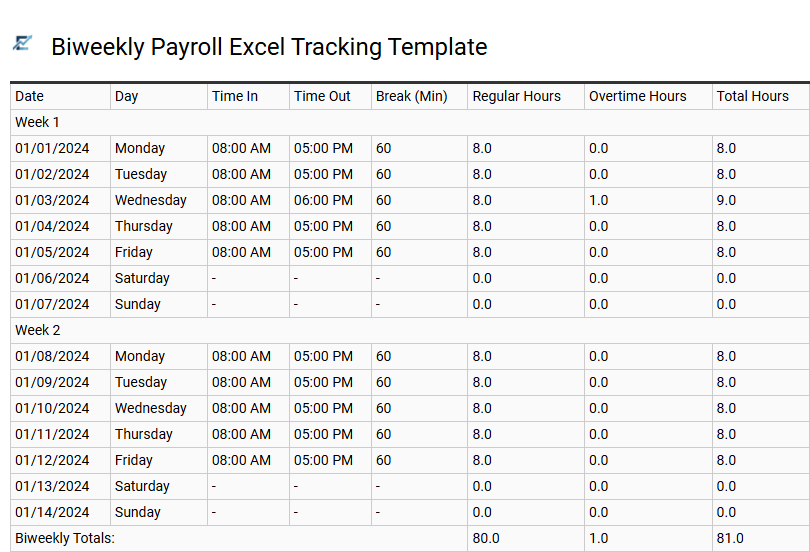
Biweekly Payroll Excel Tracking Template
A biweekly payroll Excel tracking template is an essential tool for businesses operating on a fourteen-day pay cycle. Designed to streamline timekeeping, these templates automatically calculate regular and overtime hours, reducing manual entry errors and ensuring payroll accuracy. By utilizing built-in formulas, HR managers can efficiently monitor attendance, track labor costs, and maintain compliance with labor regulations.
This semantic-optimized spreadsheet structure provides a clear audit trail for financial reporting, making it easier to manage deductions and gross pay calculations. Using an organized digital format improves transparency between employers and staff while significantly speeding up the end-of-period processing. This kind of template is perfectly suitable for managing shift rotations in a local restaurant, tracking billable hours for a small marketing agency, or monitoring seasonal staff at a retail warehouse.
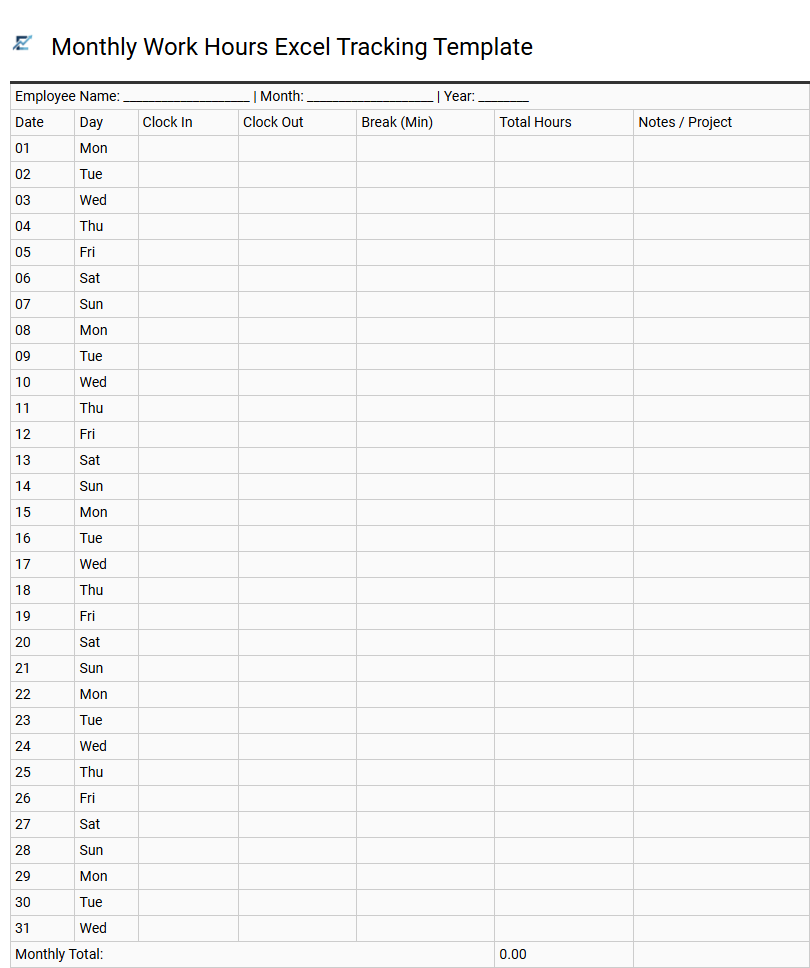
Monthly Work Hours Excel Tracking Template
A monthly work hours Excel tracking template is a vital tool for streamlining payroll processing and monitoring workforce productivity. These templates utilize automated formulas to calculate daily totals, overtime, and cumulative monthly hours, significantly minimizing manual calculation errors. By recording precise clock-in times, departures, and break durations, businesses maintain a transparent audit trail essential for labor law compliance.
Organizing data within a spreadsheet allows managers to visualize attendance patterns and labor costs efficiently. Features like data validation and pre-set categories ensure consistency across the entire pay period, providing a professional time management solution without the need for expensive software.
This template is perfectly suited for managing small business payroll, tracking freelancer billable hours, and monitoring seasonal staff rotations.
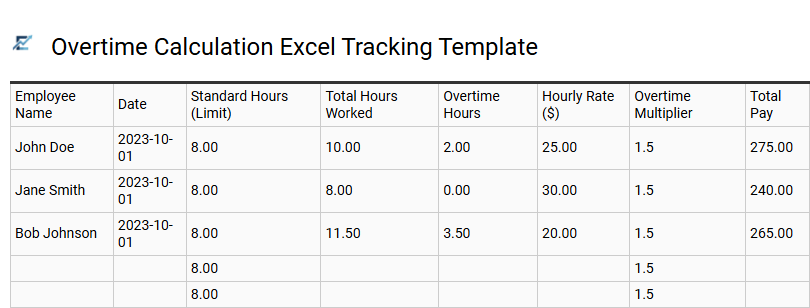
Overtime Calculation Excel Tracking Template
An overtime calculation Excel tracking template is an essential tool for streamlining payroll and ensuring labor law compliance. By automating the recording of clock-in and clock-out times, these templates use built-in formulas to distinguish between regular working hours and additional overtime. This eliminates manual calculation errors, provides transparent data for both employers and staff, and helps manage labor budgets effectively. With a structured layout, users can easily monitor daily, weekly, or monthly totals to maintain accurate attendance records and simplify financial reporting.
This template is suitable for: small retail businesses managing weekly shift rotations, construction firms tracking manual labor hours, and creative agencies monitoring billable project overtime.
Download: 💾 Overtime Calculation Excel Tracking Template .xls
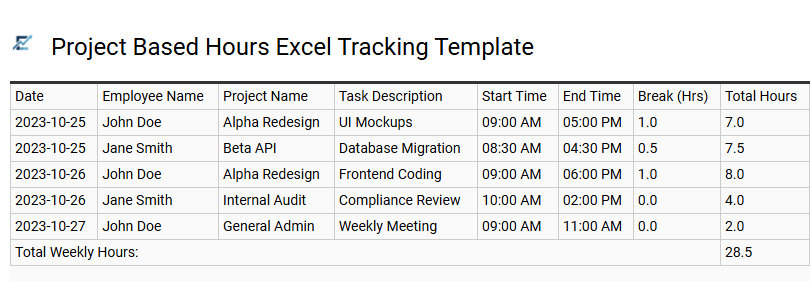
Project Based Hours Excel Tracking Template
Efficiently managing workforce productivity requires precise tools. This project-based hours Excel tracking template simplifies time management by allowing employees to record both billable and non-billable hours against specific assignments. Designed for accuracy, the template features structured columns for task descriptions, project codes, and daily duration calculations.
By centralizing time logs, businesses can streamline payroll processing, improve project costing accuracy, and monitor resource allocation in real-time. This structured data approach reduces manual entry errors and ensures project budgets remain transparent through detailed labor analysis and automated formulas.
This template is ideal for software development agencies, marketing firms managing multiple client campaigns, and architectural consultancies tracking specific design phases.
Download: 💾 Project Based Hours Excel Tracking Template .xls
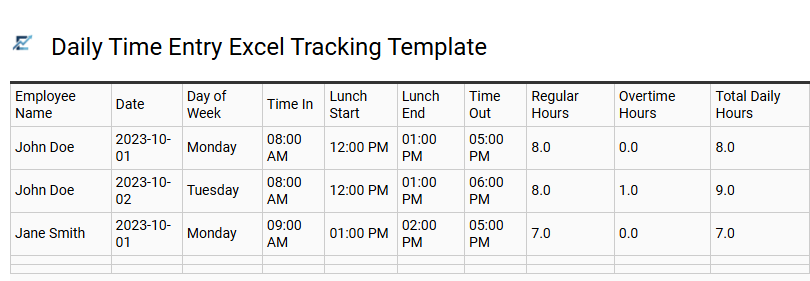
Daily Time Entry Excel Tracking Template
A Daily Time Entry Excel Tracking Template is a specialized tool designed to simplify the process of monitoring employee work hours and labor costs. By providing a structured format for logging start times, end times, and break durations, this template ensures high levels of accuracy for payroll processing and project management.
Using an Excel-based system allows for automated calculations of daily totals and overtime, reducing the risk of manual errors associated with paper timesheets. It provides managers with a clear overview of staff attendance and productivity, helping to maintain compliance with labor regulations while streamlining administrative workflows.
This template is ideally suited for monitoring construction site shifts, tracking billable hours for freelance consultants, and managing daily attendance for small retail businesses.
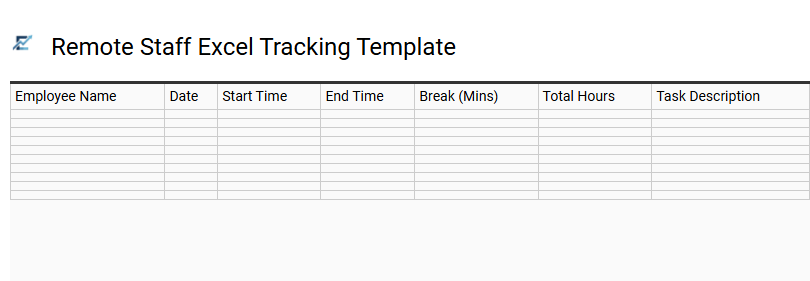
Remote Staff Excel Tracking Template
Managing a distributed workforce requires precise timekeeping to ensure payroll accuracy and project transparency. A remote staff Excel tracking template provides a structured framework for employees to log work hours, breaks, and task descriptions from any location. By utilizing automated formulas, these templates calculate daily totals and overtime instantly, significantly reducing manual administrative errors.
This solution bridges the communication gap between managers and off-site teams, fostering accountability and streamlined reporting. It serves as a cost-effective alternative to complex software, allowing for easy data sorting and performance analysis. Using a standardized spreadsheet ensures that labor costs remain within budget while maintaining a clear audit trail for compliance.
This kind of template is suitable for managing freelance contractors, tracking billable hours for creative agencies, or monitoring daily shifts for virtual assistants.
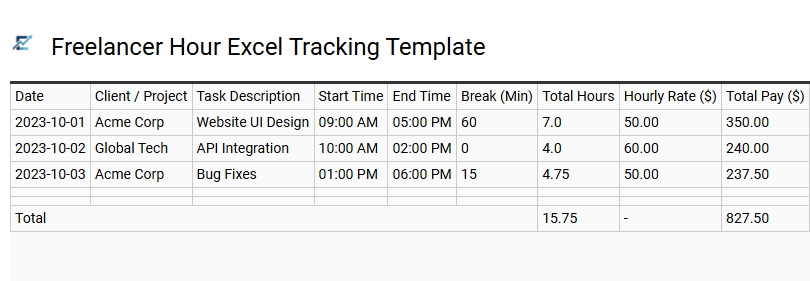
Freelancer Hour Excel Tracking Template
A Freelancer Hour Excel Tracking Template is a specialized tool designed for independent contractors to monitor billable time and project progress with precision. Using a structured spreadsheet allows users to log daily start and end times, calculate break durations, and automate total pay using built-in formulas. This systematic approach ensures accurate client invoicing and provides a transparent audit trail for all completed tasks. By centralizing data in Excel, freelancers can categorize hours by project or client, helping to analyze productivity and manage deadlines effectively. These templates are essential for maintaining professional financial records and streamlining the transition from time logging to payment collection.
This template is ideal for graphic designers managing multiple client projects, remote software developers tracking billable sprint hours, and freelance copywriters documenting time spent on various editorial assignments.
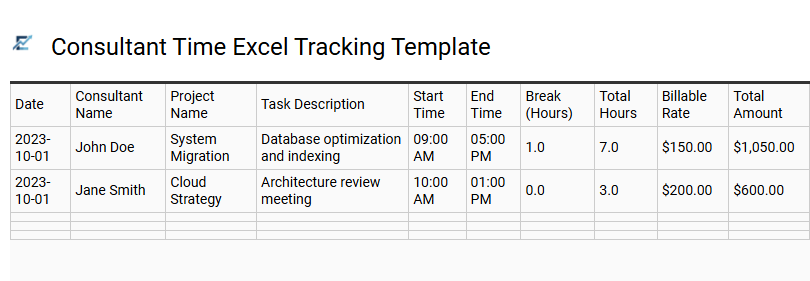
Consultant Time Excel Tracking Template
A consultant time Excel tracking template is an essential tool for professional services and independent contractors to document billable hours accurately. This structured spreadsheet allows for the precise recording of daily tasks, project durations, and hourly rates, ensuring transparency for both the consultant and the client. By utilizing built-in formulas, these templates automate total cost calculations and overtime tracking, which streamlines the payroll and invoicing process.
Implementing an Excel-based tracking system reduces manual data entry errors and provides a clear audit trail for project management. This kind of template is highly suitable for freelance software developers, independent marketing consultants, and legal professionals billing multiple clients.
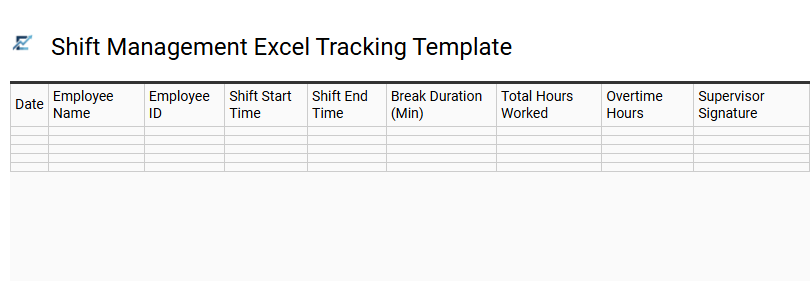
Shift Management Excel Tracking Template
A Shift Management Excel Tracking Template is an essential tool designed to streamline labor monitoring and ensure payroll accuracy. By leveraging automated formulas, these templates calculate total hours worked, overtime, and mandatory break periods, significantly reducing manual data entry errors.
This digital solution allows managers to visualize staff coverage across various departments or time slots, ensuring optimal productivity and adherence to labor regulations. Centralizing data within a spreadsheet format facilitates easy historical reporting, performance auditing, and seamless integration with accounting workflows. By using a standardized tracking system, businesses can effectively control labor costs while maintaining clear communication regarding employee schedules and expectations.
This template is highly suitable for retail store staffing, restaurant kitchen rotations, and 24/7 healthcare facility scheduling.
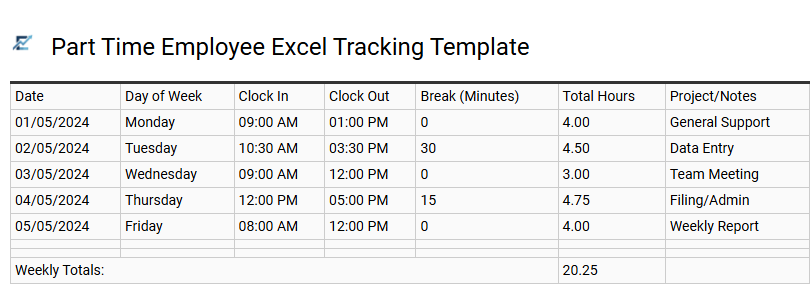
Part Time Employee Excel Tracking Template
Managing a flexible workforce requires a precise system to ensure payroll accuracy and labor compliance. A Part Time Employee Excel Tracking Template offers a streamlined solution for recording daily clock-in and clock-out times, unpaid breaks, and total hours worked. By utilizing automated formulas, these templates minimize human error, providing an instant overview of weekly or monthly labor costs.
This digital timesheet enables small business owners to monitor overtime triggers and maintain organized records for tax purposes. Using a standardized Excel format ensures transparency between employers and staff while simplifying administrative workflows. It is a cost-effective alternative to complex software, offering the flexibility to customize fields based on specific shift requirements.
This template is ideal for retail stores managing seasonal staff, small cafes with rotating shifts, and freelance agencies tracking billable hours for project-based contractors.
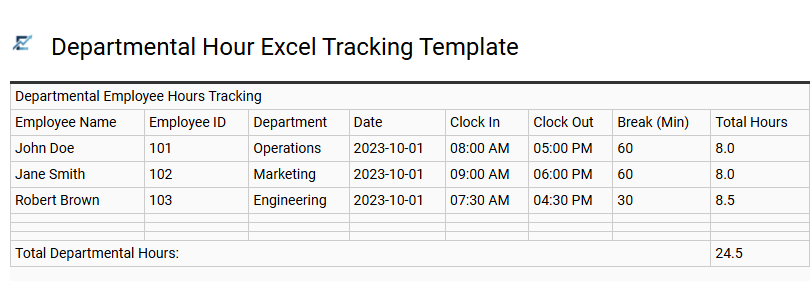
Departmental Hour Excel Tracking Template
Streamline your workforce management with a departmental hour Excel tracking template designed for precision and ease of use. This digital tool enables managers to log daily work hours, monitor overtime, and categorize labor costs by specific divisions. By using automated formulas, the template eliminates manual calculation errors, ensuring payroll accuracy and compliance with labor regulations.
Organizing data within a centralized spreadsheet provides real-time visibility into resource allocation and employee attendance trends. With clear columns for employee names, shift durations, and task descriptions, supervisors can optimize operational efficiency and improve overall productivity. This structured approach simplifies reporting and helps in making data-driven decisions for future staffing needs.
This template is perfectly suited for retail inventory shifts, construction site labor logs, and hospitality staff scheduling.
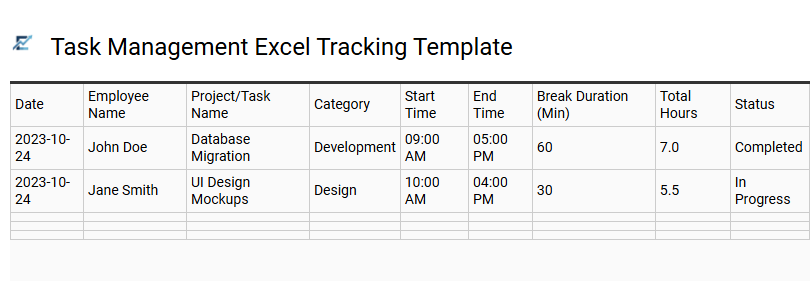
Task Management Excel Tracking Template
A Task Management Excel Tracking Template is an essential tool for businesses to monitor employee hours and project progress simultaneously. By integrating time tracking with specific task assignments, managers gain a clear overview of workforce productivity and resource allocation. These spreadsheets typically feature automated formulas to calculate total hours worked, overtime, and labor costs, significantly reducing manual entry errors.
Using a structured Excel format allows for easy data filtering, reporting, and seamless integration with payroll systems. It empowers teams to meet deadlines by identifying bottlenecks in real-time while ensuring transparent accountability across departments. This versatile tool streamlines administrative workflows, making it an ideal solution for any professional setting where time-sensitive deliverables are a priority.
This template is particularly suitable for freelance project billing, construction site labor logs, and creative agency campaign management.
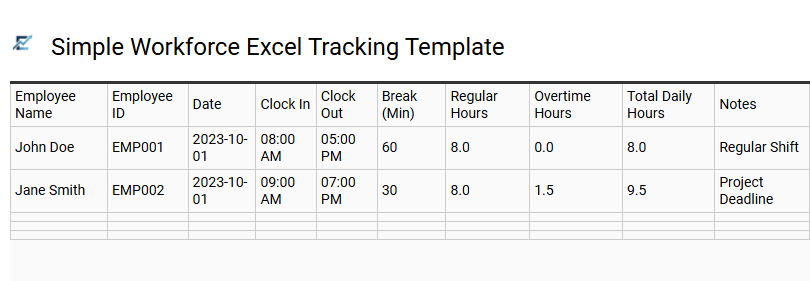
Simple Workforce Excel Tracking Template
A simple workforce Excel tracking template is an essential tool for businesses to monitor employee attendance and labor hours efficiently. By utilizing pre-configured formulas, these spreadsheets automatically calculate daily totals, overtime, and weekly summaries, significantly reducing manual data entry errors. This streamlined approach ensures accurate payroll processing and helps maintain compliance with labor regulations.
Managers can use these templates to track clock-in times, break durations, and total billable hours in a centralized digital format. This visibility into workforce productivity allows for better resource allocation and budget management. This kind of template is suitable for managing freelance contractor hours, tracking weekly shifts in retail environments, or monitoring billable time for project-based consulting teams.
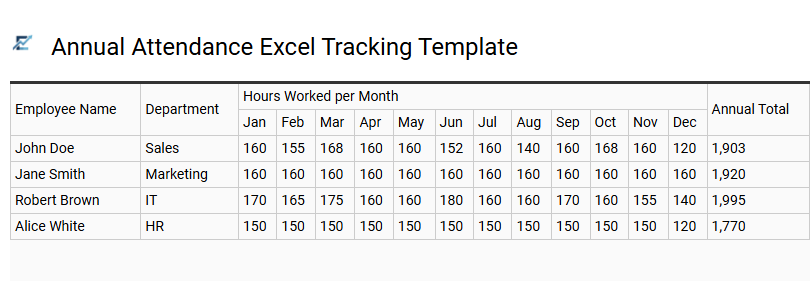
Annual Attendance Excel Tracking Template
An Annual Attendance Excel Tracking Template provides a centralized system for monitoring employee working hours, sick leave, and vacations throughout the calendar year. By utilizing a standardized spreadsheet, HR managers and small business owners can efficiently calculate totals, identify absenteeism patterns, and ensure payroll accuracy.
This digital tool simplifies workforce management by converting manual logs into a searchable, organized format. Most templates include automated formulas that aggregate daily data into comprehensive monthly and yearly summaries, significantly reducing administrative overhead and human error. Using a spreadsheet-based approach ensures better compliance, improved transparency, and data-driven insights into staff availability.
This kind of template is suitable for managing small business payroll, tracking seasonal staff shifts in retail environments, and monitoring remote team attendance for performance evaluations.
Our professional Excel timesheet template streamlines employee hour tracking, ensuring precise payroll management. This robust tool automates overtime calculations and attendance logs, significantly reducing manual data entry errors. By leveraging automated formulas, businesses monitor labor costs in real-time while boosting workforce productivity.
Implementing this structured reporting system simplifies auditing and ensures regulatory compliance. Optimize your administrative workflow today by integrating our customizable solution for reliable, error-free financial documentation and seamless human resource operations.