
Employee Attendance Tracker Excel Template for Streamlined Workforce Management
Managing a productive workforce requires precision, and utilizing a professional Excel template for tracking employee attendance offers a streamlined solution for modern businesses. By leveraging automated spreadsheets, human resources departments can efficiently monitor daily clock-ins, track absenteeism, and oversee leave management without expensive software. These versatile tools enhance organizational efficiency by providing a transparent overview of staff punctuality and labor allocation. Utilizing a structured attendance register ensures accurate payroll data and simplified workforce monitoring. Please check our already made variation of templates below.
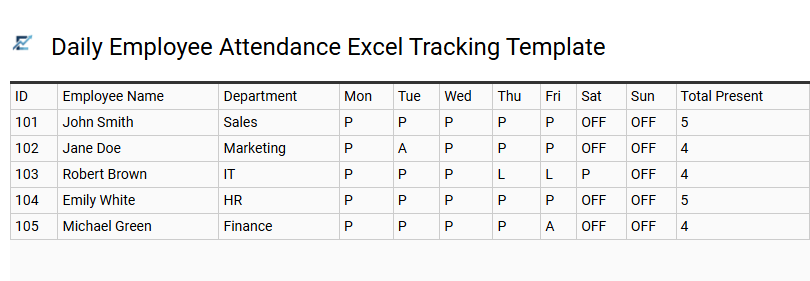
Daily Employee Attendance Excel Tracking Template
Efficiently managing workforce presence is crucial for operational success. This Daily Employee Attendance Excel Tracking Template provides a structured framework to monitor clock-in times, absences, and leaves. By centralizing data in a spreadsheet, HR managers and business owners can easily analyze attendance trends, calculate payroll hours, and improve workplace accountability.
Automated features often include drop-down menus for status updates-such as Present, Absent, Late, or Sick-and built-in formulas for monthly summaries. This digital log eliminates manual entry errors and ensures compliance with labor record-keeping regulations. Using a standardized format simplifies reporting and helps identify absenteeism patterns before they impact overall productivity.
This kind of template is suitable for managing small business retail shifts, tracking remote team log-ins, or overseeing construction site daily labor logs.
Download: 💾 Daily Employee Attendance Excel Tracking Template .xls
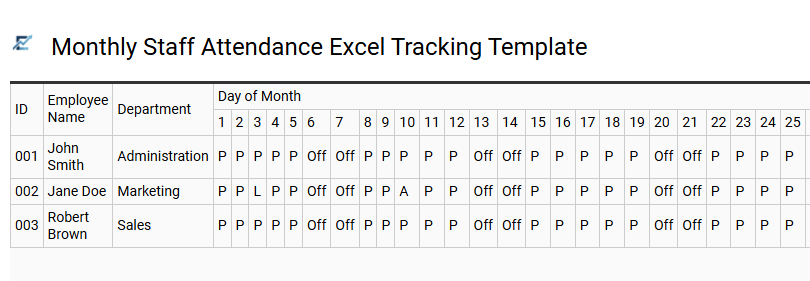
Monthly Staff Attendance Excel Tracking Template
Efficiently managing workforce presence is vital for payroll accuracy and operational productivity. A Monthly Staff Attendance Excel Tracking Template provides a structured framework to record daily check-ins, sick leaves, and vacations. By utilizing built-in formulas, businesses can automatically calculate total workdays and absenteeism rates, eliminating manual errors and saving administrative time.
This digital tool enhances transparency and helps managers identify attendance patterns at a glance. It serves as a reliable database for HR departments to streamline monthly reporting and ensure compliance with labor regulations. Using an organized spreadsheet ensures that all employee data remains centralized and accessible for performance reviews and audits.
This template is ideal for managing small business payroll, tracking student attendance in classrooms, or monitoring volunteer shifts for non-profit organizations.
Download: 💾 Monthly Staff Attendance Excel Tracking Template .xls
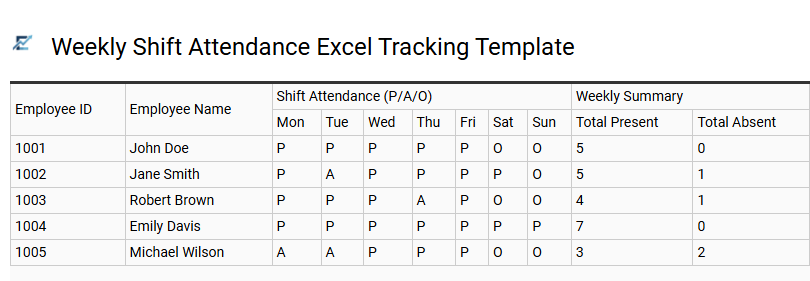
Weekly Shift Attendance Excel Tracking Template
A weekly shift attendance Excel tracking template is an essential tool for streamlining workforce management and ensuring payroll accuracy. By digitizing employee check-ins, managers can monitor daily attendance, identify absenteeism patterns, and track overtime hours in real-time. This spreadsheet approach eliminates the errors associated with manual paper logs, providing a centralized data source for labor compliance and performance reviews.
With pre-configured formulas, these templates automatically calculate total hours worked, helping supervisors maintain departmental budget goals. The organized layout allows for quick visual assessments of staffing levels across different shifts, ensuring optimal coverage throughout the workweek.
This template is perfectly suitable for retail stores managing rotating part-time schedules, small restaurants tracking server shifts, and boutique fitness studios monitoring instructor attendance.
Download: 💾 Weekly Shift Attendance Excel Tracking Template .xls
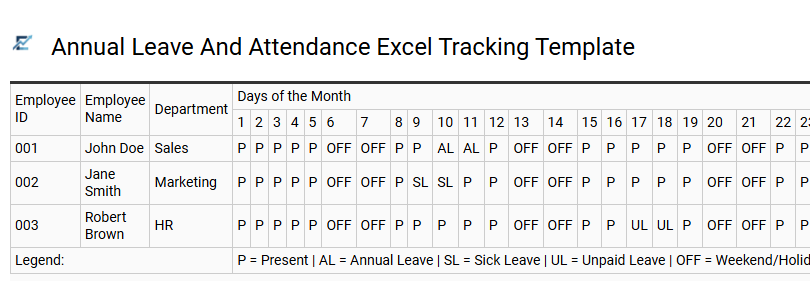
Annual Leave And Attendance Excel Tracking Template
An efficient annual leave and attendance Excel tracking template streamlines workforce management by centralizing employee time-off requests and daily presence. This digital tool enables HR managers and small business owners to monitor sick days, vacation time, and unauthorized absences with precision. By utilizing automated formulas and color-coded legends, organizations can quickly identify absenteeism patterns, ensure adequate staffing levels, and simplify monthly payroll processing.
A well-structured template reduces manual data entry errors associated with paper logs while providing clear, visual data for performance reviews and labor law compliance reporting. Implementing this system fosters transparency between management and staff regarding leave balances and accruals.
This versatile solution is perfect for managing small business operations, coordinating department-level shift scheduling, and monitoring remote team productivity.
Download: 💾 Annual Leave And Attendance Excel Tracking Template .xls
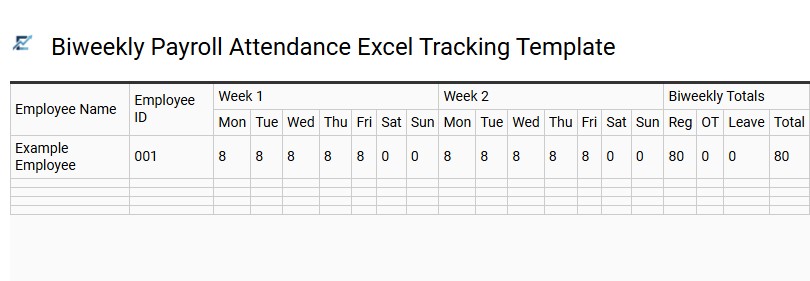
Biweekly Payroll Attendance Excel Tracking Template
Streamline your workforce management with a Biweekly Payroll Attendance Excel Tracking Template. This specialized tool allows human resource managers to accurately record employee hours, overtime, and absences over a fourteen-day pay cycle. By utilizing automated formulas, the template calculates total payable hours, reducing the risk of manual data entry errors and ensuring timely compensation.
Designed for efficiency, these templates often include designated fields for holiday pay, sick leave, and shift differentials. This systematic approach to time tracking enhances transparency and provides a reliable audit trail for labor law compliance. This kind of template is suitable for retail small businesses managing shift workers, construction firms tracking site labor, and healthcare clinics operating on biweekly schedules.
Download: 💾 Biweekly Payroll Attendance Excel Tracking Template .xls
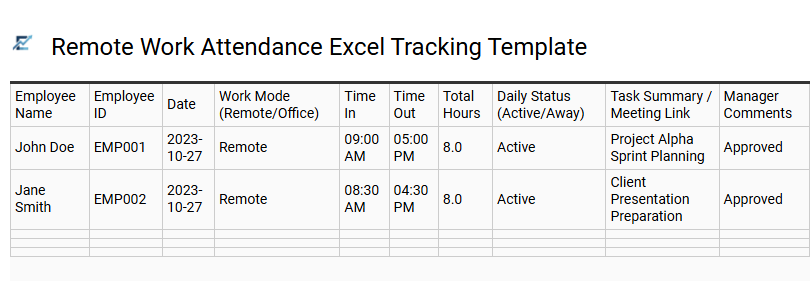
Remote Work Attendance Excel Tracking Template
A remote work attendance Excel tracking template is a vital tool for managing distributed teams with precision. This digital log simplifies the process of monitoring daily check-ins, total hours worked, and leave requests within a centralized spreadsheet. By utilizing automated formulas, managers can easily calculate monthly attendance and streamline payroll preparation without investing in expensive software.
This template enhances transparency and accountability, ensuring that project deadlines are met regardless of the employee's physical location. It provides a structured way to visualize workforce availability and identify attendance patterns over time. This kind of template is perfectly suitable for managing small freelance collectives, tracking shifts in hybrid office models, and monitoring time logs for international startups.
Download: 💾 Remote Work Attendance Excel Tracking Template .xls
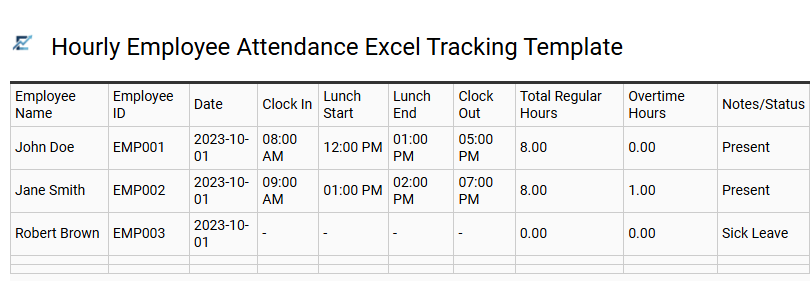
Hourly Employee Attendance Excel Tracking Template
An hourly employee attendance Excel tracking template is an essential tool for streamlining workforce management and payroll accuracy. This spreadsheet allows managers to systematically record clock-in and clock-out times, calculate daily totals, and monitor overtime hours automatically using built-in formulas. By centralizing attendance data, businesses can ensure labor law compliance, reduce manual entry errors, and gain insights into staffing trends.
Features typically include automated summaries, color-coded absence tracking, and monthly overview tabs, providing a cost-effective alternative to complex HR software. Utilizing a structured Excel format improves transparency between employers and staff while simplifying the preparation of monthly pay stubs.
This template is suitable for managing retail staff shifts, tracking billable hours for freelance contractors, and monitoring production line schedules in manufacturing.
Download: 💾 Hourly Employee Attendance Excel Tracking Template .xls
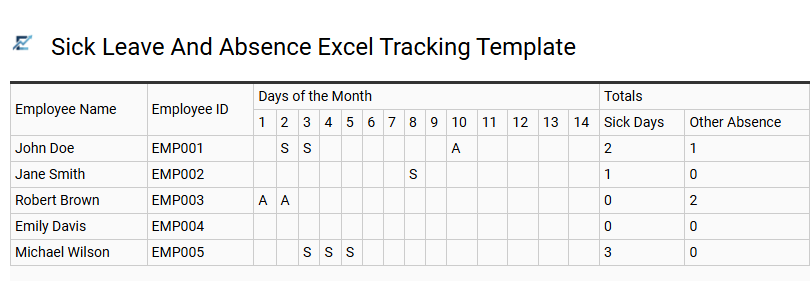
Sick Leave And Absence Excel Tracking Template
Streamline your workforce management with a professional Excel-based solution designed to monitor employee reliability and health-related downtime. This tracking template provides a centralized system for recording unplanned absences, medical leave, and personal time off, ensuring that HR departments maintain precise data for payroll processing and performance evaluations.
By utilizing automated formulas and visual dashboards, managers can quickly identify absenteeism trends, calculate total sick days per period, and ensure organizational compliance with labor regulations. This tool eliminates manual errors, improves resource allocation, and offers clear documentation for employee health records.
This template is perfectly suitable for small business payroll management, monitoring departmental attendance patterns, and maintaining historical medical records for internal HR audits.
Download: 💾 Sick Leave And Absence Excel Tracking Template .xls
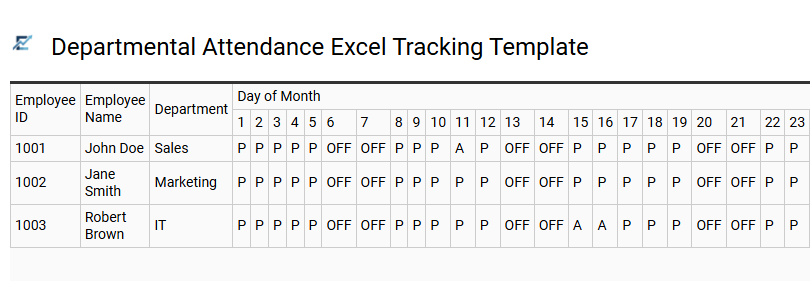
Departmental Attendance Excel Tracking Template
A Departmental Attendance Excel Tracking Template is a robust tool designed to streamline workforce management and timekeeping. This spreadsheet solution allows managers to record daily presence, sick leave, and vacations for specific teams in one centralized location. By utilizing automated formulas, the template calculates total monthly work hours and identifies absenteeism trends, ensuring high payroll accuracy and better resource allocation.
Implementing a structured Excel tracker enhances organizational transparency and simplifies HR reporting. It provides an immediate overview of employee availability, which is vital for maintaining steady operational workflows and meeting project deadlines across various departments.
This template is ideal for managing retail shift rotations, tracking office-based administrative staff, and monitoring remote engineering team availability.
Download: 💾 Departmental Attendance Excel Tracking Template .xls
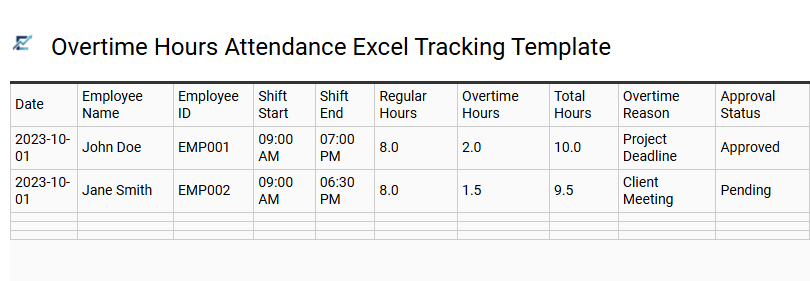
Overtime Hours Attendance Excel Tracking Template
An Overtime Hours Attendance Excel Tracking Template is an essential tool for businesses seeking to accurately monitor employee labor beyond standard shifts. Utilizing automated formulas, this spreadsheet enables HR professionals to track additional time, calculate labor costs, and ensure strict compliance with labor regulations. By centralizing attendance data, organizations can easily identify staffing shortages, prevent employee burnout, and streamline monthly payroll processing.
This structured approach enhances transparency and reduces the risk of manual accounting errors during peak operational periods. This template is ideally suited for managing high-volume manufacturing shifts, coordinating seasonal retail staff during holiday rushes, and tracking project-based deadlines in professional service agencies.
Download: 💾 Overtime Hours Attendance Excel Tracking Template .xls
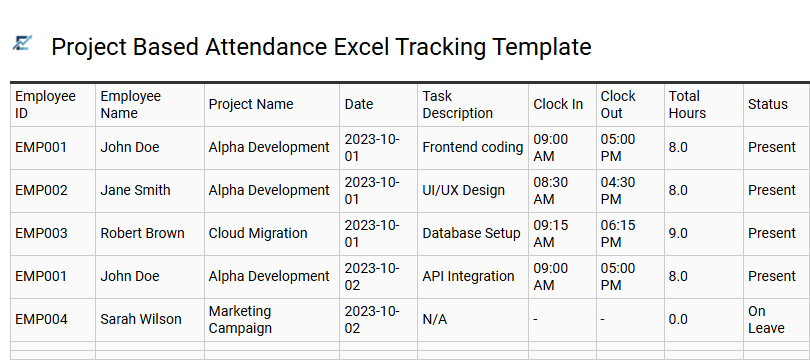
Project Based Attendance Excel Tracking Template
A project-based attendance Excel tracking template is a specialized tool designed to monitor employee work hours relative to specific tasks and assignments. Unlike traditional logs that only record clock-in times, this system allows managers to link attendance data directly to project IDs, ensuring precise labor cost analysis and budget oversight.
By organizing data through project codes and task descriptions, businesses can improve the accuracy of client billing and internal resource allocation. These templates typically include automated formulas that aggregate daily hours into weekly or monthly summaries, simplifying the transition from attendance tracking to payroll processing.
This template is ideal for construction firms managing multiple job sites, creative agencies billing clients per project hour, and software development teams tracking time across different development sprints.
Download: 💾 Project Based Attendance Excel Tracking Template .xls
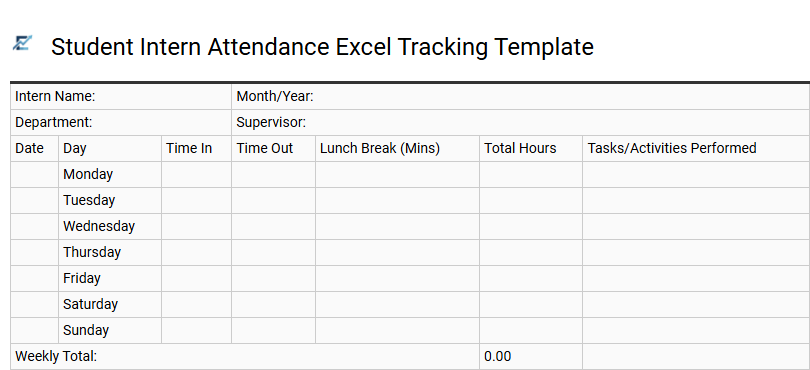
Student Intern Attendance Excel Tracking Template
A Student Intern Attendance Excel Tracking Template provides a streamlined solution for monitoring daily work hours, break times, and overall engagement. Designed for simplicity and accuracy, this tool helps HR managers and supervisors maintain precise records for payroll processing, academic credit verification, and performance assessments.
By utilizing automated formulas, the template eliminates manual calculation errors and offers clear data visualization of attendance patterns. Key features typically include:
- Automated calculation of daily and weekly total hours.
- Dedicated fields for clock-in, clock-out, and break durations.
- Summary dashboards for quick oversight of intern reliability.
This template is suitable for managing university credit requirements, tracking summer internship programs, and monitoring remote part-time student workers.
Download: 💾 Student Intern Attendance Excel Tracking Template .xls
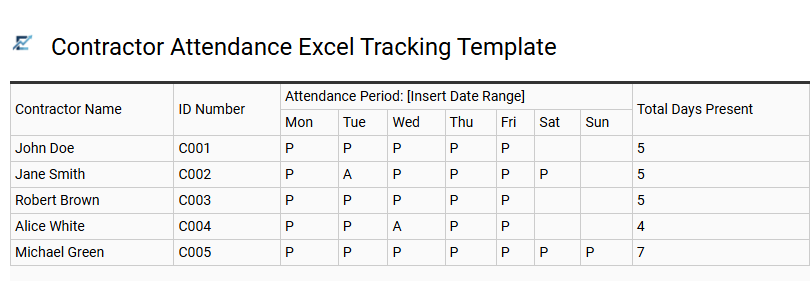
Contractor Attendance Excel Tracking Template
Efficiently managing external labor requires a reliable system to monitor working hours and project milestones. A Contractor Attendance Excel Tracking Template provides a structured framework for recording daily clock-in and clock-out times, break durations, and total billable hours. By utilizing built-in formulas, project managers can automate payroll calculations and ensure strict adherence to project timelines.
This digital tool simplifies administrative oversight, offering a clear audit trail for compliance and budget reporting. It eliminates the manual errors associated with paper logs and provides real-time visibility into workforce availability, making it an essential resource for businesses relying on temporary or contract-based staffing solutions.
This template is suitable for construction site labor management, freelance software development projects, and seasonal warehouse staffing.
Download: 💾 Contractor Attendance Excel Tracking Template .xls
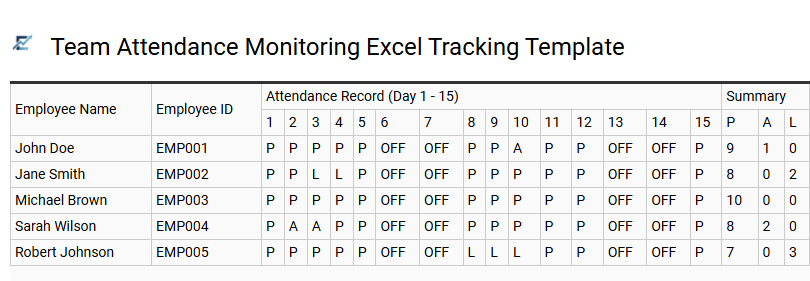
Team Attendance Monitoring Excel Tracking Template
A Team Attendance Monitoring Excel Tracking Template is a professional tool designed to streamline workforce management and ensure operational efficiency. By digitizing daily check-ins, sick leave, and vacation requests, managers can maintain a centralized record of employee reliability. These templates often utilize automated formulas to calculate total hours worked, identify absenteeism trends, and simplify payroll preparation.
Using an Excel-based system provides a cost-effective way to improve transparency and accountability within any department. It allows for quick visual summaries of team availability, helping supervisors make informed decisions regarding resource allocation and project deadlines.
This template is suitable for small business payroll processing, tracking remote team log-ins, and managing seasonal staff rotations.
Download: 💾 Team Attendance Monitoring Excel Tracking Template .xls
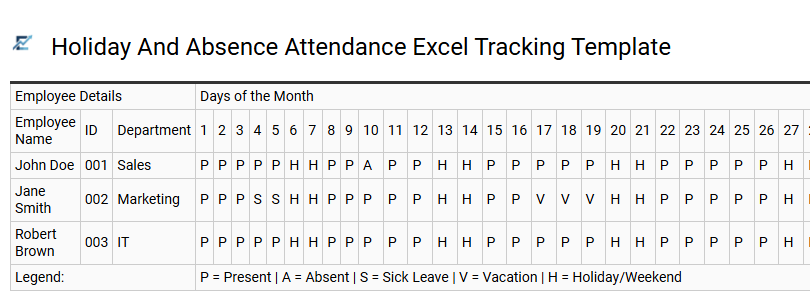
Holiday And Absence Attendance Excel Tracking Template
Efficiently managing workforce availability is essential for maintaining operational continuity. This Excel tracking template provides a structured system for monitoring employee vacations, medical leave, and unauthorized absences. By automating leave balance calculations, it reduces administrative overhead and ensures accurate data for payroll processing.
The template offers a visual overview of team availability, helping managers identify attendance trends and prevent staffing shortages during peak holiday periods. With its customizable format, it serves as a reliable audit trail for compliance and performance reviews. This tool simplifies record-keeping, allowing small to medium-sized enterprises to maintain professional attendance standards without the need for expensive software.
This template is ideal for small business payroll management, tracking departmental vacation schedules, and monitoring remote team availability.
Download: 💾 Holiday And Absence Attendance Excel Tracking Template .xls
This Employee Attendance Tracker Excel Template offers a robust spreadsheet solution for modern workforce management. By simplifying time tracking and absence management, businesses enhance payroll accuracy and staff productivity.
Utilizing this automated tool ensures streamlined shift scheduling and real-time monitoring of labor costs. Ultimately, integrating a reliable attendance system fosters operational efficiency and provides data-driven insights into team performance.
Adopt this versatile Excel framework to optimize administrative workflows and maintain a seamless, professional record of employee hours and reliability.