
Professional Excel Date Tracking Spreadsheet for Managing Project Milestones and Deadlines
Managing critical timelines requires precision. Using a versatile Excel template for tracking dates simplifies your workflow, ensuring you never miss a vital deadline or milestone. Whether you are handling project schedules, expiration dates, or recurring tasks, a well-structured spreadsheet provides a centralized hub for effective date monitoring. By leveraging automated formatting and conditional logic, these tools enhance organization and streamline time-sensitive operations. Boost your productivity with a robust data entry system designed for schedule management. Please check our already made variation of templates below.
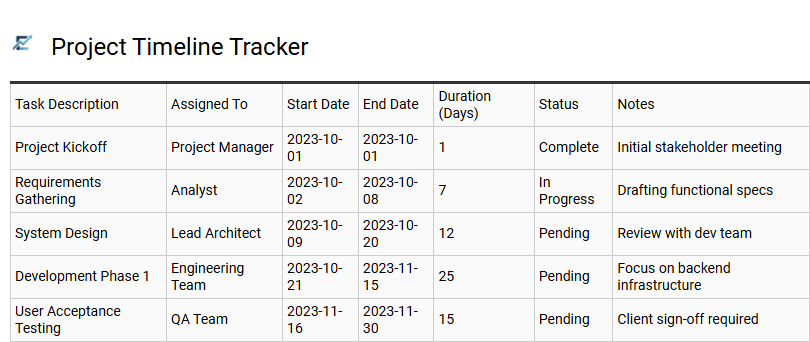
Project Timeline Tracker
A Project Timeline Tracker in Excel is a powerful tool designed to streamline schedule management and ensure all critical milestones are met on time. By organizing start dates, deadlines, and task durations into a centralized spreadsheet, users gain a comprehensive visual overview of project health. This template often utilizes automated formulas and conditional formatting to highlight upcoming deadlines, identify overdue tasks, and monitor real-time progress.
Implementing a structured date-tracking system reduces the risk of project delays and improves communication among stakeholders. It provides a clear roadmap for resource allocation and ensures every team member remains aligned with the overarching project goals. This template is highly suitable for construction project scheduling, product launch roadmaps, and corporate event planning.
Download: 💾 Project Timeline Tracker .xls
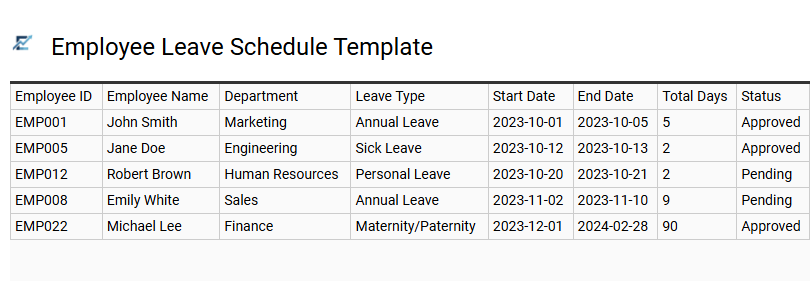
Employee Leave Schedule Template
An Employee Leave Schedule Template is an essential Excel tool designed to streamline workforce management and ensure operational continuity. By centralizing staff absences-such as vacations, sick leave, and personal time-team leaders can visualize department coverage at a glance. Using a structured date-tracking system helps prevent understaffing, simplifies payroll synchronization, and maintains high productivity levels. These templates often feature automated calculations for remaining leave balances, providing transparency for both employers and employees. Efficiently tracking dates within a dynamic spreadsheet allows for better resource allocation and informed long-term project planning.
This type of template is particularly suitable for managing seasonal holiday rushes, tracking departmental sick leave trends, and coordinating long-term maternity or paternity absences.
Download: 💾 Employee Leave Schedule Template .xls
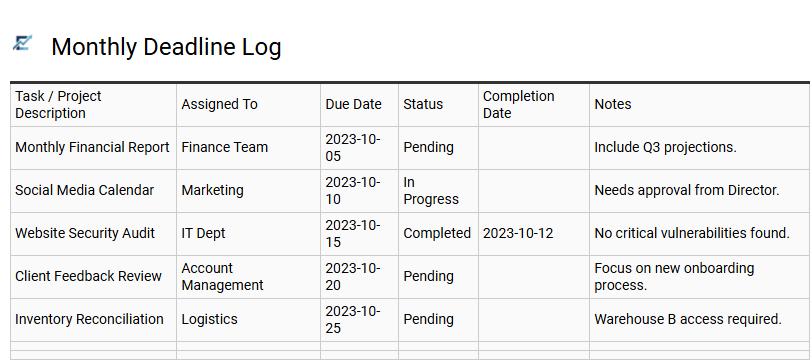
Monthly Deadline Log
A Monthly Deadline Log is a specialized Excel template designed to streamline time management and ensure no critical dates are overlooked. By organizing tasks within a recurring 30-day framework, users can visualize upcoming project milestones, submission dates, and operational requirements at a glance.
Utilizing Excel features like conditional formatting allows for automatic highlighting of approaching or overdue tasks, enhancing overall accountability. This structured approach helps both teams and individuals prioritize high-impact activities while maintaining a clear record of progress. It effectively transforms a standard list into a dynamic dashboard for comprehensive monthly oversight.
This template is suitable for managing monthly financial reporting cycles, tracking academic assignment due dates, and monitoring recurring social media content schedules.
Download: 💾 Monthly Deadline Log .xls
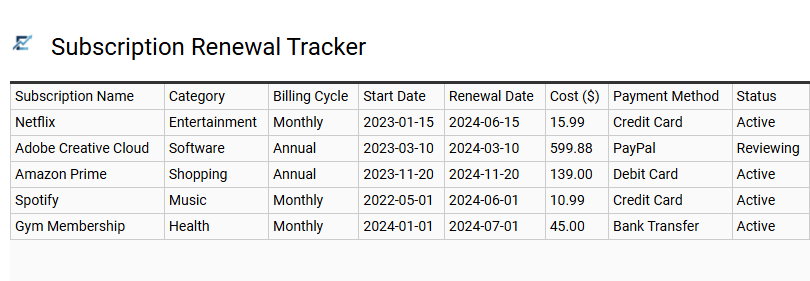
Subscription Renewal Tracker
Managing multiple recurring services is simplified with a Subscription Renewal Tracker. This specialized Excel template allows you to centralize payment schedules, costs, and expiration dates in one organized dashboard. By utilizing automated formulas, the tracker can highlight upcoming deadlines, ensuring you never miss a cancellation window or face unexpected auto-renewal charges.
Maintaining a clear overview of your digital and physical commitments helps optimize your budget and eliminate waste from unused services. This tool is essential for maintaining financial oversight and ensuring continuous access to vital tools.
This template is ideal for managing personal streaming services, tracking corporate software licenses, and monitoring professional membership expirations.
Download: 💾 Subscription Renewal Tracker .xls
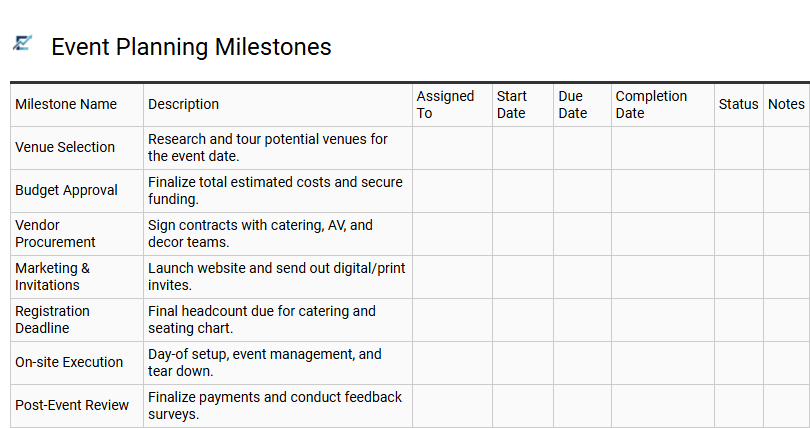
Event Planning Milestones
An Excel template for tracking event planning milestones is an essential tool for maintaining organization and meeting critical deadlines. By centralizing key dates, such as vendor bookings, marketing launches, and budget reviews, organizers can visualize the entire project timeline at a glance. These templates allow for real-time progress updates and often use conditional formatting to highlight approaching deadlines, ensuring that no logistical detail is overlooked. Managing complex schedules becomes more efficient when you can track task dependencies and owner accountability within a single spreadsheet, facilitating seamless execution from initial concept to the day of the event.
This kind of template is suitable for corporate conferences, wedding coordination, and community festivals.
Download: 💾 Event Planning Milestones .xls
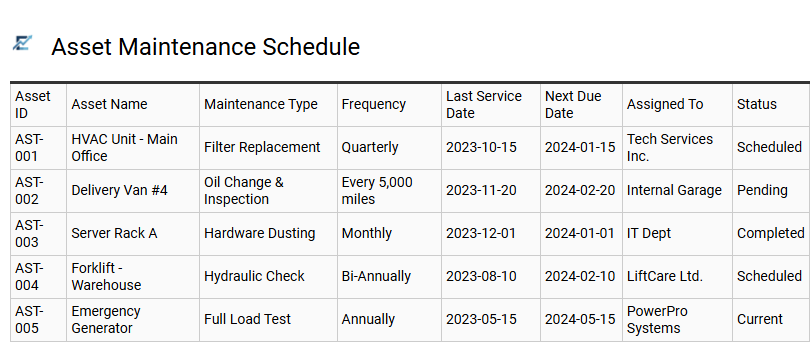
Asset Maintenance Schedule
An asset maintenance schedule is a vital Excel tool designed to streamline the tracking of recurring service dates and inspection intervals. By centralizing equipment data, businesses can transition from reactive repairs to proactive upkeep, significantly extending the lifespan of valuable hardware. This template typically utilizes automated formulas to calculate upcoming deadlines, highlighting overdue tasks through conditional formatting.
Precise date tracking ensures regulatory compliance and prevents costly operational downtime. Users can easily log historical maintenance records and set reminders for future oil changes, safety checks, or software updates, maintaining a clear audit trail. This systematic approach optimizes resource allocation and ensures all machinery remains in peak operational condition.
This template is perfectly suited for managing fleet vehicle servicing, industrial factory machinery inspections, and commercial HVAC system maintenance.
Download: 💾 Asset Maintenance Schedule .xls
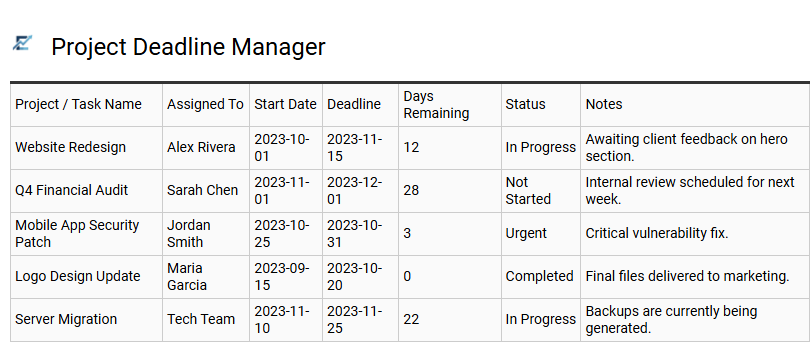
Project Deadline Manager
An efficient Project Deadline Manager Excel template streamlines schedule tracking and ensures no critical milestones are missed. By centralizing start dates, due dates, and completion status, project leads can visualize timelines through automated features like conditional formatting and progress bars. This tool enhances team accountability, allowing users to prioritize tasks based on immediate urgency and time remaining.
Using a structured digital layout allows for real-time monitoring of project health, helping to mitigate risks associated with delays. With built-in formulas for status updates and overdue alerts, managing complex workflows becomes both intuitive and error-free. This versatile template provides a clear, high-level overview of all time-sensitive commitments in one accessible document.
This template is ideal for marketing campaign launches, construction project scheduling, and academic research planning.
Download: 💾 Project Deadline Manager .xls
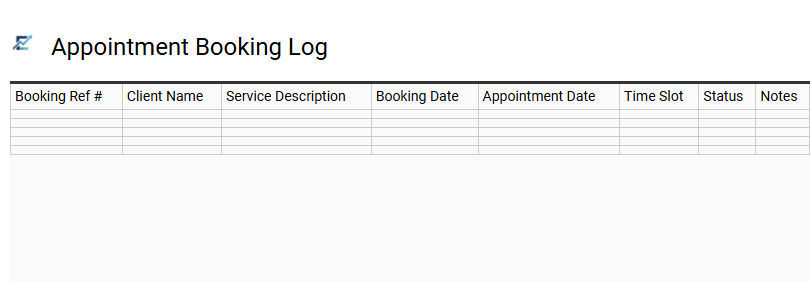
Appointment Booking Log
An Appointment Booking Log is a specialized Excel template designed to streamline schedule management and date tracking. This tool centralizes client engagements, deadlines, and service intervals into a single, organized dashboard. By documenting specific dates and times, users can effectively prevent double-bookings, monitor attendance trends, and ensure timely follow-ups.
Utilizing spreadsheet features like conditional formatting allows for visual alerts on upcoming or overdue appointments, enhancing operational efficiency. This structured approach to date tracking improves professional reliability and maximizes daily productivity.
This template is suitable for medical clinics managing patient visits, freelance consultants scheduling client sessions, and beauty salons organizing service rotations.
Download: 💾 Appointment Booking Log .xls
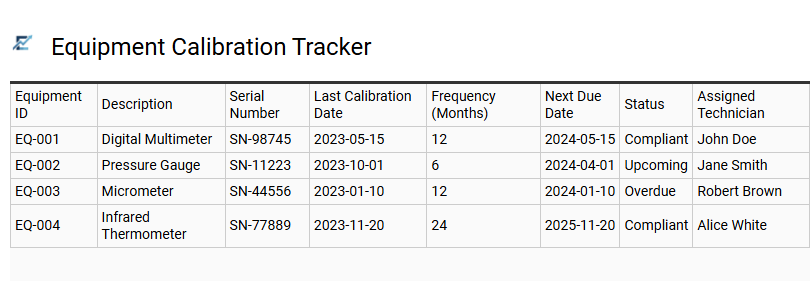
Equipment Calibration Tracker
An Equipment Calibration Tracker is a specialized Excel template designed to maintain the precision and reliability of technical instruments. By systematically logging calibration dates, service intervals, and certification statuses, businesses can ensure strict compliance with industry quality standards. The template often utilizes conditional formatting to provide visual alerts for upcoming deadlines, reducing the risk of using unverified machinery. Centralizing this data helps prevent operational errors, minimizes downtime, and simplifies the auditing process for quality management teams. This proactive approach ensures that all assets operate within specific tolerance levels, preserving data integrity and safety.
This template is suitable for medical laboratory instruments, manufacturing shop floor gauges, and construction site surveying tools.
Download: 💾 Equipment Calibration Tracker .xls
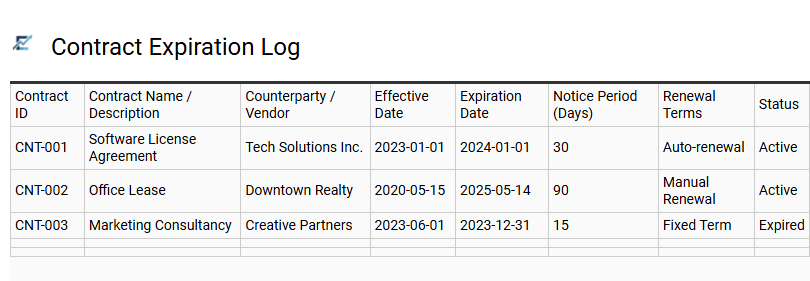
Contract Expiration Log
A Contract Expiration Log is a specialized Excel template designed to centralize and monitor the validity periods of professional agreements. By tracking start dates, end dates, and notice periods, this tool helps organizations avoid costly service lapses or unintended automatic renewals. Utilizing features like conditional formatting allows users to see visual warnings as deadlines approach, ensuring timely renegotiations or terminations.
Maintaining an organized log enhances operational efficiency and legal compliance by providing a clear timeline of all active obligations. This proactive approach to document management minimizes risk and ensures that procurement and HR departments remain ahead of critical milestones. This template is particularly effective for managing vendor service agreements, employee fixed-term contracts, and software license renewals.
Download: 💾 Contract Expiration Log .xls
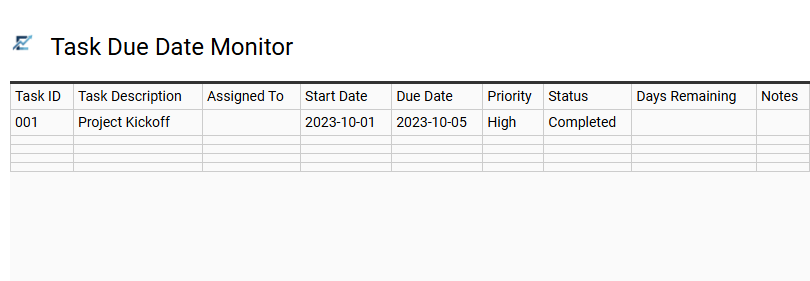
Task Due Date Monitor
A Task Due Date Monitor in Excel is a powerful tool designed to streamline project management and time tracking. By utilizing automated functions and conditional formatting, this template provides a visual overview of upcoming deadlines, overdue tasks, and completion statuses. It allows users to centralize essential information, ensuring that high-priority items are addressed promptly to prevent project delays.
This structured format improves accountability by clearly defining responsibilities and timelines. With the ability to filter and sort data by urgency or department, the template serves as a dynamic dashboard for maintaining organizational efficiency. It eliminates the risks associated with manual scheduling, allowing for better resource allocation and stress-free milestone management.
This template is ideal for managing marketing campaign launches, tracking academic assignment schedules, and monitoring corporate compliance renewal dates.
Download: 💾 Task Due Date Monitor .xls
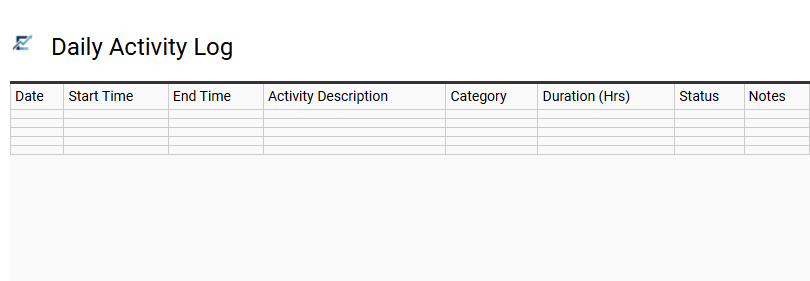
Daily Activity Log
A Daily Activity Log is a vital component of an Excel template for tracking dates, providing a structured framework to monitor productivity and time management. By documenting specific tasks chronologically, users can maintain an accurate historical record of their daily operations. This log utilizes Excel's data validation and date formatting to ensure consistency, making it easy to sort entries and visualize progress over weeks or months.
Incorporating columns for durations and descriptions helps identify time-intensive tasks and streamline workflows. This systematic approach to date tracking ensures that deadlines remain visible and accountability is maintained across all recorded activities.
This template is suitable for professional freelance billing, personal fitness habit tracking, and monitoring project management milestones.
Download: 💾 Daily Activity Log .xls
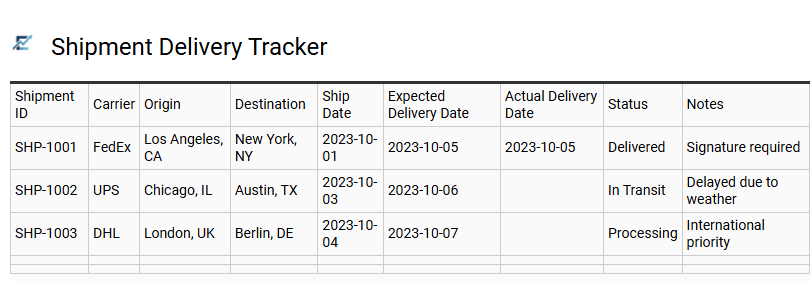
Shipment Delivery Tracker
An Excel-based shipment delivery tracker is an essential tool for streamlining logistics and maintaining supply chain transparency. This template allows businesses to organize and monitor critical milestones, such as dispatch dates, estimated times of arrival (ETA), and actual delivery timestamps. By leveraging date-tracking formulas and conditional formatting, users can instantly identify transit delays and evaluate carrier reliability.
Centralizing this data in a spreadsheet helps minimize manual errors and ensures that inventory levels are managed efficiently. With a clear overview of every package's journey, companies can improve customer satisfaction through more accurate status updates and proactive problem-solving.
This template is ideal for e-commerce order fulfillment, international freight monitoring, and corporate procurement management.
Download: 💾 Shipment Delivery Tracker .xls
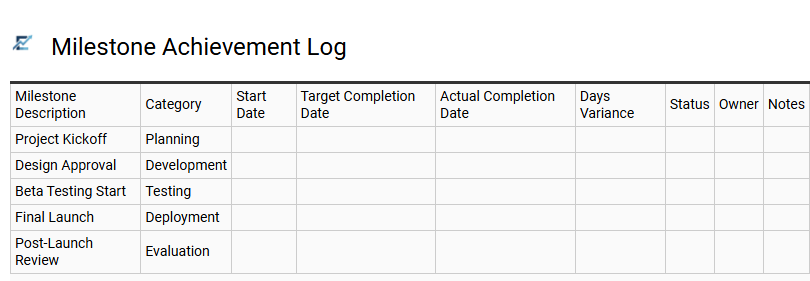
Milestone Achievement Log
A Milestone Achievement Log is a specialized Excel template designed to monitor critical dates and key progress markers. By centralizing deadlines, planned versus actual completion dates, and real-time status updates, this log ensures transparency and accountability throughout a project's lifecycle.
Using an Excel-based tracker allows for efficient data filtering, automated date calculations, and visual status indicators, making it easier to identify potential bottlenecks before they impact the final schedule. It serves as both a strategic roadmap for upcoming tasks and a reliable historical record of organizational success. This systematic approach to date tracking enhances time management and keeps all stakeholders aligned on significant project shifts.
This template is ideal for software development sprints, academic dissertation timelines, and real estate construction phase monitoring.
Download: 💾 Milestone Achievement Log .xls
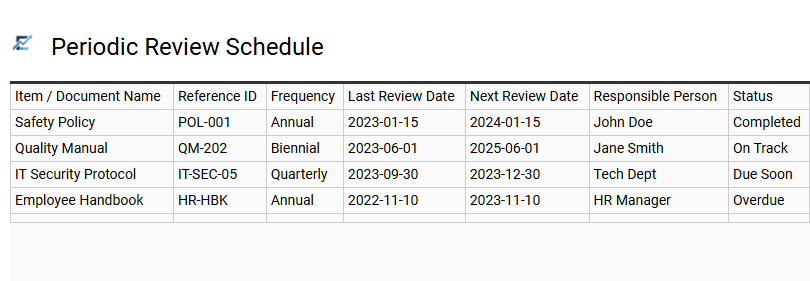
Periodic Review Schedule
A Periodic Review Schedule is a vital component of an Excel date-tracking template, designed to automate the management of recurring deadlines. By utilizing Excel functions such as EDATE or WORKDAY, the template automatically calculates future review dates based on set intervals-such as monthly, quarterly, or annually. This ensures that critical tasks, such as policy updates or safety inspections, are never overlooked.
Integrating conditional formatting provides immediate visual alerts for upcoming or overdue milestones, significantly improving accountability. This structured approach helps organizations maintain regulatory compliance and operational efficiency by providing a clear roadmap of recurring obligations. By centralizing these dates, users can mitigate the risks associated with manual tracking and missed deadlines.
This template is suitable for managing ISO audit cycles, conducting annual employee performance appraisals, and tracking scheduled preventative machinery maintenance.
Download: 💾 Periodic Review Schedule .xls
This professional Excel date tracking spreadsheet streamlines complex workflows by centralizing project milestones and critical deadlines. Utilizing advanced conditional formatting and automated timeline visualization, it ensures team accountability through dynamic status updates and overdue task alerts. By integrating Gantt chart elements and precise data validation, the tool transforms raw data into actionable insights. Elevate your project management efficiency and maintain schedule integrity with this robust digital solution, designed for seamless task oversight and peak organizational productivity.