
Streamline Daily Productivity with a Comprehensive Excel Task Tracking Spreadsheet
Optimizing your daily workflow is essential for peak productivity. An Excel template for tracking daily tasks serves as a powerful task management tool, transforming a simple spreadsheet into a dynamic to-do list. By utilizing structured layouts, you can monitor efficiency, prioritize deliverables, and maintain a clear overview of your progress throughout the workday. Streamline your processes and stay organized with a professional tracking system. Check out the already made variation of templates below.
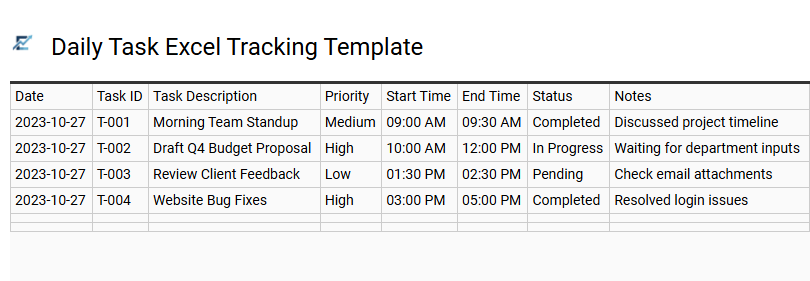
Daily Task Excel Tracking Template
A daily task Excel tracking template is a powerful productivity tool designed to streamline your workflow and enhance organization. By utilizing a structured spreadsheet, you can categorize to-do items, assign priority levels, and set specific deadlines. These templates often feature automated functions like conditional formatting and checkboxes to provide real-time visual progress updates.
Implementing an Excel-based tracker helps eliminate mental fatigue by centralizing your responsibilities in a single, accessible location. It ensures that critical milestones are met while allowing for easy adjustments as your schedule evolves. This systematic approach is essential for anyone looking to maximize efficiency and maintain a clear overview of their daily goals.
This template is perfectly suited for managing individual freelance projects, academic study schedules, and daily office administrative duties.
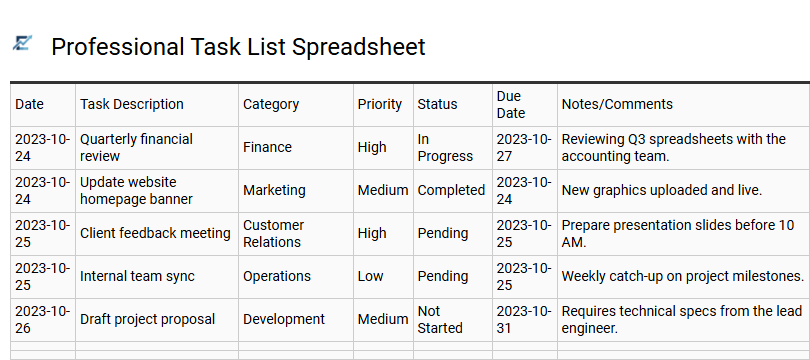
Professional Task List Spreadsheet
A professional task list spreadsheet is an essential tool for enhancing daily productivity and organizational efficiency. By utilizing an Excel-based template, users can systematically categorize responsibilities, assign priority levels, and set clear deadlines. Features such as automated progress tracking and status updates provide a real-time overview of pending workflows, ensuring critical objectives are never missed.
This digital approach allows for easy filtering and data sorting, making it superior to traditional note-taking for managing complex project requirements. Implementing a structured daily tracker helps professionals maintain focus, reduce cognitive load, and achieve a better work-life balance through effective time management and accountability.
This template is ideal for managing corporate project milestones, tracking freelance client deliverables, or organizing academic research schedules.
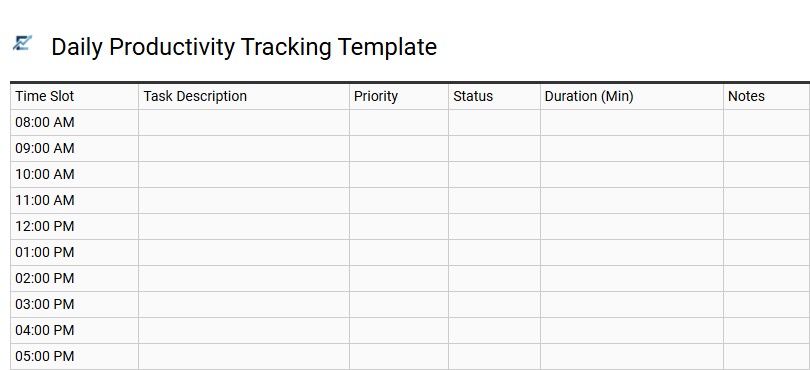
Daily Productivity Tracking Template
A daily productivity tracking template is a powerful tool designed to streamline workflow and improve time management. By using an Excel-based system, individuals can categorize tasks, assign priority levels, and monitor completion statuses in real-time. This structured approach helps eliminate distractions, reduces the mental load of multitasking, and ensures that high-impact goals are met promptly. Features such as automated checkboxes and progress bars provide visual motivation, while data-driven insights allow users to identify and resolve efficiency bottlenecks. Whether you are aiming to enhance professional output or personal organization, a dedicated spreadsheet provides the accountability needed to stay focused and organized throughout the day. This template is ideal for project managers overseeing team milestones, freelancers balancing multiple client deliverables, and students organizing complex academic schedules.
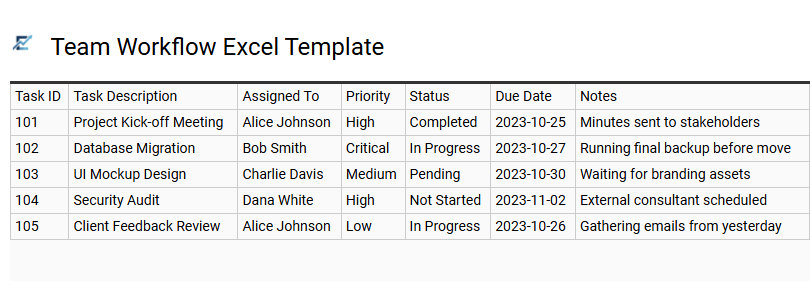
Team Workflow Excel Template
A Team Workflow Excel Template is a robust solution for centralizing task management and enhancing group collaboration. By organizing daily tasks in a shared spreadsheet, teams can assign ownership, set firm deadlines, and track real-time progress through status indicators. This template streamlines communication by providing a single source of truth, reducing the need for constant status meetings. Highlighting priorities and bottlenecks helps managers optimize resource allocation and ensure project milestones are met on time. Its customizable nature allows for seamless integration into existing processes without the overhead of complex software. By fostering accountability and transparency, it empowers teams to maintain high productivity levels and meet organizational goals efficiently.
This template is suitable for managing marketing campaign launches, coordinating software development sprints, and overseeing administrative office operations.
Download: 💾 Team Workflow Excel Template .xls
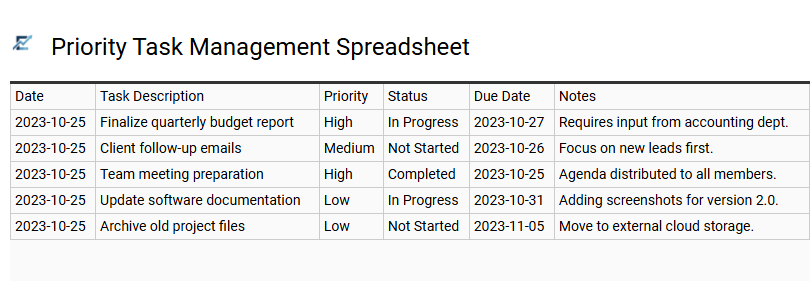
Priority Task Management Spreadsheet
An Excel-based priority task management spreadsheet is a powerful productivity tool designed to streamline your daily workflow. By categorizing activities based on urgency and importance, this template helps users focus on high-impact objectives while minimizing distractions.
Key features typically include automated status tracking, deadline reminders, and color-coded priority levels that provide a clear visual overview of your pending responsibilities. Utilizing a structured digital grid allows for seamless data entry and real-time progress monitoring, ensuring no critical assignment is overlooked. This systematic approach enhances time management and ensures that resources are allocated efficiently across various professional or personal projects.
This template is ideal for project managers overseeing team milestones, freelancers balancing multiple client deadlines, and students organizing complex academic coursework.
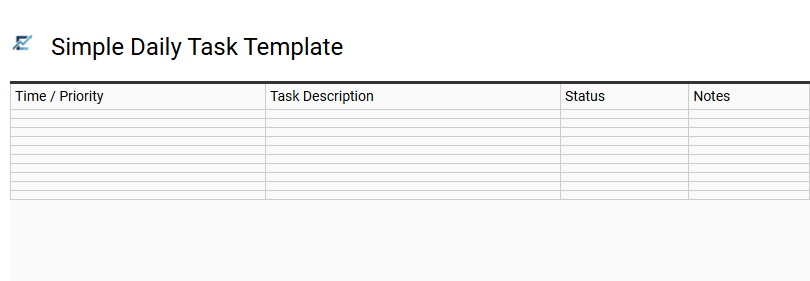
Simple Daily Task Template
A simple daily task template in Excel is a powerful tool for enhancing productivity and maintaining a clear overview of your professional or personal responsibilities. By utilizing a structured spreadsheet, you can easily categorize assignments, assign priority levels, and set specific deadlines. This visual organization helps reduce mental clutter and ensures that high-priority goals are addressed first.
Most templates include status columns, such as "To Do," "In Progress," and "Completed," allowing for real-time progress tracking. Because Excel is highly customizable, you can adapt the layout to fit your specific workflow without the need for complex software. This streamlined approach to task management fosters better time management and accountability throughout the day.
This template is perfectly suited for project managers tracking team milestones, students organizing academic assignments, and freelancers managing various client deliverables.
Download: 💾 Simple Daily Task Template .xls
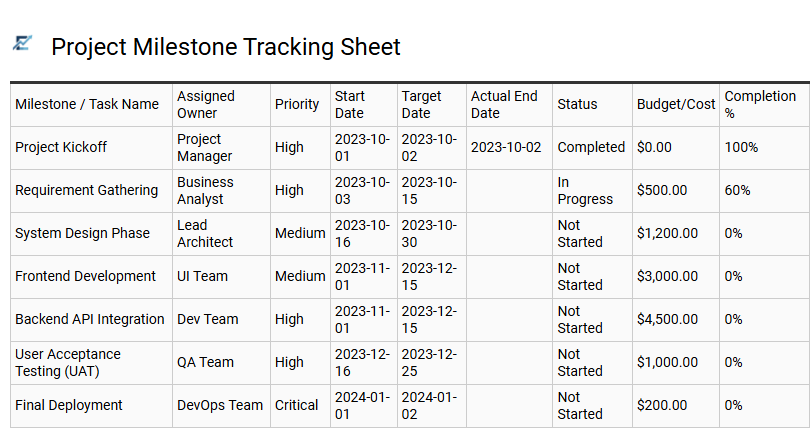
Project Milestone Tracking Sheet
A Project Milestone Tracking Sheet is a powerful component of a daily task Excel template, designed to bridge the gap between incremental tasks and major project goals. By defining high-level milestones, you can visualize the project lifecycle, monitor critical deadlines, and ensure that daily activities align with overarching objectives. This structured format helps project managers identify potential bottlenecks early, allowing for better resource allocation and timeline adjustments.
Integrating milestone tracking into your workflow enhances accountability and provides a clear roadmap for success. It transforms complex projects into manageable phases, ensuring that no essential deliverable is overlooked. This template is particularly effective for maintaining momentum and documenting progress for stakeholders through organized, data-driven insights. This template is ideal for software development sprints, integrated marketing campaign launches, and complex construction project scheduling.
Download: 💾 Project Milestone Tracking Sheet .xls
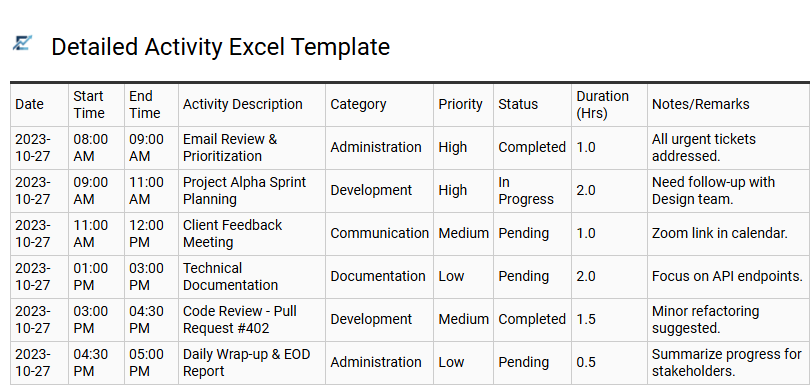
Detailed Activity Excel Template
A detailed activity Excel template serves as a robust framework for systematic time management and enhanced productivity. By meticulously logging daily tasks, setting priority levels, and monitoring completion status, users can transform chaotic schedules into organized workflows. This spreadsheet approach allows for granular tracking of time allocation, helping to identify efficiency gaps and ensure deadlines are met.
Utilizing features like conditional formatting and data validation, this tool provides a clear visual overview of progress, making it easier to pivot resources where they are needed most. It is an ideal solution for anyone looking to optimize their daily routine through data-driven insights and structured task organization. This kind of template is suitable for project managers tracking team milestones, students balancing complex academic deadlines, and freelancers monitoring billable client hours.
Download: 💾 Detailed Activity Excel Template .xls
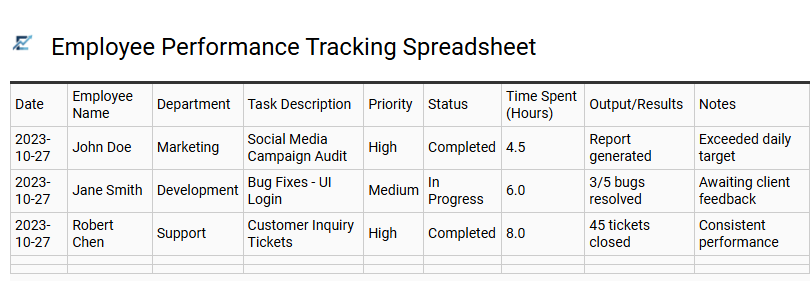
Employee Performance Tracking Spreadsheet
An Excel template for tracking daily tasks is a powerful tool for monitoring workforce productivity and operational efficiency. By utilizing a performance tracking spreadsheet, managers can record daily outputs, monitor task status, and analyze time allocation across various projects. This systematic approach ensures accountability and provides objective data for performance reviews. By centralizing work logs into a structured digital format, businesses can identify bottlenecks, optimize workflows, and ensure team members remain aligned with organizational objectives. Utilizing these metrics allows for data-driven decisions that enhance overall team output and streamline communication.
This kind of template is suitable for remote team monitoring, conducting annual employee appraisals, and managing project-based freelance deliverables.
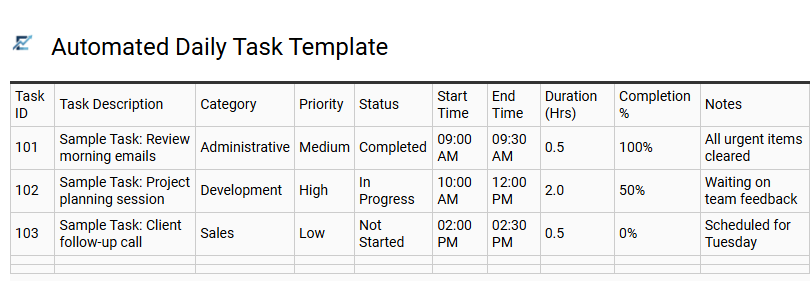
Automated Daily Task Template
An automated daily task template for Excel streamlines workflow management by leveraging built-in formulas and conditional formatting to monitor progress. Unlike static lists, this dynamic tool provides real-time updates on deadlines, priority levels, and completion statuses. By reducing manual data entry, it enhances productivity and ensures that high-priority items are visually highlighted for immediate attention.
Integrating automation into your daily routine helps eliminate administrative overhead, allowing you to focus on execution rather than organization. This semantic structure allows for better data sorting and insightful tracking of long-term productivity trends. This kind of template is perfectly suited for managing small business operations, tracking freelance client milestones, and organizing complex academic study schedules.
Download: 💾 Automated Daily Task Template .xls
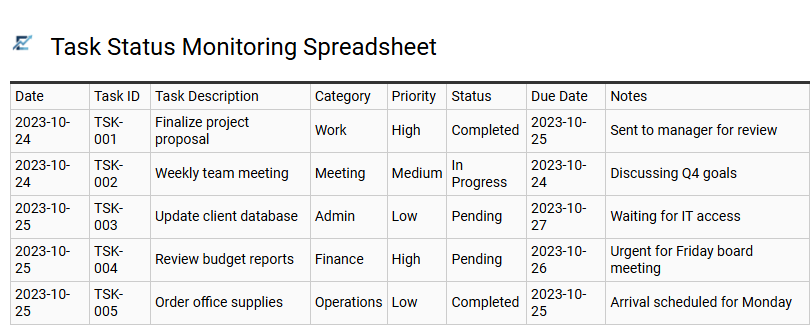
Task Status Monitoring Spreadsheet
An Excel-based daily task tracker provides a structured framework for managing professional and personal responsibilities. By utilizing a task status monitoring spreadsheet, you can define priorities, set clear deadlines, and visualize progress using automated status updates. This template enhances efficiency by consolidating all pending items into a single, accessible dashboard.
Integrated features such as conditional formatting and dropdown menus allow users to identify bottlenecks and shift focus toward high-priority assignments instantly. Organizing your workflow digitally minimizes manual errors and ensures that no critical milestone is overlooked during the business day. This systematic approach fosters accountability and provides a historical record of completed work for future performance reviews.
This template is suitable for managing freelance project milestones, tracking daily administrative office operations, or coordinating academic research deadlines.
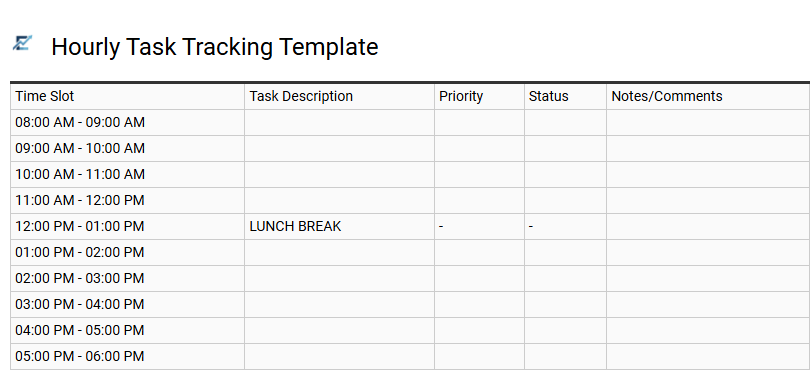
Hourly Task Tracking Template
An hourly task tracking template is a specialized productivity tool designed to help individuals and professionals organize their workday with granular precision. By breaking down daily objectives into sixty-minute intervals, this Excel-based framework ensures every minute is accounted for, significantly reducing procrastination and identifying "time leaks."
Using features like automated time calculations and status dropdowns, users can monitor their progress in real-time and maintain a clear visual roadmap of their priorities. This systematic approach to time management fosters better accountability and helps in refining workflow efficiency over time. This template is highly effective for freelancers managing billable hours, students balancing rigorous study schedules, and project managers overseeing tight delivery deadlines.
Download: 💾 Hourly Task Tracking Template .xls
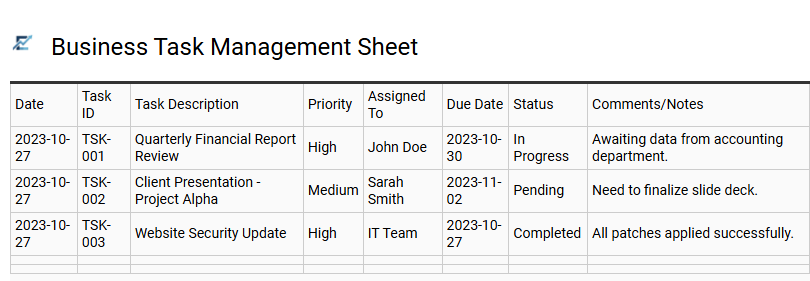
Business Task Management Sheet
A Business Task Management Sheet in Excel is a powerful tool designed to streamline professional workflows and enhance team productivity. By organizing daily responsibilities into a structured format, users can easily monitor project progress, set priority levels, and assign clear ownership for every deliverable. This template utilizes the functional power of spreadsheets to provide a real-time overview of operational goals without the complexity of high-end software.
Effective task tracking ensures that deadlines are met and resources are allocated efficiently. With features like status updates and automated formatting, businesses can maintain transparency across departments and reduce the risk of missed assignments. This approach fosters accountability and helps teams focus on high-impact activities that drive organizational growth.
This template is suitable for managing weekly marketing campaigns, tracking recurring administrative office duties, and overseeing small-scale software development sprints.
Download: 💾 Business Task Management Sheet .xls
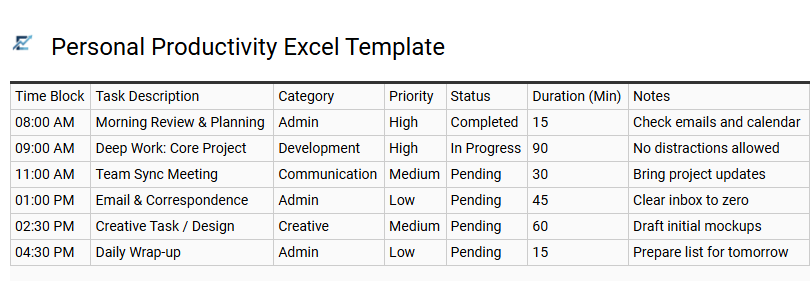
Personal Productivity Excel Template
A personal productivity Excel template is a dynamic tool designed to streamline daily task management and enhance organizational efficiency. By utilizing a structured spreadsheet format, users can easily categorize priorities, set deadlines, and monitor progress using automated status indicators. This digital task tracker provides a centralized hub for managing professional obligations and personal goals, helping to eliminate the mental clutter of unorganized to-do lists.
Leveraging built-in features like conditional formatting and data validation, these templates ensure that high-priority items remain visible while providing a clear overview of your daily workload. Whether you are aiming to optimize your time management or ensure no deadline is missed, an Excel-based system offers the flexibility to adapt to any custom workflow.
This template is ideal for freelancers managing multiple client projects, students organizing complex study schedules, and remote professionals tracking recurring administrative responsibilities.
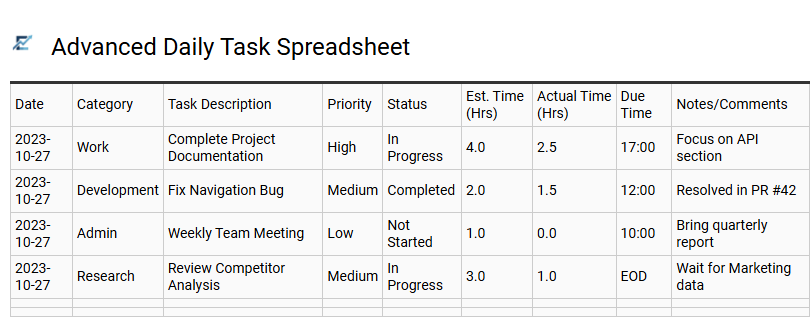
Advanced Daily Task Spreadsheet
An advanced daily task spreadsheet serves as a dynamic productivity engine, moving beyond simple checklists to provide comprehensive workflow management. By utilizing automated Excel formulas, conditional formatting, and status tracking, this template allows users to visualize priorities and deadlines with precision. It features dedicated columns for task categorization, estimated time versus actual duration, and progress indicators to help identify bottlenecks in your schedule.
Integrating such a structured tool into your routine enhances focus and ensures high-priority objectives are completed efficiently. This data-driven approach to time management empowers individuals to optimize their performance and maintain accountability throughout the workday.
This template is ideal for project managers coordinating complex team deliverables, freelancers balancing multiple client contracts, and students managing intensive exam preparation schedules.
Download: 💾 Advanced Daily Task Spreadsheet .xls
Implementing a robust Excel task tracking spreadsheet revolutionizes daily operations by centralizing project management. By utilizing conditional formatting and automated formulas, users achieve seamless workflow optimization. This dynamic tool simplifies task prioritization, ensuring critical deadlines are met through real-time status updates.
Leveraging spreadsheet capabilities for performance monitoring transforms raw data into actionable insights. Elevate your time management and foster accountability. Integrating these advanced productivity tools guarantees a structured approach to professional success and efficient resource allocation.