
Automated Business Expense Tracking Spreadsheet for Strategic Financial Management
Managing professional finances requires precision and clarity. Utilizing a robust excel template for tracking business expenses simplifies your bookkeeping process, ensuring every receipt and transaction is meticulously documented. By categorizing overhead costs and monitoring real-time cash flow within a structured spreadsheet, entrepreneurs can identify critical spending patterns and maximize potential tax deductions. Effective budget planning starts with organized data entry, allowing for more accurate financial forecasting and long-term growth strategies. Please check the already made variation of templates below.
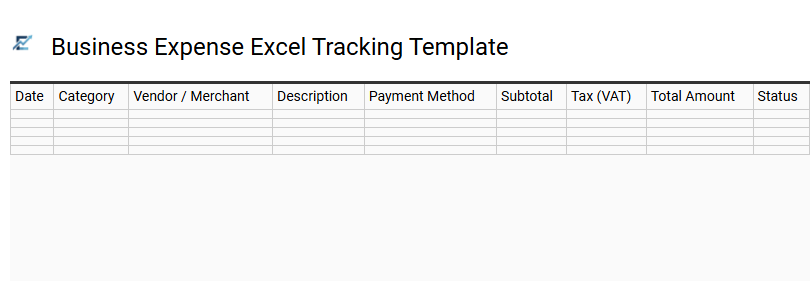
Business Expense Excel Tracking Template
A business expense Excel tracking template provides a structured framework for recording and categorizing all corporate outgoings. By utilizing pre-formatted columns for dates, vendors, categories, and tax amounts, businesses can maintain accurate financial records essential for cash flow management and tax compliance. These templates often include automated formulas that summarize spending patterns, helping owners identify cost-saving opportunities and stay within defined budgets. Streamlining your bookkeeping with a spreadsheet ensures that every receipt is accounted for, reducing errors during manual data entry and simplifying year-end reporting.
This template is highly suitable for freelancers managing billable project costs, small retail startups tracking operational overhead, and non-profit organizations monitoring monthly administrative spending.
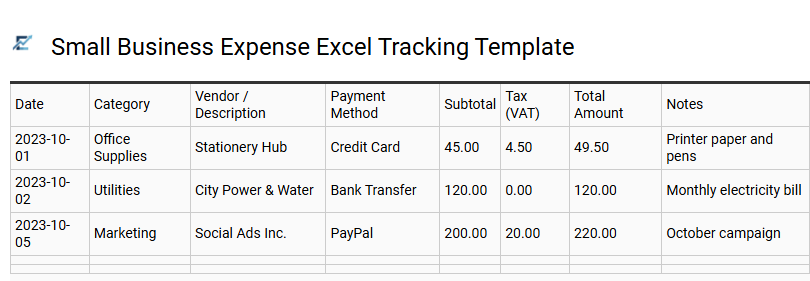
Small Business Expense Excel Tracking Template
A Small Business Expense Excel Tracking Template is a vital tool for maintaining financial clarity and operational efficiency. By centralizing all expenditures-including recurring subscriptions, payroll, and overhead costs-business owners can monitor their cash flow in real-time. This structured approach to bookkeeping simplifies tax preparation and helps identify critical cost-saving opportunities through automated calculations and category breakdowns.
Using a dedicated spreadsheet minimizes manual entry errors and ensures every transaction is documented for accurate financial forecasting. This streamlined visibility into spending habits allows entrepreneurs to make data-driven decisions that support long-term growth and fiscal health.
This template is ideal for freelance consultants managing project-specific costs, local boutique owners tracking monthly inventory and utility bills, and tech startup founders monitoring burn rates during their first year of operation.
Download: 💾 Small Business Expense Excel Tracking Template .xls
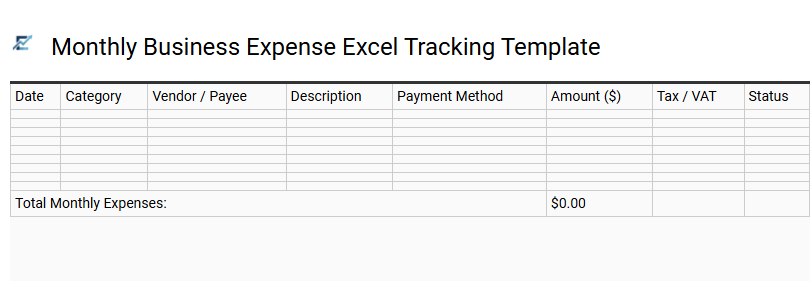
Monthly Business Expense Excel Tracking Template
A professional Excel tracking template is a vital tool for maintaining financial transparency and operational efficiency. By centralizing all outgoing costs-from recurring subscriptions to vendor payments-business owners gain a comprehensive view of their monthly cash flow. This structured approach simplifies tax preparation, helps identify potential cost-saving opportunities, and ensures that departmental budgets are strictly followed throughout the fiscal year.
Utilizing a spreadsheet allows for easy categorization and automated calculations, significantly reducing the risk of manual bookkeeping errors. With real-time visibility into your spending habits, you can make data-driven decisions to scale your operations sustainably and improve your bottom line. This template is ideal for freelancers managing project-related costs, small startups monitoring monthly burn rates, and non-profit organizations tracking administrative overhead.
Download: 💾 Monthly Business Expense Excel Tracking Template .xls
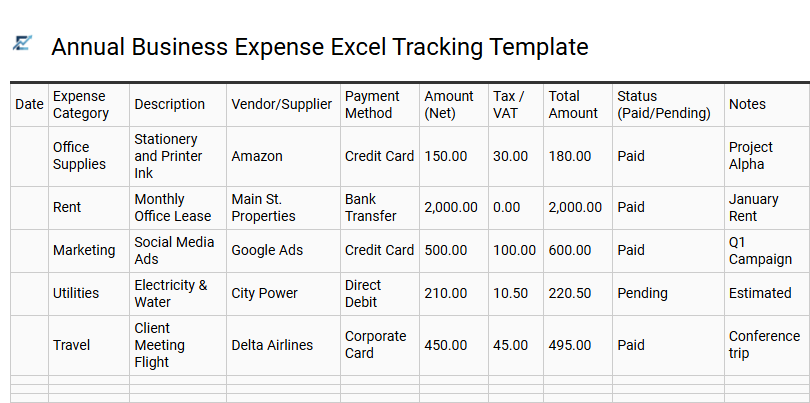
Annual Business Expense Excel Tracking Template
Streamline your financial management with a robust Excel-based solution designed for comprehensive annual oversight. This template allows businesses to categorize expenditures, track monthly outflows, and simplify tax documentation. By centralizing data such as vendor payments, operational costs, and travel expenses, you ensure accurate reporting and improved budget forecasting.
Using automated formulas, this tool eliminates manual calculation errors, providing a real-time snapshot of your fiscal health. It is an essential asset for maintaining transparency and optimizing resource allocation throughout the calendar year. This template is perfectly suited for freelance graphic designers, boutique retail stores, and independent consulting firms.
Download: 💾 Annual Business Expense Excel Tracking Template .xls
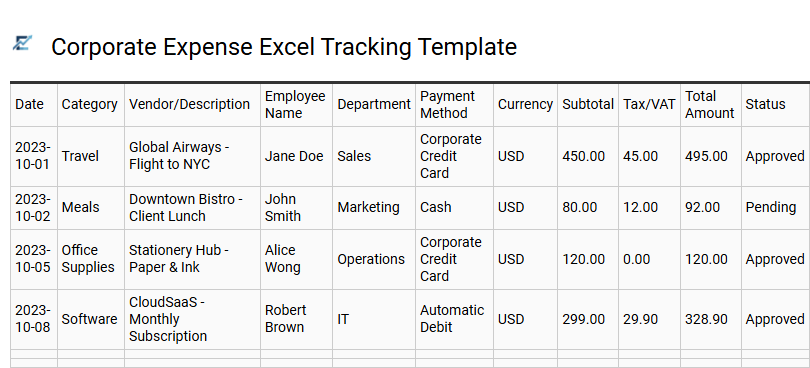
Corporate Expense Excel Tracking Template
A corporate expense Excel tracking template is a vital financial tool designed to streamline bookkeeping and enhance fiscal oversight. It provides a structured framework for recording daily business expenditures, including vendor details, payment dates, and tax-deductible categories. By utilizing automated formulas, businesses can monitor real-time cash flow, track departmental budget adherence, and simplify the reimbursement workflow for employees.
This organized approach ensures audit readiness and helps identify unnecessary overhead, ultimately improving a company's bottom line. Implementing a standardized spreadsheet allows for clear data visualization, making it easier for stakeholders to analyze spending patterns and make informed financial projections.
This template is ideal for managing startup operational costs, tracking consultant travel reimbursements, and monitoring monthly office utility expenditures.
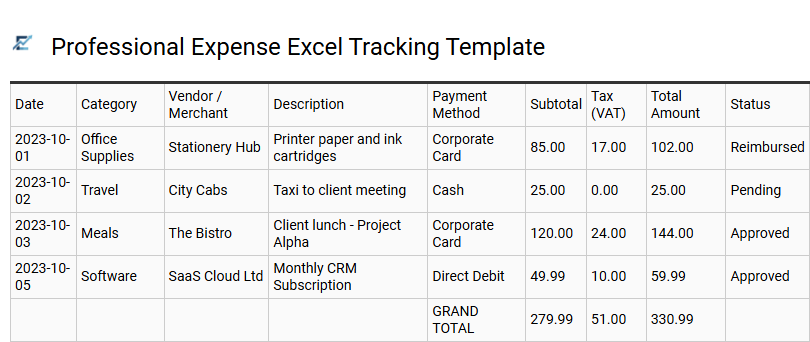
Professional Expense Excel Tracking Template
A professional expense Excel tracking template is a vital financial tool designed to streamline company spending. By centralizing all outlays, businesses can maintain accurate cash flow records, simplify tax preparation, and monitor budget compliance in real-time. These templates typically feature categorized columns for dates, vendors, tax amounts, and payment methods, allowing for automated calculations and insightful data visualization. Implementing a structured spreadsheet reduces manual errors and ensures every deductible cost is accounted for, ultimately improving bottom-line profitability. This versatile solution provides the transparency needed for strategic financial planning and effective resource management.
This template is ideal for small business owners managing daily operations, freelancers tracking billable project costs, and sales teams organizing monthly travel reimbursements.
Download: 💾 Professional Expense Excel Tracking Template .xls
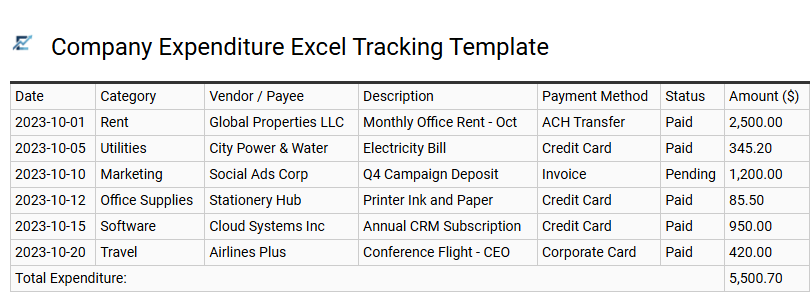
Company Expenditure Excel Tracking Template
A Company Expenditure Excel Tracking Template is an essential tool for maintaining financial transparency and organizational health. By utilizing structured spreadsheets, businesses can systematically record every transaction, from daily operational costs to significant capital investments. These templates typically feature categorized columns for dates, vendors, payment methods, and tax details, enabling automated totals through built-in formulas. This streamlined approach simplifies tax preparation, improves cash flow management, and provides actionable insights into spending patterns without the need for complex accounting software. Using a standardized format ensures data consistency, making it easier to identify potential cost-saving opportunities and stay within departmental budgets.
This kind of template is highly suitable for small business owners managing monthly overhead, freelancers tracking billable project expenses, and department heads monitoring quarterly budget allocations.
Download: 💾 Company Expenditure Excel Tracking Template .xls
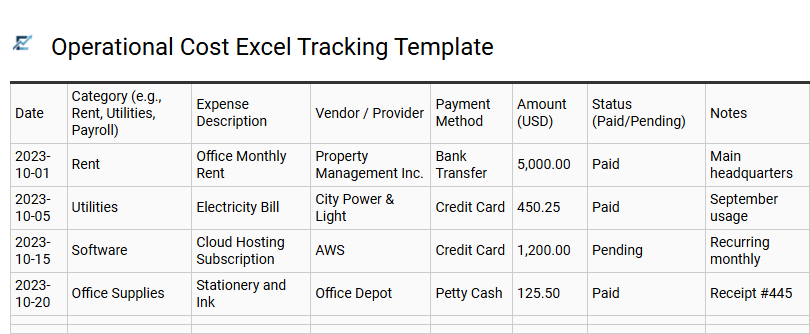
Operational Cost Excel Tracking Template
Efficiently managing day-to-day business expenditures is vital for maintaining financial health and long-term sustainability. An operational cost Excel tracking template provides a structured framework to monitor recurring expenses such as rent, utilities, payroll, and maintenance. By utilizing automated formulas and data visualization, businesses can identify spending trends, eliminate unnecessary overhead, and ensure strict budget compliance. This systematic approach to bookkeeping enhances financial transparency and simplifies the preparation of annual tax documentation. A dedicated spreadsheet serves as a foundational tool for real-time fiscal oversight, helping managers make data-driven decisions to improve the bottom line.
This template is suitable for small retail boutiques monitoring inventory overhead, freelance consulting firms managing software subscriptions, and non-profit organizations tracking monthly administrative disbursements.
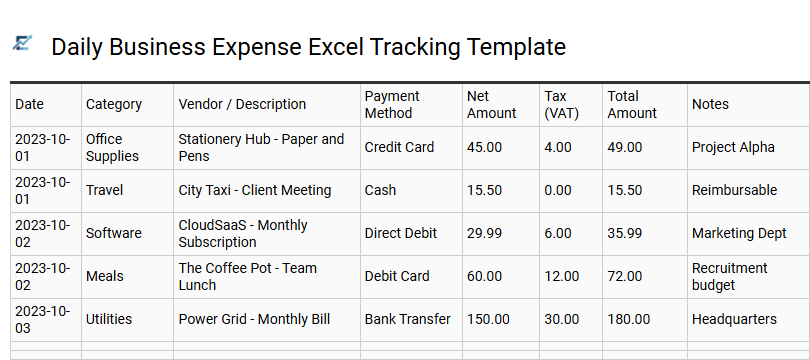
Daily Business Expense Excel Tracking Template
A daily business expense Excel tracking template is an essential tool for maintaining financial transparency and operational control. By logging expenditures as they occur, business owners can accurately monitor cash flow, manage departmental budgets, and simplify year-end tax preparation. This digital ledger typically organizes data by date, category, vendor, and payment method, ensuring every dollar is accounted for.
Using a structured spreadsheet helps identify unnecessary spending patterns and ensures you never miss a tax-deductible expense. Automating your bookkeeping through Excel reduces manual entry errors and provides a centralized database for financial analysis and audit readiness.
This template is perfectly suited for independent freelancers managing project costs, small retail shop owners tracking inventory overhead, and consulting firms monitoring reimbursable travel expenses.
Download: 💾 Daily Business Expense Excel Tracking Template .xls
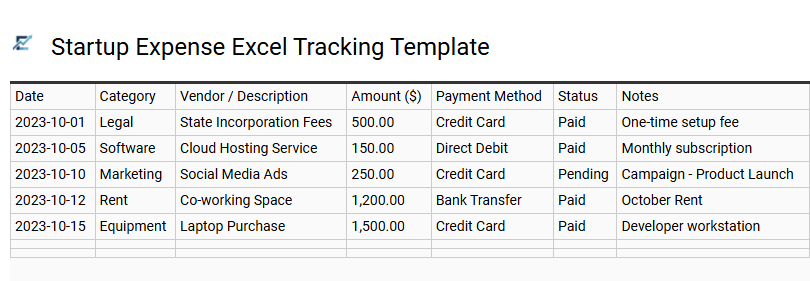
Startup Expense Excel Tracking Template
A startup expense Excel tracking template is a vital financial tool designed for entrepreneurs to monitor cash flow and maintain fiscal discipline. This organized spreadsheet allows business owners to categorize diverse expenditures-such as digital marketing, software subscriptions, and office overhead-within a single, centralized location.
By utilizing automated formulas, startups can instantly calculate monthly burn rates and compare actual spending against projected budgets. Maintaining precise records is essential for tax compliance, simplifying investor reporting, and identifying areas for cost optimization during the critical scaling phase. Using a professional template ensures that no receipt goes unrecorded, providing a clear roadmap for long-term profitability.
This kind of template is suitable for early-stage tech companies managing seed funding, freelance consultants tracking deductible business costs, and small retail businesses monitoring initial inventory and overhead expenses.
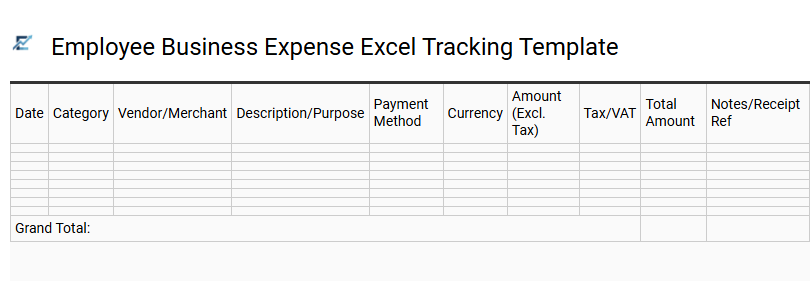
Employee Business Expense Excel Tracking Template
An Employee Business Expense Excel Tracking Template provides a structured framework for recording and categorizing professional expenditures. By using a standardized spreadsheet, businesses can efficiently monitor cash flow, ensure accurate tax deductions, and streamline the reimbursement process. These templates typically include fields for dates, vendor details, expense categories-such as travel, meals, or office supplies-and total costs with automated calculation formulas.
Implementing a digital tracker reduces manual data entry errors and improves financial transparency for both management and accounting departments. It serves as a centralized audit trail, making it easier to verify receipts and maintain budget compliance throughout the fiscal year.
This template is particularly suitable for field sales representatives documenting travel costs, project managers overseeing site-specific budgets, and remote employees submitting monthly home-office reimbursement claims.
Download: 💾 Employee Business Expense Excel Tracking Template .xls
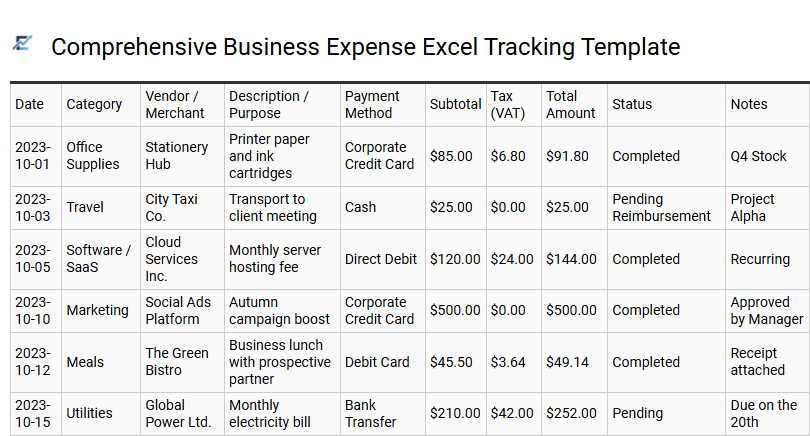
Comprehensive Business Expense Excel Tracking Template
Maintaining financial health requires a precise system for recording outflows. A professional business expense Excel template offers a centralized platform to document daily transactions, categorize operational costs, and monitor real-time cash flow. By systematically tracking expenditures like marketing, utilities, and inventory, stakeholders can gain actionable insights into their spending habits.
These templates simplify tax preparation by organizing receipts and deductible items into audit-ready formats. With built-in formulas for automatic totaling and monthly summaries, users can eliminate manual calculation errors and focus on strategic growth. Digital tracking ensures historical data is easily accessible for year-over-year comparisons and budget forecasting.
This template is ideal for freelancers managing project-specific costs, small business owners tracking monthly overhead, and sales teams documenting reimbursable travel expenses.
Download: 💾 Comprehensive Business Expense Excel Tracking Template .xls
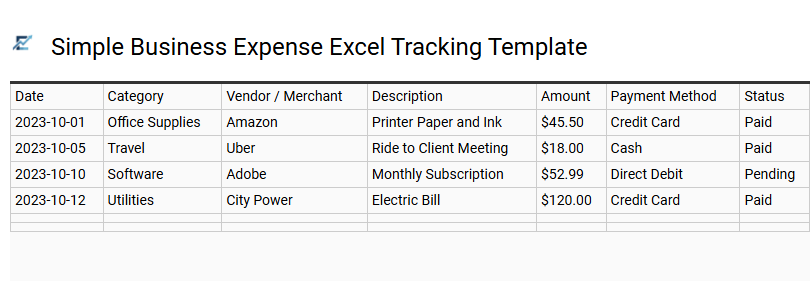
Simple Business Expense Excel Tracking Template
Efficient financial management is vital for any growing enterprise. A simple business expense Excel tracking template offers a user-friendly solution for organizing daily transactions, monitoring cash flow, and simplifying year-end tax reporting. By documenting costs such as supplies, travel, and utilities in a structured spreadsheet, business owners can maintain accurate records and identify opportunities for cost savings. This tool eliminates the need for expensive accounting software while ensuring all deductible expenses are captured for maximum tax efficiency.
This template is ideal for independent freelancers managing project-based costs, startup founders tracking initial burn rates, and small retail shop owners organizing monthly inventory purchases.
Download: 💾 Simple Business Expense Excel Tracking Template .xls
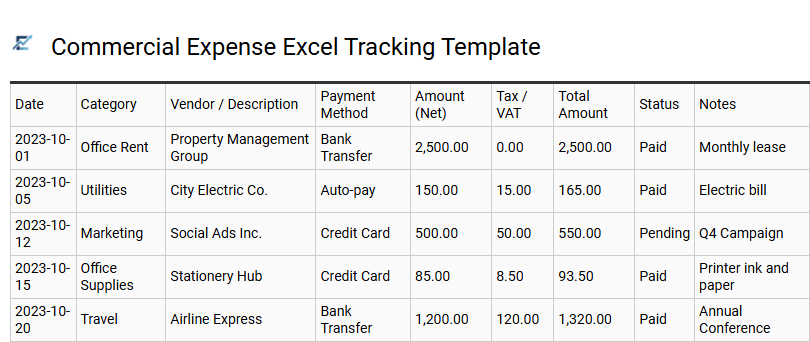
Commercial Expense Excel Tracking Template
A commercial expense Excel tracking template provides a structured framework for businesses to monitor their financial health effectively. By categorizing operational costs-such as utilities, marketing, and inventory-owners gain clear insights into cash flow and overall profitability. These templates often feature built-in formulas for automated calculations, which help in reducing manual entry errors and streamlining year-end tax preparation. Utilizing a standardized spreadsheet ensures consistency across different reporting periods, making it significantly easier to identify spending trends and optimize budget allocation strategies.
This kind of template is suitable for small business monthly accounting, tracking project-specific overhead, and managing employee travel reimbursements.
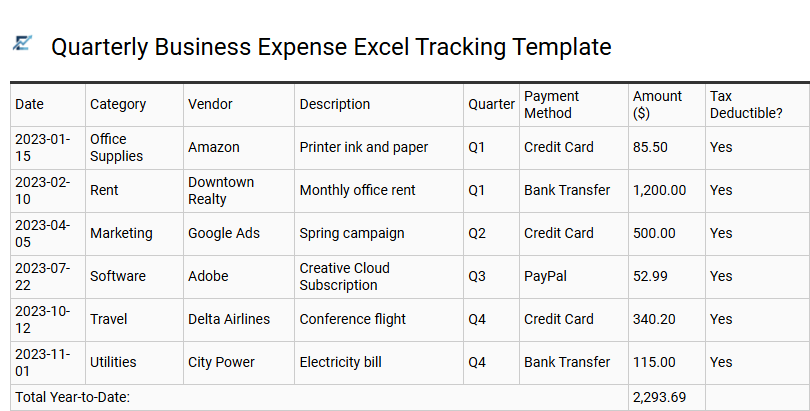
Quarterly Business Expense Excel Tracking Template
Maintaining financial clarity is essential for any growing enterprise. A Quarterly Business Expense Excel Tracking Template provides a systematic framework to categorize expenditures, monitor cash flow, and simplify tax preparation. By recording operational costs-such as travel, office supplies, and utility bills-on a three-month cycle, business owners can identify spending trends and adjust budgets for improved profitability.
This spreadsheet solution eliminates manual calculation errors through automated formulas, ensuring that total overhead and VAT remain accurate for reporting. Utilizing a standardized tracking method enhances financial transparency and ensures you are prepared for year-end audits or investor reviews.
This template is ideal for freelance consultants managing project-related costs, small retail shop owners tracking monthly inventory overhead, and startup founders monitoring quarterly burn rates.
Download: 💾 Quarterly Business Expense Excel Tracking Template .xls
Adopting an automated business expense tracking spreadsheet is a cornerstone of strategic financial management. This dynamic tool streamlines bookkeeping by automatically categorizing expenditures, ensuring tax compliance and real-time cash flow visibility. By mitigating manual data entry errors, organizations enhance fiscal oversight and precision in budget allocation. Leveraging these automated solutions facilitates cost-reduction strategies and data-driven decision-making. Ultimately, integrating robust tracking systems empowers businesses to optimize resource management, maintain financial health, and achieve sustained operational efficiency through accurate reporting.