
Action Item Tracking Excel Template for Efficient Project Management
Streamline your project management workflow by implementing a robust Excel template for tracking action items. These dynamic spreadsheets serve as a centralized hub for monitoring task progress, assigning ownership, and ensuring critical deadlines are met. By leveraging structured data organization and status updates, teams can enhance accountability and eliminate bottlenecks across various deliverables. Utilizing automated productivity tools simplifies complex task lists, allowing for real-time visibility into project health. Explore our curated selection of professional layouts tailored for efficiency. Check out the already made variation of templates below.
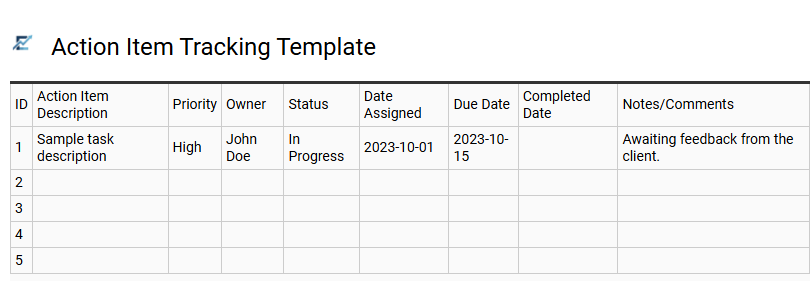
Action Item Tracking Template
An Action Item Tracking Template is a vital project management tool designed to organize tasks and ensure team accountability. By centralizing data in Excel, users can easily assign ownership, set priority levels, and monitor deadlines through a structured interface.
These templates typically feature dedicated columns for task descriptions, status updates, and completion dates. Utilizing Excel allows for advanced filtering, sorting, and conditional formatting to highlight overdue items. This systematic approach reduces project risks, improves communication, and provides stakeholders with a clear overview of progress.
This template is suitable for managing weekly team meetings, coordinating complex product launches, or tracking internal audit remediation steps.
Download: 💾 Action Item Tracking Template .xls
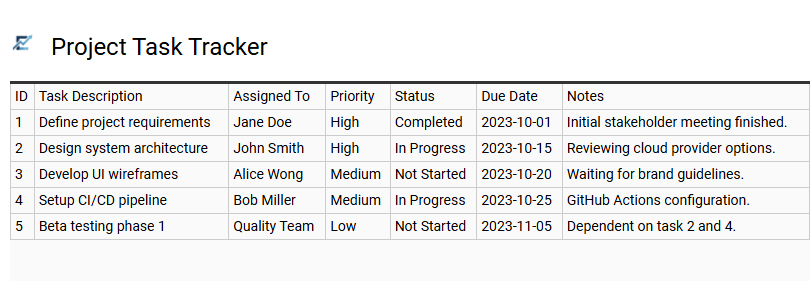
Project Task Tracker
An Excel-based action item tracker is a vital project management tool designed to organize, prioritize, and monitor team progress. By centralizing task descriptions, assigned owners, due dates, and status updates in one accessible spreadsheet, managers can ensure accountability and maintain strict timelines. Using a structured template simplifies data entry and allows for efficient filtering, helping teams focus on high-priority goals while preventing missed deadlines. This clear visibility provides stakeholders with a real-time overview of project health and operational efficiency.
This template is ideal for software development sprints, marketing campaign launches, and construction site management.
Download: 💾 Project Task Tracker .xls
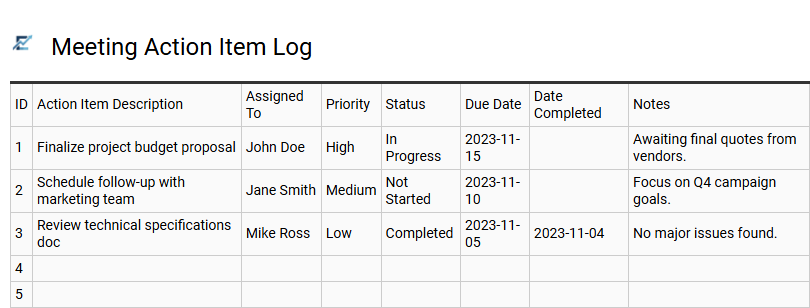
Meeting Action Item Log
A Meeting Action Item Log is a structured Excel tool designed to document, assign, and monitor tasks identified during professional discussions. By capturing critical details such as task descriptions, assigned owners, priority levels, and deadlines, this template ensures organizational accountability and prevents vital decisions from being forgotten.
Utilizing a centralized log allows teams to filter by status-such as "In Progress" or "Completed"-providing real-time visibility into project momentum. This systematic approach streamlines post-meeting workflows, transforming verbal agreements into measurable results. By maintaining a clear record of responsibilities, stakeholders can effectively track deliverables, manage workloads, and ensure project timelines are met with precision.
This template is ideal for project status updates, board of director meetings, and cross-functional team collaborations.
Download: 💾 Meeting Action Item Log .xls
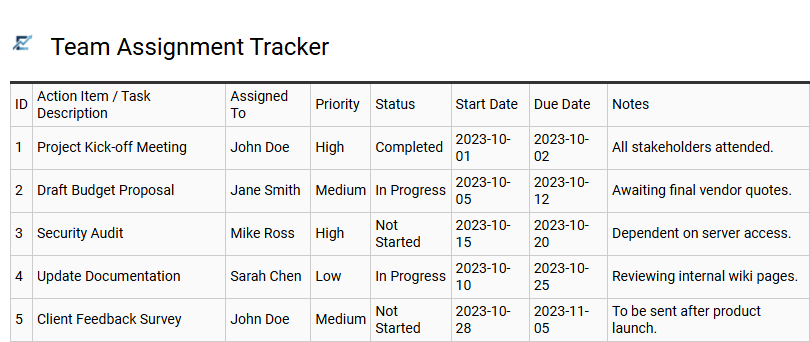
Team Assignment Tracker
A Team Assignment Tracker is a vital component of an Excel action item template, engineered to enhance accountability and streamline delegation. This tool centralizes project tasks, allowing managers to assign specific owners, define clear deadlines, and monitor real-time progress in a single, accessible view.
By organizing deliverables into a structured format, teams can prioritize high-impact activities and significantly reduce communication gaps. Common features include status dropdowns, priority markers, and automated formatting to highlight overdue items. This systematic approach ensures every contributor remains aligned with project goals, fostering transparency and driving operational efficiency across the organization.
This template is suitable for managing agile sprint tasks, tracking action items from weekly board meetings, and coordinating cross-functional product launches.
Download: 💾 Team Assignment Tracker .xls
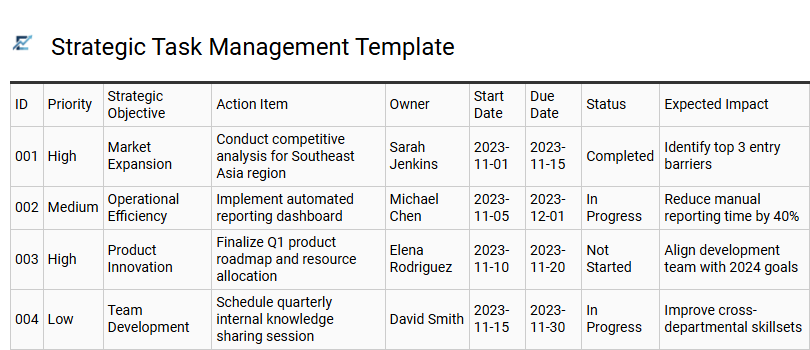
Strategic Task Management Template
A strategic task management template is a professional Excel tool designed to organize, prioritize, and monitor critical action items within a centralized framework. Unlike a standard checklist, this template emphasizes accountability by assigning specific owners, setting firm deadlines, and tracking real-time progress statuses. By aligning daily tasks with broader organizational goals, it ensures that team efforts remain focused on high-impact results. Features such as automated status indicators and priority levels provide stakeholders with immediate visual insights into project health, helping to identify bottlenecks before they delay delivery.
This template is perfectly suited for managing quarterly marketing roadmaps, post-meeting executive action plans, and cross-functional software development sprints.
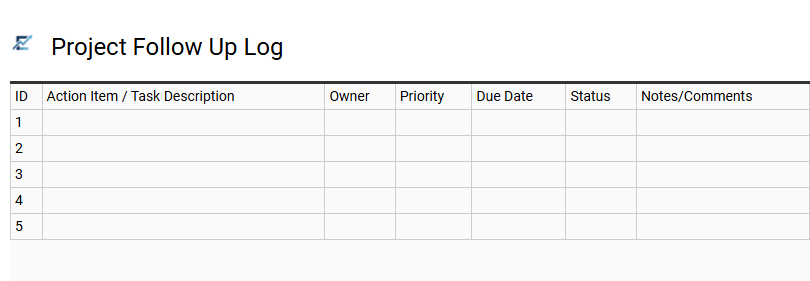
Project Follow Up Log
A Project Follow Up Log is a specialized Excel template designed to centralize task management and enhance team accountability. By documenting specific action items, assigned owners, and firm deadlines, this tool ensures that no critical deliverable is overlooked during the project lifecycle. Utilizing a structured log helps project managers monitor real-time progress, identify potential bottlenecks, and maintain clear communication across all stakeholders. With organized columns for status updates and priority levels, it transforms complex project data into a clear, actionable roadmap. Implementing this template streamlines workflows, reduces the risk of missed milestones, and fosters a culture of transparency and efficiency.
This template is highly suitable for managing weekly departmental meetings, tracking construction site milestones, and organizing agile software development sprints.
Download: 💾 Project Follow Up Log .xls
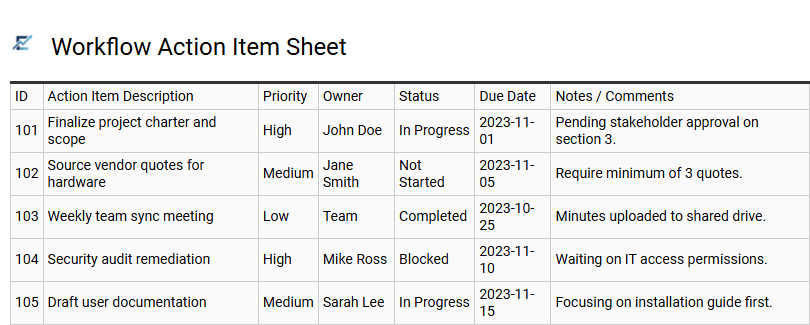
Workflow Action Item Sheet
A Workflow Action Item Sheet is a robust Excel template designed to enhance project management and team accountability. This tool centralizes task tracking by organizing essential data points, including task descriptions, assigned owners, priority levels, and due dates. By maintaining a structured overview of pending responsibilities, teams can effectively monitor progress, identify potential bottlenecks, and ensure all deliverables are completed on schedule.
The sheet serves as a dynamic roadmap, transforming complex project goals into manageable, actionable steps. Implementing this template fosters transparent communication and provides a clear historical record of task completion and performance metrics.
This template is suitable for managing recurring team meetings, product launch planning, and audit compliance tracking.
Download: 💾 Workflow Action Item Sheet .xls
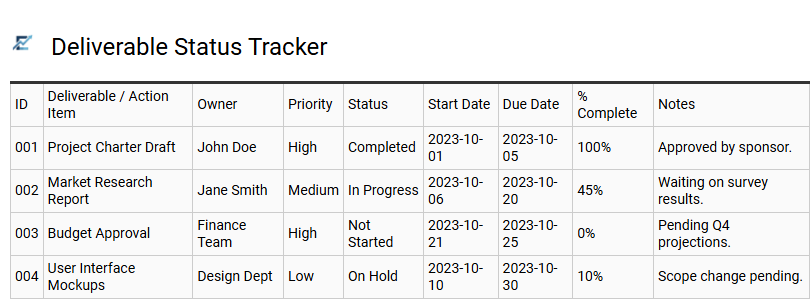
Deliverable Status Tracker
A Deliverable Status Tracker is a specialized project management tool designed to monitor the progress of specific project outputs from inception to completion. By utilizing an Excel-based action item template, teams can maintain a clear visual overview of task ownership, deadlines, and current completion stages. This systematic approach enhances accountability, prevents bottlenecks, and keeps stakeholders informed about critical project milestones.
Key features typically include status labels such as "In Progress" or "Blocked," priority levels, and automated formatting to highlight upcoming deadlines. Implementing this structured documentation is vital for maintaining project momentum and ensuring that no critical task falls through the cracks.
This template is ideal for software development sprints, marketing campaign launches, and construction project milestones.
Download: 💾 Deliverable Status Tracker .xls
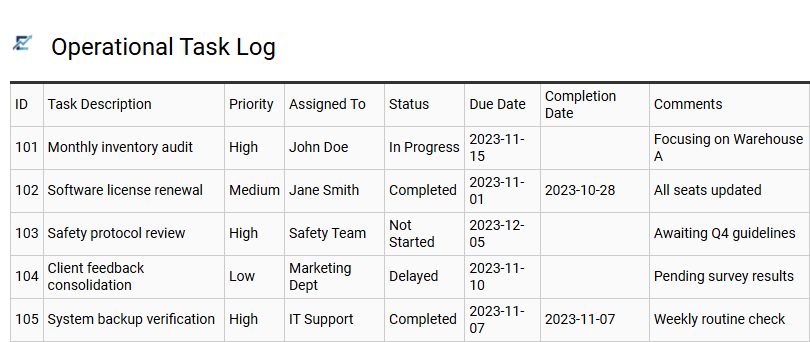
Operational Task Log
An Operational Task Log is a robust Excel template designed to streamline daily workflows and enhance team accountability. By centralizing action items, this tool allows managers to assign responsibilities, set firm deadlines, and monitor real-time progress through status updates. Using a structured log minimizes the risk of missed deadlines and ensures organizational transparency across departments.
Key features typically include priority levels, automated color-coding for overdue tasks, and detailed owner tracking. Implementing this system optimizes operational efficiency by transforming abstract goals into measurable, actionable steps. It serves as a single source of truth for ongoing activities, facilitating smoother communication and faster decision-making processes.
This template is suitable for managing warehouse inventory checks, coordinating weekly retail maintenance schedules, and tracking administrative compliance audits.
Download: 💾 Operational Task Log .xls
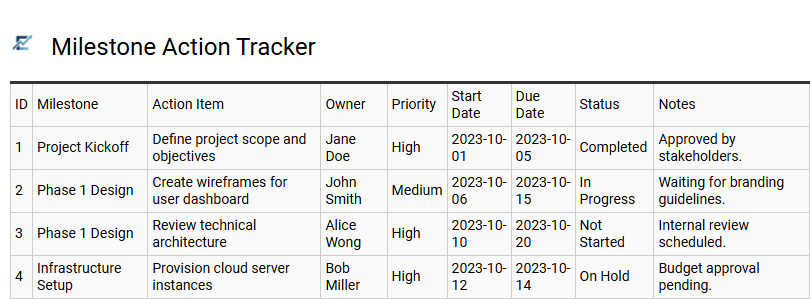
Milestone Action Tracker
A Milestone Action Tracker is a specialized Excel template designed to bridge the gap between high-level project goals and daily task execution. By categorizing specific action items under major project milestones, teams can clearly visualize how individual responsibilities contribute to significant deliverables. This structured format typically includes columns for task descriptions, assigned owners, priority levels, and real-time status updates.
Utilizing this tracker enhances accountability and ensures that critical deadlines remain visible to all stakeholders. It serves as a centralized dashboard for monitoring progress, identifying bottlenecks, and maintaining a clear audit trail of completed works. This type of template is highly effective for managing complex product launches, tracking multi-phase construction projects, and coordinating large-scale corporate event planning.
Download: 💾 Milestone Action Tracker .xls
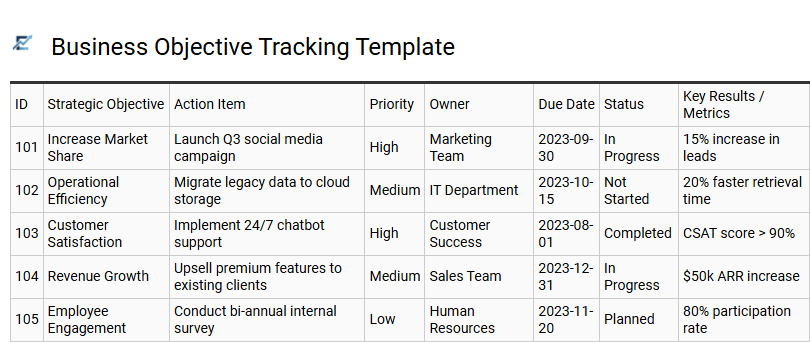
Business Objective Tracking Template
A Business Objective Tracking Template is a specialized Excel tool designed to bridge the gap between high-level strategic goals and daily operations. By centralizing action items, teams can maintain a clear line of sight between individual tasks and broader organizational milestones. This structured format allows for the seamless management of task ownership, deadlines, and priority levels, ensuring that every effort contributes to key performance indicators (KPIs).
Using this template minimizes project bottlenecks and enhances accountability through real-time progress visualization. It serves as a single source of truth, helping stakeholders identify potential risks and reallocate resources before objectives are compromised. Efficient tracking transforms abstract visions into measurable results by maintaining disciplined documentation of every move.
This template is ideal for quarterly sales goal monitoring, annual strategic planning execution, and cross-departmental product launch coordination.
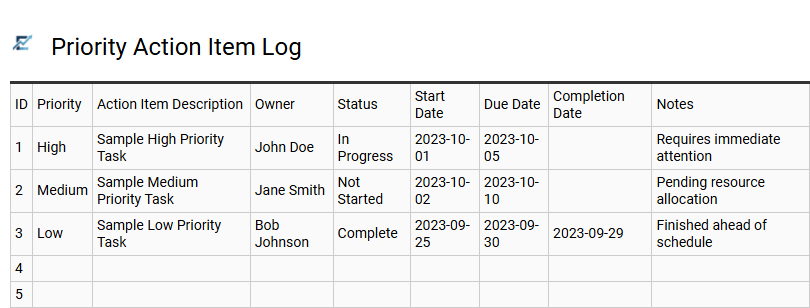
Priority Action Item Log
A Priority Action Item Log is a specialized Excel template designed to enhance productivity by systematically organizing tasks based on their urgency and strategic importance. This tool provides a structured framework for project managers and teams to document task owners, set clear deadlines, and monitor real-time progress. By implementing a prioritized hierarchy, users can effectively allocate resources to high-impact activities, reducing bottlenecks and ensuring that critical objectives are met on schedule. Centralizing action items in a sortable digital format improves accountability and fosters seamless communication within any professional environment.
This template is highly suitable for managing complex project milestones, tracking action points from executive meetings, and coordinating departmental product launch checklists.
Download: 💾 Priority Action Item Log .xls
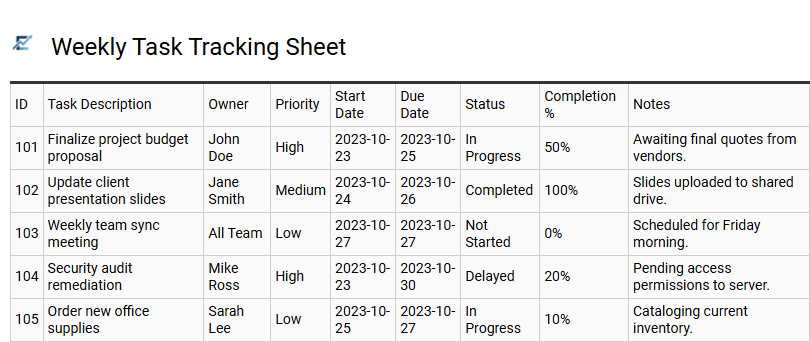
Weekly Task Tracking Sheet
A Weekly Task Tracking Sheet is a specialized Excel template designed to streamline project management and enhance individual productivity. By centralizing action items, this tool allows users to categorize tasks by priority, assign ownership, and establish firm deadlines within a seven-day window. It provides a visual snapshot of progress, helping teams identify potential bottlenecks and maintain high levels of accountability.
The structured layout typically monitors task status-from "Pending" to "Completed"-facilitating efficient time management and resource allocation. This systematic approach to organization minimizes project delays and improves clarity during stakeholder status meetings. It is an ideal, lightweight solution for managing both recurring responsibilities and high-priority deliverables without the complexity of heavy software.
This template is perfectly suited for managing agile software development sprints, coordinating weekly marketing campaign deliverables, or tracking administrative tasks within small business operations.
Download: 💾 Weekly Task Tracking Sheet .xls
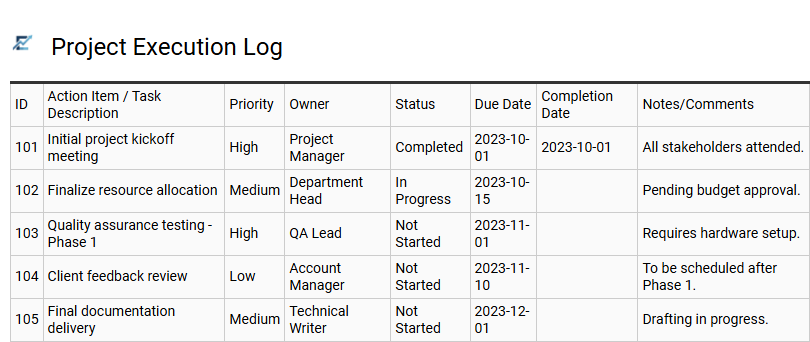
Project Execution Log
A Project Execution Log serves as the primary engine within an Excel action item tracker, providing a centralized framework for documenting and monitoring every task. By recording critical data points-such as task descriptions, designated owners, priority levels, and deadlines-this log fosters transparency and team accountability.
Incorporating features like conditional formatting for overdue dates and data validation for status updates allows project managers to visualize real-time progress and mitigate risks effectively. This structured approach ensures that no detail is overlooked, transforming complex workflows into manageable, actionable steps that keep stakeholders aligned.
This template is suitable for managing software development sprints, coordinating multi-channel marketing campaigns, and overseeing complex construction project milestones.
Download: 💾 Project Execution Log .xls
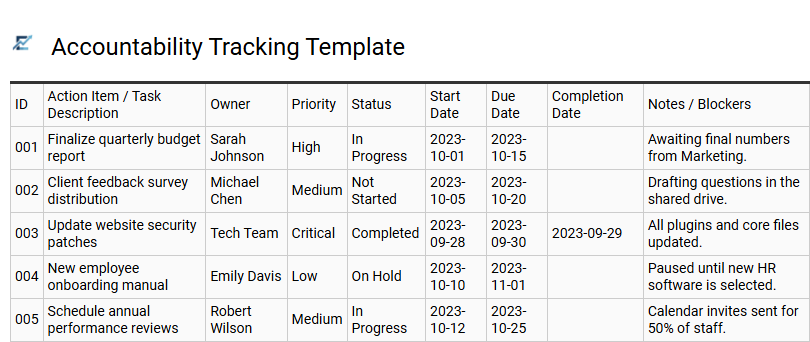
Accountability Tracking Template
An Accountability Tracking Template is a professional Excel framework designed to streamline task management and enhance team transparency. This tool centralizes action items by clearly defining the "who," "what," and "when" of every project component. By using a structured spreadsheet, teams can assign specific owners to tasks, set firm deadlines, and monitor real-time progress through status indicators.
Utilizing this template fosters a culture of ownership and reduces the risk of missed milestones. It provides a visual overview of pending responsibilities, allowing managers to identify bottlenecks and reallocate resources effectively. This systematic approach to documentation ensures that every participant remains aligned with the project goals and delivery timelines.
This template is ideally suited for weekly team meetings, complex project milestone tracking, and individual performance improvement plans.
Download: 💾 Accountability Tracking Template .xls
Utilizing an Action Item Tracking Excel Template is essential for streamlined task management and maintaining project momentum. This tool fosters accountability by clearly defining ownership and tracking project deliverables against strict deadlines. By centralizing status updates and monitoring progress, teams achieve significant workflow optimization and increased productivity. Implementing a structured spreadsheet ensures that every critical task is documented, providing a comprehensive overview of the project lifecycle and ensuring successful outcomes through organized, data-driven oversight.